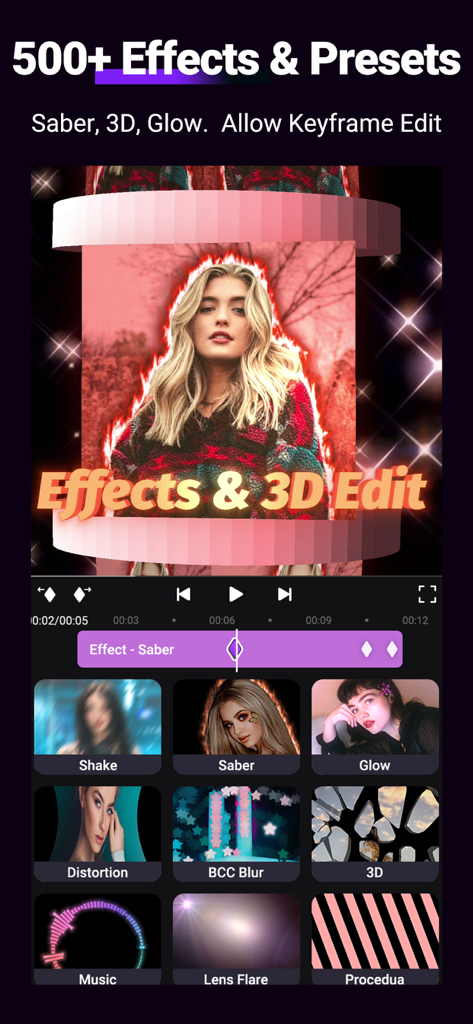
Motion Ninja 동영상 편집 인터페이스, 3D 효과 및 키프레임 애니메이션 제어 기능 표시
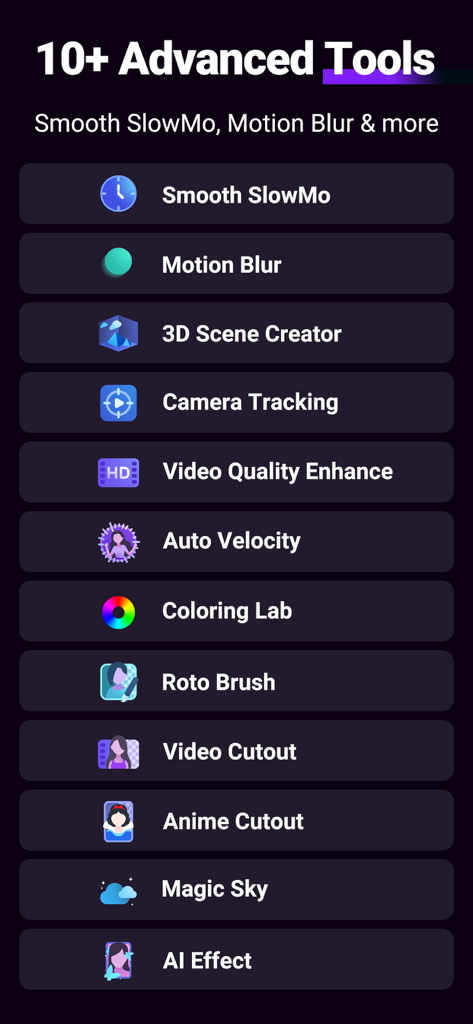
Motion Ninja의 고급 동영상 편집 도구 목록, 부드러운 슬로우 모션, 3D 장면 생성기, AI 효과 포함.
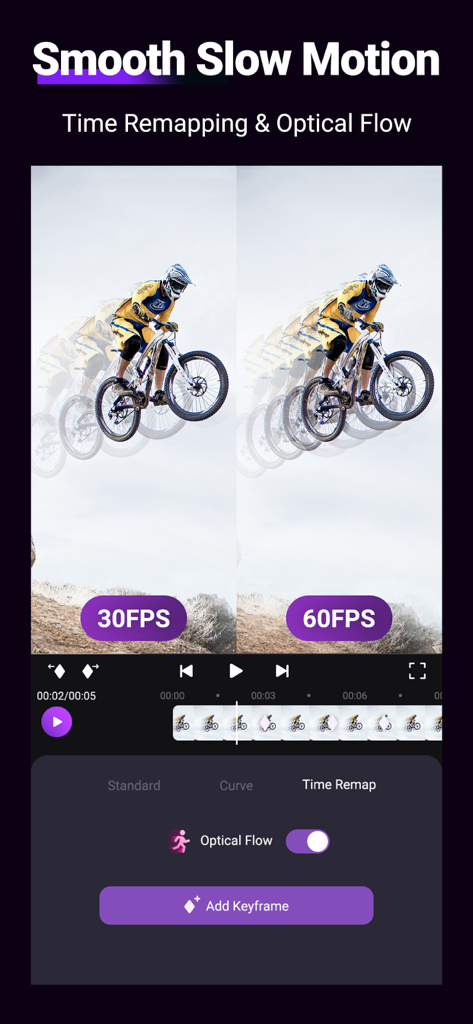
부드러운 슬로우 모션 동영상 편집을 위한 시간 재매핑 및 광학 흐름 기능을 보여주는 Motion Ninja 앱 인터페이스
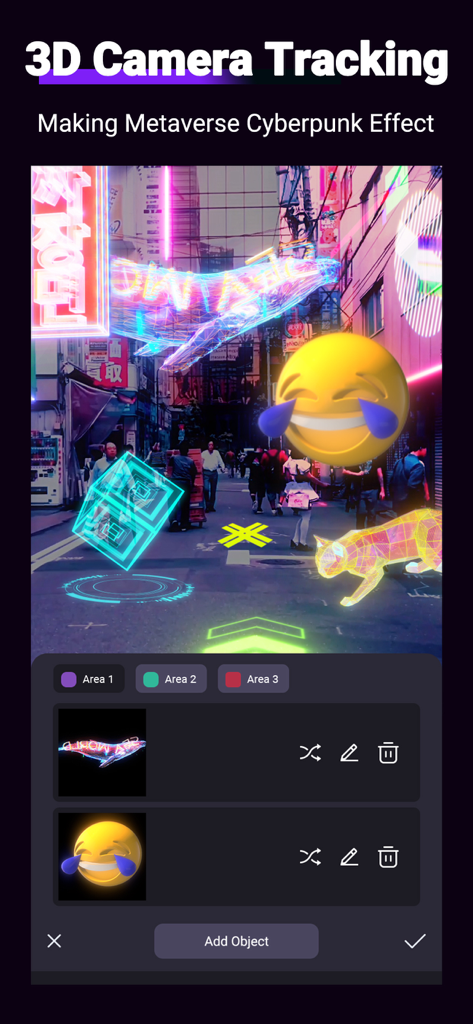
사이버펑크 네온 효과 및 개체가 포함된 3D 카메라 추적을 보여주는 Motion Ninja 동영상 편집기 인터페이스.
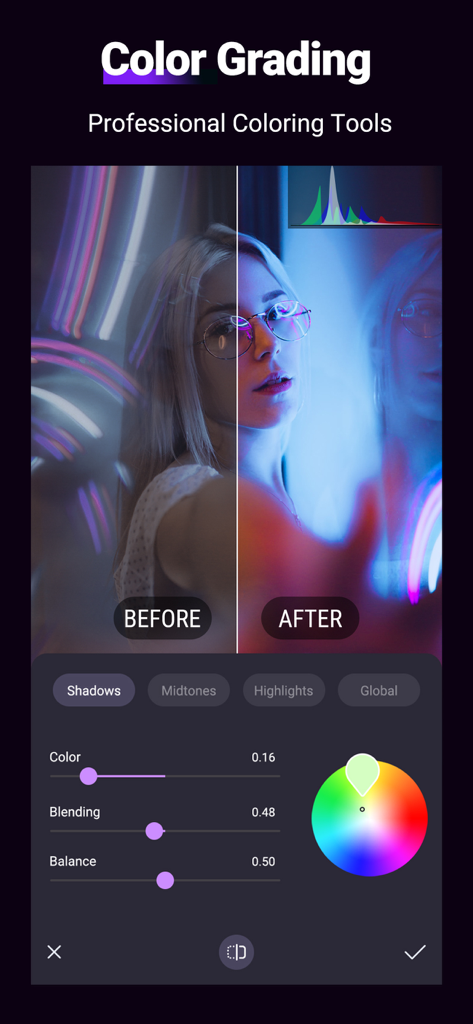
Motion Ninja 동영상 편집기의 스크린샷, 인물 사진에 대한 이전/이후 비교와 함께 전문적인 색상 보정 도구 표시.
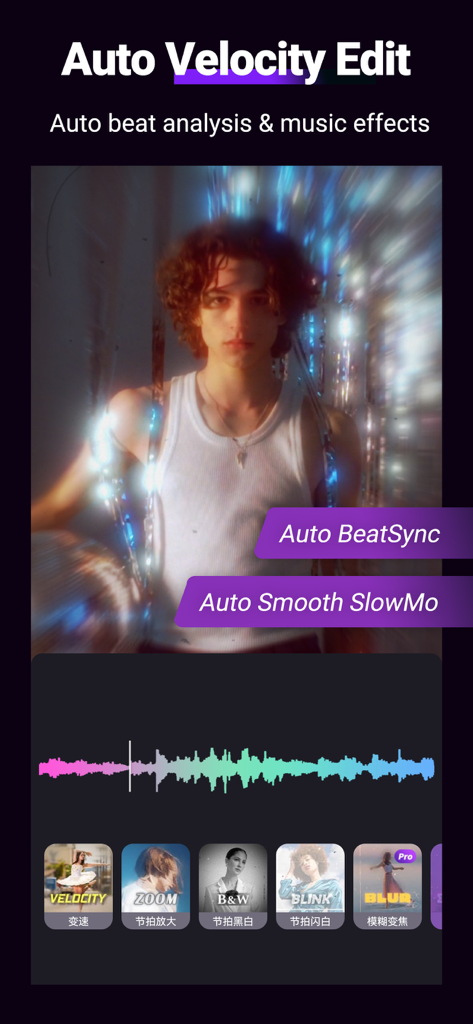
Motion Ninja 동영상 편집기 앱의 자동 속도 편집 및 비트 분석 기능 표시 화면.
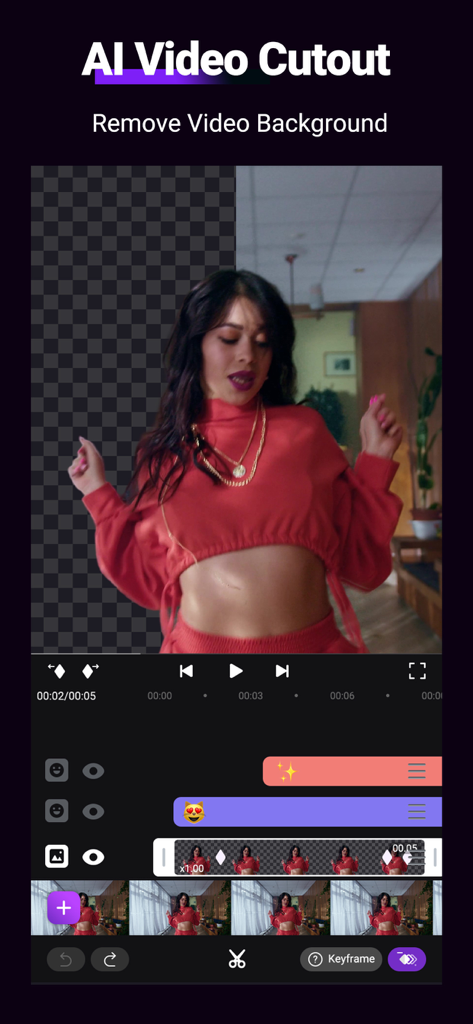
춤추는 여성 클립에서 배경을 제거하는 AI 동영상 잘라내기 도구를 시연하는 Motion Ninja 인터페이스.
편집을 프로 수준으로 끌어올리세요
이 앱을 돋보이게 하는 도구, 2M+ 명의 사용자가 선택.
📈
고급 키프레임 애니메이션
맞춤형 곡선과 그래프로 모션을 완벽하게 제어하여 부드럽고 엘리트 수준의 전환을 만드세요.
🧊
몰입형 3D 카메라 및 장면
카메라 추적, 3D 모델, 전문적인 초점 흐림 효과로 평면 동영상을 깊이 있는 3D 환경으로 변환하세요.
⚡
AI 기반 속도 및 효과
광학 흐름 슬로우 모션, 모션 블러, 500개 이상의 트렌디한 영화 효과 라이브러리로 완벽한 편집을 달성하세요.
앱 소개
에 대해 알아야 할 모든 것 Motion Ninja Video Editor.
설명
Motion Ninja provides FREE multi-layer editing, 3D camera & 3D scene building, and fully custom keyframe & curves editing.
Motion Ninja is a must-have app for AMV, MAD, and fan edits creators! You can enjoy creation with custom keyframe & curves control, 500+ effects & keyframe presets, 10+ advanced edit tools like smooth slowmo, motion blur, 3d camera tracking and more.
Features Highlight:
● Keyframe Animation
Support keyframe editing for all features, including size, position, rotate, mask, border, blending, effect, adjustment.
FREE curves (graphs) editing, including 5 different curves -- bezier, bounce, step, loop, random
Separate keyframe track control for different features.
● Keyframe Effects Library
500+ Effects that include diverse types like Shake, 3D, Glow, Blur, VHS, Distortion, Lens Flare, Particles, Music Visualizer and more updating.
Keyframe Preset: provides presets with keyframes added, helping you edit faster.
●3D Camera Edit and Comprehensive Editing Tools
Build your 3D Scene and Camera edits with tools like: 3D Text; 3D Models; 3D Particles; 3D camera setting and focus blur; Parenting and Null Object.
Powerful grouping & masking, color adjustment, blending, chroma, clipboard, border&shadow.
●Pro Toolbox
Super powerful toolbox: offer 10+ AE-like advanced editing tools and more will be updated.
Tools include:
Smooth Slow Motion with Optical Fow; Frame Rate Changer; Motion Blur; Photo & Video Quality Enhancer; Color Lab; 3D Camera Tracking; Auto Velocity Edit; Moving Picture Editor; AI Effects; Video Magic Sky Replacement and more!
●Preset & Templates
You can save or share presets with QR code, or apply presets in the menu directly. Update popular templates that allow you not only to apply in one click but also to enter and edit the project.
● Save and Share
Support exporting MP4 video and converting GIF animation. Custom export resolution and frame rate including 1080p,2k&4k. Save videos from this Motion Ninja video maker & upload to YouTube, TikTok, Facebook, WhatsApp, Instagram.
● Subscription option:
$3.99 per month, $17.99 per year. Subscribe for unlimited access to all features and content offered for purchase within the app. Payment will be charged to iTunes Account at confirmation of purchase. Subscription automatically renews unless auto-renew is turned off at least 24-hours before the end of the current period. Account will be charged for renewal within 24-hours prior to the end of the current period, and identify the cost of the renewal. Subscriptions may be managed by the user and auto-renewal may be turned off by going to the user's Account Settings after purchase. Any unused portion of a free trial period, if offered, will be forfeited when the user purchases a subscription to that publication, where applicable. Pricing in other countries may vary and actual charges may be converted to your local currency depending on the country of residence.
● Privacy policy:
https://www.floatcamellia.com/privacy.html
● Terms of use:
https://www.floatcamellia.com/agreement.html
If you have any questions, please email us at floatcamellia@163.com.
최신 버전
4.8.5
크기
361.0 MB
출시일
2021년 1월 7일
편집을 프로 수준으로 끌어올리세요
3D 카메라 도구와 AE와 같은 정밀도로 바이럴 AMV와 팬 편집을 만드는 2백만 명 이상의 크리에이터와 함께하세요. 당신의 다음 걸작이 탭 한 번이면 완성됩니다.
FAQ
자주 묻는 질문
에 대해 알아야 할 모든 것 Motion Ninja Video Editor
Motion Ninja Video Editor는 무엇인가요?
Motion Ninja Video Editor는 무료 멀티 레이어 편집, 3D 카메라 및 장면 구축, 맞춤 키프레임 및 곡선 편집을 위한 앱입니다. 500개 이상의 효과와 10개 이상의 고급 편집 도구를 포함합니다.
Motion Ninja는 무료 기능을 제공하나요?
네, Motion Ninja는 무료 멀티 레이어 편집, 3D 카메라 및 장면 구축, 맞춤 키프레임 및 곡선 편집을 제공합니다. 많은 효과와 도구를 구독 없이 사용할 수 있습니다.
Motion Ninja Video Editor에서 키프레임을 편집할 수 있나요?
네, Motion Ninja는 크기, 위치, 효과를 포함한 모든 기능에 대해 키프레임 편집을 지원합니다. 또한 5가지 유형의 무료 곡선 편집을 제공하여 애니메이션을 정밀하게 제어할 수 있습니다.
Motion Ninja에는 어떤 종류의 효과가 있나요?
Motion Ninja는 흔들림, 3D, 빛, 흐림, VHS, 왜곡, 렌즈 플레어, 음악 시각화 등 500개 이상의 효과를 제공합니다. 키프레임 사전 설정도 편집 과정을 가속화하는 데 사용할 수 있습니다.
Motion Ninja 구독료는 얼마인가요?
Motion Ninja 구독료는 월 $3.99 또는 연 $17.99입니다. 이 구독은 앱 내에서 구매 가능한 모든 기능과 콘텐츠에 무제한으로 액세스할 수 있습니다.
Motion Ninja에는 3D 편집 도구가 포함되어 있나요?
네, Motion Ninja에는 3D 카메라 및 장면 편집 도구가 포함되어 있습니다. 사용자는 3D 장면을 구축하고, 3D 텍스트, 모델 및 입자를 추가하고, 초점 흐림 기능이 있는 3D 카메라 설정을 활용할 수 있습니다.
Motion Ninja로 부드러운 슬로우 모션 동영상을 만들 수 있나요?
네, Motion Ninja의 Pro Toolbox는 광학 흐름을 갖춘 부드러운 슬로우 모션과 프레임 속도 변경 기능을 제공합니다. 이러한 도구를 통해 사용자는 부드러운 슬로우 모션 효과를 정밀하게 만들 수 있습니다.
Motion Ninja에서 동영상 배경을 제거하려면 어떻게 해야 하나요?
Motion Ninja는 사용자가 동영상에서 배경을 제거할 수 있는 AI 비디오 컷아웃 도구를 제공합니다. 이 기능은 창의적인 동영상 구성을 위해 피사체를 분리하는 데 도움이 됩니다.
Motion Ninja에서 사용할 수 있는 내보내기 옵션은 무엇인가요?
Motion Ninja는 MP4 동영상 내보내기와 애니메이션을 GIF로 변환하는 것을 지원합니다. 사용자는 1080p, 2k, 4k 옵션을 포함하여 내보내기 해상도와 프레임 속도를 사용자 정의할 수 있습니다.
Motion Ninja를 사용하면 3D 카메라 추적 효과를 만들 수 있나요?
네, Motion Ninja는 고급 도구의 일부로 3D 카메라 추적 기능을 제공합니다. 이를 통해 사용자는 복잡한 구성을 위해 3D 환경 내에서 객체를 추적하여 동적인 효과를 만들 수 있습니다.
Motion Ninja에서 색상을 조정할 수 있나요?
네, Motion Ninja는 Color Lab 내에서 포괄적인 색상 조정 도구를 제공합니다. 사용자는 그림자, 중간 톤, 하이라이트 및 전체 색상 설정을 정밀하게 제어하여 전문적인 색상 등급 결과를 얻을 수 있습니다.
App information, icons, screenshots, and descriptions displayed on this page are sourced from the Apple App Store and are the property of their respective developers. Download estimates and rankings are based on MWM's proprietary models and may not reflect actual figures. This page is provided for informational and analytical purposes only.
Believe this page infringes your intellectual property? File a dispute