
이 페이지는 앱이나 개발자의 공식 페이지가 아니며, 정보 제공 및 논평을 목적으로 작성된 독립 편집 간행물입니다. 명시적으로 달리 언급되지 않는 한, 해당 앱이나 개발자는 MWM, Apple, Google Play, 앱 퍼블리셔 또는 앱 개발자와 제휴, 보증, 후원, 승인 또는 공식적으로 연결되어 있지 않으며, 이 페이지의 어떤 내용도 해당 앱이 MWM의 서비스를 사용하여 개발되었음을 의미하지 않습니다. 모든 상표, 로고, 스크린샷 및 기타 콘텐츠는 해당 소유자의 자산입니다.


Music Editor Cut MP3 Converter
이 앱은 당신의 사운드에 대한 통제력을 획기적으로 바꿉니다. 더 이상 오디오 편집은 전문가만의 영역이 아닙니다. 비디오에서 오디오를 추출하거나, 수십 년 된 녹음을 조정하거나, 밈을 위한 완벽한 음향 효과를 만들어 보세요. 이 앱은 당신의 창의력을 마음껏 펼칠 수 있는 도구를 제공합니다. 이제 여러분은 모든 사운드 파일의 지배자가 됩니다.
다운로드
2.5M+사용자 평점
총 평가 수
37.6K개발사
카테고리
Music지원 언어
23최신 버전
1.4.33크기
328.9 MB출시일
2023년 1월 31일이 오디오 편집 도구가 제공하는 주요 기능과 사용자에게 미치는 영향력 평가.
Music Editor Cut MP3 Converter: 핵심 기능 분석
정밀 오디오 자르기
이 앱은 사용자가 밀리초 단위의 정확성으로 오디오를 자르고, 여러 부분을 선택하여 저장하며, 원하는 구간만 남길 수 있게 해줍니다.
비디오를 오디오로 변환
이 도구는 사용자가 비디오 파일에서 오디오를 추출하여 언제든지 들을 수 있는 오디오 파일로 변환할 수 있게 합니다.
오디오 형식 변환
이 앱은 MP3, AAC, WAV, FLAC 등 다양한 오디오 형식을 지원하여 사용자가 필요에 따라 파일을 변환할 수 있도록 합니다.
보이스 체인저
이 기능은 사용자가 자신의 목소리를 남성, 노인, 로봇 등 다양한 스타일로 변경하고, 톤, 피치, 속도를 사용자 지정할 수 있도록 합니다.
오디오 결합
이 앱은 사용자가 두 개 이상의 오디오 파일을 하나로 합쳐 새로운 곡이나 사운드 트랙을 만들 수 있게 해줍니다.
오디오 믹싱
이 도구는 사용자가 여러 오디오 트랙을 혼합하여 새로운 사운드 구성을 만들 수 있도록 지원합니다.
이퀄라이저 조정
이 도구는 사용자가 이퀄라이저를 사용하여 다양한 사운드 효과를 적용하고 오디오 출력의 음질을 미세 조정할 수 있도록 합니다.
페이드 인/아웃 효과
이 앱은 오디오에 부드러운 시작(페이드 인)과 끝(페이드 아웃) 효과를 적용하여 전문적인 사운드를 연출할 수 있도록 합니다.
자주 묻는 질문
에 대해 알아야 할 모든 것 Music Editor Cut MP3 Converter
What is the Music Editor Cut MP3 Converter app?
Music Editor Cut MP3 Converter, also known as Super Sound, is a powerful audio editor. It supports functions like audio editing, cutting, splicing, mixing, format conversion, and voice changing to create music and ringtones.
Can Music Editor Cut MP3 Converter convert video to audio?
Yes, Music Editor Cut MP3 Converter converts video files to audio. This feature allows users to extract audio from videos and listen to them as desired.
Does the Music Editor Cut MP3 Converter app include a voice changer?
Yes, Music Editor Cut MP3 Converter offers a voice changer. Users can alter their voice to male, elderly, or robot, and customize tone, pitch, and speed for creative effects.
What audio editing features are available in Music Editor Cut MP3 Converter?
Music Editor Cut MP3 Converter provides audio mixing, fade in/out effects, volume adjustment, tone and tempo changes, and audio speed modification for comprehensive editing.
How do I cut audio with precision in Music Editor Cut MP3 Converter?
Music Editor Cut MP3 Converter enables precise audio cutting in milliseconds. Users can perform multiple cuts, save specific segments, or choose to keep or delete selected audio parts.
Can I combine multiple audio files using Music Editor Cut MP3 Converter?
Yes, Music Editor Cut MP3 Converter supports splicing, which combines two or more audio files into a single track. This creates combined songs or audio compositions.
Which audio formats does Music Editor Cut MP3 Converter support for conversion?
Music Editor Cut MP3 Converter supports various audio formats for conversion, including MP3, AAC, WAV, FLAC, M4A, and AMR, ensuring broad compatibility.
Is Music Editor Cut MP3 Converter a subscription-based service?
Yes, Music Editor Cut MP3 Converter operates on an auto-renewable subscription model. It offers both monthly and yearly subscription durations for users.
How can I cancel my Music Editor Cut MP3 Converter subscription?
You can cancel your Music Editor Cut MP3 Converter auto-renewal subscription through your iPhone account settings. Cancellation must occur at least 24 hours before the current period ends.
Does Music Editor Cut MP3 Converter app offer an equalizer?
Yes, Music Editor Cut MP3 Converter includes an equalizer feature. This allows users to apply various sound effects to customize their audio output.
Does the Music Editor Cut MP3 Converter app provide multitrack editing?
Yes, Music Editor Cut MP3 Converter supports multitrack editing. This feature, indicated by a crown icon, allows users to layer and mix multiple audio streams simultaneously.
Can I create ringtones with the Music Editor Cut MP3 Converter app?
Yes, Music Editor Cut MP3 Converter enables users to create ringtones. You can set your edited audio files as personalized ringtones directly within the app.
What new features are available in the Music Editor Cut MP3 Converter app?
Recent additions to the Music Editor Cut MP3 Converter app include 'Remove vocals' and 'Noise suppressor,' marked as new features in the main interface.
다음 스크린샷과 설명은 앱의 공식 스토어 목록에서 직접 가져온 것이며 앱 개발자의 자산입니다.
앱 스토어
스크린샷
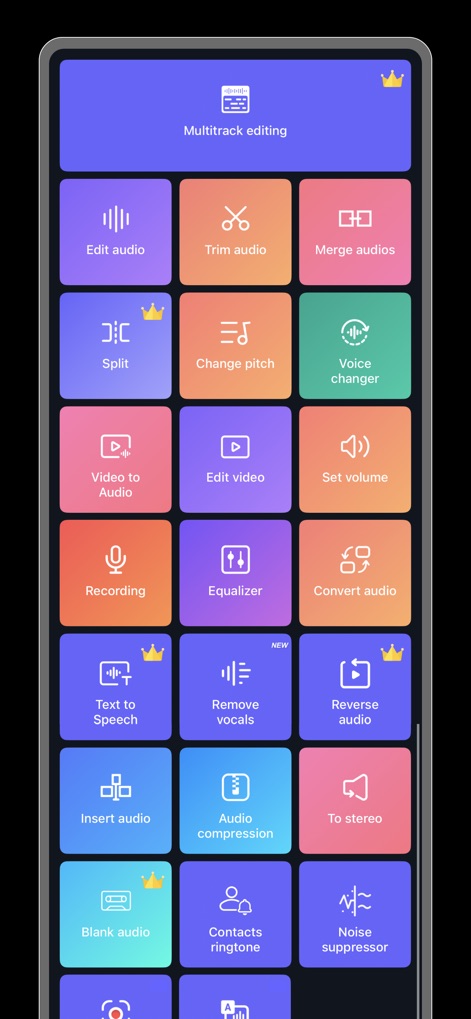
이 앱은 멀티트랙 편집과 음성 변조 등 다양한 오디오 기능을 시각적으로 직관적인 버튼 레이아웃과 명확한 아이콘으로 제공합니다.
다재다능한 오디오 도구

사용자는 여러 오디오 파형을 시각적으로 배열하고 개별 클립을 자르거나 분할하는 직관적인 편집 도구를 활용하여 복잡한 오디오를 제작할 수 있습니다.
자유로운 리믹스 편집

이 화면은 사용자가 오디오를 재생하고 믹싱, 자르기, 페이드 인/아웃, 속도 조절과 같은 핵심 편집 옵션을 쉽고 빠르게 적용할 수 있도록 합니다.
간편한 음악 편집

사용자는 오디오 파형에서 시작점과 끝점을 시각적으로 조절하여 원하는 구간을 정확히 선택하거나 삭제할 수 있으며, 초 단위의 시간 표시를 통해 세밀한 편집이 가능합니다.
정확한 오디오 자르기

이 기능은 사용자가 선택한 비디오 파일에서 오디오를 추출하여 MP3 형식으로 변환하고 저장할 수 있게 해주며, 변환된 파일명과 함께 원본 비디오 미리보기를 제공합니다.
영상에서 오디오 추출

사용자는 톤, 템포, 속도 슬라이더를 조절하여 목소리를 변경하거나, 남성, 로봇, 미니언즈 등 다양한 사전 설정된 음성 효과를 쉽게 적용할 수 있습니다.
재미있는 음성 변환

이 화면은 사용자가 여러 오디오 파일을 목록으로 확인하고 합칠 수 있도록 하며, 각 파일의 페이드 인/아웃 설정과 전체 병합된 트랙의 재생 시간 정보를 제공합니다.
음악 파일 합치기
설명
Download
비슷한 앱
유사한 기능과 사용자 경험을 가진 앱
Ringtones Maker - the ring app
苏娟 陈

LittyTone:Ringtone & AI Voice
Shenzhen Chuangyuan Huaqi technology Co., LTD

Garage Ringtones for iPhone
Appflow Software - FZCO

ClipTone: Ringtone & AI Cover
BUD TECHNOLOGIES, PTE. LTD.

Mp3 Cutter - M4a, Music Cutter
TOWER OF HANOI SOFTWARE COMPANY LIMITED

Ringtone Maker & MP3 Converter
Oleksandr Pylaiev

Ringtone Maker +
迪刚 宋
Any Ringtones
Ion Danilov

Ringtone Maker Garage
TwinBit Ltd
이 페이지는 앱이나 개발자의 공식 페이지가 아니며, 정보 제공 및 논평을 목적으로 작성된 독립 편집 간행물입니다. 명시적으로 달리 언급되지 않는 한, 해당 앱이나 개발자는 MWM, Apple, Google Play, 앱 퍼블리셔 또는 앱 개발자와 제휴, 보증, 후원, 승인 또는 공식적으로 연결되어 있지 않으며, 이 페이지의 어떤 내용도 해당 앱이 MWM의 서비스를 사용하여 개발되었음을 의미하지 않습니다. 모든 상표, 로고, 스크린샷 및 기타 콘텐츠는 해당 소유자의 자산입니다.