
이 페이지는 앱이나 개발자의 공식 페이지가 아니며, 정보 제공 및 논평을 목적으로 작성된 독립 편집 간행물입니다. 명시적으로 달리 언급되지 않는 한, 해당 앱이나 개발자는 MWM, Apple, Google Play, 앱 퍼블리셔 또는 앱 개발자와 제휴, 보증, 후원, 승인 또는 공식적으로 연결되어 있지 않으며, 이 페이지의 어떤 내용도 해당 앱이 MWM의 서비스를 사용하여 개발되었음을 의미하지 않습니다. 모든 상표, 로고, 스크린샷 및 기타 콘텐츠는 해당 소유자의 자산입니다.


OffScreen: Screen Time Control
이 앱은 사용자가 디지털 중독의 사슬에서 벗어나도록 돕는 도구로 기능하며, 스크린 타임에 대한 맹목적인 복종을 끝내는 데 기여합니다. 이제 알게 될 것입니다.
다운로드
2.5M+사용자 평점
총 평가 수
55.0K개발사
카테고리
Health & Fitness지원 언어
3최신 버전
3.20.7크기
114.7 MB출시일
2019년 9월 10일디지털 웰빙과 생산성 향상을 위한 핵심 도구 평가
OffScreen: Screen Time Control 앱 주요 기능 분석
종합적인 사용 시간 추적
사용자는 기기 사용 습관을 종합적으로 이해하고, 목표 설정 및 활동 패턴 분석을 통해 디지털 웰빙을 개선할 수 있도록 이 도구는 상세한 화면 시간 데이터를 제공합니다.
맞춤형 집중 모드
이 도구는 뽀모도로, 카운트다운 등 다양한 집중 모드를 제공하며, 사용자가 필요에 따라 허용 앱 목록을 설정하여 생산성을 극대화하고 디지털 방해 없이 작업에 몰두할 수 있도록 돕습니다.
디지털 디톡스 챌린지
이 앱은 화면 시간, 휴대폰 집어 들기, 수면 등 다양한 챌린지를 제공하여 사용자가 건강한 디지털 습관을 형성하고 스마트폰 중독에서 벗어나도록 돕습니다.
특정 앱 사용 제한
사용자는 특정 소셜 앱에 대한 사용 금지 시간을 설정하여 방해 요소를 줄이고 오프라인 시간에 집중할 수 있도록 이 앱은 앱 비활성화 기능을 제공합니다.
Apple HealthKit 연동
이 앱은 수면 시간 및 집중 명상 시간을 Apple HealthKit과 동기화하여 사용자의 전반적인 건강 데이터를 통합적으로 관리하고 추적할 수 있도록 지원합니다.
사용 데이터 시각화 및 공유
이 앱은 사용자가 주/월/년 단위로 자신의 사용 데이터를 시각적으로 확인하고, 잘 디자인된 공유 카드를 통해 성과를 타인과 공유하며 동기 부여를 얻을 수 있도록 합니다.
자주 묻는 질문
에 대해 알아야 할 모든 것 OffScreen: Screen Time Control
What is OffScreen: Screen Time Control?
OffScreen: Screen Time Control helps users track their phone usage and enhance focus. It offers tools for screen time management, various focus modes, and digital detox challenges to promote healthier digital habits.
How does OffScreen help me track my screen time?
OffScreen tracks daily screen time, pickups, average usage, and time spent while walking or stationary. It allows users to set screen time goals and provides daily insights into their phone habits.
Can I set specific goals for my phone usage with OffScreen?
Yes, OffScreen allows users to set a screen time goal. The app provides daily insights to help monitor progress against this goal and manage phone usage effectively.
Does OffScreen offer a Pomodoro timer for focus sessions?
Yes, OffScreen's Focus Mode supports a Pomodoro timer. It also includes countdown and time accumulation modes to help users maintain concentration and productivity.
Can OffScreen block distracting social apps during my OFF Time?
Yes, OffScreen's OFF Time feature allows users to set disable times for social applications. This helps users enjoy periods of uninterrupted focus and reduce digital distractions.
Does OffScreen integrate with Apple HealthKit?
Yes, OffScreen syncs sleep time and focus mindfulness time with Apple HealthKit. This integration allows for a comprehensive overview of user wellness data.
How does OffScreen categorize my focus sessions?
OffScreen allows users to categorize their focus sessions using tags. This feature helps organize and track different types of focused work or study periods.
Can I see my OffScreen usage data over different periods?
Yes, OffScreen provides data visualization in week, month, and year views. Users can analyze their screen time and focus patterns over various durations.
Does OffScreen track location in the background?
Yes, OffScreen tracks your location in the background to collect walking time data. This activity can potentially affect the device's battery life.
What types of challenges does OffScreen offer for digital detox?
OffScreen offers digital detox challenges including screen time challenges, pickup challenges, and sleep challenges. These help users reduce phone dependency and improve well-being.
How do OffScreen subscriptions work?
OffScreen subscriptions are charged to your iTunes account upon purchase confirmation. They automatically renew unless auto-renew is turned off at least 24 hours before the current period ends.
Can I use other apps while OffScreen's focus mode is active?
Yes, OffScreen's focus mode allows users to set a concentration app whitelist. This enables using specific applications like a dictionary during a focus session without breaking concentration.
Does OffScreen provide widgets for quick data viewing?
Yes, OffScreen offers customizable widgets to clearly display data. Users can view essential metrics like screen time, pickups, and OFF time directly from their home screen.
다음 스크린샷과 설명은 앱의 공식 스토어 목록에서 직접 가져온 것이며 앱 개발자의 자산입니다.
앱 스토어
스크린샷
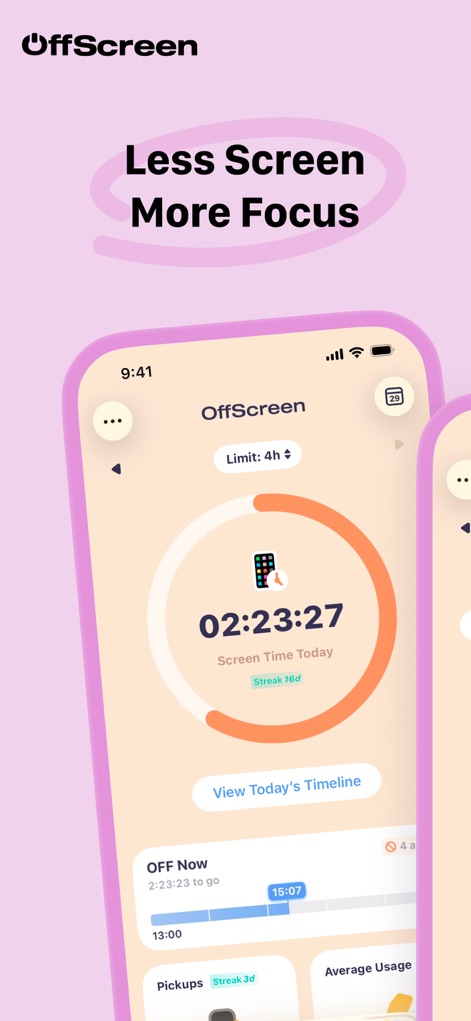
이 앱은 사용자의 일일 스크린 시간 목표와 현재 사용량을 원형 다이얼 및 시간 관리 타임라인으로 명확하게 보여줍니다.
시간 관리 시작
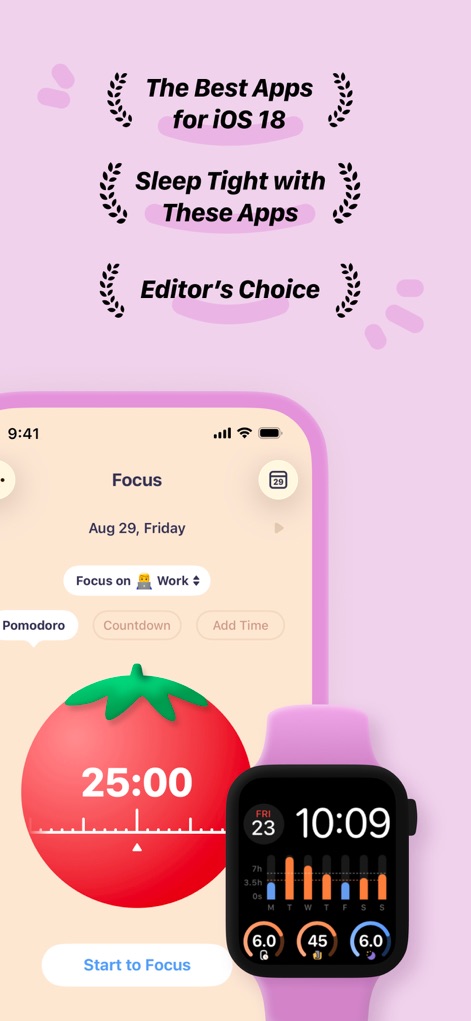
사용자는 포모도로 타이머로 생산성을 높이고, 이 도구는 아이폰과 애플 워치에 집중 시간을 동기화하여 보여줍니다.
생산성 집중 모드
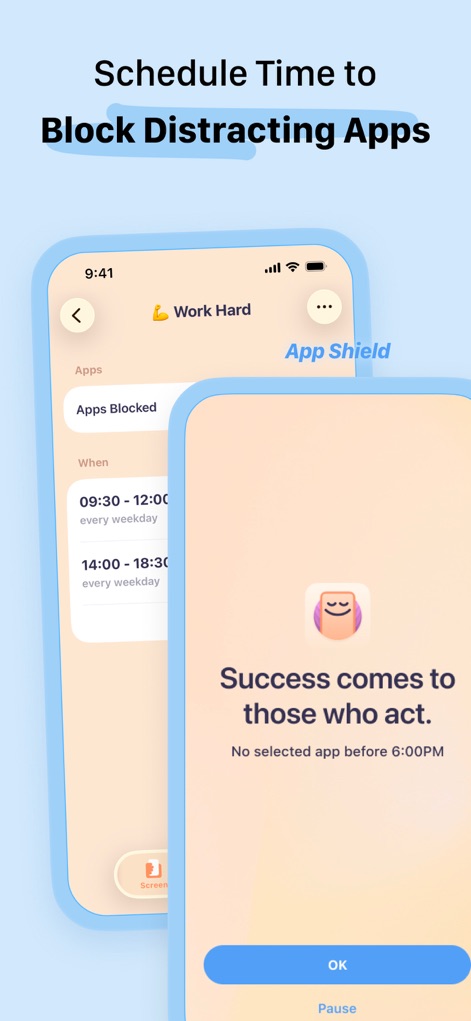
이 앱은 특정 앱 차단 스케줄을 설정할 수 있게 하여, 사용자가 지정된 요일 및 시간에 방해 요소를 효과적으로 관리할 수 있도록 돕습니다.
방해 요소 차단
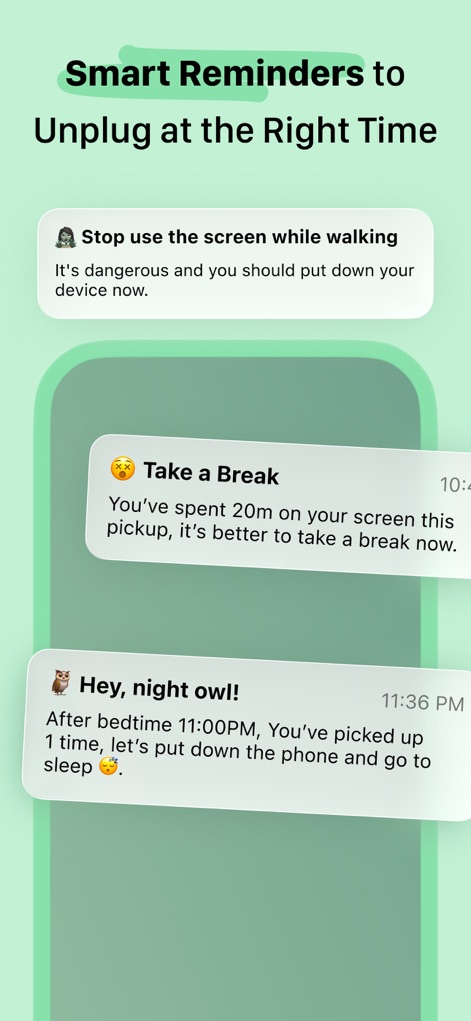
이 앱은 걷는 중 사용 금지 및 야간 활동 알림과 같은 스마트 알림을 통해 사용자의 디지털 습관 개선을 유도합니다.
현명한 알림 설정
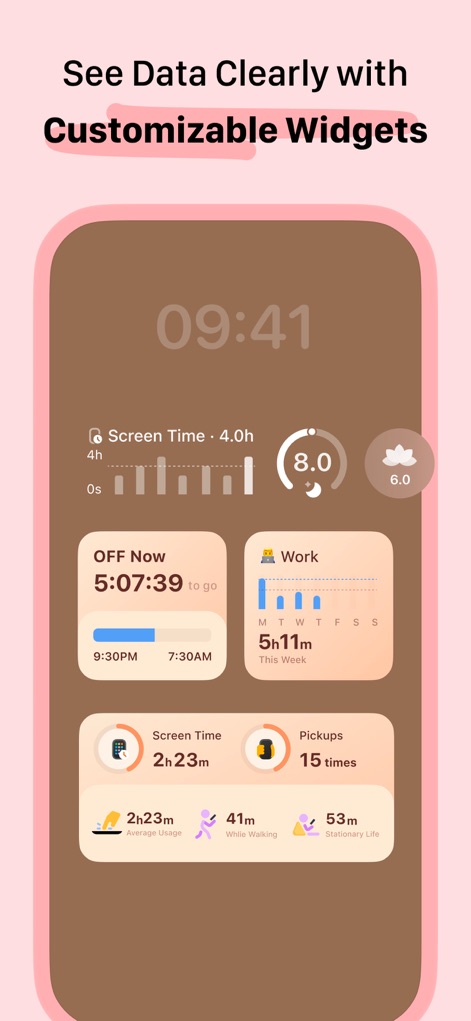
사용자는 사용자 지정 위젯으로 스크린 시간 및 픽업 횟수를 포함한 핵심 사용량 데이터를 한눈에 확인할 수 있습니다.
맞춤형 위젯 활용
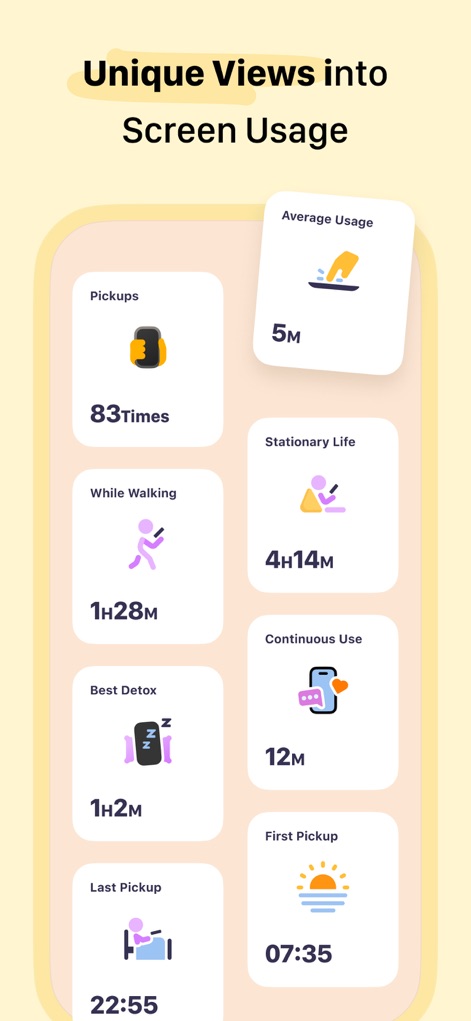
이 앱은 픽업 횟수와 걷는 중 사용 시간 같은 독특한 데이터를 제공하여, 사용자가 자신의 스크린 사용 습관을 깊이 이해하도록 돕습니다.
사용 패턴 심층 분석
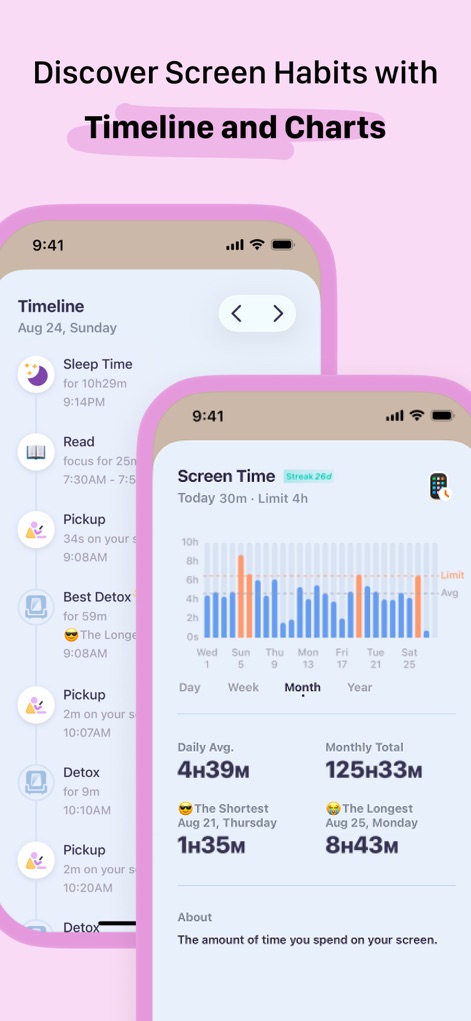
사용자는 타임라인과 막대 차트를 통해 일별 스크린 시간 변화 및 수면 시간과 같은 자신의 디지털 습관 추이를 시각적으로 파악할 수 있습니다.
습관 추이 파악
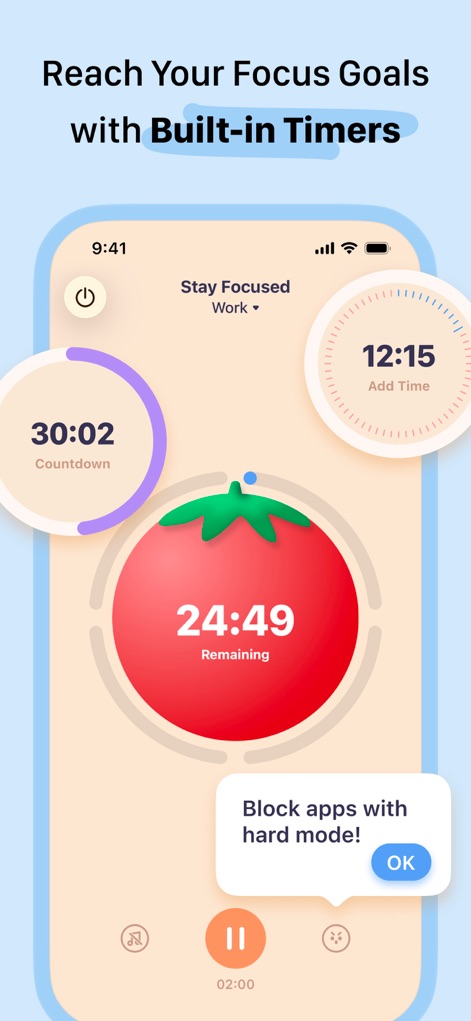
이 도구는 포모도로 타이머와 카운트다운 기능을 통해 사용자가 집중 목표를 설정하고, 방해 앱 차단 메시지로 몰입을 유지하도록 돕습니다.
집중 목표 달성
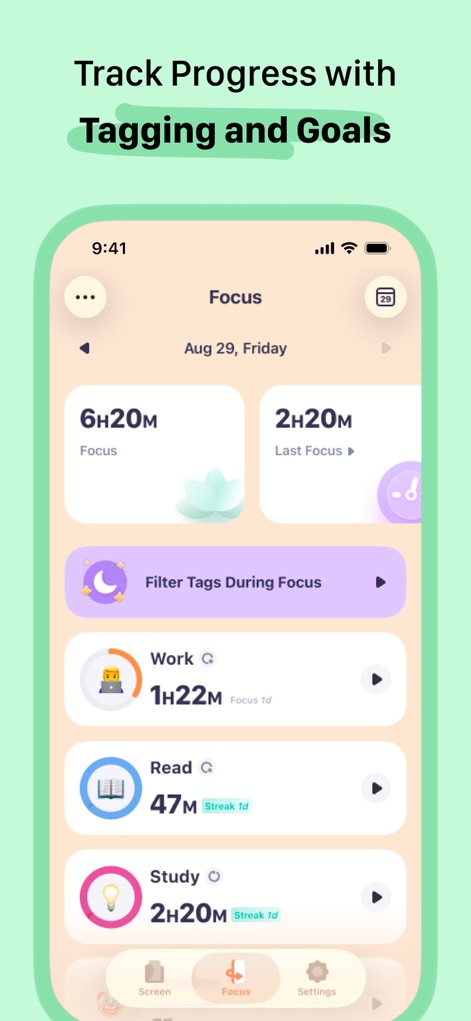
사용자는 '업무', '독서', '공부'와 같은 태그별 집중 세션을 기록하고, 각 목표의 진행 상황과 스트릭을 손쉽게 추적할 수 있습니다.
목표별 진행 관리
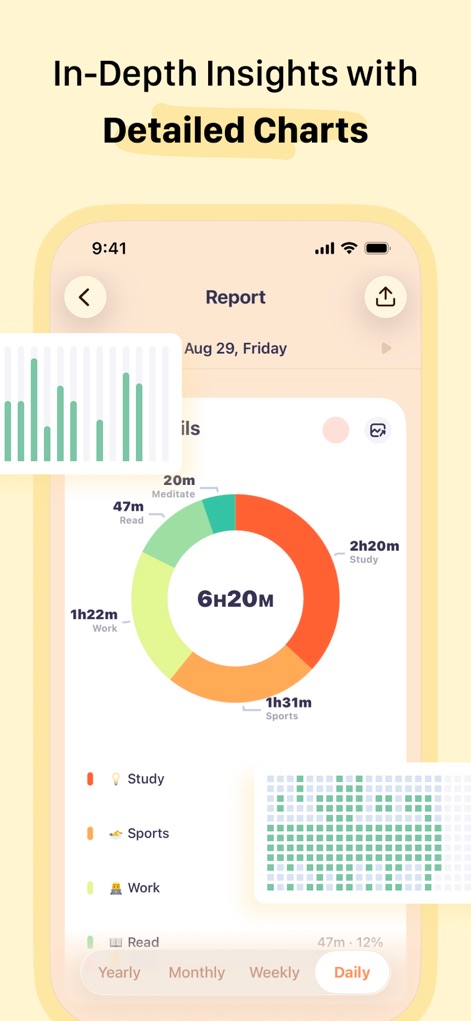
이 앱은 원형 차트로 카테고리별 집중 시간을 시각화하고, 상세 그리드 차트로 일별 집중 활동을 보여주어 심층적인 통찰력을 제공합니다.
상세 보고서 분석
설명
Download
비슷한 앱
유사한 기능과 사용자 경험을 가진 앱
Opal: Screen Time Control
OPAL OS CORPORATION

BePresent: Screen Time Control
Screen Detox Inc

Brick - Ditch Distractions
Brick LLC (Wisconsin)

one sec | screen time + focus
riedel.wtf apps S.L.
ScreenZen- Screen Time Control
ScreenZen LLC

Refocus: Block Apps & Websites
Labi, LLC

Clarymind: Focus + Self Care
Seamint Co., Ltd.

Roots: Screen Time Control
MWM

AppBlock: Block Apps & Website
MobileSoft s.r.o.
이 페이지는 앱이나 개발자의 공식 페이지가 아니며, 정보 제공 및 논평을 목적으로 작성된 독립 편집 간행물입니다. 명시적으로 달리 언급되지 않는 한, 해당 앱이나 개발자는 MWM, Apple, Google Play, 앱 퍼블리셔 또는 앱 개발자와 제휴, 보증, 후원, 승인 또는 공식적으로 연결되어 있지 않으며, 이 페이지의 어떤 내용도 해당 앱이 MWM의 서비스를 사용하여 개발되었음을 의미하지 않습니다. 모든 상표, 로고, 스크린샷 및 기타 콘텐츠는 해당 소유자의 자산입니다.