
이 페이지는 앱이나 개발자의 공식 페이지가 아니며, 정보 제공 및 논평을 목적으로 작성된 독립 편집 간행물입니다. 명시적으로 달리 언급되지 않는 한, 해당 앱이나 개발자는 MWM, Apple, Google Play, 앱 퍼블리셔 또는 앱 개발자와 제휴, 보증, 후원, 승인 또는 공식적으로 연결되어 있지 않으며, 이 페이지의 어떤 내용도 해당 앱이 MWM의 서비스를 사용하여 개발되었음을 의미하지 않습니다. 모든 상표, 로고, 스크린샷 및 기타 콘텐츠는 해당 소유자의 자산입니다.


Oticon Companion
이 앱은 사용자에게 청력 보조 기기를 손 안에서 완벽하게 제어할 수 있는 권한을 부여합니다. 환경을 형성하고 사운드를 미세 조정하며, 마치 음파의 마스터처럼 듣는 경험을 지시할 수 있습니다.
다운로드
1M+사용자 평점
총 평가 수
87.7K개발사
카테고리
Medical지원 언어
31최신 버전
1.7.0크기
480.7 MB출시일
2023년 2월 9일청각 솔루션 모바일 제어의 핵심 역량 평가
Oticon Companion 앱 기능 분석
볼륨 조절
이 앱은 사용자가 각 보청기의 볼륨을 함께 또는 개별적으로 조절하여 개인에게 최적화된 청취 경험을 제공합니다.
미디어 스트리밍
이 앱은 사용자가 휴대폰에서 직접 보청기로 통화, 음악 및 팟캐스트를 스트리밍하여 다양한 오디오 콘텐츠를 편리하게 즐길 수 있게 해줍니다.
청취 프로그램 전환
이 도구는 사용자가 청각 전문가가 설정한 다양한 청취 프로그램 사이를 전환하여 다양한 환경에 최적화된 사운드 경험을 얻을 수 있도록 합니다.
온라인 전문가 상담
이 앱은 사용자가 예약된 온라인 방문을 통해 청각 전문가와 원격으로 만날 수 있도록 지원하여 편리한 전문가 지원 접근성을 제공합니다.
스피치 부스터
이 앱은 SpeechBooster 기능을 통해 배경 소음을 줄이고 음성 선명도를 향상시켜 시끄러운 환경에서도 대화에 더 잘 집중할 수 있도록 돕습니다.
보청기 찾기
이 앱은 사용자가 분실한 보청기의 위치를 추적할 수 있는 기능을 제공하여 기기 분실의 염려를 덜어줍니다.
주변 소리 이퀄라이저
이 앱은 사용자가 주변 환경의 소리를 개인의 선호에 맞게 미세 조정할 수 있는 사운드 이퀄라이저 기능을 제공합니다.
주변 소음 음소거
이 앱은 사용자가 주변 소음을 일시적으로 음소거하여 특정 상황에서 집중력을 높이거나 원치 않는 소리를 차단할 수 있도록 합니다.
스트리밍 이퀄라이저
이 앱은 사용자가 보청기로 스트리밍되는 소리(음악, 팟캐스트 등)의 음질을 개인의 청취 선호에 맞춰 조절할 수 있도록 합니다.
배터리 잔량 확인
이 도구는 사용자가 보청기의 배터리 잔량을 실시간으로 확인할 수 있게 하여 갑작스러운 방전으로 인한 불편을 예방합니다.
자주 묻는 질문
에 대해 알아야 할 모든 것 Oticon Companion
What is the Oticon Companion app?
The Oticon Companion app allows users to control their Oticon hearing aids directly from their mobile device. It enables discreet adjustments and access to various features.
Can I adjust the volume of my hearing aids with the Oticon Companion app?
Yes, the Oticon Companion app allows you to adjust the sound volume for each hearing aid together or separately. It also includes an option to mute surroundings.
How do I check my Oticon hearing aid battery levels using the Oticon Companion app?
Yes, the Oticon Companion app allows you to check the current battery levels of your hearing aids. It displays the percentage and estimated remaining time for both the left and right units.
Can the Oticon Companion app help me find lost hearing aids?
Yes, the Oticon Companion app can help you find your lost hearing aids. This feature requires location services to be continuously enabled on your mobile device.
Does the Oticon Companion app include a SpeechBooster feature?
Yes, the Oticon Companion app includes SpeechBooster. This feature reduces background noise and enhances speech, though it is not available for Oticon Opn™ hearing aid models.
Can I have an online appointment with my hearing care professional using the Oticon Companion app?
Yes, the Oticon Companion app allows you to meet your hearing care professional for an online visit by appointment. This enables remote counseling and hearing aid adjustments.
What are the compatibility requirements for the Oticon Companion app?
The Oticon Companion app is compatible with most hearing aid models. Devices from 2016-2018 may require a hearing aid update. An iOS version of 15.2 or later is recommended.
Does the Oticon Companion app track hearing aid usage?
Yes, the Oticon Companion app includes the HearingFitness™ feature. It tracks your progress and wearing time, but is only available for Oticon Intent™ and Oticon Real™ models.
Does the Oticon Companion app offer a sound equalizer?
Yes, the Oticon Companion app offers a sound equalizer to adjust sounds around you. This feature is available for Oticon Intent™ and Oticon Real™ models.
Can I control my Oticon hearing aids with Apple Watch?
Yes, the Oticon Companion app includes an app for Apple Watch. This allows you to discreetly change programs and adjust volume when within Bluetooth range.
다음 스크린샷과 설명은 앱의 공식 스토어 목록에서 직접 가져온 것이며 앱 개발자의 자산입니다.
앱 스토어
스크린샷
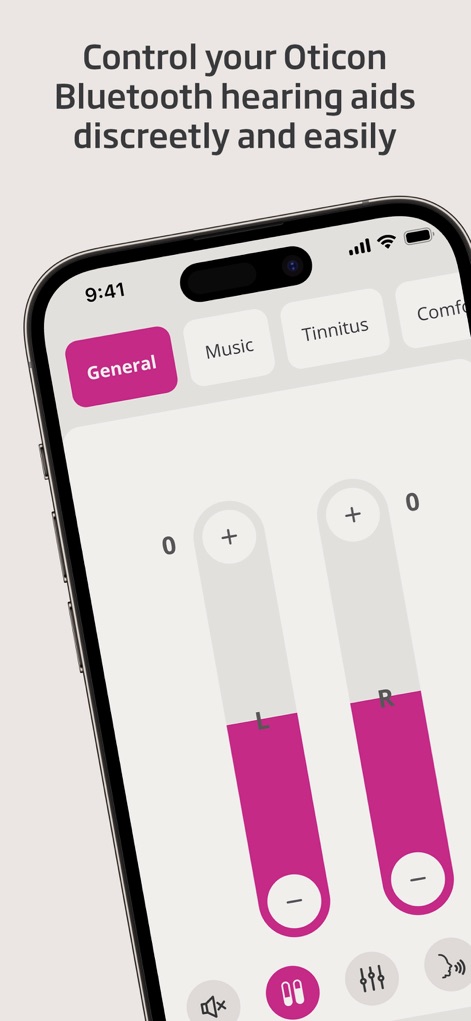
사용자는 이 화면에서 'L'과 'R' 슬라이더를 통해 각 보청기의 볼륨을 개별적으로 조절하고, 상단 탭에서 'General'과 같은 다양한 청취 프로그램을 쉽게 전환할 수 있습니다.
소리 조절 및 프로그램 변경
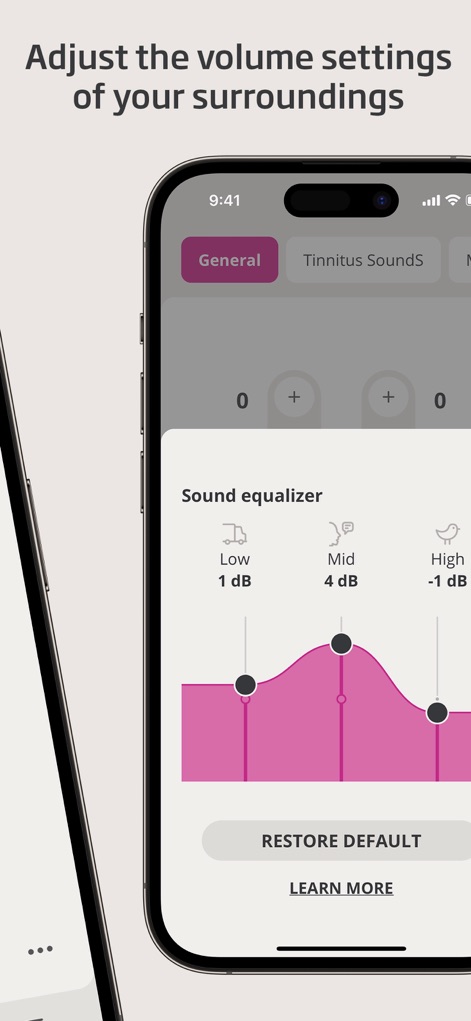
이 화면은 사용자가 'Low', 'Mid', 'High' 주파수 설정 지점을 조절하여 주변 소리를 개인에게 맞춰 미세 조정할 수 있는 'Sound equalizer' 기능을 보여줍니다.
맞춤형 사운드 조절
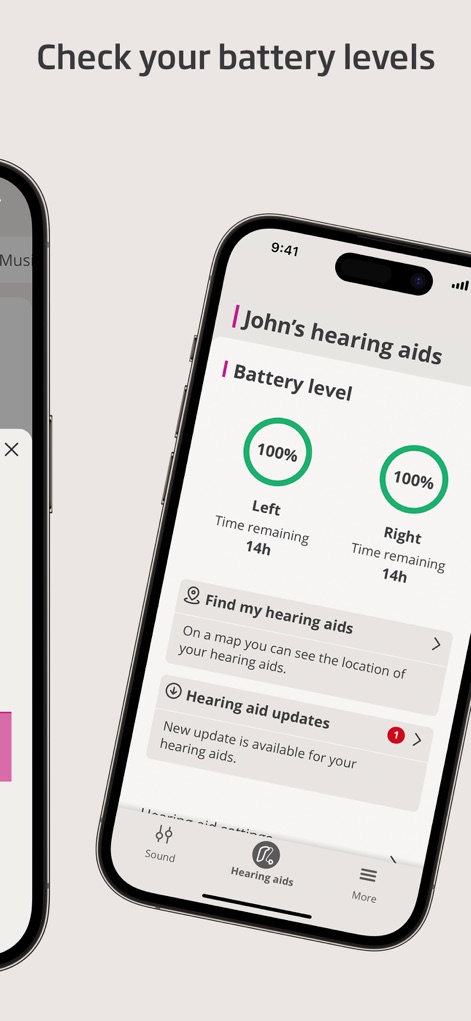
이 화면은 사용자가 각 보청기의 '배터리 잔량'을 '100%' 및 남은 사용 시간으로 확인하고, 'Hearing aid updates' 섹션에서 최신 소프트웨어 업데이트 알림을 받을 수 있도록 합니다.
보청기 상태 한눈에
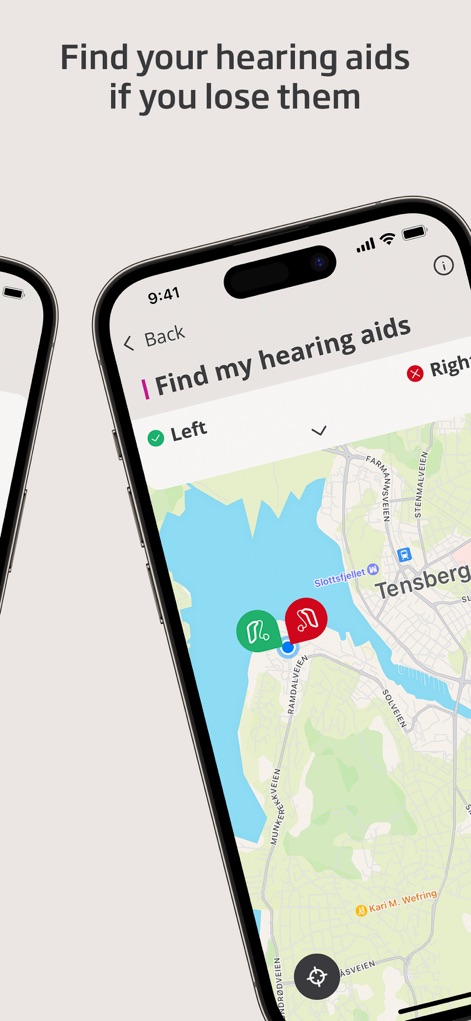
사용자는 이 지도를 통해 분실한 보청기의 'L' 및 'R' 위치 아이콘을 확인하여 기기를 쉽게 찾을 수 있으며, 현재 위치와 보청기 간의 거리를 시각적으로 파악할 수 있습니다.
분실 보청기 찾기
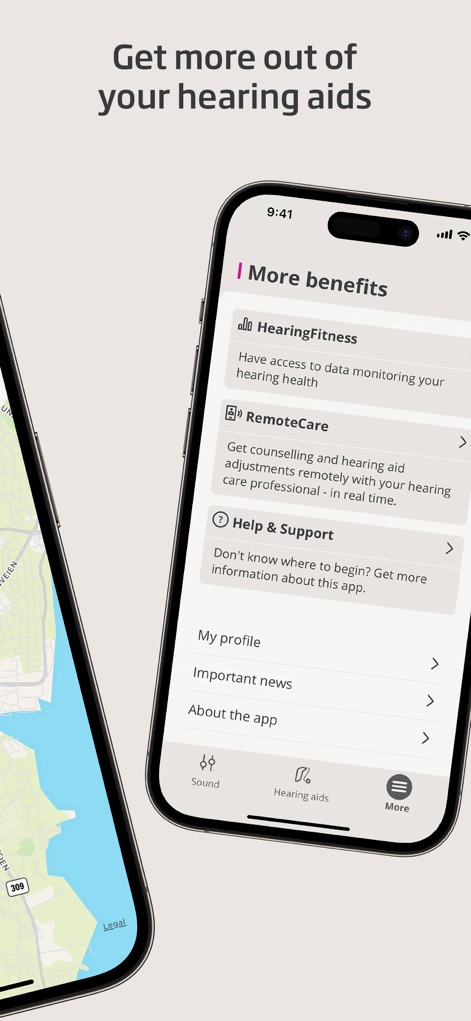
이 화면은 사용자가 'HearingFitness™'를 통해 청력 건강 진행 상황을 모니터링하고, 'RemoteCare' 기능을 활용하여 전문가와 원격 상담을 진행할 수 있는 다양한 추가 기능을 제공합니다.
추가 기능 탐색
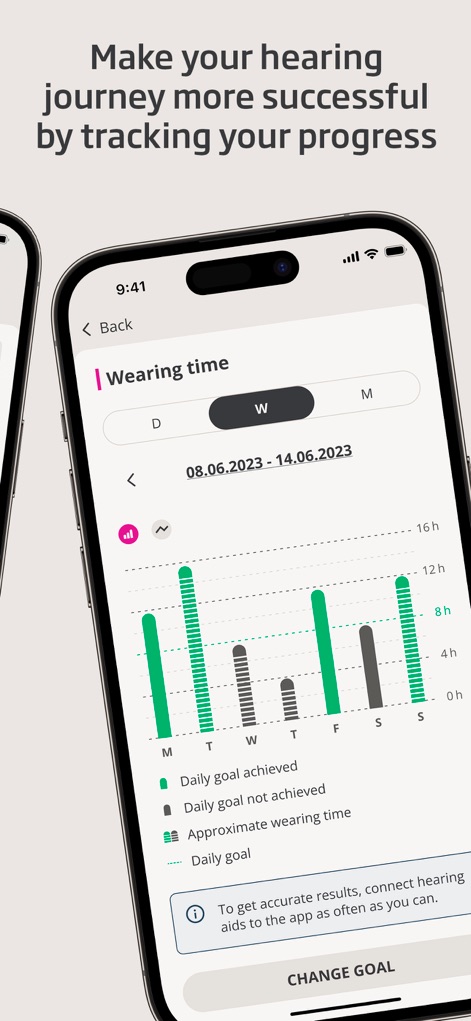
이 화면은 사용자가 주간 '착용 시간'을 막대 그래프로 시각적으로 확인하고, 'Daily goal'과 실제 착용 시간을 비교하여 청력 건강 관리 목표 달성 여부를 추적할 수 있도록 돕습니다.
청력 건강 추적
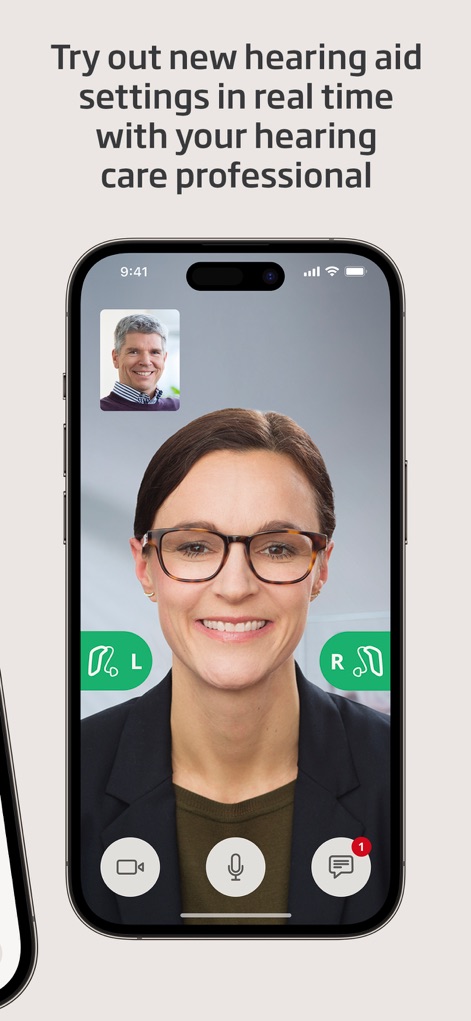
사용자는 이 화상 통화 인터페이스를 통해 청력 전문가와 실시간으로 소통하며 보청기 설정을 조절할 수 있으며, 'L'과 'R' 아이콘으로 각 보청기의 상태를 직관적으로 확인할 수 있습니다.
전문가 원격 상담
설명
Download
비슷한 앱
유사한 기능과 사용자 경험을 가진 앱

ReSound Smart 3D
GN Resound A/S

Braun IPL app
P&G Productions
Philips HearLink 2
SBO Hearing AS

BeMore – for your hearing aids
GN Hearing Care Corporation
Jabra Enhance Pro
GN Hearing Care Corporation

Miracle-Ear App
Miracle-Ear, Inc.

myPhonak
Sonova AG

Amplifon App
Amplifon S.p.A.

Hearing Remote
Sonova AG
이 페이지는 앱이나 개발자의 공식 페이지가 아니며, 정보 제공 및 논평을 목적으로 작성된 독립 편집 간행물입니다. 명시적으로 달리 언급되지 않는 한, 해당 앱이나 개발자는 MWM, Apple, Google Play, 앱 퍼블리셔 또는 앱 개발자와 제휴, 보증, 후원, 승인 또는 공식적으로 연결되어 있지 않으며, 이 페이지의 어떤 내용도 해당 앱이 MWM의 서비스를 사용하여 개발되었음을 의미하지 않습니다. 모든 상표, 로고, 스크린샷 및 기타 콘텐츠는 해당 소유자의 자산입니다.