
이 페이지는 앱이나 개발자의 공식 페이지가 아니며, 정보 제공 및 논평을 목적으로 작성된 독립 편집 간행물입니다. 명시적으로 달리 언급되지 않는 한, 해당 앱이나 개발자는 MWM, Apple, Google Play, 앱 퍼블리셔 또는 앱 개발자와 제휴, 보증, 후원, 승인 또는 공식적으로 연결되어 있지 않으며, 이 페이지의 어떤 내용도 해당 앱이 MWM의 서비스를 사용하여 개발되었음을 의미하지 않습니다. 모든 상표, 로고, 스크린샷 및 기타 콘텐츠는 해당 소유자의 자산입니다.


ReSound Smart 3D
청각 보철의 완벽한 통제는 이제 손안에 있습니다. 더 이상 클리닉 방문에 얽매이지 않습니다. 이 앱은 당신의 청력 경험을 당신이 원하는 대로 재구성할 수 있는 강력한 도구입니다.
다운로드
1M+사용자 평점
총 평가 수
129.1K개발사
카테고리
Medical지원 언어
44최신 버전
1.43.2크기
267.4 MB출시일
2017년 4월 28일혁신적인 모바일 제어 및 맞춤형 기능으로 사용자 편의성 극대화
ReSound Smart 3D 앱 심층 분석: 청각 보조 기기 관리의 새로운 지평
원격 전문가 지원 (ReSound Assist)
사용자가 청각 전문가로부터 청력 보청기 설정을 원격으로 업데이트받고 새로운 소프트웨어 업데이트를 받을 수 있게 합니다. 이를 통해 사용자는 병원 방문 없이도 최적의 청취 환경을 유지할 수 있습니다.
개별 맞춤형 소리 조절
이 앱은 사용자가 보청기의 볼륨, 고음, 중음, 저음 및 소음 감소 설정을 세밀하게 조정하여 개인화된 청취 경험을 만들 수 있도록 지원합니다. 이는 다양한 환경에서 최적의 소리를 들을 수 있도록 돕습니다.
보청기 분실 방지 및 찾기
이 도구는 사용자가 분실했거나 잘못 둔 보청기의 위치를 찾는 데 도움을 주어, 사용자의 걱정을 덜어주고 소중한 장치를 되찾을 수 있도록 합니다. 이는 특히 고령층 사용자에게 매우 유용합니다.
프로그램 및 즐겨찾기 관리
사용자는 다양한 청취 환경에 맞춰 보청기 프로그램을 변경하고, 선호하는 설정을 즐겨찾기로 저장하며, 특정 장소에 태그를 지정하여 편리하게 불러올 수 있습니다. 이는 사용자의 편의성과 적응성을 향상시킵니다.
이명 관리 기능
이 앱은 이명 관리 기능을 제공하여, 사용자가 이명 소리 생성기의 변동 및 주파수를 조절하고 자연 소리를 선택하여 이명 증상을 완화하는 데 도움을 줍니다. 이는 이명으로 고통받는 사용자에게 실질적인 지원을 제공합니다.
배터리 상태 모니터링
이 앱은 충전식 보청기의 배터리 상태를 실시간으로 모니터링하여, 사용자가 배터리 잔량을 쉽게 확인하고 갑작스러운 방전 없이 장치를 사용할 수 있도록 합니다. 이는 보청기 사용의 신뢰성을 높여줍니다.
자주 묻는 질문
에 대해 알아야 할 모든 것 ReSound Smart 3D
What is the ReSound Smart 3D app?
The ReSound Smart 3D app allows users to control their hearing aids from a mobile device, offering sound adjustments, program changes, and remote support from hearing care professionals.
Can I adjust my hearing aid settings with the ReSound Smart 3D app?
Yes, the ReSound Smart 3D app allows users to adjust volume, mute hearing aids, change programs, and personalize sound by adjusting treble, middle, and bass tones.
How does the ReSound Smart 3D app help me find lost hearing aids?
The ReSound Smart 3D app includes a feature that helps locate lost or misplaced hearing aids using a map view and signal strength indicators to guide users.
Can I receive remote assistance from my hearing care professional using ReSound Smart 3D?
Yes, ReSound Assist allows users to request help from their hearing care professional, who can send new hearing aid settings and software updates remotely.
Does the ReSound Smart 3D app have a Tinnitus Manager?
Yes, the ReSound Smart 3D app features a Tinnitus Manager where users can adjust the sound variation and frequency of the Tinnitus Sound Generator and select Nature Sounds.
Can I stream audio to my ReSound hearing aids through the app?
Yes, the ReSound Smart 3D app enables users to adjust the volume of optionally acquired ReSound streaming accessories, such as for TV audio.
Is it possible to save custom sound settings in the ReSound Smart 3D app?
Yes, users can save their preferred settings as a Favorite within the ReSound Smart 3D app and can even tag these custom settings to a specific location.
How do I check the fit of my hearing aids with the ReSound Smart 3D app?
The ReSound Smart 3D app provides a 'Check My Fit' feature, allowing users to compare their current hearing aid fit with a reference image to ensure proper placement.
Does the ReSound Smart 3D app monitor hearing aid battery status?
Yes, the ReSound Smart 3D app allows users to monitor the battery status of their rechargeable hearing aids directly from their mobile device.
다음 스크린샷과 설명은 앱의 공식 스토어 목록에서 직접 가져온 것이며 앱 개발자의 자산입니다.
앱 스토어
스크린샷

사용자는 노이즈 필터와 사운드 인핸서를 통해 자신에게 최적화된 청취 환경을 정밀하게 조정할 수 있습니다.
청취 환경 맞춤 설정

이 앱은 올-어라운드 프로그램과 같은 다양한 사전 설정 모드를 제공하여 사용자가 음성 명료도를 포함한 청취 환경을 쉽게 전환할 수 있도록 돕습니다.
다양한 청취 프로그램

사용자는 저음, 중음, 고음 조절 기능을 활용하여 청력 보조기의 소리를 개인화하고, 소음 감소 설정을 통해 원치 않는 배경 소음을 줄일 수 있습니다.
개인 맞춤형 사운드

이 앱은 사용자가 청각 전문가와 영상 통화를 통해 직접 소통하고, 필요한 경우 마이크를 음소거하여 사적인 대화를 나눌 수 있도록 지원합니다.
전문가와 원격 상담
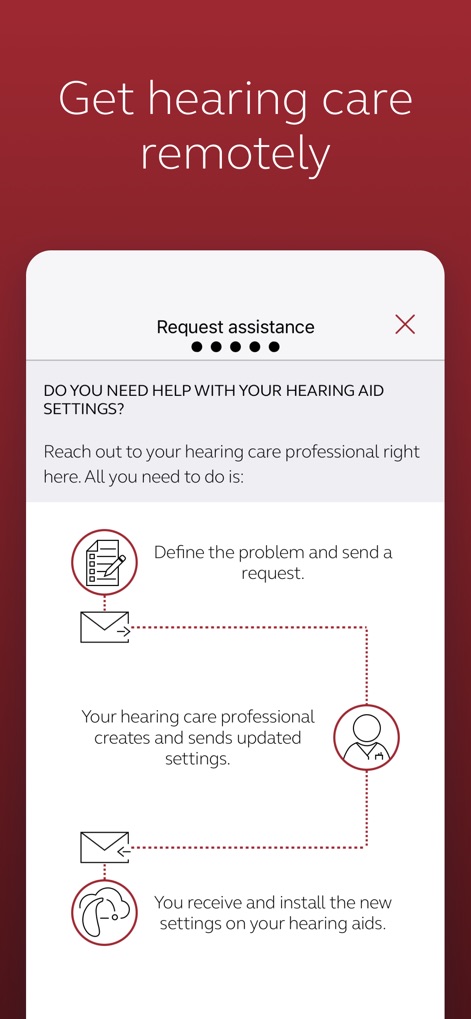
사용자는 이 앱을 통해 문제 정의 및 요청을 전송하고, 청각 전문가로부터 새로운 설정을 생성하여 수신함으로써 언제 어디서든 청력 보조기를 업데이트할 수 있습니다.
원격 청각 관리
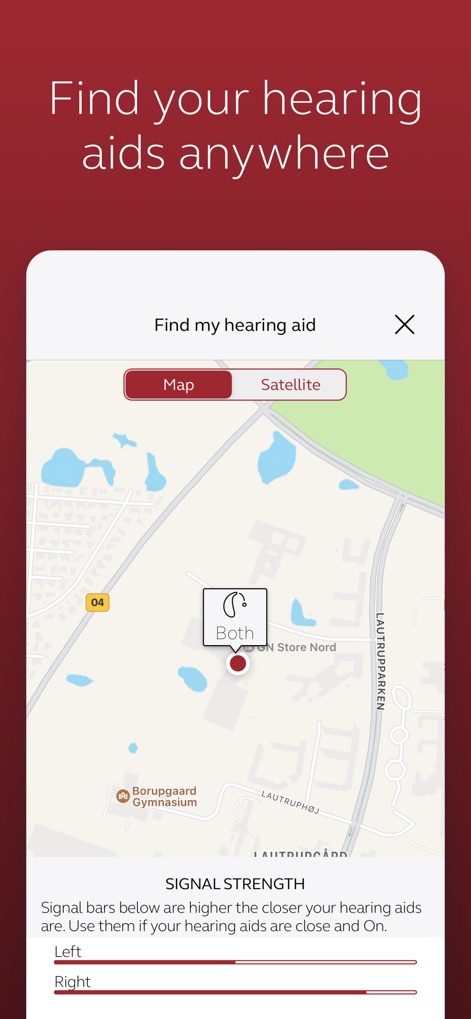
이 도구는 지도 기반 위치 추적을 통해 분실된 보청기를 찾을 수 있게 하며, 신호 강도 표시로 보청기가 가까이에 있는지 직관적으로 알려줍니다.
보청기 찾기

사용자는 이 앱에서 TV 스트리머 설정을 관리하고 베이스 부스트와 같은 기능을 사용하여 TV 오디오를 청력 보조기로 직접 스트리밍하며 청취 경험을 최적화할 수 있습니다.
TV 오디오 스트리밍

이 앱은 현재 착용 사진과 참조 착용 사진을 비교하여 사용자가 보청기의 올바른 착용감을 시각적으로 확인하고 필요한 조정을 할 수 있도록 돕습니다.
착용감 확인
설명
Download
비슷한 앱
유사한 기능과 사용자 경험을 가진 앱

Braun IPL app
P&G Productions
Philips HearLink 2
SBO Hearing AS

BeMore – for your hearing aids
GN Hearing Care Corporation
Jabra Enhance Pro
GN Hearing Care Corporation

Miracle-Ear App
Miracle-Ear, Inc.

myPhonak
Sonova AG

Amplifon App
Amplifon S.p.A.

Hearing Remote
Sonova AG

Oticon Companion
Oticon
이 페이지는 앱이나 개발자의 공식 페이지가 아니며, 정보 제공 및 논평을 목적으로 작성된 독립 편집 간행물입니다. 명시적으로 달리 언급되지 않는 한, 해당 앱이나 개발자는 MWM, Apple, Google Play, 앱 퍼블리셔 또는 앱 개발자와 제휴, 보증, 후원, 승인 또는 공식적으로 연결되어 있지 않으며, 이 페이지의 어떤 내용도 해당 앱이 MWM의 서비스를 사용하여 개발되었음을 의미하지 않습니다. 모든 상표, 로고, 스크린샷 및 기타 콘텐츠는 해당 소유자의 자산입니다.