
이 페이지는 앱이나 개발자의 공식 페이지가 아니며, 정보 제공 및 논평을 목적으로 작성된 독립 편집 간행물입니다. 명시적으로 달리 언급되지 않는 한, 해당 앱이나 개발자는 MWM, Apple, Google Play, 앱 퍼블리셔 또는 앱 개발자와 제휴, 보증, 후원, 승인 또는 공식적으로 연결되어 있지 않으며, 이 페이지의 어떤 내용도 해당 앱이 MWM의 서비스를 사용하여 개발되었음을 의미하지 않습니다. 모든 상표, 로고, 스크린샷 및 기타 콘텐츠는 해당 소유자의 자산입니다.


Parental Control App - Kidslox
당신은 아이들의 디지털 활동을 조작할 수 있는 힘을 얻습니다.
다운로드
5M+사용자 평점
총 평가 수
95.9K개발사
카테고리
Lifestyle지원 언어
52최신 버전
10.10.0크기
424.7 MB출시일
2014년 9월 23일자녀의 디지털 습관 관리 및 온라인 안전을 위한 주요 기능 개요
Kidslox 앱 기술 분석
유해 콘텐츠 및 앱 차단
이 앱은 유해 웹 콘텐츠를 필터링하고, 특정 앱 및 웹사이트의 접근을 차단하며, 인터넷 접속을 완전히 제한하고, 인앱 구매를 막아 자녀를 온라인 위험으로부터 보호할 수 있도록 해줍니다.
정교한 스크린 타임 제어
이 도구는 자녀의 일일 스크린 타임 한도를 설정하고, 숙제나 집안일 완료에 대한 스크린 타임 보상을 제공하며, 식사 시간이나 취침 시간 등 특정 활동을 위해 기기 사용 스케줄을 설정할 수 있게 해줍니다.
가족 위치 추적 및 안전 구역 알림
이 앱은 지도에서 자녀 기기의 현재 위치를 확인할 수 있게 해주며, 미리 설정된 안전 구역을 자녀가 벗어나거나 진입할 때 즉각적인 알림을 받아 오프라인 안전을 보장합니다.
광범위한 멀티플랫폼 원격 관리
이 솔루션은 하나의 계정으로 최대 10대의 아이폰, 아이패드 등 다양한 모바일 기기를 추가하여 관리할 수 있으며, 앱 또는 웹 브라우저를 통해 모든 설정을 원격으로 제어할 수 있는 편리함을 제공합니다.
자녀 기기 활동 모니터링
이 도구는 자녀가 기기에서 무엇을 했는지 확인하여 디지털 습관과 관심사에 대한 통찰력을 얻을 수 있도록 해줍니다.
유연한 제한 수준 전환
이 앱은 버튼 하나로 다른 제한 수준 사이를 쉽게 전환할 수 있게 해주어, 부모가 상황에 따라 빠르게 기기 사용 환경을 조절할 수 있도록 돕습니다.
자주 묻는 질문
에 대해 알아야 할 모든 것 Parental Control App - Kidslox
What is Kidslox?
Kidslox is a parental control app that helps families manage screen time. It blocks apps and websites, filters content, sets schedules, and monitors device usage across multiple platforms.
How does Kidslox help manage screen time?
Kidslox allows setting daily screen time limits, creating weekly schedules for device usage, and offering screen time rewards for completed tasks. It helps balance device use.
Can Kidslox block specific apps and websites?
Yes, Kidslox blocks individual apps and websites. It filters explicit content like pornography and gambling, blocks social media apps such as Instagram, and restricts internet access.
Does Kidslox include a location tracking feature?
Yes, Kidslox includes a family location tracker. It displays children's device locations on a map and sends notifications when they enter or leave pre-set zones.
How many devices can one Kidslox account manage?
One Kidslox account manages up to 10 devices. This includes iPhones, iPads, iPods, and other mobile devices, controlled via the app or a web browser.
Does Kidslox offer a free trial?
Yes, Kidslox offers a 3-day free trial that provides access to all Premium features. After the trial, a subscription is required for continued access.
How does Kidslox monitor web activity and social media?
Kidslox monitors web search history, identifying suspicious searches. It also monitors Instagram and YouTube activity, detecting suspicious comments/chats and tracking content viewed.
Can children earn extra screen time with Kidslox?
Yes, Kidslox features Screen Time Rewards. Children earn additional screen time for completing tasks like homework or household chores, promoting positive behavior.
What happens if an MDM profile is already on a device?
Kidslox cannot be added to a device with an existing education or business Mobile Device Management (MDM) profile. The original MDM profile must be removed first.
Does Kidslox provide SOS alerts?
Yes, Kidslox provides SOS alerts. Children can activate a panic button on their device, which sends an alert with their location to parents.
How do Kidslox subscriptions work?
Subscriptions are processed via iTunes, renewing automatically unless canceled 24 hours before the period ends. A 'Lifetime subscription' offers ongoing access with a one-off payment.
다음 스크린샷과 설명은 앱의 공식 스토어 목록에서 직접 가져온 것이며 앱 개발자의 자산입니다.
앱 스토어
스크린샷
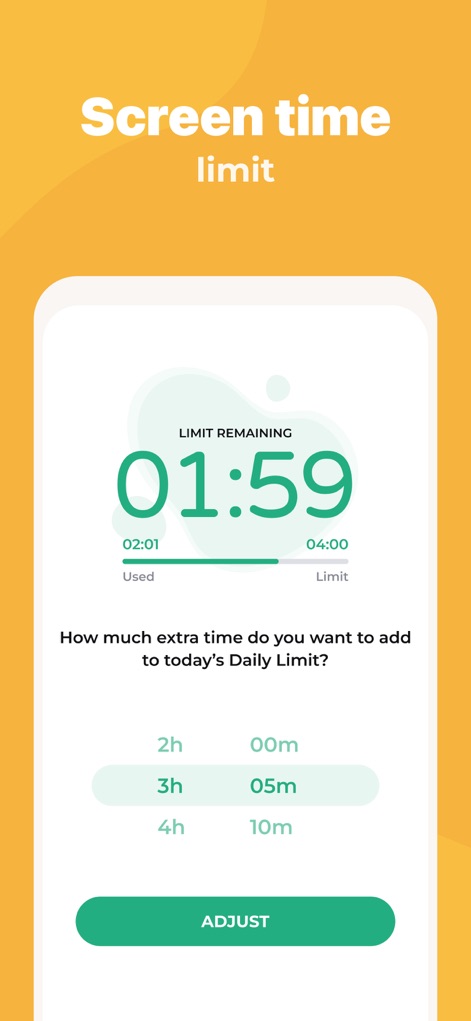
이 앱은 자녀의 남은 스크린 시간을 명확하게 보여주며, 필요에 따라 추가 시간을 선택하고 조정할 수 있는 편리한 기능을 제공합니다.
유연한 시간 관리
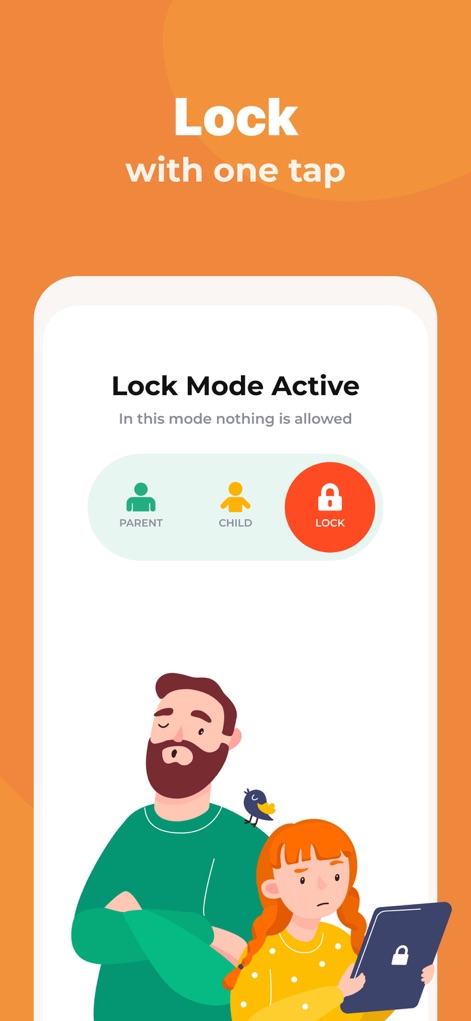
이 도구는 단 한 번의 탭으로 장치를 잠글 수 있는 기능을 제공하며, 사용자는 'PARENT', 'CHILD', 'LOCK' 모드 중에서 현재 상황에 맞는 통제 수준을 쉽게 선택할 수 있습니다.
즉시 장치 잠금
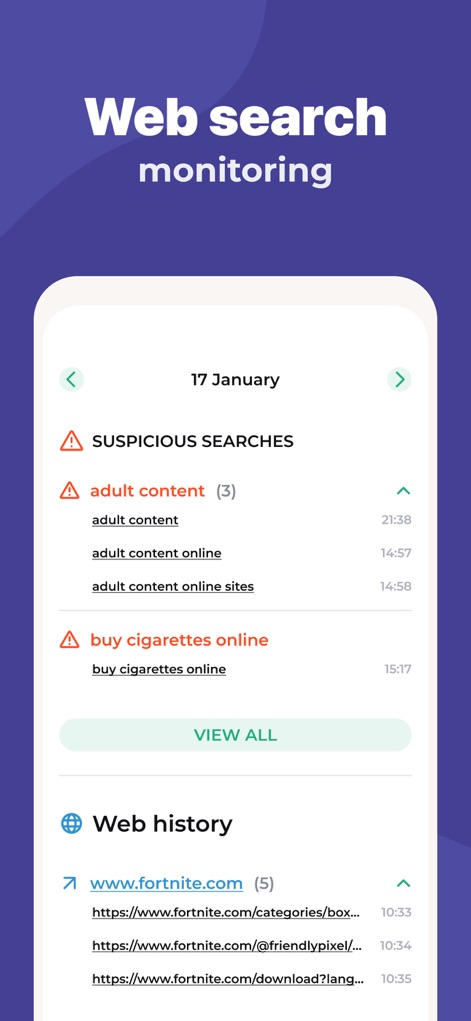
이 앱은 의심스러운 검색어 목록과 상세한 웹 기록을 제공하여 자녀의 온라인 활동을 모니터링하고, 부적절한 콘텐츠로부터 보호하는 데 도움을 줍니다.
웹 검색 추적
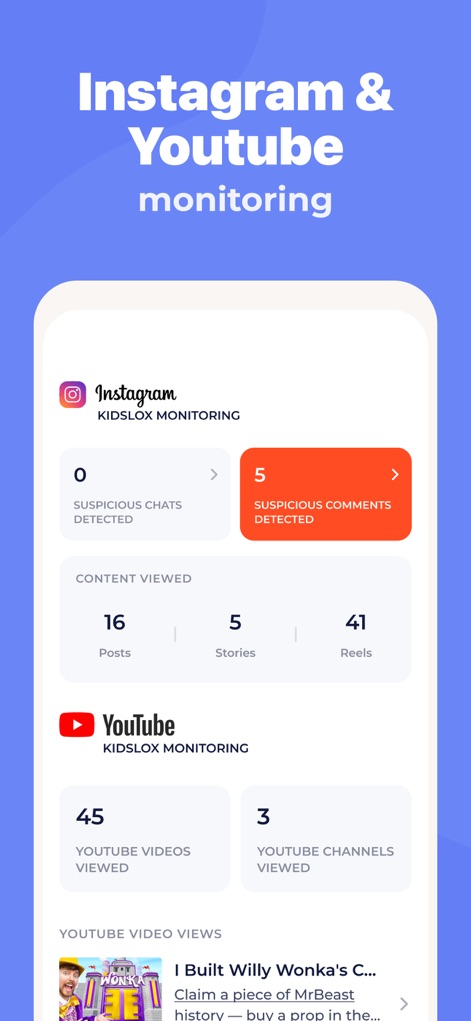
이 도구는 Instagram에서 의심스러운 댓글 탐지 결과를 보여주고, YouTube에서 시청한 비디오 및 채널 수를 명확히 표시하여 자녀의 소셜 미디어 활동을 파악할 수 있습니다.
소셜 미디어 분석
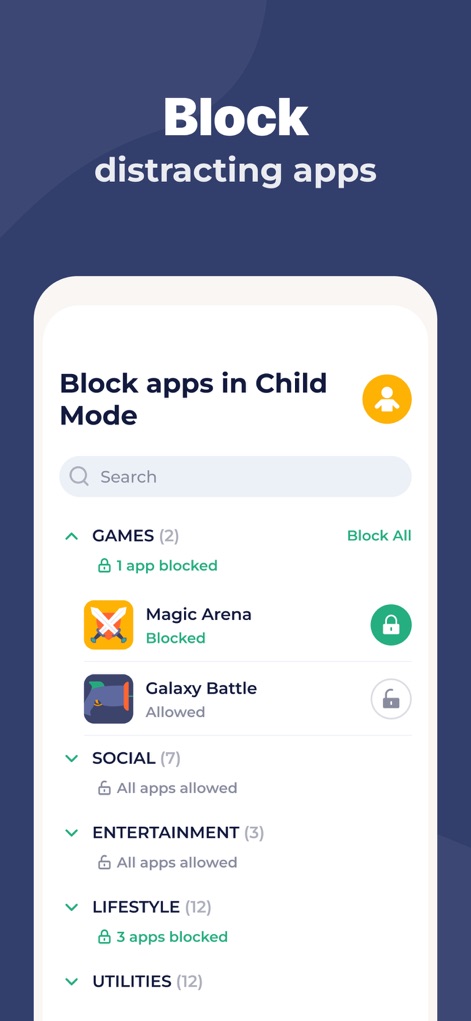
사용자는 이 도구를 통해 'GAMES', 'SOCIAL'과 같은 카테고리별로 앱 목록을 확인하고, 특정 앱을 개별적으로 차단하거나 허용하여 자녀의 집중을 관리할 수 있습니다.
방해 앱 차단
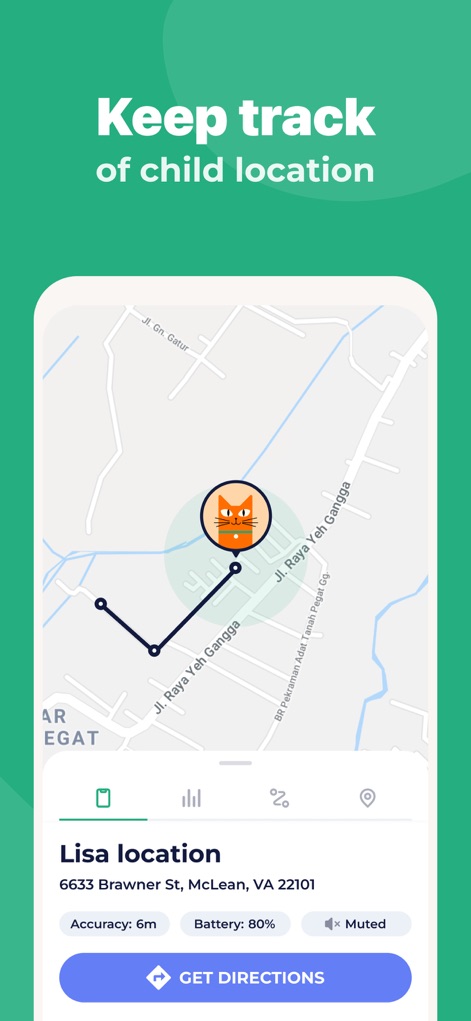
사용자는 지도에서 자녀의 정확한 위치를 파악하고, 위치 정확도와 기기의 배터리 잔량 정보를 실시간으로 확인하여 자녀의 안전을 지킬 수 있습니다.
실시간 위치 확인
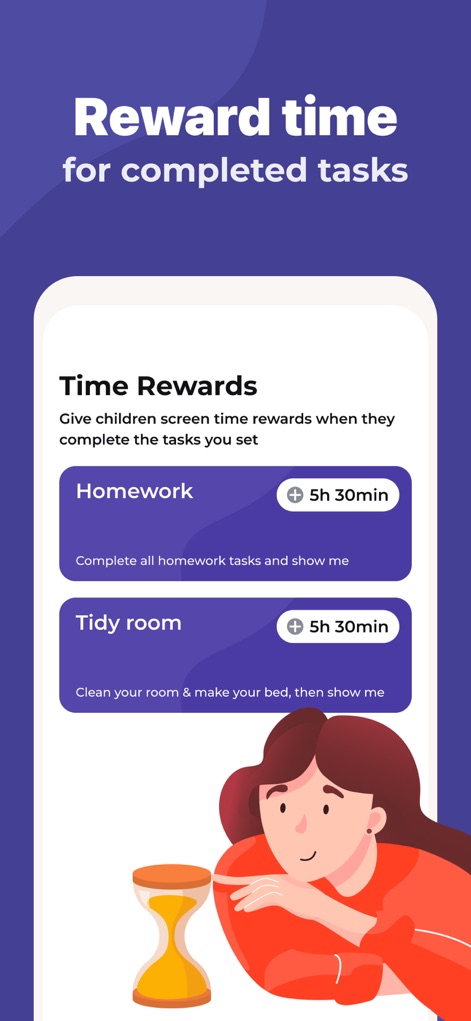
이 도구는 'Homework'와 같은 과제 목록을 제공하고, 자녀가 이를 완료했을 때 '5h 30min'과 같은 추가 스크린 타임 보상을 부여하여 책임감을 기를 수 있도록 돕습니다.
과제 완료 보상
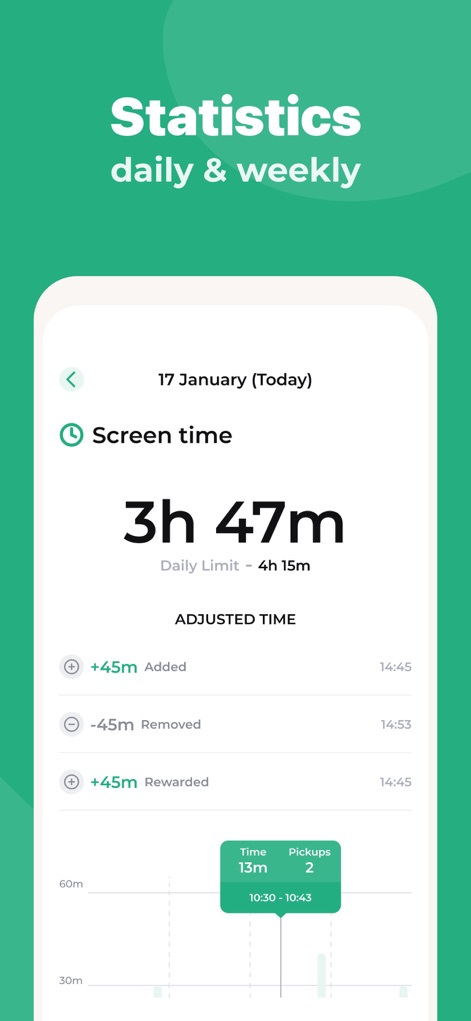
사용자는 이 화면에서 일일 스크린 타임 총 사용 시간과 일일 제한 시간을 한눈에 확인하고, 추가되거나 보상된 스크린 타임의 상세 내역을 파악하여 사용 패턴을 분석할 수 있습니다.
상세 사용 통계

이 앱은 'Bed time', 'Homework', 'Dinner' 등 특정 활동에 대한 스케줄을 설정할 수 있게 하며, 각 스케줄에 'Lock mode'와 같은 특정 모드를 적용하여 기기 사용을 유연하게 제어합니다.
맞춤형 사용 스케줄
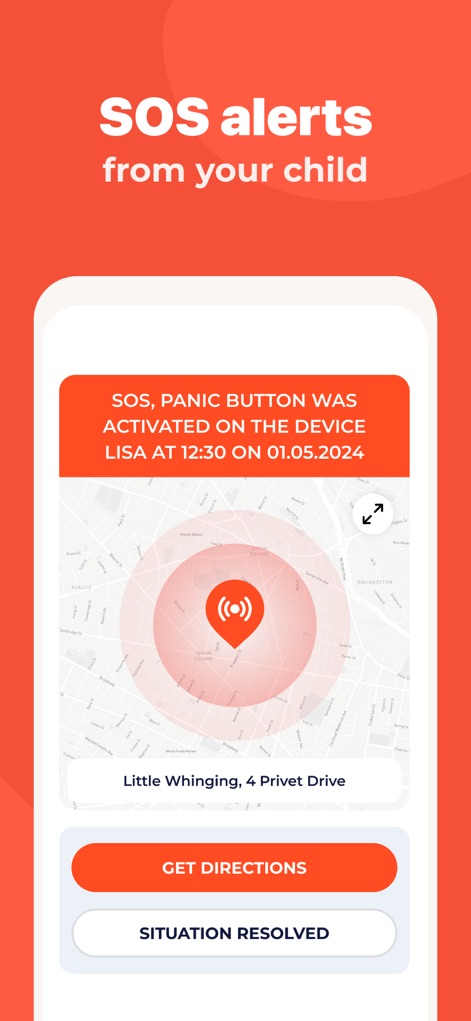
이 앱은 자녀의 기기에서 SOS 패닉 버튼이 활성화되었을 때 즉시 알림을 제공하며, 발생 위치를 지도에 명확히 표시하여 부모가 신속하게 상황을 파악하고 대처할 수 있도록 지원합니다.
긴급 SOS 알림
설명
Download
비슷한 앱
유사한 기능과 사용자 경험을 가진 앱

Findos - Find My Device
Pollux Bilisim Teknolojileri Sanayi ve Ticaret Limited Sirketi

Boost Family Guard
Smith Micro Software, Inc.

Google Family Link
Google LLC

Findmykids: GPS Phone Tracker
LETEM LTD

Nintendo Switch Parental Cont…
Nintendo Co., Ltd.

Parental Control App Kids360
ANKO SOLUTIONS LLC

JusTalk Kids - Safe Messenger
Ningbo Jus Internet Technology Co., Ltd.

FlashGet Kids:parental control
HONGKONG FLASHGET NETWORK TECHNOLOGY CO., LIMITED

Parental Control App: AirDroid
SAND STUDIO CORPORATION LIMITED
이 페이지는 앱이나 개발자의 공식 페이지가 아니며, 정보 제공 및 논평을 목적으로 작성된 독립 편집 간행물입니다. 명시적으로 달리 언급되지 않는 한, 해당 앱이나 개발자는 MWM, Apple, Google Play, 앱 퍼블리셔 또는 앱 개발자와 제휴, 보증, 후원, 승인 또는 공식적으로 연결되어 있지 않으며, 이 페이지의 어떤 내용도 해당 앱이 MWM의 서비스를 사용하여 개발되었음을 의미하지 않습니다. 모든 상표, 로고, 스크린샷 및 기타 콘텐츠는 해당 소유자의 자산입니다.