INFOSOFT Informations- und Dokumentationssysteme GmbH
카테고리
Business
다운로드
1M+
사용자 평점
4.7/5
총 평가 수
32K+
지원 언어
21
효율성에 초점
이 인터페이스를 사용하는 1M+ 명의 사용자.
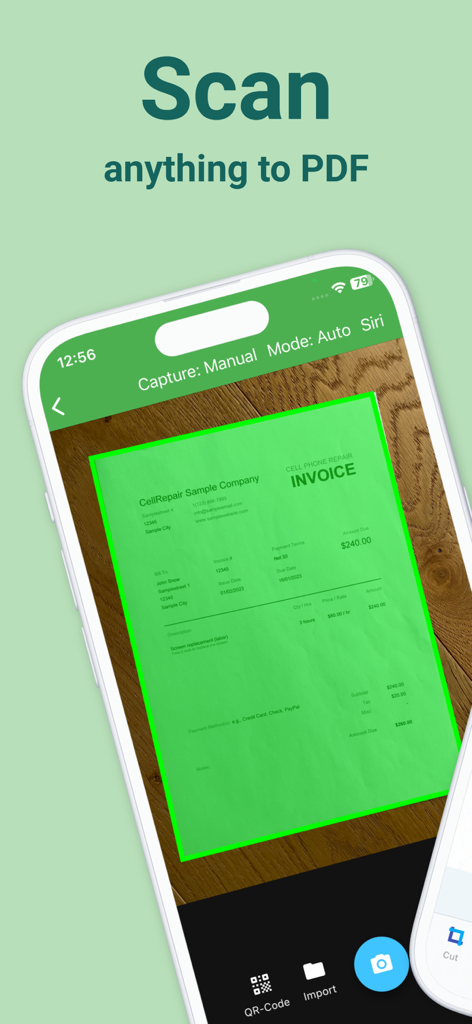
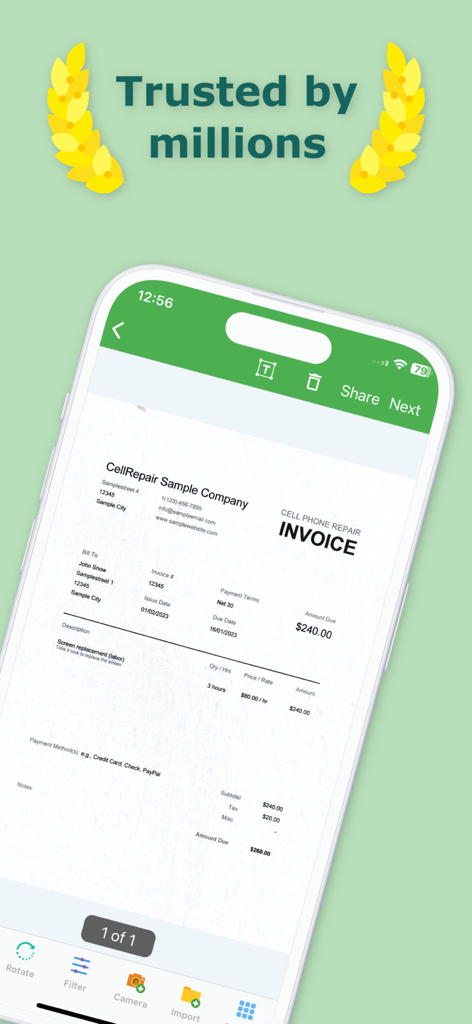
Docutain 모바일 앱이 휴대폰 수리 송장을 스캔하여 고품질 PDF 문서를 생성하는 모습.
Docutain 앱 인터페이스에 스마트폰 화면에 스캔된 사업 송장이 표시되는 모습
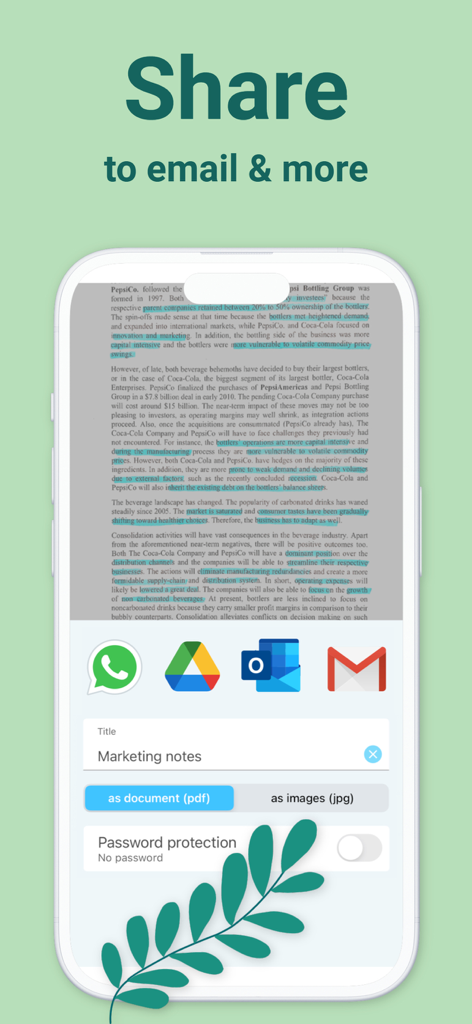
Docutain 앱 인터페이스에 이메일 및 메신저를 통한 PDF 및 JPG 형식의 문서 공유 옵션이 표시되는 모습
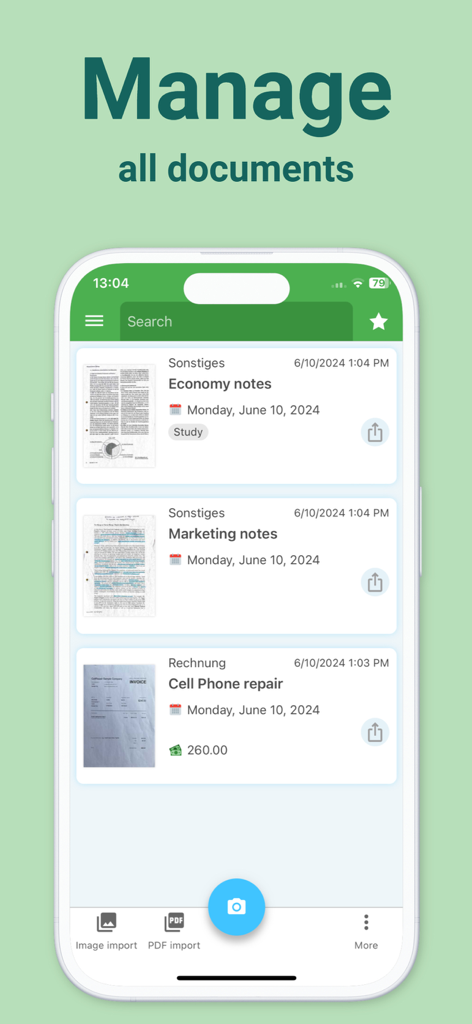
Docutain 앱 화면에 경제 노트 및 휴대폰 수리 송장을 포함한 스캔된 문서 목록이 표시되는 모습
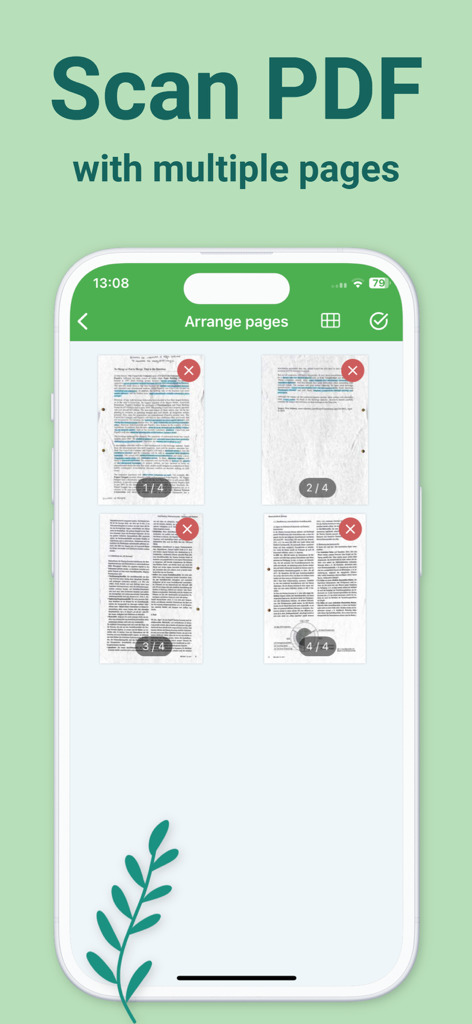
Docutain 앱 인터페이스에 다중 페이지 PDF를 위한 4개의 스캔된 페이지 그리드가 표시되는 모습
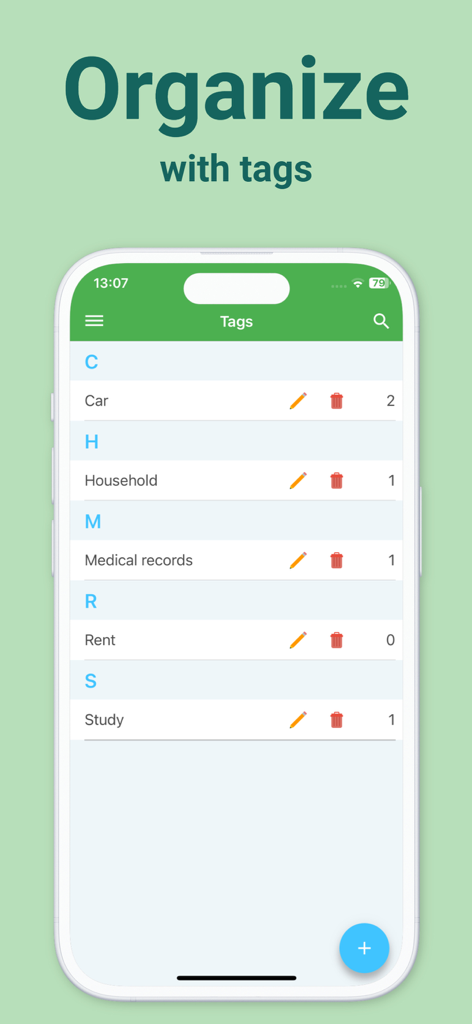
Docutain 앱에서 정리된 문서 태그를 보여주는 모바일 화면
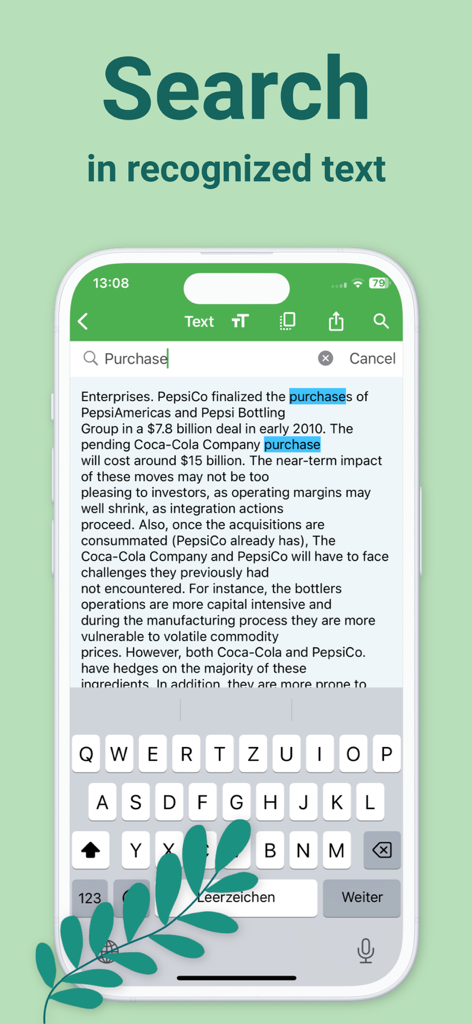
Docutain 앱이 OCR 기술을 사용하여 스캔된 문서 내에서 전체 텍스트 검색 기능을 시연하는 모습
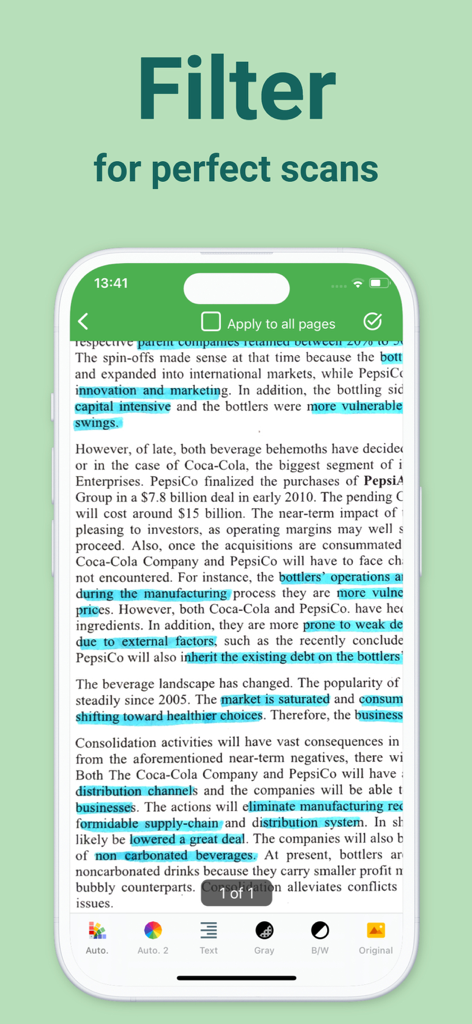
Docutain 앱 화면에 문서 스캔 품질 향상을 위한 흑백 및 회색조와 같은 다양한 이미지 필터가 표시되는 모습
전문적인 정확성으로 서류 작업을 마스터하세요
이 앱을 돋보이게 하는 도구, 1M+ 명의 사용자가 선택.
🔍
HD 스캔 및 OCR 지능
자동 가장자리 감지 및 흐림 감소 기능으로 선명한 PDF를 캡처하세요. 고급 OCR 기술로 모든 단어를 검색할 수 있어 몇 초 안에 모든 문서를 찾을 수 있습니다.
📁
세금 준비를 위한 정리
스캔할 때 영수증, 송장 및 보증서를 태그하고 분류하세요. 세금 시즌을 위해 기록을 쉽게 정리하고 클릭 한 번으로 내보내어 공제액을 극대화하세요.
🛡️
군사 등급 개인 정보 보호
민감한 데이터는 귀하에게 안전하게 보관됩니다. 로컬 우선 저장, 최첨단 암호화 및 생체 인식 보호 기능을 활용하세요. 외부 서버나 강제 클라우드 업로드가 필요하지 않습니다.
앱 소개
에 대해 알아야 할 모든 것 PDF Scanner App, OCR: Docutain.
설명
The only Scanner App you need!
1) The integrated document scanner enables fast PDF scans in HD quality. The scan is readable and searchable thanks to automatic OCR text recognition.
2) With the secure document management system and scanner, the right document is at hand in just one click. Paper chaos or going through paper folders are a thing of the past!
3) Optional cloud integration and local storage on the device for maximum security of your documents.
4) Share scannable documents directly via email or messenger.
*BENEFITS OF DOCUTAIN*
Scan in HD
With intelligent document recognition and automatic shutter in the perfect moment, perspective correction, document edge detection, blur-reduction and color correction, you achieve a perfect scan with the PDF scanner app. Create a PDF scan or photo scan, use batch scanning for multiple pages and convert to PDF.
Edit
Manually crop, color filter, add, reorder, or remove pages. Even after saving, you can still edit the scan of documents.
Organize
Optional index information when saving a scan (e.g. name, keywords, address, tax relevance, and optical character recognition (OCR)) helps organize and retrieve your digital documents.
Index information is automatically recognized so that you receive suitable suggestions for indexing scannable PDFs.
Docutain Pro also lets you pay your scanned invoices and monitor expenses through payment providers.
You can use the PDF scanner app to manage not only scannable documents with the camera, but also existing photos and PDF documents. This also enables to convert images to PDF files (jpg to pdf).
Search & Find
Find documents with the help of the detailed search mask, your self-defined criteria or via the full text search thanks to OCR. In addition, quick searches are available, e.g. via keywords or addresses.
Share
You can export your scannable docs as PDF files and send them directly by mail or text messenger with the mobile scanner.
Security & Privacy
With optional cloud connection you can protect documents from loss and synchronize them with all your end devices. Available cloud services: GoogleDrive, OneDrive, Dropbox, STRATO HiDrive, MagentaCLOUD, Web.de, GMX MediaCenter, Box, WebDAV, Nextcloud, ownCloud.
For maximum security, you can encrypt all data in the scanner app using state-of-the-art methods and protect app access with a password or fingerprint. No external servers are connected, data is stored locally on your device.
*USE CASES*
Invoices & Contracts
Receipts, warranties, business cards, passports, insurance documents + more scannable documents can be managed securely & clearly in one place with relevant information - e.g. end of contract reminder.
Tax return
Find all tax-related documents within one click. Save time to focus on tax return. Docutain supports you.
Rental
Documents for service charge settlements can be assigned to the rental parties by means of keywords, without duplications after scanning. This way, billing is done quickly. Apartment handover protocols, meter readings or defects can be easily stored in the DMS.
Studies, Homeschooling, Homeoffice
Exercise sheets, homework, lecture notes, book pages + more. Share transcripts with fellow students, scan books from the term paper, or send certificates to instructors as space-saving PDF scans.
Recipes
Create your own cookbook with document types + tags and browse with flexibility combining your criteria with the PDF scanner app and intuitive document manager.
Download Docutain, the scanning app, stay organized and keep track with the smart, mobile photo scanner!
Contact@Docutain.de
Terms of Use
http://www.docutain.de/AGBPrivat?Local=en
최신 버전
2.55.1
크기
188.5 MB
출시일
2020년 1월 21일
휴대폰을 안전한 페이퍼리스 오피스로 전환하세요
HD 정밀도와 로컬 우선 암호화를 통해 세금, 계약서 및 영수증을 관리하는 100만 명 이상의 전문가들과 함께하세요. 귀하의 데이터, 귀하의 기기, 귀하의 통제권.
FAQ
자주 묻는 질문
에 대해 알아야 할 모든 것 PDF Scanner App, OCR: Docutain
Docutain PDF Scanner 앱에 OCR 텍스트 인식이 포함되어 있나요?
예, Docutain PDF Scanner 앱에는 자동 OCR 텍스트 인식이 포함되어 있어 스캔한 문서를 읽고 검색할 수 있습니다. 이 기능은 HD 품질 스캔을 위해 통합되었습니다.
Docutain은 스캔한 문서를 정리하는 데 어떻게 도움이 되나요?
Docutain은 이름, 키워드, 주소, 세금 관련성 등 선택적 색인 정보를 사용하여 문서를 정리합니다. 자동 인식된 색인 제안을 제공하며 앱 인터페이스에서 볼 수 있는 분류를 위한 태그를 지원합니다.
Docutain PDF Scanner 앱에서 문서를 공유할 수 있나요?
예, 사용자는 이메일이나 메신저를 통해 Docutain 앱에서 직접 스캔 가능한 문서를 공유할 수 있습니다. 내보내기 옵션에는 PDF 및 JPG 형식이 포함되며, 공유를 위해 암호 보호 기능도 추가로 제공됩니다.
문서 저장을 위해 Docutain 앱과 호환되는 클라우드 서비스는 무엇인가요?
Docutain은 GoogleDrive, OneDrive, Dropbox, STRATO HiDrive, MagentaCLOUD, Web.de, GMX MediaCenter, Box, WebDAV, Nextcloud, ownCloud와 같은 서비스와의 선택적 클라우드 통합을 지원하여 문서 동기화 및 보안을 강화합니다.
Docutain PDF Scanner 앱 내에서 스캔한 문서를 편집할 수 있나요?
예, Docutain PDF Scanner 앱을 사용하면 사용자가 스캔을 편집할 수 있습니다. 수동 자르기, 색상 필터링, 페이지 추가, 재정렬 또는 삭제와 같은 기능이 포함됩니다. 문서를 저장한 후에도 편집이 가능합니다.
Docutain 앱은 스캔한 문서 내에서 전체 텍스트 검색을 허용하나요?
예, Docutain은 OCR 기능 덕분에 스캔한 문서 내에서 전체 텍스트 검색을 가능하게 합니다. 사용자는 상세 검색 마스크, 자체 정의 기준 또는 키워드를 통한 빠른 검색을 사용하여 문서를 찾을 수 있습니다.
Docutain PDF Scanner 앱은 다중 페이지 문서를 처리할 수 있나요?
예, Docutain은 여러 페이지를 스캔하여 단일 PDF 문서로 변환하는 것을 지원합니다. 앱은 일괄 스캔 및 캡처 후 페이지 배열 기능을 제공합니다.
Docutain은 사용자 데이터에 대한 강화된 보안 기능을 제공하나요?
예, Docutain은 최첨단 방식으로 모든 데이터를 암호화할 수 있도록 하여 최대 보안을 제공합니다. 사용자는 암호 또는 지문으로 앱 액세스를 보호할 수 있으며, 데이터는 로컬에 저장됩니다.
Docutain 앱은 기존 이미지를 PDF 파일로 변환할 수 있나요?
예, Docutain 앱은 기존 사진 및 이미지를 PDF 파일(jpg to pdf)로 변환합니다. 이 기능을 통해 사용자는 카메라 스캔 외에 더 넓은 범위의 디지털 문서를 관리할 수 있습니다.
Docutain은 고품질 결과를 위해 어떤 고급 스캔 기능을 포함하나요?
Docutain은 지능형 문서 인식, 자동 셔터, 원근 보정, 문서 가장자리 감지, 흐림 감소, 색상 보정과 같은 기능을 포함합니다. 이러한 기능은 PDF 및 사진 출력에 대해 완벽한 HD 품질 스캔을 보장합니다.
App information, icons, screenshots, and descriptions displayed on this page are sourced from the Apple App Store and are the property of their respective developers. Download estimates and rankings are based on MWM's proprietary models and may not reflect actual figures. This page is provided for informational and analytical purposes only.
Believe this page infringes your intellectual property? File a dispute