Previs Pro - Storyboard Fast

Previs Pro - Storyboard Fast

다운로드: App Store
로고: Previs Pro - Storyboard Fast

Previs Pro: 현대 영화 제작자를 위한 전문 3D 스토리보딩

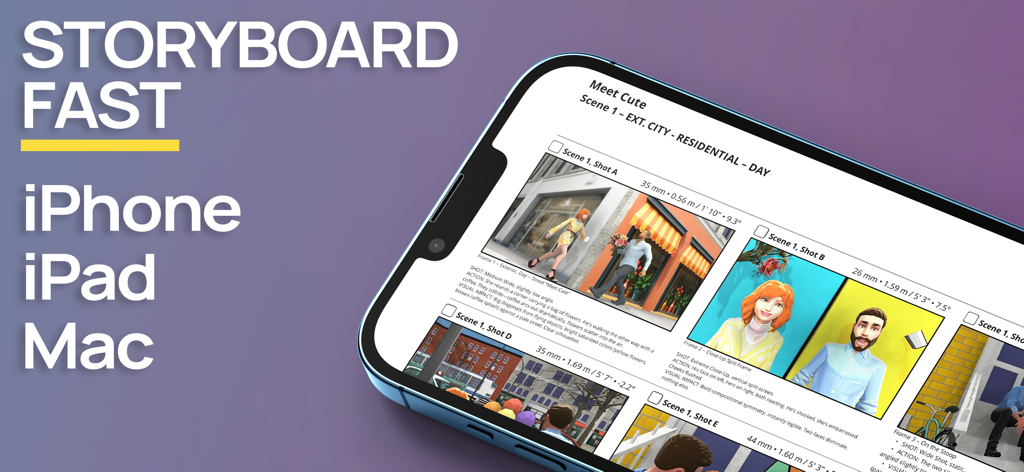
막대기 사람 그리기를 멈추고 기술적 정확성으로 비전을 시각화하세요. 3D 세트를 만들고, 현장에서 AR을 실험하고, iPhone 또는 iPad에서 직접 전문 샷 리스트를 내보내세요.

개발사

Ghostwheel LLC

카테고리

Photo & Video

다운로드

111K+

사용자 평점

4.8/5

총 평가 수

2K+

지원 언어

11

비전 시각화

이 인터페이스를 사용하는 111K+ 명의 사용자.

Previs Pro 스토리보드 앱 인터페이스, iPhone에서 3D 영화 장면 표시
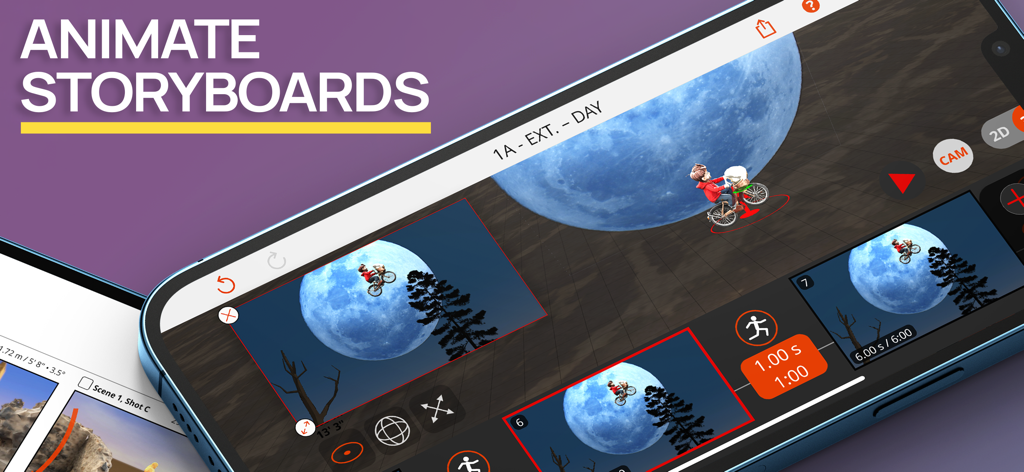
Previs Pro 스토리보드 앱 인터페이스, iPhone에서 3D 영화 장면 표시

Previs Pro 앱 인터페이스, 영화 같은 달 장면의 3D 스토리보드 애니메이션 표시
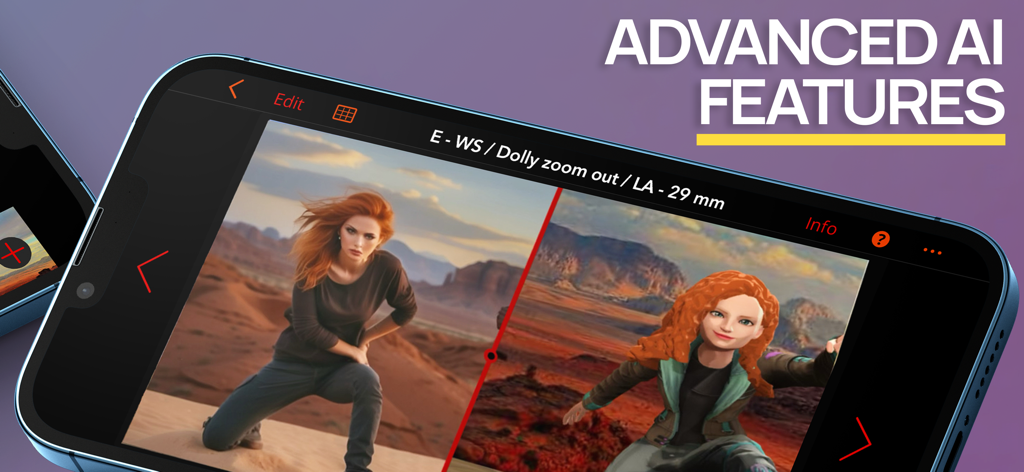
Previs Pro 앱 인터페이스, 영화 같은 달 장면의 3D 스토리보드 애니메이션 표시

스마트폰의 Previs Pro 앱, AI 기능을 사용하여 실제 이미지와 3D 스토리보드 모델 간의 분할 화면 비교 표시
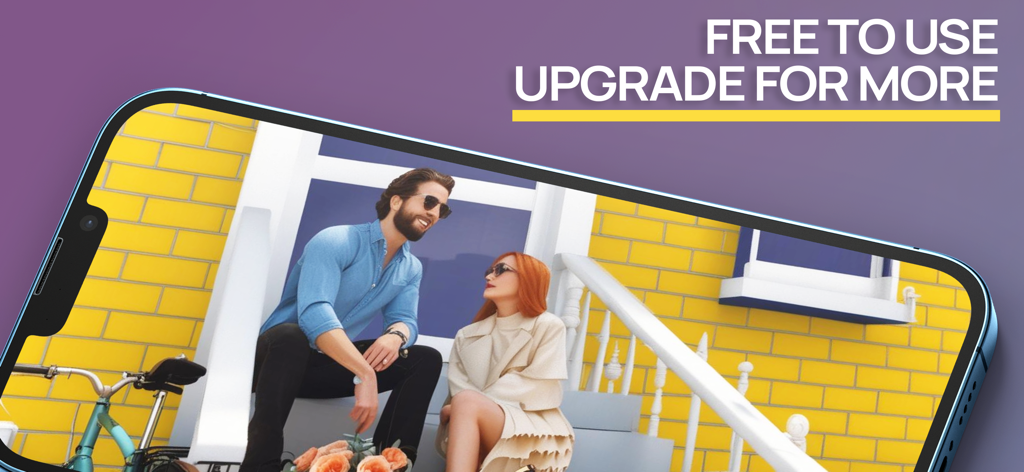
스마트폰의 Previs Pro 앱, AI 기능을 사용하여 실제 이미지와 3D 스토리보드 모델 간의 분할 화면 비교 표시

현관에 앉아 있는 두 명의 캐릭터의 3D 스토리보드 장면을 표시하는 스마트폰
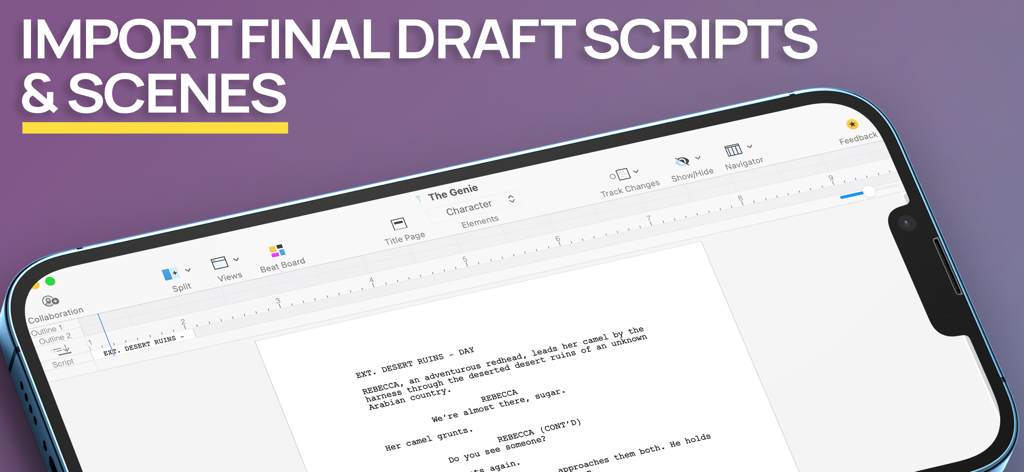
현관에 앉아 있는 두 명의 캐릭터의 3D 스토리보드 장면을 표시하는 스마트폰

Previs Pro 앱의 스크린샷, 모바일 장치 화면에서 Final Draft 각본 및 장면 가져오기 표시

Previs Pro 앱의 스크린샷, 모바일 장치 화면에서 Final Draft 각본 및 장면 가져오기 표시

비전을 더 빠르게 시각화하세요

이 앱을 돋보이게 하는 도구, 111K+ 명의 사용자가 선택.

🎬

그리기 기술 불필요

간단한 제스처로 몇 초 만에 복잡한 3D 세트를 만드세요. 포즈를 취할 수 있는 캐릭터와 수백 개의 소품으로 장면을 채워 비전을 절대적인 명확성으로 전달하세요.

📍

AR 현장 답사

증강 현실을 사용하여 실제 환경에 가상 배우와 소품을 배치하세요. 촬영팀이 현장에 도착하기도 전에 촬영 장소를 답사하고 촬영을 확정하세요.

🎥

전문가를 위한 기술적 정확성

실제 카메라 센서, 렌즈 및 화면 비율을 구성하세요. DP와 촬영팀이 실제로 사용할 수 있는 전문 PDF 스토리보드 및 샷 리스트를 내보내세요.

전 세계 사용자들에게 사랑받는 앱

Trusted by 111K+ 명이 이 앱을 사랑합니다.

"

"Previs Pro는 사전 제작 워크플로우를 완전히 간소화했습니다. Final Draft 각본을 가져와 즉시 3D로 장면을 구성할 수 있습니다. 훌륭한 일러스트레이터가 되지 않고도 제 머릿속에 있는 것을 촬영팀에게 정확히 보여주는 가장 좋은 방법입니다."

Marcus Chen, 인디 영화 감독
"

"기술적 정확성이 저를 사로잡았습니다. 특정 센서 유형과 초점 거리를 선택하면 스토리보드가 실제로 현장에서 유용하게 사용됩니다. 또한, 현장 답사 중에 캐릭터를 배치하기 위해 AR 기능을 사용하는 것은 마법과 같습니다."

Sarah Jenkins, 촬영 감독

앱 소개

에 대해 알아야 할 모든 것 Previs Pro - Storyboard Fast.

설명

Create 3D storyboards in your iPad or iPhone using simple taps, swipes, and gestures that you already know. Filmmakers, directors, cinematographers, video creators, and screenwriters know that you MUST storyboard your shots and scenes BEFORE you roll camera. Previsualize every shot in your scene AND every scene in your script. Experiment - with 2D and 3D real-time views - to find the very best shot for your film or video. PURCHASE OPTIONS Annual - under US$15 per month average Lifetime - own it forever STORYBOARD FAST With Previs Pro, quickly build a 3D set populated with buildings, props, and characters. Position your camera and lights for the perfect shot. Add a second shot - perhaps a Close-Up or Cutaway - by just moving the camera into position. Add more shots until your scene is complete. ** Final Draft Import ** Import every scene and character from your Final Draft script. You’re halfway finished before you even start. Works with Final Draft 12! STORYBOARD EASY Experimenting with different types of shots is a breeze. Simply move the camera around the 3D set until you find your shot. Pan left, tilt up, dolly in, or zoom. Your view of the shot is always updated in real-time. What you see is truly what you get. STORYBOARD ANYWHERE Storyboard where and when inspiration strikes. If you're in the middle of production and a shot isn't working, then pull out your iPhone and design a shot that does work. Send and share the new shot with your entire cast and crew. The best storyboard is the one in your pocket — that you can change, and share whenever necessary. ** Augmented Reality ** With our A/R feature, you can place your virtual props and characters into a real-world location - the streets of London, on a bridge in Paris, or your own backyard - and start building shots in the same exact location where you plan to shoot. Can't get there to use A/R? No problem. Import a photo or image of your location into your shot and use it as a "proxy". It's the next best thing to being there. STORYBOARD LIKE THE PROS At some point, you need to turn your shots in Previs Pro into storyboards for your cast and crew. If you're a director, you need to create a shot list. If you're a cinematographer or DP, you need information on camera type, lenses, and aspect ratios. If you're doing it all yourself, then you need all this information. With Previs Pro, you can export storyboards as printable PDF's or shareable graphics files. You can include as much rich data as needed, or show nothing but the Camera View. ADDITIONAL PREVIS PRO FEATURES ** IMPORT 3D PROPS ** Import your own 3D props from prop and object libraries like Sketchfab. ** CAMERAS AND LIGHTING ** * Camera/Sensor Types: Full Frame 35mm, Alexa LF Open Gate sensor, Super 35mm, Micro 4/3, 2/3" Video, and iPhone * * Aspect Ratios: 1.77:1 (16:9), 1.85:1, 2.35:1, 2.39:1, 3:2, 4:3 * * Moveable spotlights and lanterns * ** POSABLE AND EDITABLE CHARACTERS ** * Over 50 poses available - Standing, Sitting, Moving, Lying, Action, & Special Gestures * Adjust character height, gender, body type, hair color, skin, eye, and clothing color * Add character to Cast to place them in any future shot or scene * Adults and Kids characters * Set and Custom Facial Expressions ** HUNDREDS OF PROPS ** * Choose props among Furnishing, Buildings, Nature, Exterior, Animals, Vehicles, Tools, Weapons, and Household Items * Can't find a prop you want? Use a basic shape or add your own image * Import 3D Props from libraries like Sketchfab ** POWERFUL AND EASY FILE MANAGEMENT AND SECURITY ** * Save your projects securely with iCloud, Dropbox, or locally * * Share your Previs Pro files with other trusted users * ** INTEGRATIONS ** * Import Final Draft scripts. Export storyboard images back to Final Draft * * Export storyboard images to production services like Studio Binder and Celtx * Please visit previspro.com/terms-of-use to learn our terms of use

최신 버전

3.3.0

크기

761.3 MB

출시일

2020년 2월 5일

그림 그리기를 멈추고, 연출을 시작하세요.

몇 분 만에 각본을 전문적인 3D 스토리보드로 바꾸는 111,000명 이상의 영화 제작자 및 창작자 커뮤니티에 참여하세요. Previs Pro를 다운로드하고 주머니 속에 할리우드급 프리비즈 스튜디오를 휴대하세요.

다운로드: App Store
FAQ

자주 묻는 질문

에 대해 알아야 할 모든 것 Previs Pro - Storyboard Fast

Previs Pro - Storyboard Fast는 무엇인가요?

Previs Pro - Storyboard Fast는 3D 스토리보드를 만드는 iPad 및 iPhone용 앱입니다. 영화 제작자 및 비디오 제작자가 샷과 장면을 미리 보고, 3D 세트를 구축하고, 카메라 각도를 실시간으로 실험할 수 있습니다.

Previs Pro로 3D 스토리보드를 만들 수 있나요?

네, Previs Pro는 3D 스토리보드를 만듭니다. 사용자는 건물, 소품, 캐릭터로 3D 세트를 구축한 다음 카메라와 조명을 배치하여 앱 내에서 샷을 효과적으로 디자인할 수 있습니다.

어떤 기기에서 Previs Pro를 지원하나요?

Previs Pro는 iPhone, iPad 및 Mac 기기를 지원합니다. 사용자는 이러한 플랫폼에서 3D 스토리보드를 만들 수 있습니다.

Previs Pro는 다양한 가격 옵션을 제공하나요?

네, Previs Pro는 연간 구독(월 US$15 미만)과 평생 구매 옵션을 제공합니다. 사용자는 앱을 영구적으로 소유하거나 연간 구독할 수 있습니다.

Previs Pro에서 Final Draft 스크립트를 가져올 수 있나요?

네, Previs Pro는 Final Draft 스크립트에서 모든 장면과 캐릭터를 직접 가져올 수 있으며 Final Draft 12를 지원합니다. 이 통합은 콘텐츠를 자동으로 채워 스토리보드 프로세스를 간소화합니다.

Previs Pro에서 어떤 내보내기 옵션을 사용할 수 있나요?

Previs Pro는 스토리보드를 인쇄 가능한 PDF 또는 공유 가능한 그래픽 파일로 내보냅니다. 사용자는 필요한 카메라 뷰, 샷 목록, 카메라 유형, 렌즈 및 종횡비와 같은 풍부한 데이터를 포함합니다.

Previs Pro에 증강 현실(A/R) 기능이 포함되어 있나요?

네, Previs Pro에는 A/R 기능이 포함되어 있습니다. 이를 통해 사용자는 실제 장소에 가상 소품과 캐릭터를 배치하여 촬영하려는 장소에 직접 샷을 구축할 수 있습니다.

Previs Pro에서 캐릭터를 사용자 정의할 수 있나요?

네, Previs Pro는 포즈를 취하고 편집 가능한 캐릭터를 제공합니다. 사용자는 키, 성별, 체형, 머리카락, 피부, 눈, 의류 색상을 조정할 수 있습니다. 또한 50가지 이상의 포즈에서 사용자 지정 얼굴 표정을 설정할 수 있습니다.

Previs Pro에는 어떤 종류의 소품이 있나요?

Previs Pro는 가구, 건물, 자연, 차량과 같은 범주에 수백 가지 소품을 제공합니다. 사용자는 Sketchfab과 같은 라이브러리에서 3D 소품을 가져오거나 기본 모양과 사용자 지정 이미지를 사용할 수 있습니다.

Previs Pro는 파일 관리 및 보안 기능을 제공하나요?

네, Previs Pro는 안전한 파일 관리를 제공합니다. 사용자는 iCloud, Dropbox 또는 로컬에 프로젝트를 저장합니다. 또한 애플리케이션 내에서 직접 다른 신뢰할 수 있는 사용자와 Previs Pro 파일을 공유합니다.

Previs Pro는 다른 제작 서비스와 통합될 수 있나요?

네, Previs Pro는 제작 서비스와 통합됩니다. Final Draft 스크립트를 가져오고 Studio Binder 및 Celtx와 같은 플랫폼에 스토리보드 이미지를 내보냅니다.

Previs Pro는 스토리보드 애니메이션을 지원하나요?

네, Previs Pro는 스토리보드 애니메이션을 지원합니다. 이 앱을 통해 사용자는 스토리보드 시퀀스를 애니메이션화하고 모션을 시각화할 수 있습니다.

Previs Pro에 AI 기능이 있나요?

네, Previs Pro에는 고급 AI 기능이 포함되어 있습니다. 이러한 기능은 스토리보드 프로세스를 향상시켜 앱 내에서 사용자에게 정교한 도구를 제공합니다.

Previs Pro는 무료로 사용할 수 있나요?

네, Previs Pro는 더 많은 기능을 위한 업그레이드 옵션과 함께 무료로 사용할 수 있습니다. 이를 통해 사용자는 고급 기능 또는 전체 액세스를 구매하기 전에 앱을 사용해 볼 수 있습니다.