
이 페이지는 앱이나 개발자의 공식 페이지가 아니며, 정보 제공 및 논평을 목적으로 작성된 독립 편집 간행물입니다. 명시적으로 달리 언급되지 않는 한, 해당 앱이나 개발자는 MWM, Apple, Google Play, 앱 퍼블리셔 또는 앱 개발자와 제휴, 보증, 후원, 승인 또는 공식적으로 연결되어 있지 않으며, 이 페이지의 어떤 내용도 해당 앱이 MWM의 서비스를 사용하여 개발되었음을 의미하지 않습니다. 모든 상표, 로고, 스크린샷 및 기타 콘텐츠는 해당 소유자의 자산입니다.


PushUp Time: App Blocker
스크롤 중독을 막는 유일한 방법은 근육을 사용하는 것입니다.
다운로드
250k+사용자 평점
총 평가 수
21.7K개발사
카테고리
Productivity지원 언어
12최신 버전
3.3.3크기
137.7 MB출시일
2025년 9월 12일화면 시간 관리를 운동으로 전환하는 혁신적인 접근 방식 평가
PushUp Time: App Blocker 핵심 기능 분석
AI 기반 운동 잠금 해제
이 도구는 사용자가 푸쉬업, 스쿼트 또는 윗몸일으키기와 같은 특정 운동을 수행해야만 방해되는 앱에 접근할 수 있게 하여, 화면 시간 관리에 신체 활동을 통합하도록 돕습니다.
건강한 습관 형성 유도
이 앱은 사용자가 소셜 미디어와 같은 앱에 접근하려 할 때마다 운동을 유도함으로써, 건강한 신체 활동 습관을 형성하고 디지털 중독을 개선하는 데 중요한 역할을 합니다.
방해 앱 선택적 차단
사용자가 생산성을 저해하는 특정 앱을 지정하여 관리할 수 있도록 지원하며, 디지털 방해 요소로부터 벗어나도록 돕습니다.
앱 접근 시간 맞춤 설정
사용자가 앱 접근 시간을 15분에서 120분까지 스스로 조절하여 과도한 사용을 방지하고, 계획적인 디지털 소비 습관을 형성하는 데 기여합니다.
앱 잠금 해제 유연성
사용자가 필요에 따라 개별 앱 또는 모든 차단된 앱을 동시에 잠금 해제할 수 있는 유연성을 제공하여, 편리성과 통제력 사이의 균형을 맞춥니다.
오프라인 사용 가능
이 앱은 인터넷 연결 없이도 모든 핵심 기능을 사용할 수 있게 하여, 사용자가 언제 어디서든 디지털 습관을 관리하고 운동을 수행할 수 있도록 합니다.
자주 묻는 질문
에 대해 알아야 할 모든 것 PushUp Time: App Blocker
What is PushUp Time: App Blocker?
PushUp Time: App Blocker is an application that turns screen time into workout time. Users perform exercises like push-ups, squats, or sit-ups to unlock distracting apps for a chosen duration.
How does PushUp Time: App Blocker work?
Users attempt to open a distracting app, then perform a set of push-ups, squats, or sit-ups. After completing the reps, they gain timed access to the app for 15 to 120 minutes.
Which exercises does PushUp Time: App Blocker support?
PushUp Time: App Blocker supports push-ups, squats, and sit-ups. Its on-device AI counts the user's repetitions for these specific exercises.
Does PushUp Time: App Blocker require an internet connection?
No, PushUp Time: App Blocker does not require an internet connection to function. The app operates fully on-device.
What devices are compatible with PushUp Time: App Blocker?
PushUp Time: App Blocker is compatible with both iPhone and iPad devices. It works across these Apple platforms.
Can users choose which apps to block with PushUp Time: App Blocker?
Yes, PushUp Time: App Blocker allows users to block the specific apps that distract them most. They can select one app or all at once.
What are the subscription options for PushUp Time: App Blocker?
PushUp Time: App Blocker offers two premium subscription options: a Monthly plan for $12.99/month and a Yearly plan for $29.99/year.
How do users manage or cancel a PushUp Time: App Blocker subscription?
Users manage their PushUp Time: App Blocker subscription in iOS Settings under Apple ID > Subscriptions. Subscriptions auto-renew unless canceled 24+ hours before the period ends.
What are the unlock duration options in PushUp Time: App Blocker?
Users can choose unlock windows of 15, 30, 60, or 120 minutes. The number of reps required varies based on the chosen duration and exercise.
Does PushUp Time: App Blocker use AI to count exercise reps?
Yes, PushUp Time: App Blocker uses on-device AI to accurately count the user's push-ups, squats, and sit-ups. This ensures precise tracking of workouts.
다음 스크린샷과 설명은 앱의 공식 스토어 목록에서 직접 가져온 것이며 앱 개발자의 자산입니다.
앱 스토어
스크린샷

이 앱은 일별 운동량 그래프와 주간 총 푸쉬업 횟수를 통해 사용자의 운동 성과를 명확하게 시각화하여 동기 부여를 돕습니다.
운동으로 앱 해제
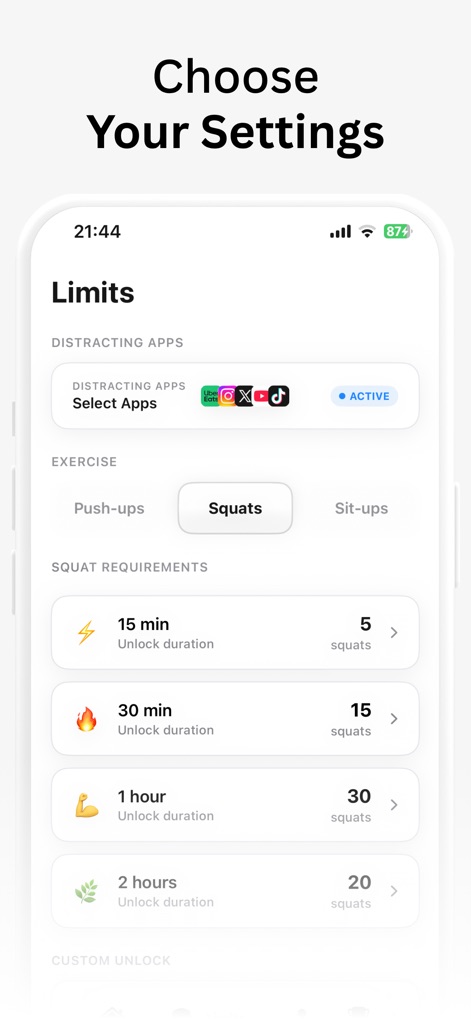
사용자는 방해되는 앱을 직접 선택하고, 각 잠금 해제 시간에 필요한 스쿼트 횟수를 맞춤 설정하여 개인화된 경험을 만듭니다.
설정 선택

이 도구는 푸쉬업, 스쿼트, 싯업의 세 가지 운동 자세를 3D 모델로 시각화하여 사용자가 자신의 선호에 맞는 활동을 쉽게 선택할 수 있도록 돕습니다.
다양한 운동
설명
Download
비슷한 앱
유사한 기능과 사용자 경험을 가진 앱
Salah Focus
MA DAANISH LATIF

Pray Screen Time - Bible Focus
Manifest Automation, Inc

PrayLock : Prayer Screen Time
Ruvix Ltd

Pushscroll Screen Time Control
Pushscroll GmbH

Unrot: Earn your screentime
Unrot OU

WillStone: Balance Screen Time
Ningbo Qunniao Technology Co., Ltd.

Quran Unlock
Muhammad Abdullahi
Wakeout! Desk Stretch & Energy
Wakeout, LLC.

Study Guard: Study & Focus
Jason Mayo
이 페이지는 앱이나 개발자의 공식 페이지가 아니며, 정보 제공 및 논평을 목적으로 작성된 독립 편집 간행물입니다. 명시적으로 달리 언급되지 않는 한, 해당 앱이나 개발자는 MWM, Apple, Google Play, 앱 퍼블리셔 또는 앱 개발자와 제휴, 보증, 후원, 승인 또는 공식적으로 연결되어 있지 않으며, 이 페이지의 어떤 내용도 해당 앱이 MWM의 서비스를 사용하여 개발되었음을 의미하지 않습니다. 모든 상표, 로고, 스크린샷 및 기타 콘텐츠는 해당 소유자의 자산입니다.