remove watermark video retouch

remove watermark video retouch

다운로드: App Store
로고: remove watermark video retouch

워터마크 제거 영상 편집: 완벽하고 전문가 수준의 콘텐츠 만들기

AI 기반의 정밀함으로 원치 않는 개체, 사람, 워터마크를 손쉽게 지우세요. 몇 번의 탭만으로 Instagram, TikTok, YouTube를 위한 영상을 완벽하게 만드세요.

개발사

Sounak Sarkar

카테고리

Graphics & Design

다운로드

243K+

사용자 평점

4.1/5

총 평가 수

1K+

지원 언어

1

깔끔한 콘텐츠의 마법

이 인터페이스를 사용하는 243K+ 명의 사용자.

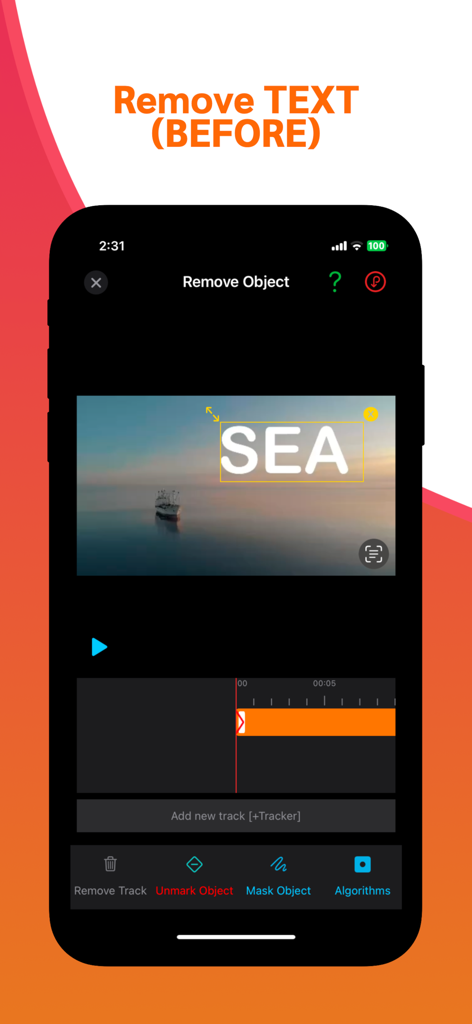
비디오 편집 앱 인터페이스에 아름다운 영상 위에 제거할 텍스트 오버레이가 선택되어 표시됨.
비디오 편집 앱 인터페이스에 아름다운 영상 위에 제거할 텍스트 오버레이가 선택되어 표시됨.

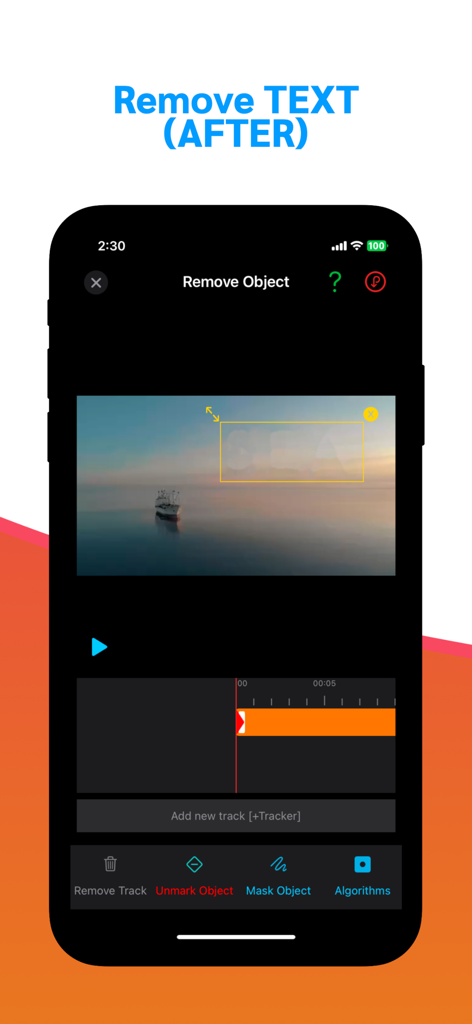
바다 위 보트 영상에 워터마크 제거 영상 편집 앱 인터페이스와 흐릿한 텍스트 마스크가 표시된 iPhone 스크린샷
바다 위 보트 영상에 워터마크 제거 영상 편집 앱 인터페이스와 흐릿한 텍스트 마스크가 표시된 iPhone 스크린샷

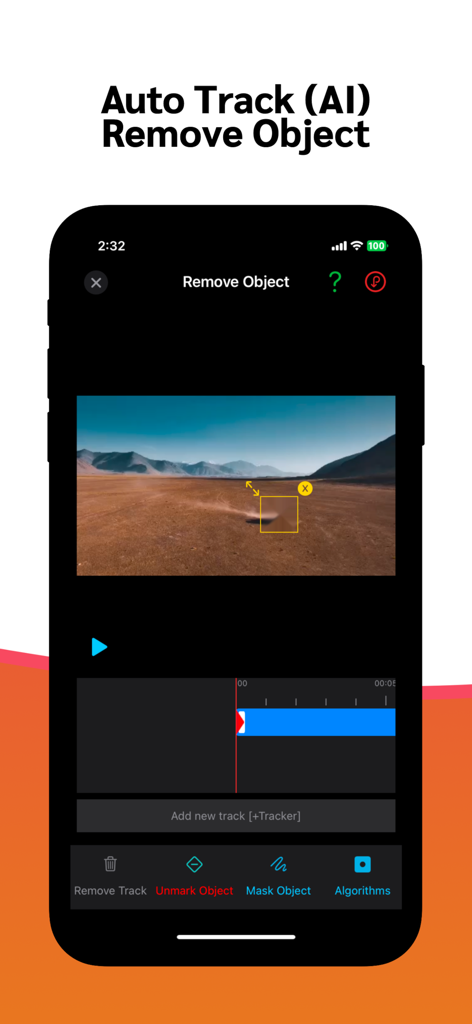
풍경 영상에서 AI 개체 추적 및 제거를 시연하는 비디오 편집 앱 인터페이스.
풍경 영상에서 AI 개체 추적 및 제거를 시연하는 비디오 편집 앱 인터페이스.

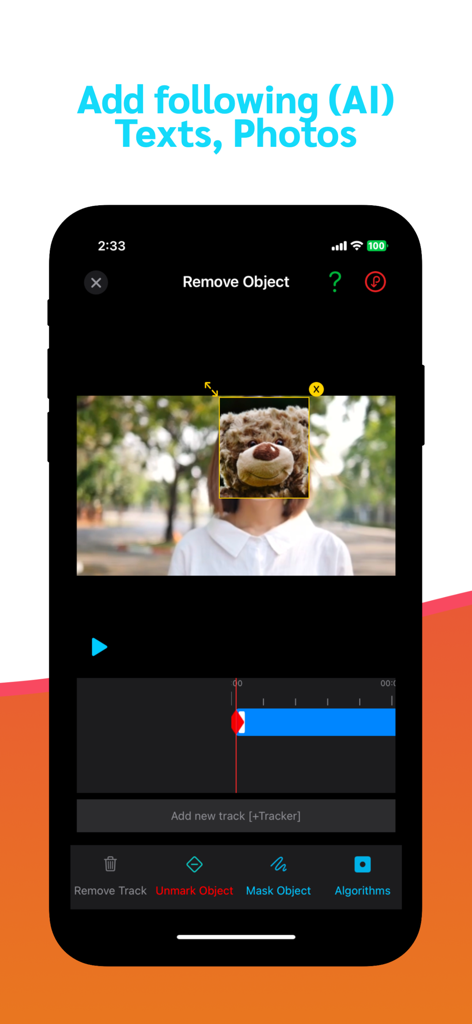
AI 기반 개체 제거 및 마스킹 도구가 표시된 비디오 편집 앱의 모바일 인터페이스

AI 기반 개체 제거 및 마스킹 도구가 표시된 비디오 편집 앱의 모바일 인터페이스

콘텐츠를 완벽하게 변환하세요

이 앱을 돋보이게 하는 도구, 243K+ 명의 사용자가 선택.

🪄

AI 기반 개체 지우개

고급 AI 알고리즘을 사용하여 사진 방해꾼, 워터마크 또는 원치 않는 개체를 정확하게 제거하세요.

⏱️

실시간 즉시 미리보기

편집하면서 마법을 경험하세요. 직관적인 인터페이스로 실시간으로 조정하고 시간을 절약하세요. 당신의 빠른 라이프스타일에 맞춰 디자인되었습니다.

전문가 수준, 알고리즘 준비

선명도를 잃지 않고 놀라운 고해상도로 내보내세요. TikTok, Reels, YouTube Shorts 콘텐츠를 정리하는 데 완벽합니다.

리뷰 분석

사용자 리뷰 인사이트.

감정 점수

15%
부정적

요약

Users generally express significant frustration with the app, though a small number find it effective for its core purpose. The main issues revolve around its inability to consistently remove watermarks, often just blurring them, alongside frequent crashes and freezing, particularly during masking or saving processes. Many users also report problems with purchased features not activating and encountering an excessive number of intrusive advertisements. Despite these widespread concerns, a few users commend its functionality for basic watermark removal and appreciate the availability of free features.

주요 테마

Watermark Removal Functionality(6)
Overall App Satisfaction(6)
Free Features Availability(1)
Basic Blurring Capability(1)
Acceptance of Ads(1)
Learnability of Features(1)

앱 소개

에 대해 알아야 할 모든 것 remove watermark video retouch.

설명

Introducing Remove objects video retouch, your ultimate solution for effortlessly erasing unwanted objects from your videos. Whether you're a content creator, a travel enthusiast, or just capturing precious memories, this app empowers you to enhance your videos by removing distracting elements in a few simple steps. Object Removal with Precision: Remove objects video retouch leverages powerful artificial intelligence and advanced algorithms to accurately identify and remove unwanted objects from your videos. Effortlessly get rid of people, overlays, blemishes, or any other distractions that take away from the beauty of your footage. Easy-to-Use Editing Tools: The app offers an intuitive interface with user-friendly editing tools. Select the object you want to remove, and let Remove objects video retouch work its magic. The process is quick, ensuring you can focus on creating captivating videos without spending hours on editing. Real-Time Preview: Witness the transformation as it happens. The real-time preview feature allows you to see the object disappear from your video instantly. Make adjustments on the fly until you achieve the perfect result. High-Quality Output: Retain the original quality of your video. Video Object Remover preserves the resolution and clarity of your footage, ensuring your final edited video looks professional and polished. Save and Share: Save your edited videos directly to your device's gallery or share them instantly on social media platforms, messaging apps, or with friends and family. Show off your creativity and impress your audience with stunning, distraction-free videos. Our App can be used for free with Ads and limited features, however, you can purchase a Video Retouch Premium subscription for the additional advanced features, and remove Ads. SUBSCRIPTION AND TERMS: When you download our App you can opt in to a 3 days free trial for monthly and 3 days free trial for yearly subscription. Our App offers auto-renewing monthly/yearly subscription options for access to the app's features and content. Your Video Retouch Premium subscription will automatically renew at the end of each term and payment will be charged through your iTunes account. You can turn off auto-renew at any time from your iTunes account settings but refunds will not be provided for any unused portion of the term. To avoid renewal, you must cancel at least 24 hours before your subscription or trial ends. Your account will be charged for renewal within 24 hours prior to the end of the current period. Any unused portion of a free trial period will be forfeited if you purchase a subscription. SUBSCRIPTION PRICING: Premium Monthly: $0.99 / Month (3 days free trial) Premium Yearly: $ 5.99 / Year (7 days free trial) Read more about our terms, conditions, and privacy here: • Privacy Policy: https://www.racersoft.in • Terms of Use: https://racersoft.in/terms-of-use/

최신 버전

1.9

크기

21.8 MB

출시일

2022년 6월 21일

가장 전문적인 영상을 게시할 준비가 되셨나요?

AI를 사용하여 워터마크와 방해 요소를 즉시 지우는 243,000명 이상의 크리에이터와 함께하세요. 깔끔한 콘텐츠, 더 나은 도달 — 오늘 무료 체험을 시작하세요.

다운로드: App Store
FAQ

자주 묻는 질문

에 대해 알아야 할 모든 것 remove watermark video retouch

What does the remove watermark video retouch app do?

remove watermark video retouch 앱은 원치 않는 객체를 동영상에서 손쉽게 삭제합니다. AI와 알고리즘을 활용하여 영상에서 사람, 오버레이, 흠집 또는 기타 방해 요소를 식별하고 제거합니다.

Does remove watermark video retouch use AI for object removal?

네, remove watermark video retouch는 강력한 인공 지능과 고급 알고리즘을 활용합니다. 이러한 기술은 동영상에서 원치 않는 객체를 정밀하게 식별하고 제거합니다.

What types of objects can remove watermark video retouch remove?

remove watermark video retouch는 동영상에서 사람, 오버레이, 흠집, 텍스트 및 기타 방해 요소를 제거할 수 있습니다. 다양한 원치 않는 요소를 정밀하게 제거할 수 있습니다.

Can I preview changes in real-time with remove watermark video retouch?

네, remove watermark video retouch는 실시간 미리 보기 기능을 제공합니다. 이를 통해 사용자는 동영상에서 객체가 즉시 사라지는 것을 확인하고 필요에 따라 조정할 수 있습니다.

Does remove watermark video retouch preserve video quality?

네, remove watermark video retouch는 영상의 원본 해상도와 선명도를 유지합니다. 이 앱은 최종 편집된 동영상이 전문적이고 세련된 모습을 유지하도록 보장합니다.

How do I save or share videos edited with remove watermark video retouch?

remove watermark video retouch를 사용하면 편집된 동영상을 기기의 갤러리에 직접 저장할 수 있습니다. 또한 소셜 미디어 플랫폼이나 메시징 앱에서 즉시 공유할 수도 있습니다.

Is remove watermark video retouch a free app?

remove watermark video retouch는 광고와 제한된 기능이 있는 무료 버전을 제공합니다. 사용자는 고급 기능을 사용하고 광고를 제거하기 위해 Video Retouch Premium 구독을 구매할 수 있습니다.

Does remove watermark video retouch offer a free trial for its premium subscription?

네, remove watermark video retouch는 월간 프리미엄의 경우 3일 무료 체험, 연간 프리미엄 구독의 경우 7일 무료 체험을 제공합니다. 체험판 세부 정보는 가입 시 확인할 수 있습니다.

How much does remove watermark video retouch Premium cost?

remove watermark video retouch Premium 월간 요금은 3일 무료 체험 포함 월 $0.99입니다. Premium 연간 요금은 7일 무료 체험 포함 연 $5.99입니다.

How do I cancel my remove watermark video retouch Premium subscription?

사용자는 iTunes 계정 설정에서 언제든지 자동 갱신을 해제할 수 있습니다. 갱신 요금을 피하려면 구독 또는 체험 기간이 종료되기 최소 24시간 전에 취소해야 합니다.

Where can I find the privacy policy for remove watermark video retouch?

remove watermark video retouch의 개인정보 처리방침은 https://www.racersoft.in에서 확인할 수 있습니다. 이 링크는 데이터 처리 및 사용자 개인 정보에 대한 세부 정보를 제공합니다.

App information, icons, screenshots, and descriptions displayed on this page are sourced from the Apple App Store and are the property of their respective developers. Download estimates and rankings are based on MWM's proprietary models and may not reflect actual figures. This page is provided for informational and analytical purposes only.

Believe this page infringes your intellectual property? File a dispute