
이 페이지는 앱이나 개발자의 공식 페이지가 아니며, 정보 제공 및 논평을 목적으로 작성된 독립 편집 간행물입니다. 명시적으로 달리 언급되지 않는 한, 해당 앱이나 개발자는 MWM, Apple, Google Play, 앱 퍼블리셔 또는 앱 개발자와 제휴, 보증, 후원, 승인 또는 공식적으로 연결되어 있지 않으며, 이 페이지의 어떤 내용도 해당 앱이 MWM의 서비스를 사용하여 개발되었음을 의미하지 않습니다. 모든 상표, 로고, 스크린샷 및 기타 콘텐츠는 해당 소유자의 자산입니다.


RICOH Smart Device Connector
당신은 더 이상 케이블과 드라이버의 노예가 아닙니다. 이 앱은 인쇄, 스캔, 그리고 발표라는 지루한 작업에 모바일 해방을 가져옵니다.
다운로드
1M+사용자 평점
총 평가 수
241개발사
카테고리
Business지원 언어
26최신 버전
3.16.19크기
72.0 MB출시일
2014년 9월 22일모바일 연결성을 통한 사무실 생산성 극대화
RICOH Smart Device Connector 주요 기능 분석
간편한 기기 연결
이 앱은 Bluetooth Low Energy, QR 코드 스캔, 또는 IP 주소를 통해 스마트 기기로 Ricoh MFP 또는 프로젝터를 빠르고 편리하게 등록하고 연결할 수 있게 해줍니다.
스마트 기기 사용자 인증
이 앱은 스마트 기기를 활용하여 Ricoh 기기에 대한 사용자 인증을 수행할 수 있게 해줍니다. 이는 기업 환경에서 보안을 강화하고 접근성을 간소화하는 데 기여합니다.
다양한 소스에서 인쇄
이 앱은 스마트 기기, 클라우드 스토리지(Box, Dropbox, Google Drive, Microsoft OneDrive), 이메일 첨부 파일 또는 웹페이지에 저장된 문서 및 이미지를 Ricoh 프린터를 통해 인쇄할 수 있도록 지원합니다.
Microsoft Office 문서 인쇄
이 도구는 Microsoft Office 문서를 직접 인쇄하는 기능을 갖추고 있어, 비즈니스 환경에서 가장 흔히 사용되는 문서 형식에 대한 원활한 인쇄 경험을 제공합니다.
모바일 투사 기능
사용자는 스마트 기기나 클라우드에 저장된 문서, 이미지, 이메일, 웹페이지를 Ricoh 프로젝터 및 인터랙티브 화이트보드에 쉽게 투사할 수 있습니다.
자동 기기 검색
이 앱은 동일 네트워크 내에서 사용 가능한 Ricoh 기기들을 자동으로 검색하는 기능을 제공하여, 사용자가 수동으로 기기를 찾을 필요 없이 연결 과정을 간소화합니다.
클라우드/기기로 스캔
이 앱은 문서를 Ricoh MFP로 스캔하여 스마트 기기 또는 Box, Dropbox, Google Drive, Microsoft OneDrive와 같은 주요 클라우드 스토리지 서비스에 직접 저장하는 기능을 제공합니다.
인터랙티브 화이트보드 주석 저장
이 앱은 Ricoh 인터랙티브 화이트보드에서 작업한 주석이 달린 문서를 저장할 수 있게 해줍니다. 이는 회의록 작성 및 공유 과정을 효율적으로 관리할 수 있도록 돕습니다.
자주 묻는 질문
에 대해 알아야 할 모든 것 RICOH Smart Device Connector
How can I connect a RICOH device to the RICOH Smart Device Connector app?
The RICOH Smart Device Connector app connects to RICOH MFPs or projectors using Bluetooth Low Energy, QR codes, an IP address, or a hostname. The app interface displays a "Connect with QR Code" option.
Which cloud services are compatible with RICOH Smart Device Connector?
The RICOH Smart Device Connector supports Box, Dropbox, Google Drive, and Microsoft OneDrive. This allows users to print, scan, and project documents and images directly from these cloud storage services.
Can I print emails and web pages using RICOH Smart Device Connector?
Yes, the RICOH Smart Device Connector facilitates printing of emails, file attachments, and webpages. These items can be printed directly from the smart device through the app.
Does the RICOH Smart Device Connector app provide document scanning capabilities?
Yes, the RICOH Smart Device Connector app provides document scanning capabilities. Users can scan documents to their smart device or directly to supported cloud services like Box, Dropbox, Google Drive, and Microsoft OneDrive.
Does RICOH Smart Device Connector support projection to a RICOH Interactive Whiteboard?
Yes, RICOH Smart Device Connector supports projecting documents and images to a RICOH Interactive Whiteboard. It also supports RICOH projectors. Specific firmware versions may be required for certain Interactive Whiteboard models.
Is there a fax function available in the RICOH Smart Device Connector app?
Yes, the RICOH Smart Device Connector app includes a dedicated Fax feature. This function is accessible directly from the app's main menu for users to send faxes.
Can users authenticate through the RICOH Smart Device Connector app?
Yes, the RICOH Smart Device Connector app enables user authentication directly via a smart device. This feature enhances security and manages access to connected RICOH machines.
What are the available print setting options in RICOH Smart Device Connector?
The RICOH Smart Device Connector offers print settings such as copies, color/B&W, paper size, orientation, 1-sided or 2-sided, paper tray selection, stapling, and combining documents.
Does RICOH Smart Device Connector automatically detect network machines?
Yes, the RICOH Smart Device Connector app automatically searches for available machines on the same network. This automatic detection excludes RICOH Interactive Whiteboards, which require manual connection.
Can RICOH Smart Device Connector print Microsoft Office documents?
Yes, RICOH Smart Device Connector supports printing Microsoft Office documents. Users should note that the layout of these documents may change when printed through the app.
다음 스크린샷과 설명은 앱의 공식 스토어 목록에서 직접 가져온 것이며 앱 개발자의 자산입니다.
앱 스토어
스크린샷
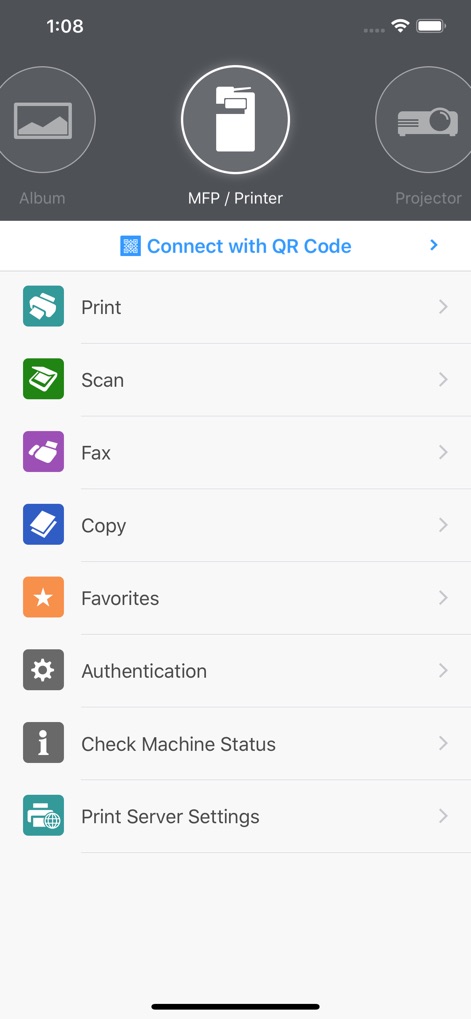
이 앱은 상단 내비게이션에서 MFP/프린터 선택 기능을 제공하며, 사용자는 하단의 목록에서 인쇄 및 스캔 작업을 손쉽게 시작할 수 있습니다.
핵심 기능 한눈에
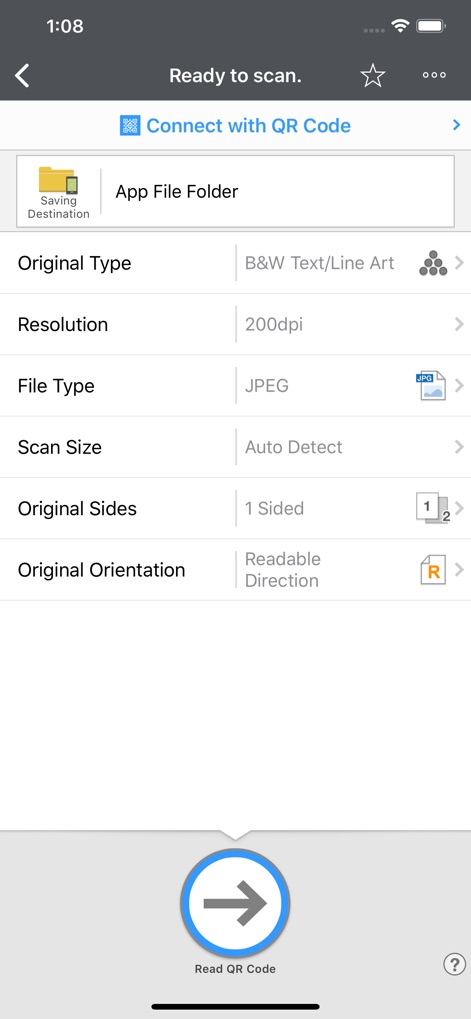
이 스크린샷은 사용자가 스캔할 문서의 원본 유형을 지정하고 해상도를 설정하여 스캔 작업의 세부 사항을 완벽하게 제어할 수 있도록 합니다.
정교한 스캔 설정
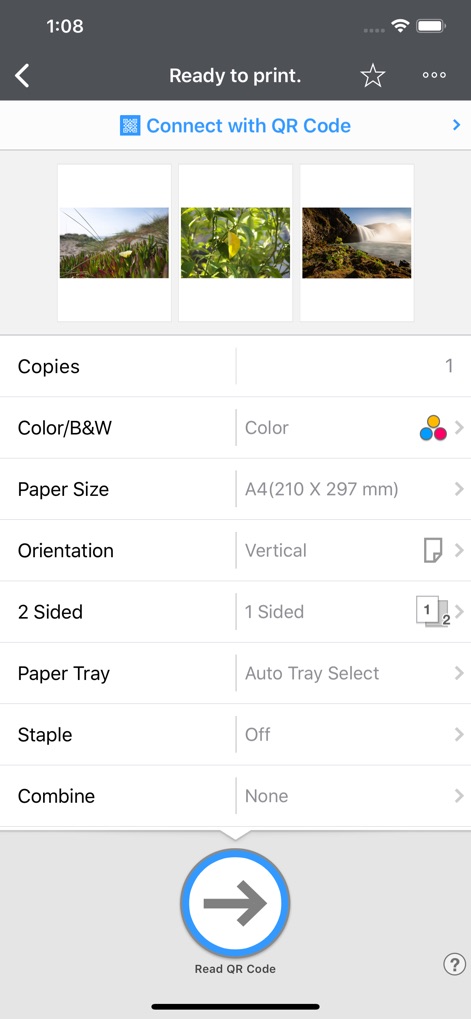
사용자는 여러 이미지 미리보기를 확인하고 용지 크기를 A4로 설정하는 등 다양한 인쇄 옵션을 통해 출력물을 효율적으로 관리할 수 있습니다.
맞춤형 인쇄 관리
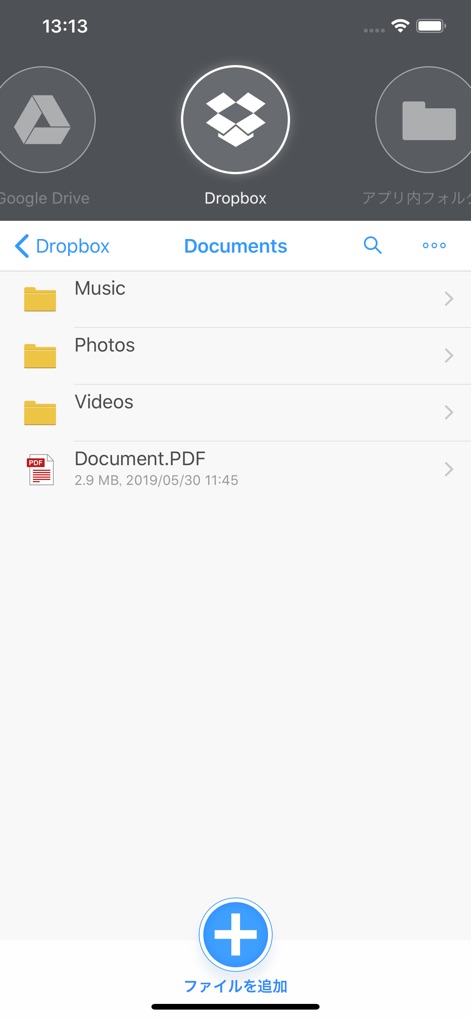
이 도구는 Dropbox와 같은 클라우드 저장소 서비스와 원활하게 통합되어, 사용자가 저장된 PDF 문서와 같은 파일을 쉽게 탐색하고 관리할 수 있도록 지원합니다.
클라우드 통합 관리
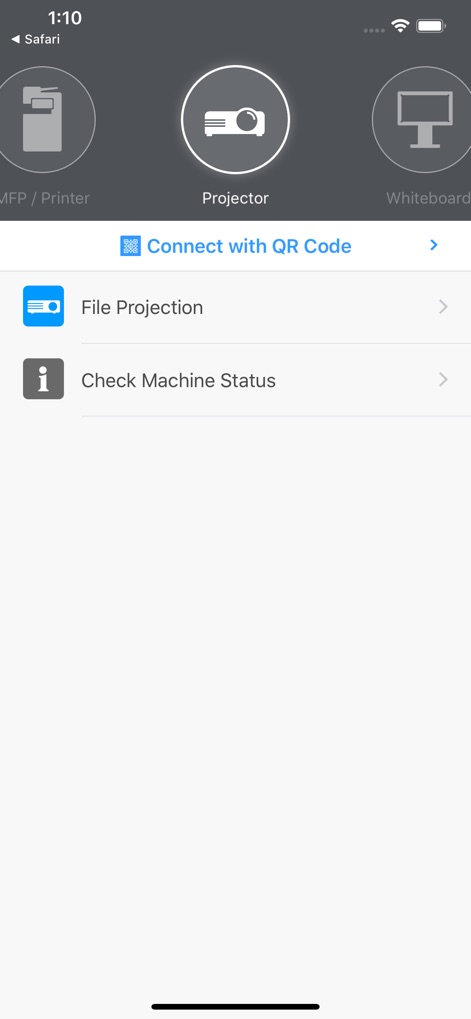
사용자는 프로젝터 아이콘을 선택하여 파일 투사를 시작할 수 있으며, 연결된 기기의 상태를 확인하는 기능도 이 앱에서 제공됩니다.
스마트한 프로젝션
설명
Download
비슷한 앱
유사한 기능과 사용자 경험을 가진 앱

DJI Mimo
SZ DJI TECHNOLOGY CO., LTD

DJI Ronin
SZ DJI TECHNOLOGY CO., LTD

Roku TV Remote Control & Cast
Aleh Piashkou

Remote for Hisense TV.
Duscov Stepan

Alpha Linker - Camera Transfer
恒茂 刘

MyCentsys Pro
Centurion Systems (Pty) Ltd

Roku TV Remote Control・
Artur Belov

Luminair
Synthe FX, LLC

FUJIFILM XApp
FUJIFILM Corporation
이 페이지는 앱이나 개발자의 공식 페이지가 아니며, 정보 제공 및 논평을 목적으로 작성된 독립 편집 간행물입니다. 명시적으로 달리 언급되지 않는 한, 해당 앱이나 개발자는 MWM, Apple, Google Play, 앱 퍼블리셔 또는 앱 개발자와 제휴, 보증, 후원, 승인 또는 공식적으로 연결되어 있지 않으며, 이 페이지의 어떤 내용도 해당 앱이 MWM의 서비스를 사용하여 개발되었음을 의미하지 않습니다. 모든 상표, 로고, 스크린샷 및 기타 콘텐츠는 해당 소유자의 자산입니다.