
이 페이지는 앱이나 개발자의 공식 페이지가 아니며, 정보 제공 및 논평을 목적으로 작성된 독립 편집 간행물입니다. 명시적으로 달리 언급되지 않는 한, 해당 앱이나 개발자는 MWM, Apple, Google Play, 앱 퍼블리셔 또는 앱 개발자와 제휴, 보증, 후원, 승인 또는 공식적으로 연결되어 있지 않으며, 이 페이지의 어떤 내용도 해당 앱이 MWM의 서비스를 사용하여 개발되었음을 의미하지 않습니다. 모든 상표, 로고, 스크린샷 및 기타 콘텐츠는 해당 소유자의 자산입니다.


RSA Authenticator (SecurID)
비밀번호를 삭제하고, 당신의 보안을 업그레이드하라. RSA Authenticator는 기존의 인증 방식에 종말을 고합니다. 기업의 디지털 생명을 지키는 최후의 보루가 됩니다.
다운로드
7.5M+사용자 평점
총 평가 수
3.8K개발사
카테고리
Business지원 언어
11최신 버전
4.7.0크기
62.8 MB출시일
2009년 6월 8일강력한 보안과 사용자 편의성을 겸비한 기업용 인증 솔루션
RSA Authenticator (SecurID) 앱 분석
다채로운 다단계 인증(MFA) 지원
이 앱은 일회용 암호(OTP), QR 코드, 코드 매칭, 푸시 알림, 생체 인식 및 하드웨어 인증기를 포함한 다채로운 다단계 인증(MFA) 옵션을 제공하여 계정의 보안 수준을 대폭 강화합니다.
피싱 저항 패스키 제공
이 도구는 피싱 공격에 대해 강력한 저항력을 제공하는 기기 바운드 패스키를 지원하여, 사용자가 앱과 서비스 전반에서 일관되고 안전한 인증 경험을 누릴 수 있도록 돕습니다.
비밀번호 없는 인증(Passwordless) 기능
이 앱은 비밀번호 없이 기기 바운드 패스키를 사용하여 빠르고 안전하며 마찰 없는 인증을 가능하게 함으로써, 조직의 보안 위험을 줄이고 직원 생산성을 크게 향상시킵니다.
원활하고 효율적인 사용자 경험
이 도구는 인증 프로세스를 간소화하고 마찰을 최소화하여, 사용자가 여러 시스템과 서비스에 쉽고 빠르게 접근할 수 있도록 원활한 경험을 제공합니다.
자주 묻는 질문
에 대해 알아야 할 모든 것 RSA Authenticator (SecurID)
What is the RSA Authenticator App?
The RSA Authenticator App secures digital life and streamlines access for enterprises and highly regulated industries. It provides trusted authentication regardless of the environment, offering robust multi-factor options.
What multi-factor authentication (MFA) options does the RSA Authenticator App offer?
The RSA Authenticator App offers diverse MFA options. These include one-time passcodes (OTP), QR codes, code matching, push notifications, biometrics, and hardware authenticators for enhanced security and protection.
Does the RSA Authenticator App support passwordless authentication?
Yes, the RSA Authenticator App supports passwordless security through passkeys. Users authenticate with device-bound passkeys for fast, secure, and frictionless access, which reduces risks and boosts productivity.
Is the RSA Authenticator App available to individual users?
No, the RSA Authenticator App is not available to everyone. Your company must be an RSA customer to use it. Users should contact their help desk administrator for registration information.
What applications does the RSA Authenticator App replace or update?
The RSA Authenticator app is an update to the existing SecurID 4.X app. It also serves as a replacement for the SecurID Authenticate 3.9.x app, consolidating authentication services.
Can I use biometrics with the RSA Authenticator App?
Yes, the RSA Authenticator App offers biometric authentication. Users can utilize methods like Face ID for fast and secure access, enhancing the security of their stored credentials.
How does the RSA Authenticator App handle sign-in requests?
The RSA Authenticator App handles sign-in requests through push notifications. Users can then approve the sign-in by matching a code, typing a code, or using other verification methods presented in the app interface.
Can I use QR codes for authentication with the RSA Authenticator App?
Yes, the RSA Authenticator App supports QR code authentication. Users can scan a QR code with their device's camera to initiate registration or complete an authentication process quickly and securely.
다음 스크린샷과 설명은 앱의 공식 스토어 목록에서 직접 가져온 것이며 앱 개발자의 자산입니다.
앱 스토어
스크린샷

이 앱은 여러 계정의 모든 자격 증명을 통합하여 표시하며, 사용자는 '모두' 탭과 '즐겨찾기' 탭으로 쉽게 정리할 수 있습니다.
모든 자격 증명

사용자는 어두운 테마와 밝은 테마 사이를 전환하여 개인화된 경험을 즐길 수 있으며, 하단 내비게이션 바에는 '홈'과 '설정'과 같은 필수 기능이 포함되어 있습니다.
맞춤형 테마 설정

이 앱은 'RSA Authenticator' 또는 'iCloud Keychain'을 통해 간편하게 패스키를 생성하고 저장할 수 있도록 지원하며, 사용자는 QR 코드 스캔을 통해 등록 절차를 시작할 수 있습니다.
패스키로 간편 로그인

사용자는 잠금 화면에서 'Authenticator' 앱의 푸시 알림을 통해 즉시 로그인 요청을 받을 수 있으며, 이를 통해 중요한 알림을 놓치지 않고 편리하게 접근할 수 있습니다.
푸시 알림으로 편리하게

이 앱은 'Frances.Ramos@tech.com' 사용자의 로그인 요청을 상세히 보여주며, 사용자는 제시된 '12S4' 및 '9F30'과 같은 코드 옵션 중에서 일치하는 코드를 선택하여 승인할 수 있습니다.
코드 매칭으로 승인

사용자는 로그인 요청의 세부 정보를 확인한 후, '코드' 입력란에 직접 코드를 입력하여 본인임을 인증하고 '승인' 또는 '거절'을 선택할 수 있습니다.
코드 입력으로 확인
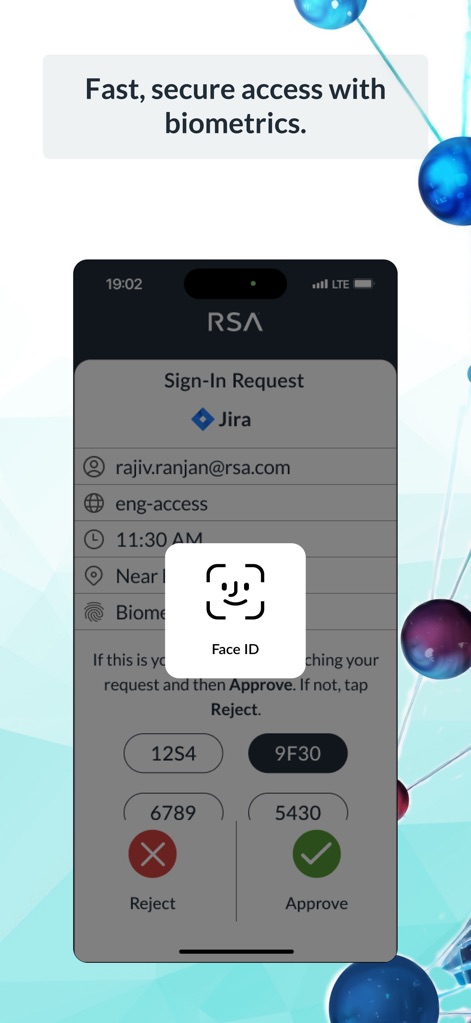
이 앱은 로그인 요청을 처리하는 동안 'Face ID'와 같은 생체 인식 기능을 활용하여 보안을 강화하며, 사용자에게는 여전히 코드 매칭 옵션과 '승인' 및 '거절' 선택지가 제공됩니다.
생체 인식으로 빠른 인증

사용자는 QR 코드 스캐너를 사용하여 '등록' 또는 '인증' 절차를 간편하게 시작할 수 있으며, 화면 하단에는 카메라 사용에 대한 명확한 지침이 표시됩니다.
QR 스캔으로 간편 등록
설명
Download
비슷한 앱
유사한 기능과 사용자 경험을 가진 앱

WatchGuard AuthPoint
WatchGuard Technologies Inc.

Multifactor
MULTIFAKTOR, OOO

Smart Log On
Acceptto Corporation

Kavach Authentication
Tirender Wig

Aladdin 2FA
Aladdin R.D. ZAO

Google Smart Lock
Google LLC

FortiToken Mobile
Fortinet, Inc

X5 Ключ
Closed Joint Stock Company"Trade House"Perekrestok

TrustBuilder Authenticator
In-Webo Technologies
이 페이지는 앱이나 개발자의 공식 페이지가 아니며, 정보 제공 및 논평을 목적으로 작성된 독립 편집 간행물입니다. 명시적으로 달리 언급되지 않는 한, 해당 앱이나 개발자는 MWM, Apple, Google Play, 앱 퍼블리셔 또는 앱 개발자와 제휴, 보증, 후원, 승인 또는 공식적으로 연결되어 있지 않으며, 이 페이지의 어떤 내용도 해당 앱이 MWM의 서비스를 사용하여 개발되었음을 의미하지 않습니다. 모든 상표, 로고, 스크린샷 및 기타 콘텐츠는 해당 소유자의 자산입니다.