Schoolwork

Schoolwork

다운로드: App Store
로고: Schoolwork

Schoolwork: 모든 교사가 모든 학생의 잠재력을 최대한 발휘하도록 지원

iPad 교실을 개인 맞춤형 학습 환경으로 변화시키세요. 관리 시간을 절약하고, 학생 진행 상황에 대한 깊은 통찰력을 얻고, 한곳에서 실시간 피드백을 제공하세요.

다운로드: App Store

개발사

Apple Inc.

카테고리

Education

다운로드

86K+

사용자 평점

3.7/5

총 평가 수

500

지원 언어

33

시각화된 교실

이 인터페이스를 사용하는 86K+ 명의 사용자.

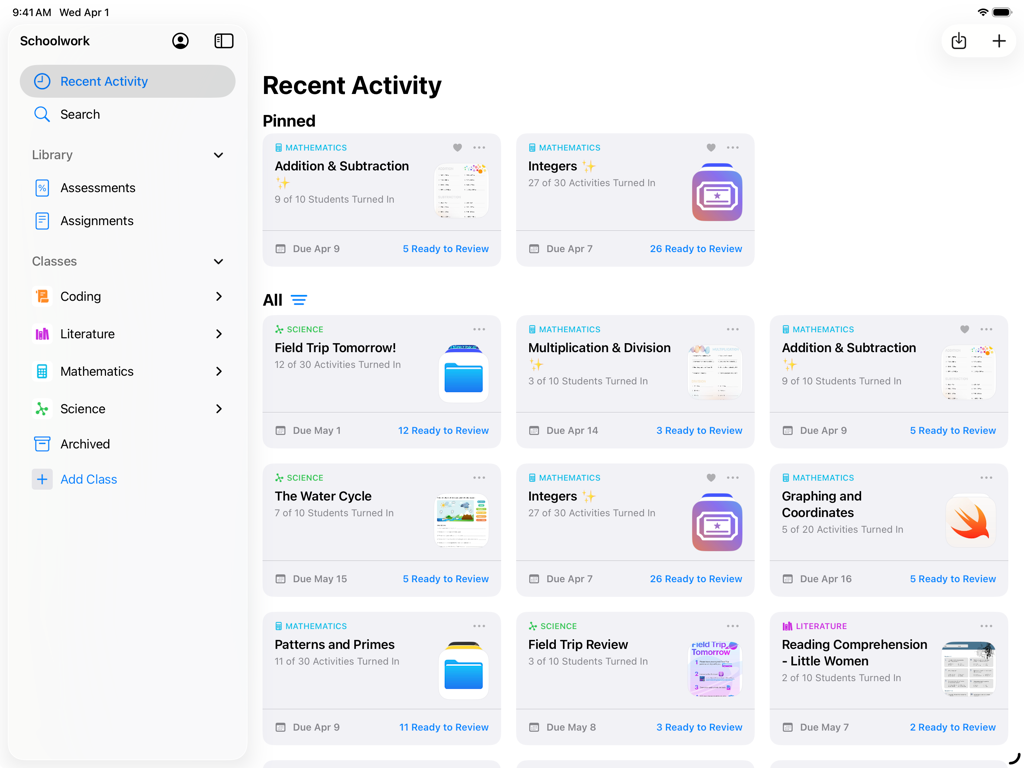
교사가 관리하는 수업 활동 및 학생 진행 상황을 보여주는 iPad의 Schoolwork 앱 대시보드 보기
교사가 관리하는 수업 활동 및 학생 진행 상황을 보여주는 iPad의 Schoolwork 앱 대시보드 보기

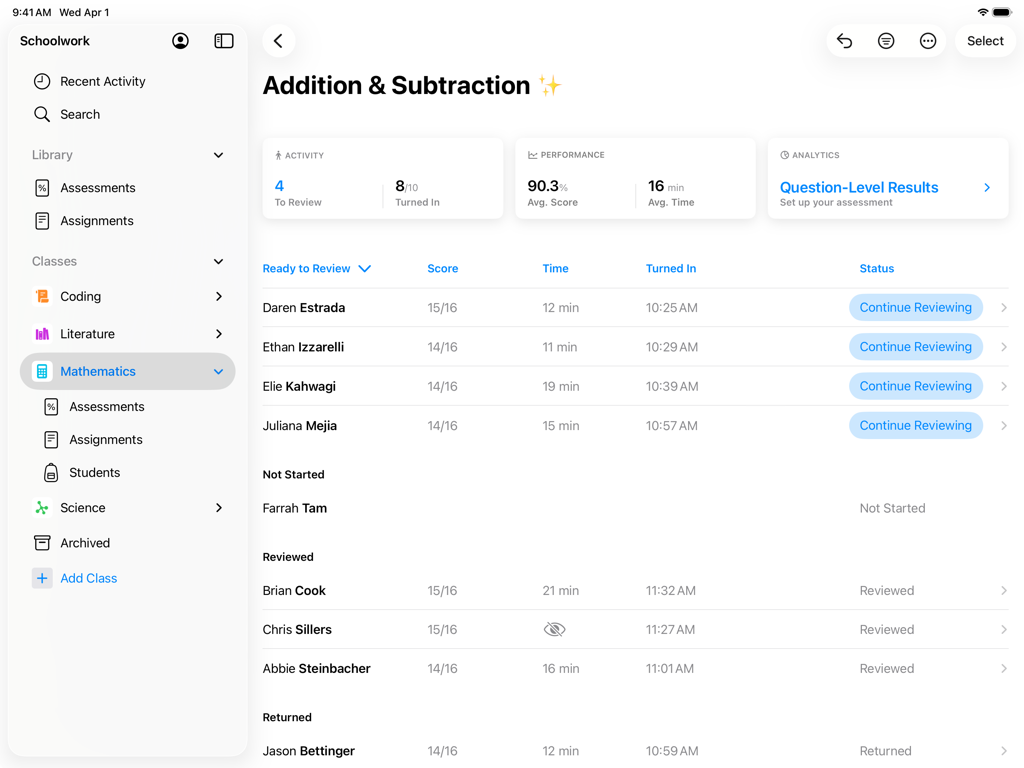
수학 과제에 대한 학생 점수 및 진행 상황을 보여주는 Schoolwork 앱의 교사 대시보드
수학 과제에 대한 학생 점수 및 진행 상황을 보여주는 Schoolwork 앱의 교사 대시보드

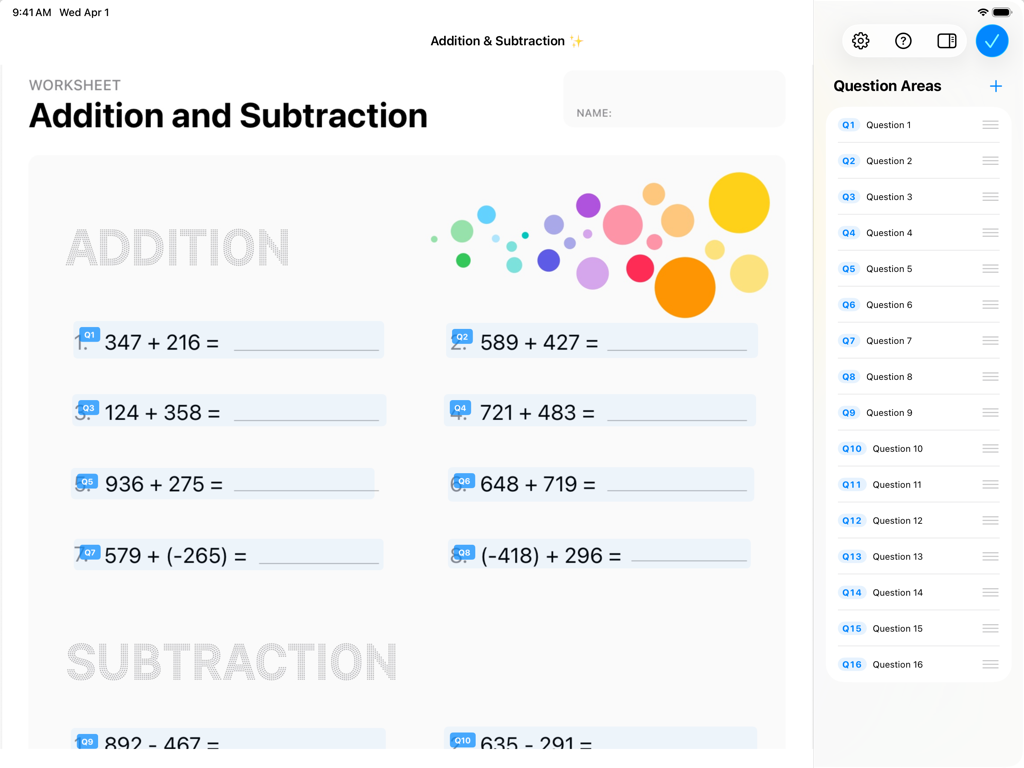
덧셈 문제와 질문 영역 목록이 있는 사이드바가 있는 디지털 수학 워크시트를 표시하는 Apple Schoolwork 앱 인터페이스.
덧셈 문제와 질문 영역 목록이 있는 사이드바가 있는 디지털 수학 워크시트를 표시하는 Apple Schoolwork 앱 인터페이스.

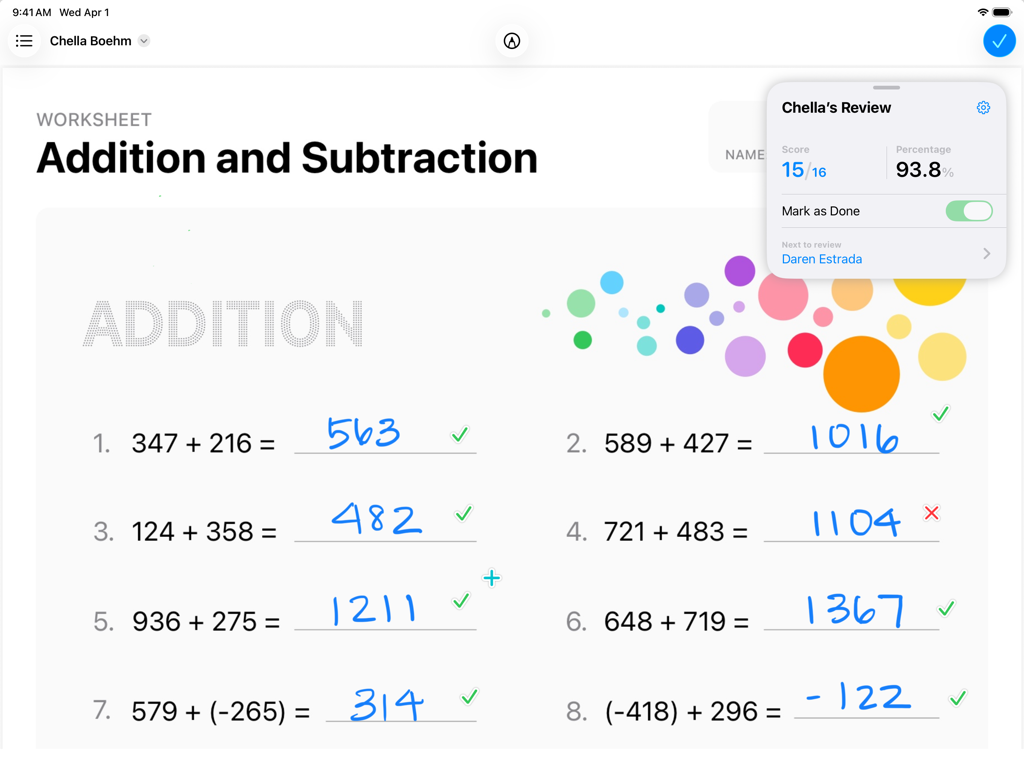
학생 진행 상황과 손글씨 답변을 보여주는 iPad의 Apple Schoolwork 앱에서 채점 중인 수학 워크시트.
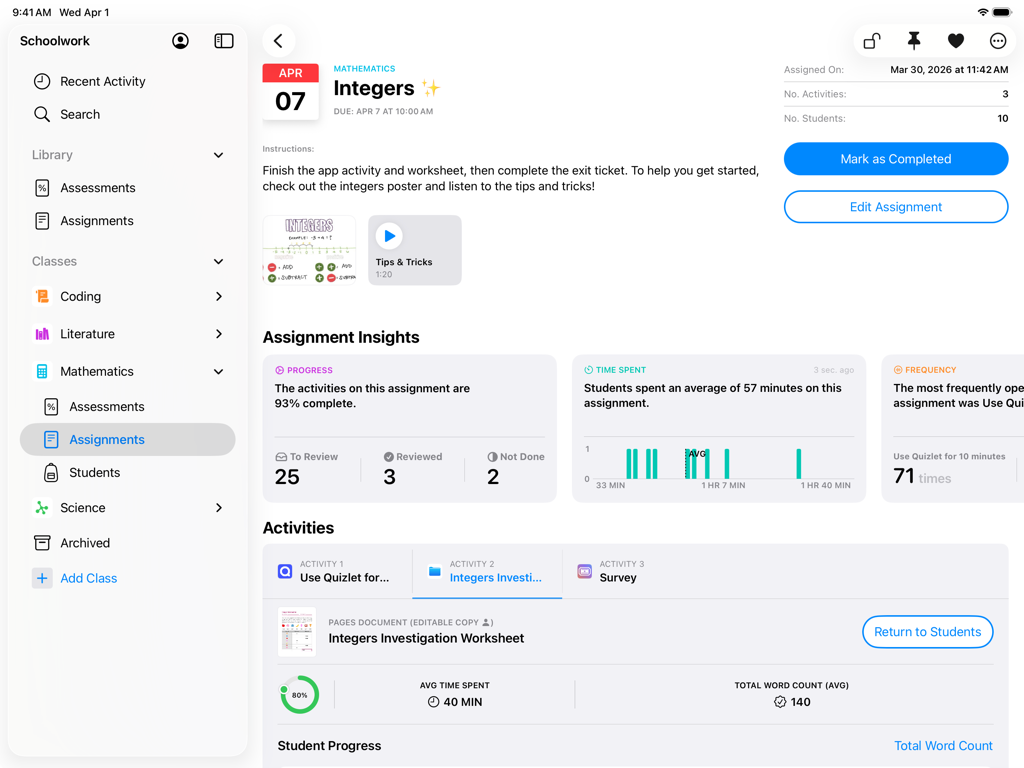
학생 진행 상황과 손글씨 답변을 보여주는 iPad의 Apple Schoolwork 앱에서 채점 중인 수학 워크시트.

iPad의 Apple Schoolwork 앱 인터페이스에 수학 과제 통찰력 및 학생 진행 상황 추적이 표시됩니다.
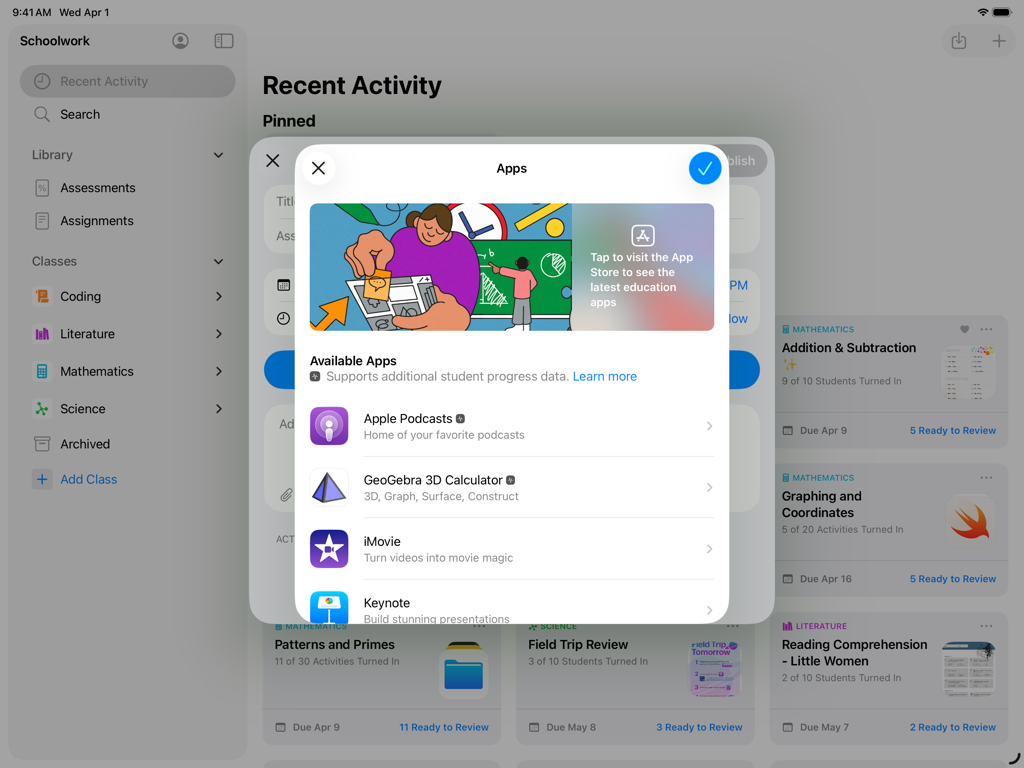
iPad의 Apple Schoolwork 앱 인터페이스에 수학 과제 통찰력 및 학생 진행 상황 추적이 표시됩니다.

학생 과제용 교육용 앱을 선택하는 메뉴를 보여주는 Schoolwork 앱의 iPad 스크린샷.
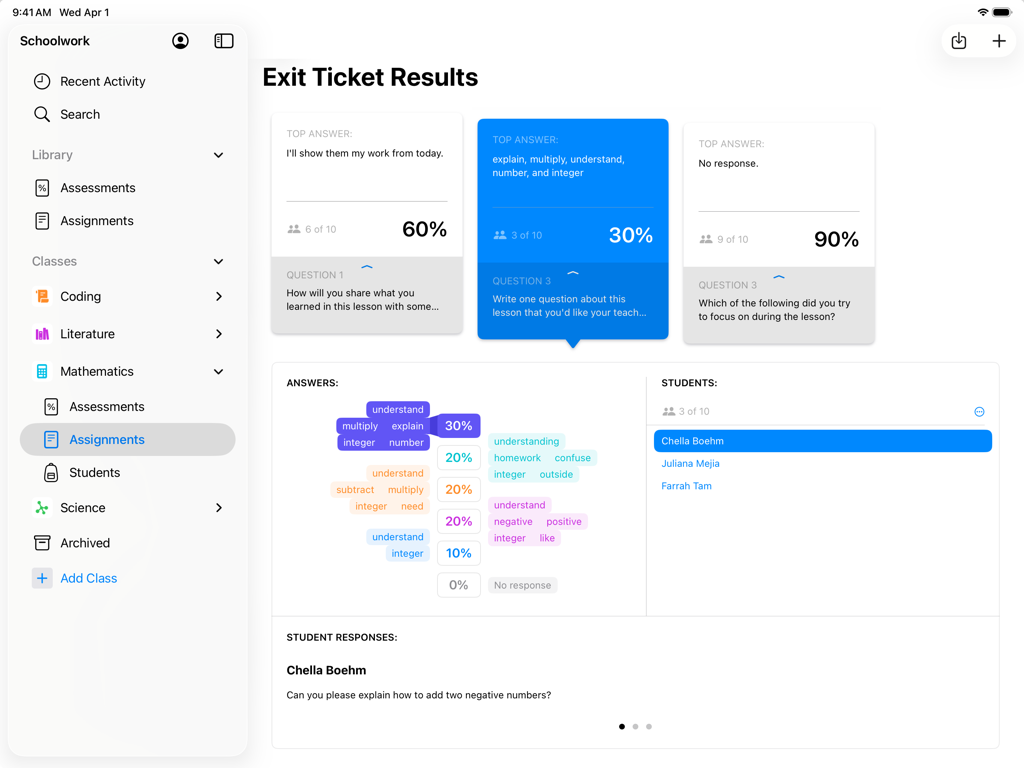
학생 과제용 교육용 앱을 선택하는 메뉴를 보여주는 Schoolwork 앱의 iPad 스크린샷.

iPad의 Apple Schoolwork 앱에서 종료 티켓 결과 및 학생 평가 데이터의 교사 보기
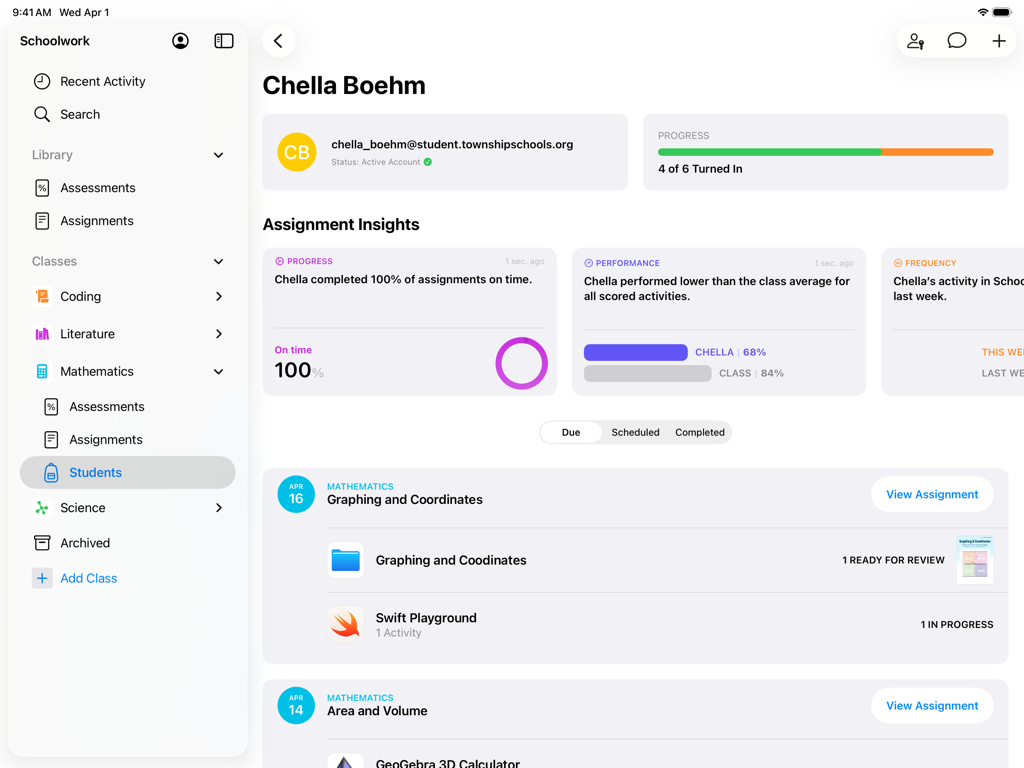
iPad의 Apple Schoolwork 앱에서 종료 티켓 결과 및 학생 평가 데이터의 교사 보기

과제 진행 상황 및 성과 통찰력을 보여주는 Schoolwork 앱의 학생 프로필 보기
과제 진행 상황 및 성과 통찰력을 보여주는 Schoolwork 앱의 학생 프로필 보기

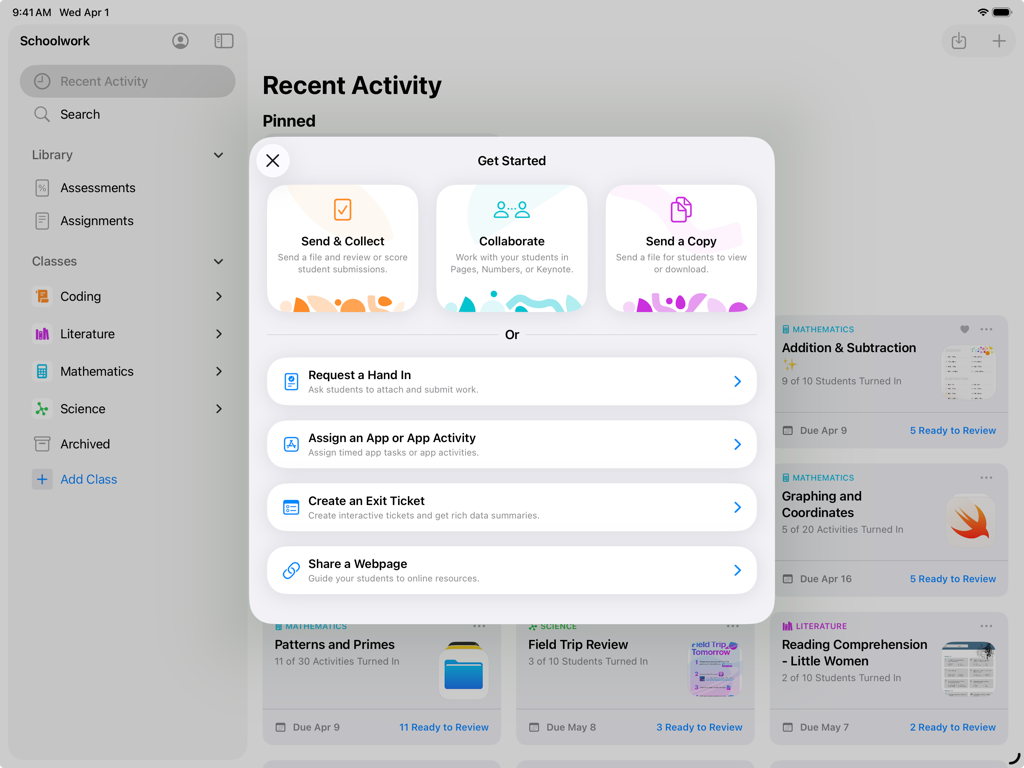
교사를 위한 과제 및 협업 옵션이 있는 시작 메뉴를 보여주는 iPad의 Schoolwork 앱.

교사를 위한 과제 및 협업 옵션이 있는 시작 메뉴를 보여주는 iPad의 Schoolwork 앱.

정밀한 수업 방식으로 역량 강화

이 앱을 돋보이게 하는 도구, 86K+ 명의 사용자가 선택.

✍️

손글씨 피드백 및 채점

Apple Pencil로 개인적인 손길을 더하세요. PDF, 사진 및 과제를 앱 내에서 바로 종이에 쓰듯이 자연스럽게 표시할 수 있습니다.

📊

데이터 기반 수업

학생들이 정확히 어디에서 어려움을 겪는지 파악하세요. 모든 즐겨 사용하는 교육용 앱에서 항목별 데이터 및 진행 상황 추적을 사용하여 맞춤형 지원을 제공하세요.

🔗

원활한 앱 워크플로우

한 번의 탭으로 외부 앱 내의 특정 활동을 할당하세요. 학생들은 바로 작업으로 이동하며, 점수와 소요 시간을 즉시 확인할 수 있습니다.

앱 소개

에 대해 알아야 할 모든 것 Schoolwork.

설명

Schoolwork is an iPad app that helps teachers save time, identify trends, and maximize each student’s potential. Using Schoolwork, teachers can create and send assessments, assignments, class announcements, or study reminders. With Schoolwork, teachers can send any document or file as a classroom assessment. They can review and score student work, and analyze student performance per item. For assignments, teachers can easily share materials, send students to a specific activity in an app, collaborate with students, and view student progress. Teachers can see analytics, insights, and progress information on how students performed, making it easier to individualize instruction based on student needs. Students get one central place to see assessments, assignments, announcements, submit work, and view their own progress. Keep students focused and organized • Students have one place to go to see their assessments, assignments, and announcements • Students can see what is due this week, across all their classes • In Pages, Keynote, and Numbers, and other supported apps, students can submit homework right from within the app Collaborate and give real-time feedback • Easily collaborate with individual students or with the entire class in just a few taps • Add comments to students’ work while they’re working on an assignment, or after completing an assessment • Easily review and score assessments with or without points • Use Apple Pencil or your finger to mark up documents, assessments, PDFs, photos, and more Assign specific activities within an app • With apps optimized for Schoolwork, you can review an app’s list of assignable activities, then easily send one or more to a class or student • With a single tap, students are brought directly to the assigned activity within the app • For activities you assign in Schoolwork, you’ll be able to view student progress, including quiz scores, points earned, and time spent Personalize instruction • See a holistic view of a student’s progress, including submitted work and progress in apps, all in one place • Use student progress to find students who might need an extra challenge, or extra support • On assessments, use item-level data to identify trends and inform instructional next steps Get started easily • Your existing classes in Apple School Manager automatically show in Schoolwork • Easily create new classes yourself right from within Schoolwork Privacy In order for teachers to view student progress or activities they assign in Schoolwork, schools are required to enable the Student Progress feature in Apple School Manager. Student progress is only reported for teacher-assigned activities that students complete while using a school-provided Managed Apple Account. All student progress data is encrypted in transit and at rest. If a school does not opt in, teachers and students can still use Schoolwork without this feature. In order to provide and improve Schoolwork, Apple collects non-personally identifiable data about how users interact with the app.

최신 버전

3.2.1

크기

166.9 MB

출시일

2018년 8월 6일

Schoolwork의 강력한 기능으로 수업 방식을 혁신하세요

지금 다운로드하여 영향력 있는 과제를 만들고, 실시간 진행 상황을 추적하며, 모든 학생의 잠재력을 최대한 발휘하세요. 이 모든 것을 iPad에서 할 수 있습니다.

다운로드: App Store

App information, icons, screenshots, and descriptions displayed on this page are sourced from the Apple App Store and are the property of their respective developers. Download estimates and rankings are based on MWM's proprietary models and may not reflect actual figures. This page is provided for informational and analytical purposes only.

Believe this page infringes your intellectual property? File a dispute