Simple Scanner - PDF Doc Scan

Simple Scanner - PDF Doc Scan

다운로드: App Store
로고: Simple Scanner - PDF Doc Scan

Simple Scanner: 올인원 휴대용 PDF 문서 스캐너

스마트하고 페이퍼리스 워크플로를 위해 휴대폰을 고화질 스캔 파워하우스로 바꾸십시오. 즉시 문서를 디지털화하고, OCR 처리하고, 클라우드에 동기화하세요.

개발사

TongSoft Information Co., Ltd.

카테고리

Business

다운로드

892K+

사용자 평점

4.9/5

총 평가 수

4K+

지원 언어

31

주머니 속 당신의 사무실

이 인터페이스를 사용하는 892K+ 명의 사용자.

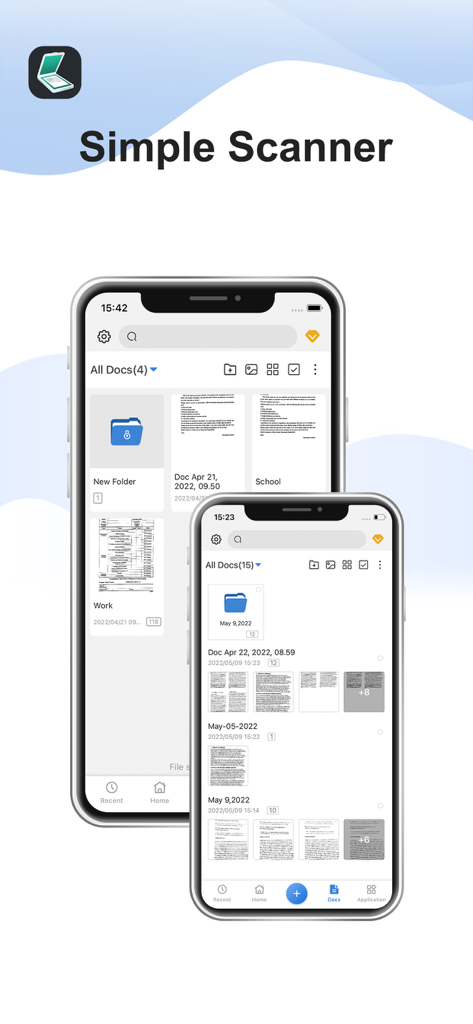
Simple Scanner 앱의 문서 관리 인터페이스를 보여주는 두 대의 iPhone

Simple Scanner 앱의 문서 관리 인터페이스를 보여주는 두 대의 iPhone

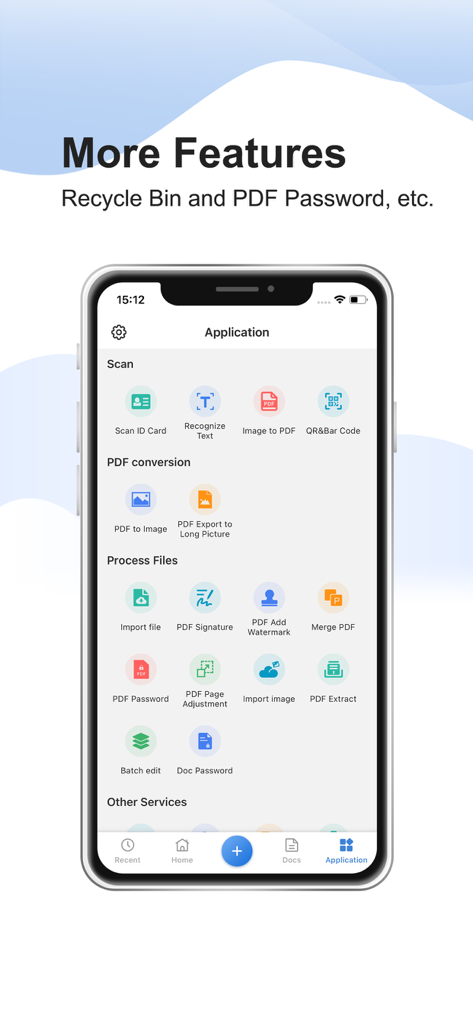
PDF 변환, 서명, 문서 보안과 같은 기능이 강조된 Simple Scanner 앱 인터페이스

PDF 변환, 서명, 문서 보안과 같은 기능이 강조된 Simple Scanner 앱 인터페이스

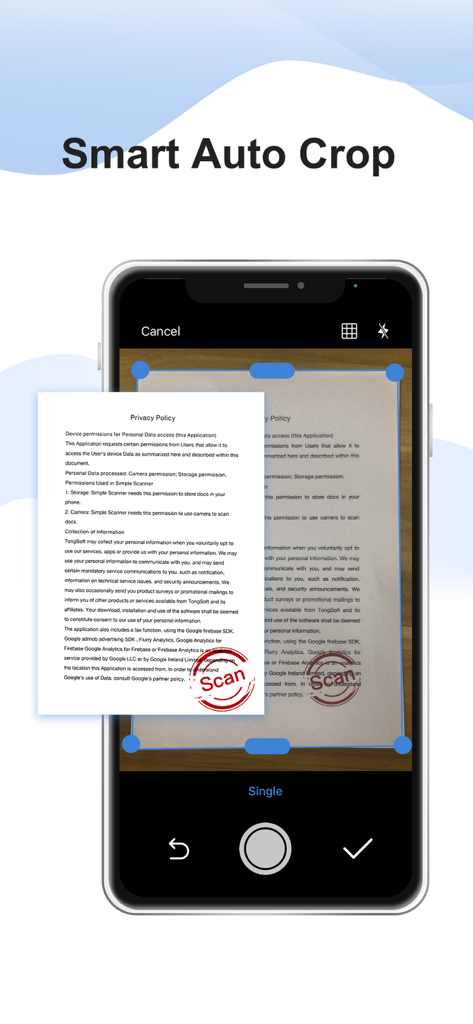
종이 문서에서 Simple Scanner 앱의 스마트 자동 자르기 기능을 시연하는 스마트폰 화면

종이 문서에서 Simple Scanner 앱의 스마트 자동 자르기 기능을 시연하는 스마트폰 화면

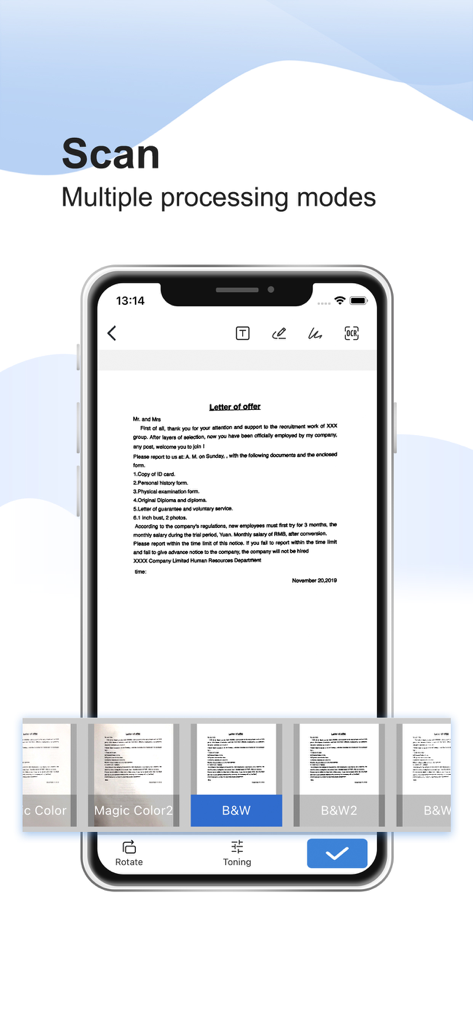
스캔된 편지와 흑백과 같은 여러 이미지 처리 필터가 있는 Simple Scanner 앱 인터페이스를 보여주는 스마트폰

스캔된 편지와 흑백과 같은 여러 이미지 처리 필터가 있는 Simple Scanner 앱 인터페이스를 보여주는 스마트폰

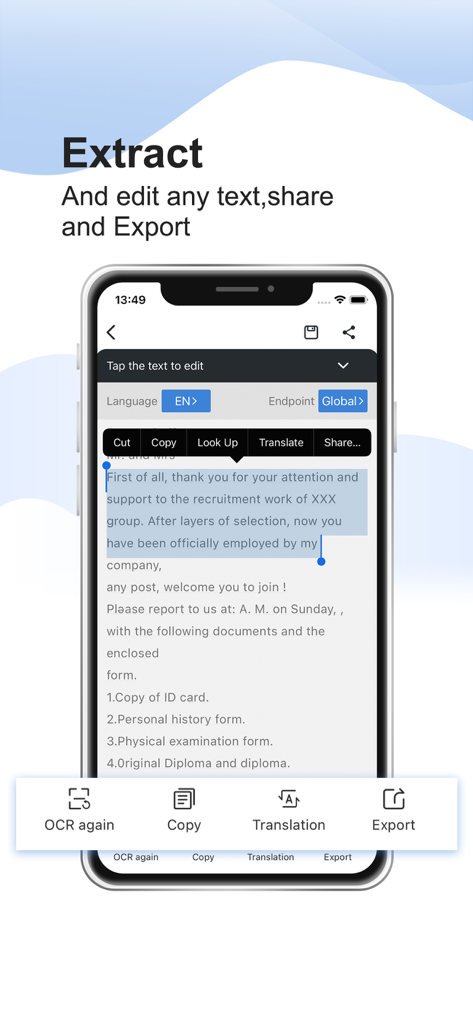
모바일 장치에서 OCR 텍스트 추출 및 편집 기능을 시연하는 Simple Scanner 앱 인터페이스

모바일 장치에서 OCR 텍스트 추출 및 편집 기능을 시연하는 Simple Scanner 앱 인터페이스

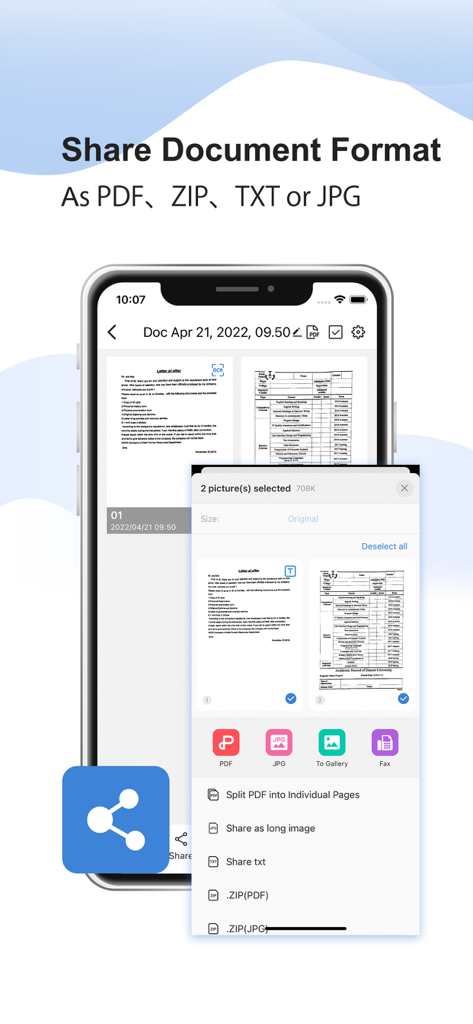
PDF, ZIP, TXT 및 JPG 형식의 문서 공유 옵션을 보여주는 모바일 앱 인터페이스

PDF, ZIP, TXT 및 JPG 형식의 문서 공유 옵션을 보여주는 모바일 앱 인터페이스

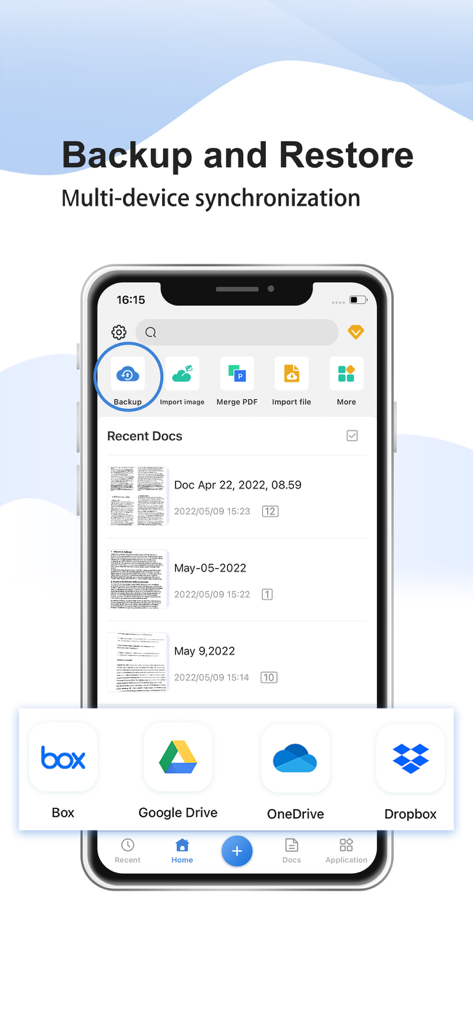
Google Drive 및 Dropbox와 같은 클라우드 스토리지 옵션을 사용하여 백업 및 복원 기능을 보여주는 Simple Scanner 앱 인터페이스

Google Drive 및 Dropbox와 같은 클라우드 스토리지 옵션을 사용하여 백업 및 복원 기능을 보여주는 Simple Scanner 앱 인터페이스

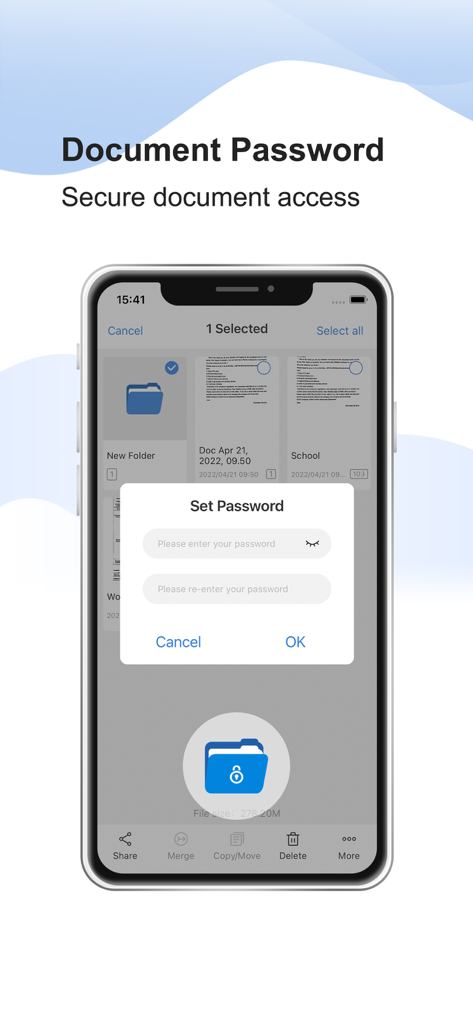
안전한 파일 액세스를 위한 문서 암호 보호 기능을 보여주는 Simple Scanner 앱 인터페이스

안전한 파일 액세스를 위한 문서 암호 보호 기능을 보여주는 Simple Scanner 앱 인터페이스

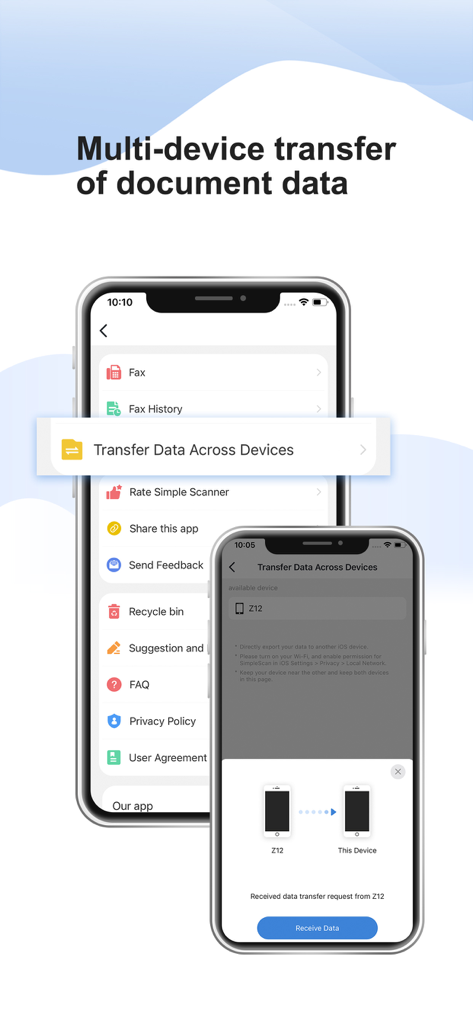
Simple Scanner 앱에서 두 대의 iPhone 간 문서 데이터의 다중 장치 전송을 보여주는 인터페이스

Simple Scanner 앱에서 두 대의 iPhone 간 문서 데이터의 다중 장치 전송을 보여주는 인터페이스

더 스마트하게 스캔하세요, 더 힘들게 말고

이 앱을 돋보이게 하는 도구, 892K+ 명의 사용자가 선택.

매우 선명한 디지털화

전문가 수준의 이미지 처리가 그림자를 자동으로 제거하고 명암을 향상시켜 완벽한 A4 및 법률 문서를 만듭니다.

🔍

OCR로 검색 가능한 텍스트

스캔을 검색 가능한 데이터로 바꾸세요. 영수증, 계약서, 메모에서 텍스트를 추출하여 노력 없이 정리 상태를 유지하세요.

☁️

즉각적인 클라우드 동기화

사무실이 당신을 따라갑니다. Google Drive, Dropbox 또는 iCloud에 문서를 자동으로 동기화하여 어디서든 안전하게 액세스하세요.

앱 소개

에 대해 알아야 할 모든 것 Simple Scanner - PDF Doc Scan.

설명

Want a moving scanner? The Simple Scanner is a PDF document scanner application that turns your phone into a portable scanner. you can scan documents, photos, receipts, reports, or just about anything. The scan will be saved to the device in image or PDF format. Name and organize your scan to a folder, or share it in the following ways: -Automatically upload JPG and PDF files to the cloud disk -Backup and restore synchronization files between multiple devices  - E-mail, print, Fax  - Dropbox, Evernote, Google Drive, WhatsApp, or more  - Wifi connects directly to your computer - Support importing PDF files into JPG. - Support for adding tags for quick file search. - Support OCR text recognition, export text. The Document Scanner application has all the features you need: - Mobile phone document, automatically remove the clutter background, generate high-definition JPEG pictures or PDF files. - A variety of image processing mode, you can manually adjust the image parameters, with a mobile phone can be paper documents, quickly turned into a clear electronic draft. - Scan color, grayscale, or black and white - Can be used in office, school, home and any place you want - Automatically detects page edges - 5 levels of contrast for clear monochrome text - Set the PDF page size (Letter, Legal, A4, etc.) - Thumbnail or list view, sorted by date or title - Simple scanner are optimized to run very fast. - Quick search by document title - Use a password to protect your documents - General - A single application that works on your phone! By agreeing to use the app, you agree to the following Privacy Policy and User Terms. Privacy Policy: https://www.tongsoftinfo.com/Simple-Scanner/Privacy-Policy.html Terms of Use: https://www.tongsoftinfo.com/Termsofuse.html If you like simple scanner or have any other comments, please take a moment to write us a comment, or simply email us at simple.scanner@tongsoftinfo.com, which will help us improve our products and give you a better experience.

최신 버전

2.9.7

크기

195.9 MB

출시일

2020년 9월 12일

업무 흐름을 페이퍼리스 파워하우스로 혁신하세요

890,000명 이상의 전문가와 함께 Simple Scanner를 사용하여 문서를 즉시 디지털화, 동기화, 보안 처리하세요. 오늘 iPhone을 위한 4.8점 평점의 오피스 허브를 다운로드하세요.

다운로드: App Store

App information, icons, screenshots, and descriptions displayed on this page are sourced from the Apple App Store and are the property of their respective developers. Download estimates and rankings are based on MWM's proprietary models and may not reflect actual figures. This page is provided for informational and analytical purposes only.

Believe this page infringes your intellectual property? File a dispute