
이 페이지는 앱이나 개발자의 공식 페이지가 아니며, 정보 제공 및 논평을 목적으로 작성된 독립 편집 간행물입니다. 명시적으로 달리 언급되지 않는 한, 해당 앱이나 개발자는 MWM, Apple, Google Play, 앱 퍼블리셔 또는 앱 개발자와 제휴, 보증, 후원, 승인 또는 공식적으로 연결되어 있지 않으며, 이 페이지의 어떤 내용도 해당 앱이 MWM의 서비스를 사용하여 개발되었음을 의미하지 않습니다. 모든 상표, 로고, 스크린샷 및 기타 콘텐츠는 해당 소유자의 자산입니다.


다운로드
2.5M+사용자 평점
총 평가 수
24.8K개발사
카테고리
Photo & Video지원 언어
1최신 버전
4.1.2크기
104.2 MB출시일
2013년 11월 29일사용자 친화적인 슬라이드쇼 제작 도구의 주요 기능 탐색
Slideshow Maker & Music Video 앱 기능 분석
고해상도 내보내기 및 공유
사용자는 슬라이드쇼를 고해상도 및 최대 60 FPS로 내보낼 수 있으며, 다양한 화면 비율(1:1, 16:9, 9:16 등)을 지원하여 소셜 미디어 플랫폼에 최적화된 콘텐츠를 쉽게 공유할 수 있습니다. 또한, 작업물을 프로젝트로 저장하여 나중에 편집할 수 있습니다.
빠른 슬라이드쇼 생성
사용자가 사진, 비디오 및 배경 음악을 결합하여 몇 분 안에 독특한 슬라이드쇼 비디오를 만들 수 있게 해줍니다.
음악 및 오디오 편집
사용자는 배경 음악을 추가하고, iTunes 보관함에서 노래를 불러오거나 자신의 목소리를 녹음할 수 있습니다. 또한, 오디오 볼륨을 조절하고, 음악을 다듬고, 슬라이드쇼 내에서 오디오가 재생되는 시작 지점을 정확하게 설정할 수 있습니다.
텍스트 오버레이 및 애니메이션
이 도구는 사용자가 비디오에 텍스트를 추가하고, 글꼴, 색상, 스타일(배경색, 테두리) 및 애니메이션을 변경할 수 있게 합니다. 텍스트의 지속 시간과 등장 시점을 정밀하게 조절하여 메시지를 효과적으로 전달할 수 있습니다.
자동 슬라이드쇼 생성
선택한 사진 및/또는 비디오로 애플리케이션이 자동으로 슬라이드쇼를 생성하여 신속한 콘텐츠 제작을 돕습니다.
고급 슬라이드 편집
이 앱은 각 사진 슬라이드의 재생 시간을 제어하고, 비디오 슬라이드를 다듬거나 재생 속도를 조절할 수 있게 합니다. 또한, 사용자는 두 손가락으로 이미지의 크기를 조정하거나 위치를 변경하여 시작-종료 애니메이션을 제어할 수 있습니다.
자주 묻는 질문
에 대해 알아야 할 모든 것 Slideshow Maker & Music Video
What is PicMusic: Slideshow Maker?
PicMusic: Slideshow Maker combines photos, videos, and background music to create unique slideshow videos. The app offers easy-to-use editing tools for quick creation and customization.
How can I create a slideshow video using PicMusic?
Yes, you can create a slideshow by selecting photos and/or videos. PicMusic automatically generates a slideshow which you can then export or edit using various tools.
Can I add music to my slideshows in PicMusic?
Yes, PicMusic allows adding background music, loading songs from iTunes Library, or recording your voice. You can also trim the song, adjust its volume, and set its play position.
What video editing options are available for slides in PicMusic?
PicMusic offers slide editing with duration control for photos. Video slides can be trimmed and their playing speed adjusted to 0.5x, 1x, 2x, or 4x.
Can I add text to videos with the PicMusic app?
Yes, PicMusic allows adding text, customizing its font, color, and styles. You can animate text and manage its duration within the slideshow timeline, similar to audio items.
What are the export options for slideshows created with PicMusic?
PicMusic slideshows export in high resolution and up to 60 FPS. The app supports multiple aspect ratios for sharing, including 1:1, 16:9, 9:16, 4:3, and 3:4.
What are the subscription options for Pic Music Pro?
Pic Music Pro offers two subscription options: $5.99 Weekly and $29.99 Annually. Prices may vary depending on the user's location.
Does a Pic Music Pro subscription automatically renew?
Yes, Pic Music Pro subscriptions automatically renew. Auto-renewal must be turned off at least 24 hours before the current period ends to avoid being charged.
How do I cancel my Pic Music Pro subscription?
You can manage and cancel your Pic Music Pro subscription by accessing 'Manage App Subscriptions' within your iTunes Account settings.
Where can I find the privacy policy for PicMusic: Slideshow Maker?
The Privacy Policy for PicMusic: Slideshow Maker is available on the app's official terms page, specifically at http://typimage.com/terms.html#privacy.
Does PicMusic offer templates for creating slideshows?
Yes, PicMusic offers various templates for quick slideshow creation, including themes for birthdays, celebrations, and anniversaries. These templates are fully customizable.
Can I create video collages using PicMusic: Slideshow Maker?
Yes, PicMusic functions as a video collage maker. It supports 'Crossover collages', allowing users to arrange multiple images within their video projects effectively.
다음 스크린샷과 설명은 앱의 공식 스토어 목록에서 직접 가져온 것이며 앱 개발자의 자산입니다.
앱 스토어
스크린샷

이 앱은 몇 번의 탭만으로 슬라이드쇼 생성을 시작하며, 사용자는 'Vlog' 및 'Birthday'와 같은 다양한 카테고리를 탐색할 수 있습니다.
빠른 슬라이드쇼 제작

이 앱은 '생일' 및 '기념일'과 같은 다양한 테마의 템플릿을 제공하여 사용자가 쉽게 시작할 수 있도록 돕습니다.
다채로운 템플릿
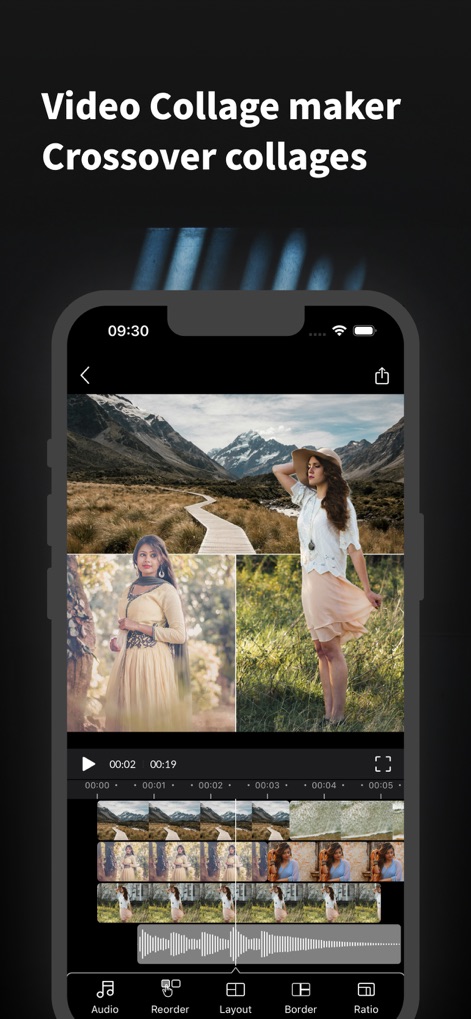
이 도구는 여러 이미지와 비디오를 결합하여 콜라주를 만들 수 있으며, 하단 타임라인에서 개별 클립을 조정하고 '오디오' 및 '레이아웃' 설정을 관리할 수 있습니다.
비디오 콜라주 편집

사용자는 템플릿으로 빠르게 프로젝트를 시작하고, 하단의 '비디오' 및 '오디오' 탭을 통해 세부적인 편집을 진행할 수 있습니다.
템플릿으로 빠른 시작

이 앱은 슬라이드 간의 '전환'을 편집할 수 있는 기능을 제공하며, 'Warp' 및 'Parametric'과 같은 다양한 효과를 선택할 수 있습니다.
부드러운 전환 효과

사용자는 배경 음악을 추가하고 편집할 수 있으며, 오디오 파형을 통해 '볼륨 조절' 및 '음악 길이 조절'을 세밀하게 제어할 수 있습니다.
배경 음악 추가

이 도구는 영상 위에 '텍스트'를 추가하고 편집하는 기능을 제공하며, '글꼴 스타일' 변경 및 '애니메이션 효과' 적용이 가능합니다.
텍스트 및 제목 편집

사용자는 '정사각형 1:1' 및 '스토리 9:16'과 같은 소셜 네트워크에 최적화된 다양한 화면 비율을 선택할 수 있습니다.
다양한 화면 비율
설명
Download
비슷한 앱
같은 카테고리의 상위 앱

CapCut: Photo & Video Editor
BYTEDANCE PTE. LTD.

Instagram, Inc.

YouTube
Google LLC

Canva: AI Photo & Video Editor
Canva Pty Ltd

Snapchat
Snap, Inc.

快手
Beijing Kwai Technology Co., Ltd.

Edits: Video Editor
Instagram, Inc.

Meitu- AI Photo & Video Editor
Xiamen Meitu Technology Co., Ltd.

Google Photos: Backup & Edit
Google LLC
이 페이지는 앱이나 개발자의 공식 페이지가 아니며, 정보 제공 및 논평을 목적으로 작성된 독립 편집 간행물입니다. 명시적으로 달리 언급되지 않는 한, 해당 앱이나 개발자는 MWM, Apple, Google Play, 앱 퍼블리셔 또는 앱 개발자와 제휴, 보증, 후원, 승인 또는 공식적으로 연결되어 있지 않으며, 이 페이지의 어떤 내용도 해당 앱이 MWM의 서비스를 사용하여 개발되었음을 의미하지 않습니다. 모든 상표, 로고, 스크린샷 및 기타 콘텐츠는 해당 소유자의 자산입니다.