Slogger: Pro Slow Motion
다운로드: App Store

이 페이지는 앱이나 개발자의 공식 페이지가 아니며, 정보 제공 및 논평을 목적으로 작성된 독립 편집 간행물입니다. 명시적으로 달리 언급되지 않는 한, 해당 앱이나 개발자는 MWM, Apple, Google Play, 앱 퍼블리셔 또는 앱 개발자와 제휴, 보증, 후원, 승인 또는 공식적으로 연결되어 있지 않으며, 이 페이지의 어떤 내용도 해당 앱이 MWM의 서비스를 사용하여 개발되었음을 의미하지 않습니다. 모든 상표, 로고, 스크린샷 및 기타 콘텐츠는 해당 소유자의 자산입니다.

로고: Slogger: Pro Slow Motion
다운로드: App Store

Slogger: Pro Slow Motion

크리에이터와 운동선수를 위한 전문가용 버퍼 기반 카메라. 수동 ISO 제어, 셔터 정밀도 및 원격 트리거링으로 저장 공간을 절약하고 모든 프레임을 완벽하게 만드세요.

주요 수치

다운로드

400

사용자 평점

1.0/5

총 평가 수

0

개발사

Sami Sharafeddine

카테고리

Photo & Video

지원 언어

16

최신 버전

1.3.2

크기

14.9 MB

출시일

2025년 5월 30일
기능

프로 수준의 캡처, 낭비되는 공간 제로

고속 버퍼 녹화와 완전한 수동 제어의 힘을 잠금 해제하여 언제나 완벽한 슬로우 모션 촬영을 하세요.

스마트 사전 트리거 버퍼

액션이 시작되는 시간을 추측하는 것을 멈추세요. 슬로거는 지속적으로 녹화하지만 트리거를 누르기 전의 순간만 저장하여 불필요한 영상을 제거합니다.

완전 수동 카메라 스위트

ISO, 셔터 속도 및 화이트 밸런스의 세분화된 제어로 촬영을 완벽하게 제어하고 어떤 조명 조건에서도 영화 같은 선명도를 달성하세요.

다음 스크린샷과 설명은 앱의 공식 스토어 목록에서 직접 가져온 것이며 앱 개발자의 자산입니다.

앱 스토어

스크린샷
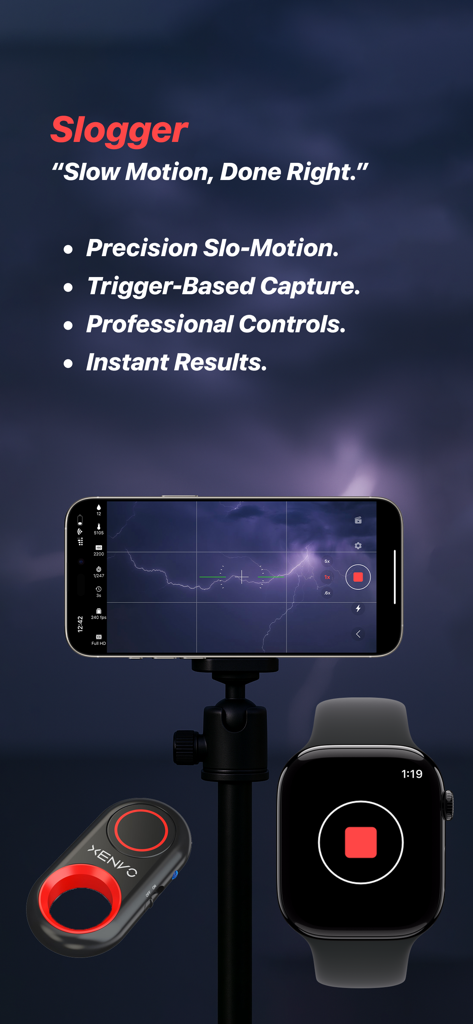
Slogger: Pro Slow Motion - 슬로거 앱이 Apple Watch 원격 트리거로 번개를 캡처하는 삼각대에 올려진 iPhone을 보여줍니다
슬로거 앱이 Apple Watch 원격 트리거로 번개를 캡처하는 삼각대에 올려진 iPhone을 보여줍니다

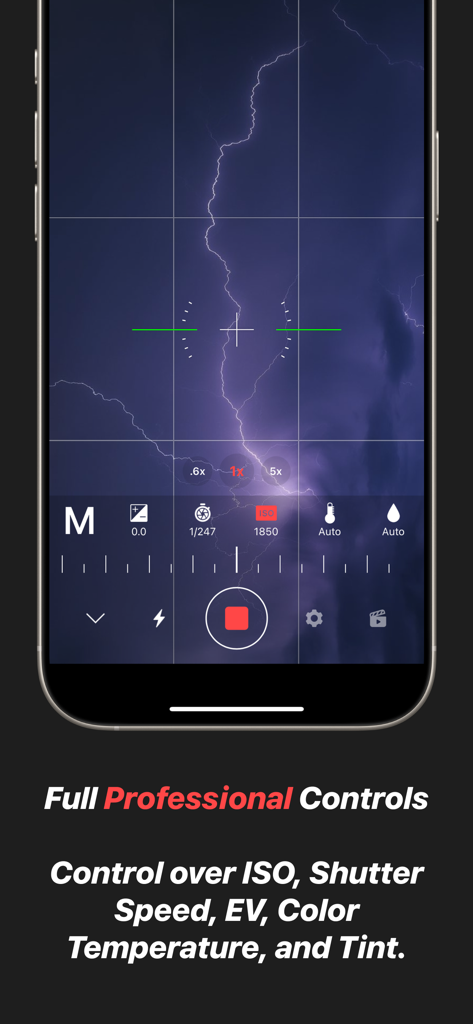
Slogger: Pro Slow Motion - 슬로거 앱 인터페이스는 ISO 셔터 속도 및 화이트 밸런스를 위한 전문가용 수동 카메라 제어를 보여줍니다
슬로거 앱 인터페이스는 ISO 셔터 속도 및 화이트 밸런스를 위한 전문가용 수동 카메라 제어를 보여줍니다

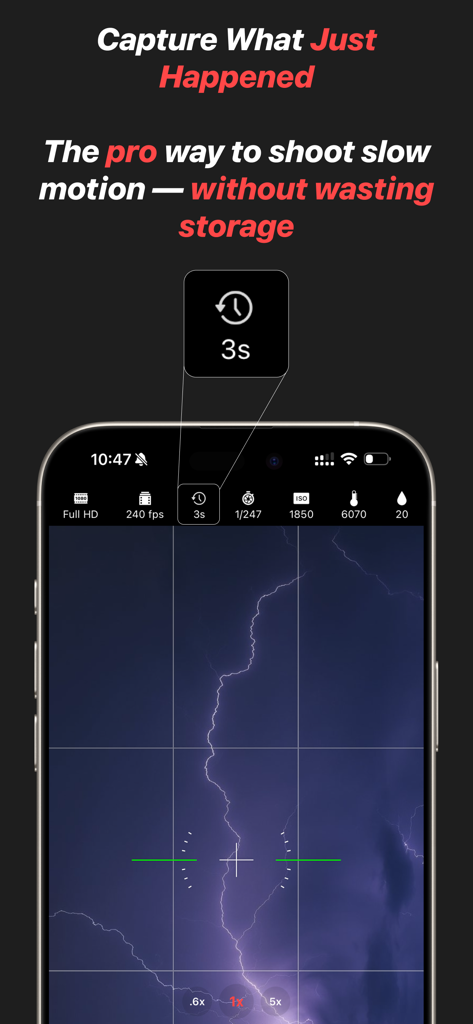
Slogger: Pro Slow Motion - 슬로거 앱 인터페이스는 전문가용 슬로우 모션 수동 설정으로 번개를 캡처합니다
슬로거 앱 인터페이스는 전문가용 슬로우 모션 수동 설정으로 번개를 캡처합니다

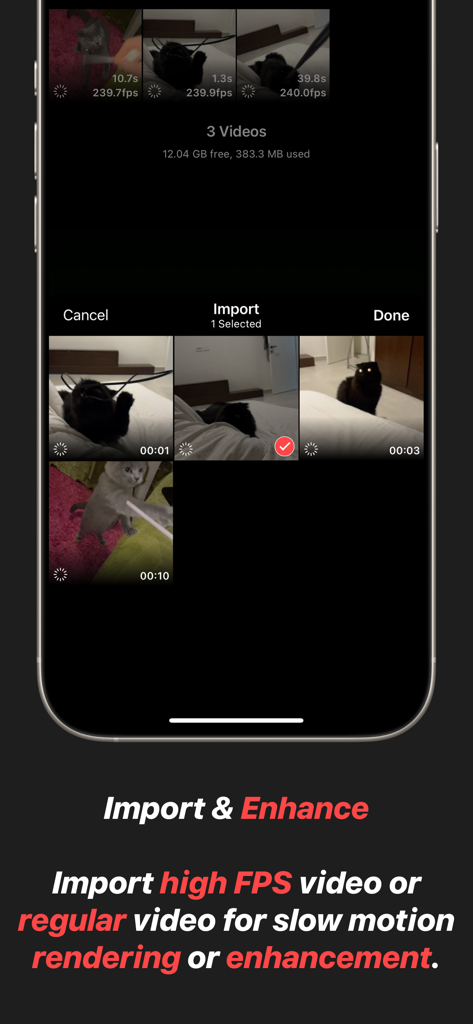
Slogger: Pro Slow Motion - 슬로거 앱의 인터페이스는 고 FPS 비디오 가져오기 및 향상 기능을 보여줍니다
슬로거 앱의 인터페이스는 고 FPS 비디오 가져오기 및 향상 기능을 보여줍니다

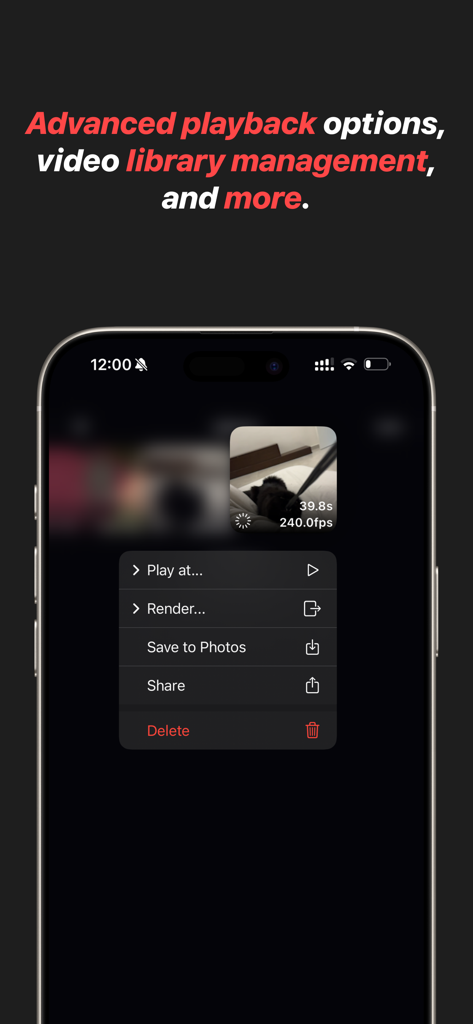
Slogger: Pro Slow Motion - 슬로거 앱 인터페이스는 슬로우 모션 비디오를 위한 고급 재생 및 비디오 라이브러리 관리 옵션을 표시합니다
슬로거 앱 인터페이스는 슬로우 모션 비디오를 위한 고급 재생 및 비디오 라이브러리 관리 옵션을 표시합니다

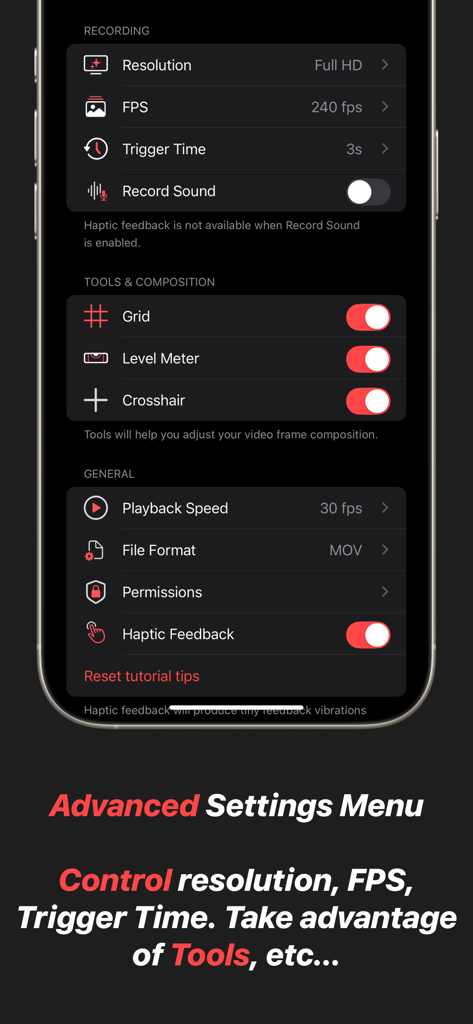
Slogger: Pro Slow Motion - 슬로거의 고급 설정 메뉴 스크린샷으로 해상도, FPS, 트리거 시간 및 그리드 및 레벨 미터와 같은 구성 도구에 대한 제어를 보여줍니다.

슬로거의 고급 설정 메뉴 스크린샷으로 해상도, FPS, 트리거 시간 및 그리드 및 레벨 미터와 같은 구성 도구에 대한 제어를 보여줍니다.

설명

Slogger is a professional-grade slow-motion video camera designed for precision, efficiency, and complete creative control. Unlike traditional video recording, which continuously fills up storage with unnecessary footage, Slogger utilizes a buffer system — recording indefinitely but only saving the moments that matter. This is the same technique used in professional high-speed camera systems, ensuring an optimized workflow with minimal storage waste. - Capture the Moment — Before It Happens Standard video recording forces you to predict the perfect moment before pressing record, often resulting in long, unnecessary clips and excessive storage use. Slogger eliminates this problem with a trigger-based capture system. The app continuously records to a buffer, and when an event occurs, a simple tap saves only the crucial seconds before the trigger. No wasted storage, no missed opportunities — just perfect slow-motion clips, every time. - Total Manual Control for Cinematic Precision Slogger puts full control in your hands. Adjust every critical setting to match your environment and creative vision: * ISO & Shutter Speed – Achieve the perfect exposure, even in challenging lighting conditions. * White Balance & Tint – Fine-tune color accuracy for professional-quality footage. * Frame Composition Tools – Use advanced framing guides to ensure every shot is perfectly aligned. * Optimized Performance – Record at the highest quality with minimal impact on device storage and performance. - Precision Focus with Continuous Autofocus Capturing high-speed motion requires perfect focus, and Slogger delivers with continuous autofocus on a selected point. Simply tap on your subject, and the app will intelligently track and maintain sharp focus. This ensures every frame remains crisp and clear, ensuring reliability of captured footage. - Trigger Events Remotely with Bluetooth or Apple Watch For hands-free operation, Slogger supports remote triggering via Bluetooth shutter remotes and the Slogger Remote Apple Watch app. Whether you're setting up an action shot, capturing precise scientific motion, or simply need a more convenient way to trigger recording, these remote options ensure you never miss a critical moment. With a single press, instantly save the most important seconds before an event — without touching your device. - Instant Access from Control Center or Lock Screen Timing is everything in slow-motion capture, and Slogger ensures you're always ready. With a dedicated Control Center and lock screen access, you can instantly launch the app and start recording without delay. Whether you’re capturing a fast-moving action shot, an unpredictable moment, or a precise scientific event, having the app just a swipe away means you’ll never miss the shot. - Import and Enhance Existing Videos Already have slow-motion or regular videos in your Photos app? Slogger allows you to import and refine existing footage with the same powerful tools available for captured videos. Apply rendering, and utilize professional-grade slow-motion controls to enhance your videos like never before. - Efficient, High-Performance Slow Motion Slogger is engineered to provide the most efficient and professional slow-motion experience possible. By combining a real-time buffer with a precision-triggered capture system, it offers a storage-conscious solution that ensures you capture the right moment — without recording hours of unnecessary footage. This is how true slow-motion professionals work, and now, it’s available on your device. - Designed for Creators, Hobbyists, and Filmmakers Whether you're a filmmaker looking for cinematic slow-motion, an athlete analyzing fast movements, or a scientist capturing high-speed events, Slogger provides the tools you need for professional-grade results. With its intuitive interface, high-performance recording engine, and uncompromising quality, this app redefines how slow-motion should be captured.

Download

다운로드: App Store

이 페이지는 앱이나 개발자의 공식 페이지가 아니며, 정보 제공 및 논평을 목적으로 작성된 독립 편집 간행물입니다. 명시적으로 달리 언급되지 않는 한, 해당 앱이나 개발자는 MWM, Apple, Google Play, 앱 퍼블리셔 또는 앱 개발자와 제휴, 보증, 후원, 승인 또는 공식적으로 연결되어 있지 않으며, 이 페이지의 어떤 내용도 해당 앱이 MWM의 서비스를 사용하여 개발되었음을 의미하지 않습니다. 모든 상표, 로고, 스크린샷 및 기타 콘텐츠는 해당 소유자의 자산입니다.








