
이 페이지는 앱이나 개발자의 공식 페이지가 아니며, 정보 제공 및 논평을 목적으로 작성된 독립 편집 간행물입니다. 명시적으로 달리 언급되지 않는 한, 해당 앱이나 개발자는 MWM, Apple, Google Play, 앱 퍼블리셔 또는 앱 개발자와 제휴, 보증, 후원, 승인 또는 공식적으로 연결되어 있지 않으며, 이 페이지의 어떤 내용도 해당 앱이 MWM의 서비스를 사용하여 개발되었음을 의미하지 않습니다. 모든 상표, 로고, 스크린샷 및 기타 콘텐츠는 해당 소유자의 자산입니다.

Snapseed: Photo Editor
평범한 사진을 특별한 예술로 승격시키는 능력. 이 앱은 사용자에게 평범한 이미지를 지배하고 재창조할 전능한 권한을 부여한다.
다운로드
100M+사용자 평점
총 평가 수
193.8K개발사
카테고리
Photo & Video지원 언어
38최신 버전
3.17.1크기
180.2 MB출시일
2011년 6월 7일Snapseed: 모바일 사진 편집의 전문가적 분석
이 분석은 Snapseed 앱이 제공하는 핵심 기능들을 심층적으로 평가하여, 다양한 사용자층에게 미치는 영향을 파악합니다.
선택 보정 (Control Point)
이 도구는 이미지의 특정 영역에만 정밀하게 밝기, 채도, 대비 등 다양한 보정 효과를 적용하여 사용자에게 세밀한 편집 제어력을 제공합니다.
힐링
이 기능은 사진에서 원치 않는 개체나 흠집을 자연스럽게 제거하여 깔끔하고 완벽한 이미지를 완성할 수 있도록 돕습니다.
렌즈 흐림
이 앱은 아름다운 보케 효과를 추가하여 피사체에 집중하고 배경을 부드럽게 흐리게 처리함으로써 전문적인 인물 사진 효과를 구현합니다.
이미지 조정
사용자는 노출, 채도, 밝기 등 기본적인 이미지 요소를 자동 또는 수동으로 미세하게 조정하여 사진의 전반적인 분위기와 색감을 최적화할 수 있습니다.
얼굴 보정 및 포즈
인물 사진을 위한 이 특화된 도구는 눈을 강조하고, 얼굴 조명을 추가하며, 피부를 부드럽게 하는 등 얼굴의 특징을 개선하고, 3D 모델 기반으로 포즈를 수정하는 기능을 제공합니다.
RAW 현상
이 기능은 JPG뿐만 아니라 RAW 파일을 열어 비파괴적으로 조정하고 편집할 수 있게 하여, 고품질의 원본 이미지 데이터를 최대한 활용할 수 있도록 지원합니다.
이중 노출
사용자는 두 장의 사진을 혼합하여 독특하고 예술적인 합성 이미지를 만들 수 있으며, 다양한 블렌딩 모드를 통해 창의적인 표현을 가능하게 합니다.
원근감
이 도구는 기울어진 선을 수정하고 건물이나 지평선의 기하학적 형태를 완벽하게 보정하여 사진의 균형과 구도를 향상시킵니다.
개인 스타일 저장
사용자는 자신이 만든 편집 스타일을 저장하고 나중에 다른 사진에 손쉽게 적용할 수 있어, 일관된 분위기를 유지하고 작업 효율성을 높일 수 있습니다.
곡선
이 기능은 사진의 밝기 수준을 정밀하게 제어하여 그림자, 중간 톤, 하이라이트 영역의 명암을 조절하고, 보다 세밀하고 전문적인 색조 보정을 가능하게 합니다.
자주 묻는 질문
에 대해 알아야 할 모든 것 Snapseed: Photo Editor
What is Snapseed?
Snapseed is a comprehensive photo editor developed by Google. It offers a wide range of tools and filters for editing JPG and RAW files without displaying any advertisements.
Does Snapseed display advertisements?
No, Snapseed does not display advertisements. It is an ad-free photo editing application developed by Google, focusing solely on providing editing functionalities.
What types of files can Snapseed open for editing?
Snapseed is capable of opening both JPG and RAW files for editing. Users can develop and tweak native camera RAW files non-destructively or export them as JPGs.
How many editing tools and filters does Snapseed offer?
Snapseed provides over 25 tools and filters for photo editing. These include features like Healing, Brush, Structure, HDR, Perspective, and various film-inspired styles.
Can users save custom editing styles in Snapseed?
Yes, users can save their personal editing looks within Snapseed and apply them to other photos later. This feature allows for consistent editing across multiple images.
How can Snapseed remove unwanted objects from a photo?
Snapseed features a "Healing" tool that allows users to remove unwanted elements or distractions from their pictures. This tool helps clean up images by seamlessly blending the surrounding areas.
Does Snapseed allow for non-destructive editing?
Yes, Snapseed supports non-destructive editing. It maintains an "Edits" history, allowing users to undo any modification at any time and revert to the original or any previous editing step.
Can custom looks be shared with others from Snapseed?
Yes, Snapseed allows users to easily share their custom-created looks. The application includes a "Share QR" option, enabling convenient sharing of these personalized editing styles.
다음 스크린샷과 설명은 앱의 공식 스토어 목록에서 직접 가져온 것이며 앱 개발자의 자산입니다.
앱 스토어
스크린샷
창의력의 시작
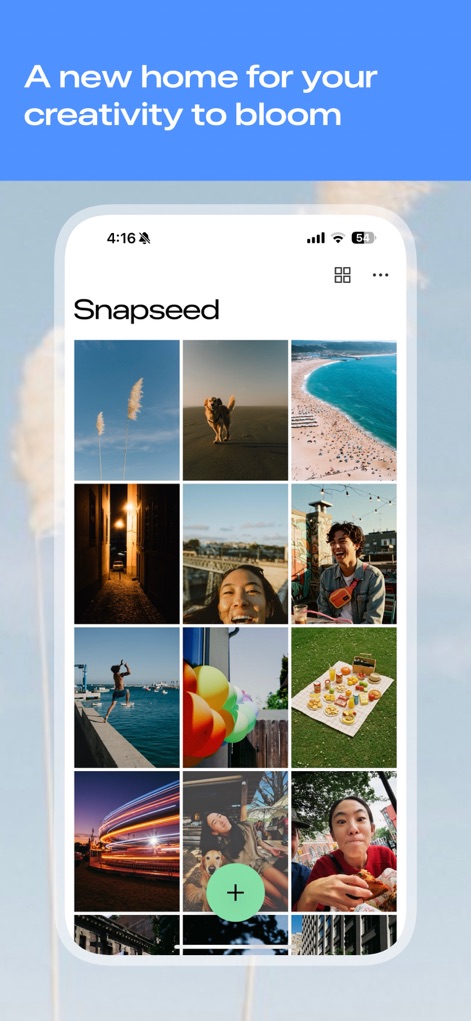
이 앱의 메인 화면에서는 다양한 편집 사진 갤러리를 한눈에 볼 수 있으며, 중앙의 큰 '+' 버튼으로 쉽게 새 작업을 시작할 수 있습니다.
전문가 수준 도구
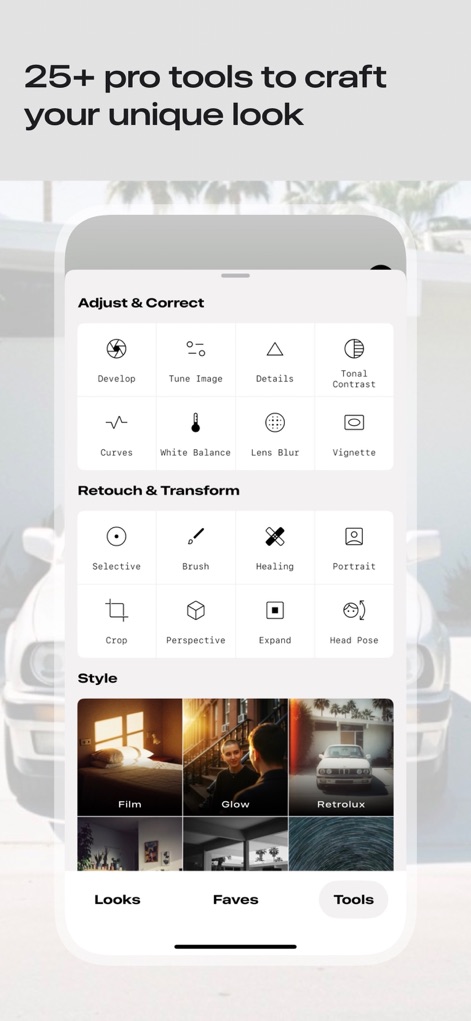
이 도구는 '조정 및 보정', '리터치 및 변형', '스타일' 등 체계적으로 분류된 25가지 이상의 전문적인 편집 기능을 제공하여 사용자가 원하는 효과를 손쉽게 적용할 수 있도록 합니다.
빈티지 필름 효과
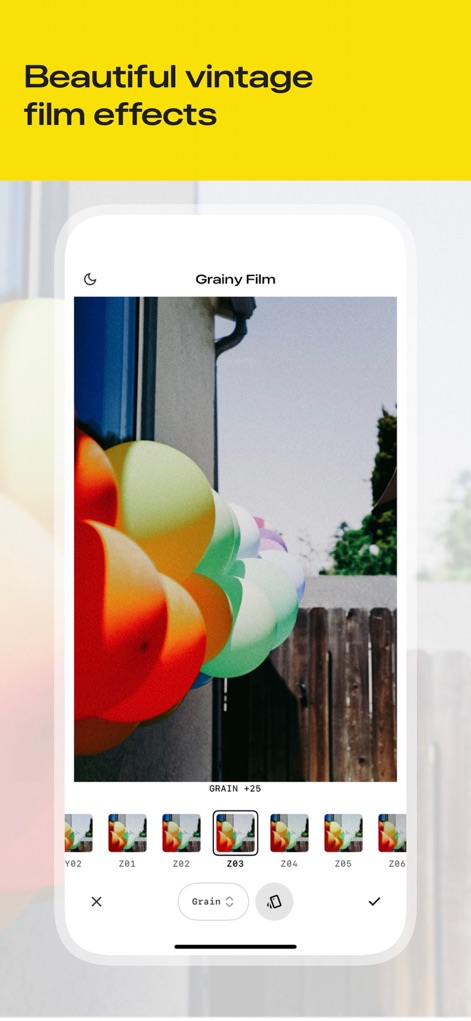
이 앱은 '그레인 필름'과 같은 다양한 빈티지 필름 효과를 제공하며, 사용자는 여러 미리보기 썸네일을 통해 원하는 스타일을 선택하고 그레인 강도를 조절하여 개성 있는 사진을 연출할 수 있습니다.
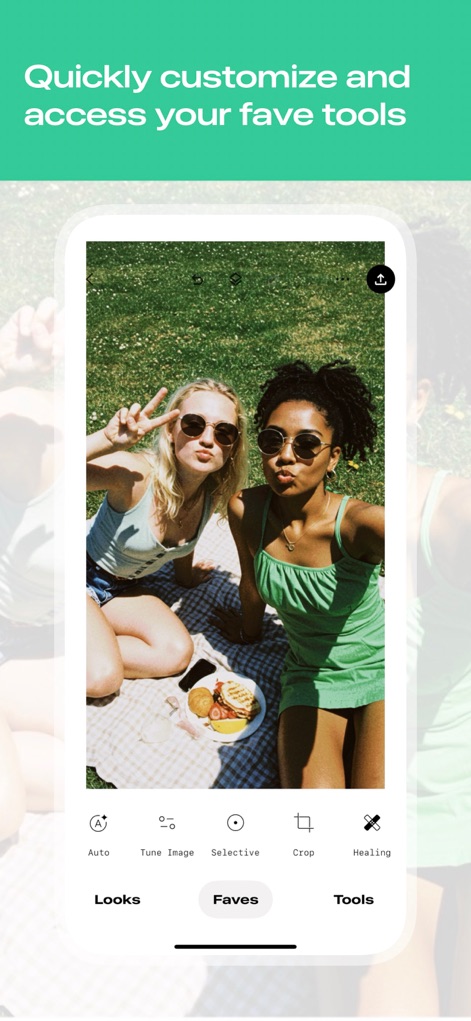
나만의 즐겨찾기
사용자는 자주 사용하는 편집 도구들을 '즐겨찾기' 탭에 저장하여 '자동 조정' 및 '선택 보정'과 같은 기능에 빠르게 접근하고 작업을 효율적으로 진행할 수 있습니다.

원치 않는 요소 제거
이 앱의 '힐링' 도구를 사용하여 사진 배경에 있는 불필요한 객체나 요소를 손쉽게 제거할 수 있으며, 제거 영역이 빨간색으로 표시되어 직관적인 편집이 가능합니다.
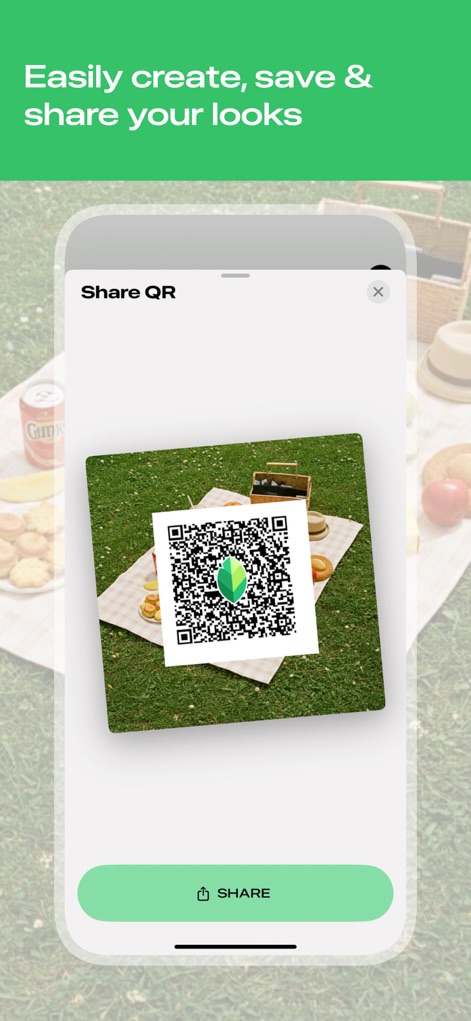
편집 스타일 공유
사용자는 자신이 만든 독특한 편집 스타일을 QR 코드로 생성하여 손쉽게 다른 사람들과 공유할 수 있으며, 하단의 '공유' 버튼을 통해 즉시 스타일을 전송할 수 있습니다.
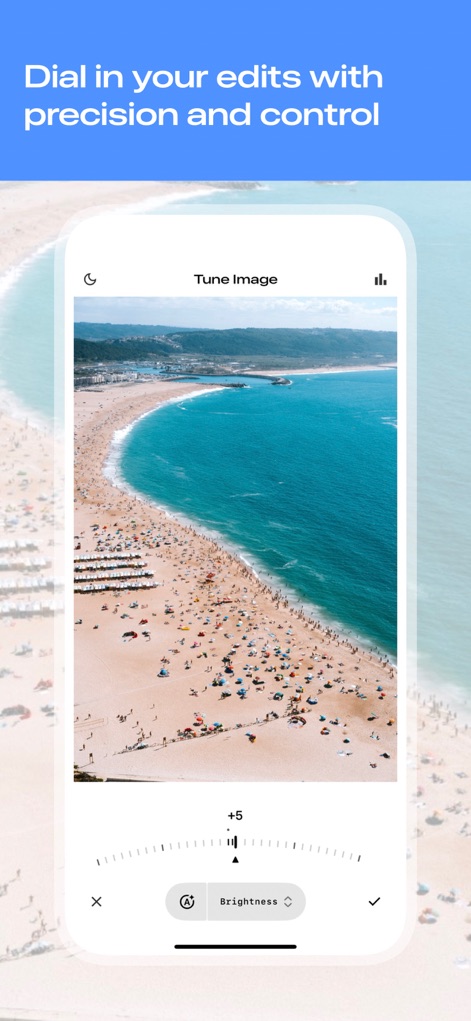
정밀한 이미지 조정
'이미지 조정' 기능을 통해 밝기, 대비, 채도 등 다양한 요소들을 정밀하게 조절할 수 있으며, 하단의 직관적인 슬라이더 컨트롤을 사용하여 미세한 변화를 적용할 수 있습니다.
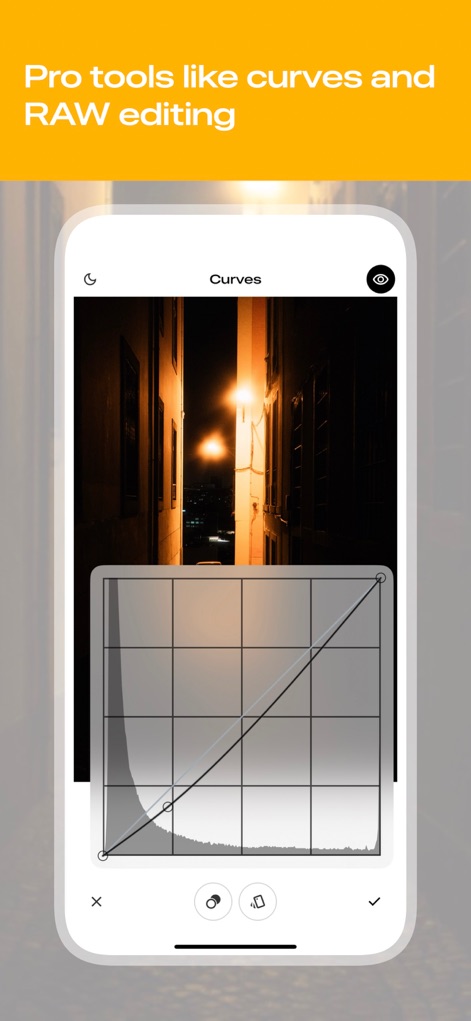
고급 곡선 편집
이 앱은 '곡선' 도구를 제공하여 사진의 톤과 밝기 분포를 세밀하게 제어할 수 있으며, 격자 모양의 그래프 인터페이스를 통해 사용자가 직관적으로 원하는 효과를 구현할 수 있습니다.
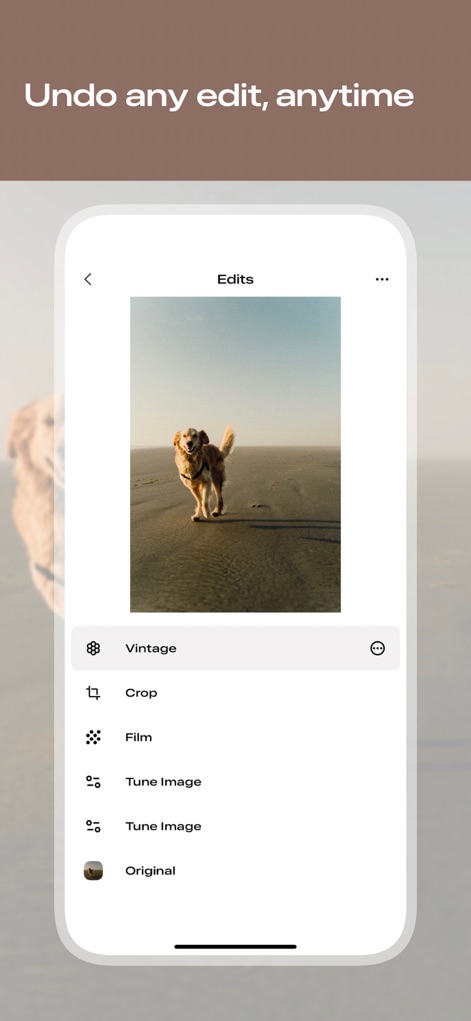
비파괴 편집 기록
사용자는 모든 편집 단계를 '편집 기록' 목록에서 확인할 수 있으며, '빈티지'나 '크롭'과 같은 특정 편집을 선택하여 되돌리거나 원본 이미지로 돌아갈 수 있습니다.
설명
Download
비슷한 앱
유사한 기능과 사용자 경험을 가진 앱

Evoto-AI Photo Editor&Retouch
TRUESIGHT PTE. LTD.

Darkroom: Photo & Video Editor
Bergen Co.

LD - Photo & Video Finishing
Lens Distortions, LLC

Focos
Mosaic S.r.l.

SKRWT
Mathaeus Jagielski

Polarr Pro Photo Editor
Polarr Inc

Photomator – Photo Editor
Apple Inc.

Canon DPP Express
Canon Inc.

原片
Beijing Kwai Technology Co., Ltd.
이 페이지는 앱이나 개발자의 공식 페이지가 아니며, 정보 제공 및 논평을 목적으로 작성된 독립 편집 간행물입니다. 명시적으로 달리 언급되지 않는 한, 해당 앱이나 개발자는 MWM, Apple, Google Play, 앱 퍼블리셔 또는 앱 개발자와 제휴, 보증, 후원, 승인 또는 공식적으로 연결되어 있지 않으며, 이 페이지의 어떤 내용도 해당 앱이 MWM의 서비스를 사용하여 개발되었음을 의미하지 않습니다. 모든 상표, 로고, 스크린샷 및 기타 콘텐츠는 해당 소유자의 자산입니다.