
이 페이지는 앱이나 개발자의 공식 페이지가 아니며, 정보 제공 및 논평을 목적으로 작성된 독립 편집 간행물입니다. 명시적으로 달리 언급되지 않는 한, 해당 앱이나 개발자는 MWM, Apple, Google Play, 앱 퍼블리셔 또는 앱 개발자와 제휴, 보증, 후원, 승인 또는 공식적으로 연결되어 있지 않으며, 이 페이지의 어떤 내용도 해당 앱이 MWM의 서비스를 사용하여 개발되었음을 의미하지 않습니다. 모든 상표, 로고, 스크린샷 및 기타 콘텐츠는 해당 소유자의 자산입니다.

Sticky Note Widget - Cute Memo
매력적인 사용자 지정 위젯으로 홈 및 잠금 화면을 변환하세요. 귀여운 글꼴, 패턴, 사진으로 완벽한 디지털 공간을 디자인하면서 할 일을 손쉽게 관리하세요.
다운로드
1M+사용자 평점
총 평가 수
22K+개발사
카테고리
Productivity지원 언어
11최신 버전
3.3.6크기
214.2 MB출시일
2020년 9월 17일생산성과 당신의 미적 감각의 만남
가장 중요한 작업과 창의적인 아이디어를 앞쪽에 배치하여 아름답고 정리된 공간으로 홈 및 잠금 화면을 변환하세요.
중요한 것을 고정하세요
잠금을 해제하지 않고도 홈 및 잠금 화면에서 할 일, 미리 알림, 목표를 즉시 확인할 수 있습니다.
나만의 스타일로 맞춤 설정하세요
미적 글꼴, 귀여운 패턴, 나만의 사진으로 자신을 표현하고 개성을 완벽하게 반영하는 디지털 공간을 만드세요.
자주 묻는 질문
에 대해 알아야 할 모든 것 Sticky Note Widget - Cute Memo
Sticky Note란 무엇인가요?
Sticky Note는 사용자가 홈 화면과 잠금 화면에 사용자 지정 가능한 메모를 직접 고정하여 작업 관리, 할 일 목록 및 미리 알림을 설정할 수 있는 메모 앱입니다.
Sticky Note 메모를 잠금 화면에 고정할 수 있나요?
예, Sticky Note를 사용하면 중요한 작업, 미리 알림 또는 일정에 빠르게 액세스하기 위해 메모를 잠금 화면에 직접 고정할 수 있습니다.
Sticky Note 메모의 배경을 어떻게 사용자 지정하나요?
Sticky Note 메모는 다양한 색상, 패턴 중에서 선택하거나 개인 사진을 업로드하는 등 광범위한 배경 사용자 지정 기능을 제공합니다.
Sticky Note는 메모에 글자 수를 표시하나요?
예, Sticky Note는 글자 수를 표시합니다. 이 기능은 소셜 미디어 게시물 참조 및 글쓰기 지원에 유용합니다.
Sticky Note의 프리미엄 기능은 무엇인가요?
Sticky Note의 프리미엄 기능에는 광고 없음, 메모 배경으로 개인 사진 사용 가능, 메모 목록 위젯 잠금 해제 등이 포함됩니다.
Sticky Note는 Apple Watch를 지원하나요?
예, Sticky Note는 Apple Watch를 지원합니다. 사용자는 메모를 Apple Watch에 직접 고정하여 빠르게 액세스할 수 있습니다.
홈 화면에 Sticky Note 위젯을 어떻게 추가하나요?
Sticky Note 위젯을 추가하려면 설치 후 앱을 열고 위젯을 홈 화면에 추가하세요. 그런 다음 모양과 내용을 사용자 지정하세요.
Sticky Note에서 카테고리별로 작업을 정리할 수 있나요?
예, Sticky Note를 사용하면 사용자가 작업을 효과적으로 정리하고, 미리 알림을 설정하며, 할 일 목록을 카테고리별로 관리하여 더 나은 관리를 할 수 있습니다.
Sticky Note는 개인정보 보호정책 및 이용약관을 제공하나요?
예, Sticky Note는 사용자 참조를 위해 애플리케이션 설명 내에 개인정보 보호정책 및 이용약관 링크를 제공합니다.
Sticky Note는 일일 할 일 목록 관리에 적합한가요?
예, Sticky Note는 일일 할 일 목록 및 미리 알림 관리에 이상적이며, 중요한 작업을 눈에 보이게 유지하는 간단한 인터페이스를 제공합니다.
다음 스크린샷과 설명은 앱의 공식 스토어 목록에서 직접 가져온 것이며 앱 개발자의 자산입니다.
앱 스토어
스크린샷
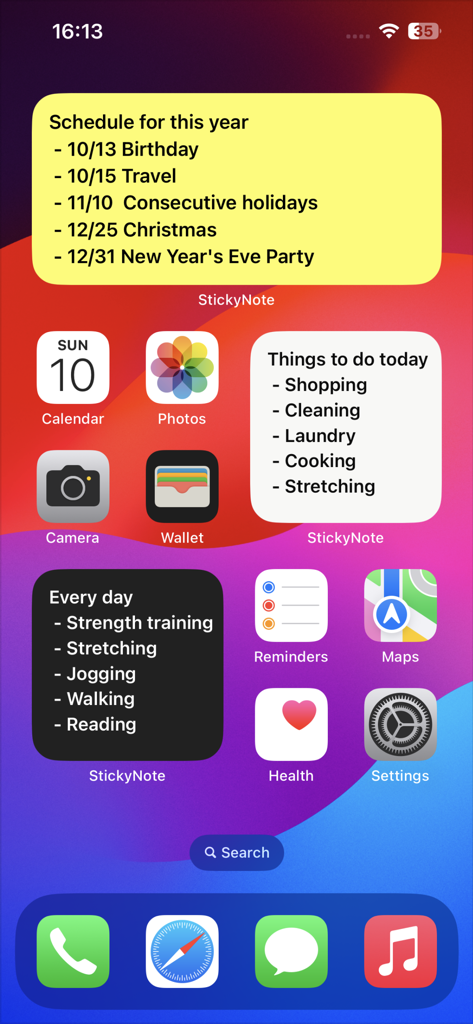
다양한 색상의 스티키 노트 위젯으로 작업과 일정을 정리하는 아이폰 홈 화면 스크린샷
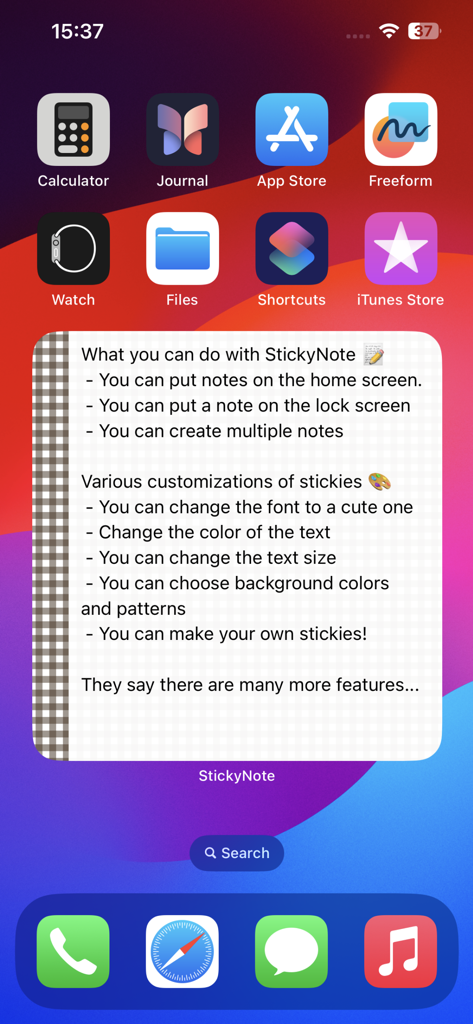
체커보드 테두리와 설명 텍스트로 사용자 지정 가능한 스티키 노트 위젯을 표시하는 아이폰 홈 화면.
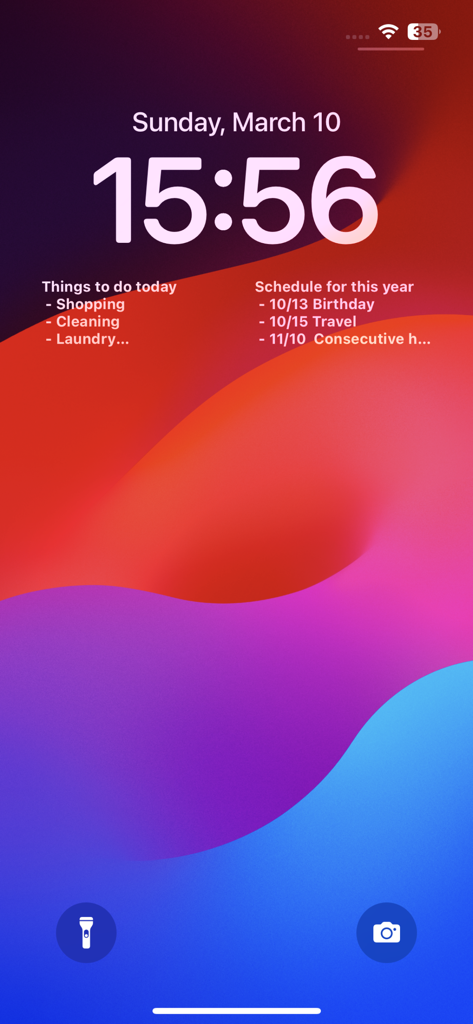
작업과 일정을 위한 두 개의 스티키 노트 위젯을 표시하는 아이폰 잠금 화면
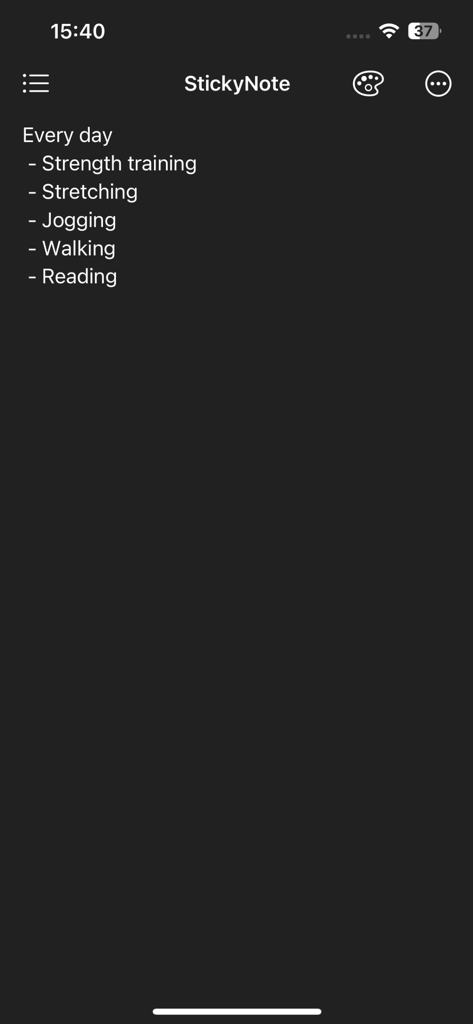
스트렝스 트레이닝, 조깅, 독서 등 일일 루틴 목록이 포함된 스티키 노트 앱의 다크 모드 인터페이스
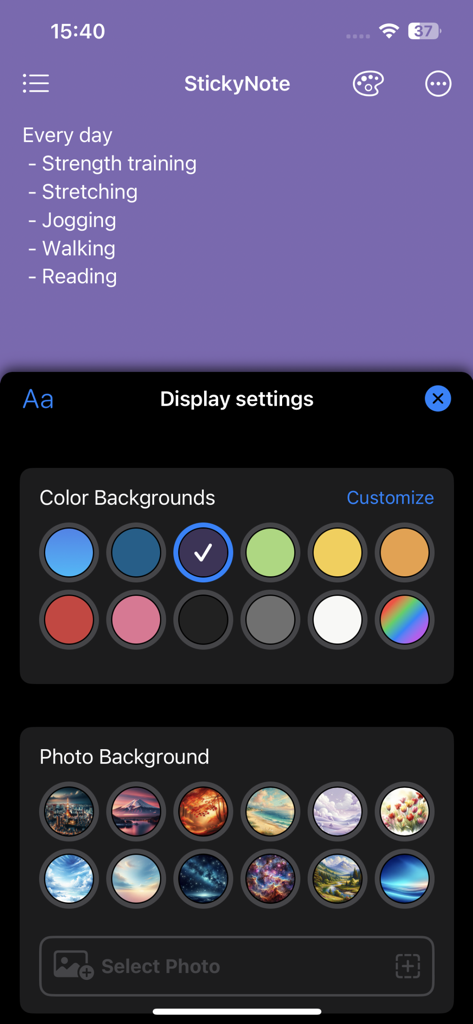
스티키 노트 메모를 개인화하기 위한 배경색 및 사진 옵션을 보여주는 디스플레이 설정 화면
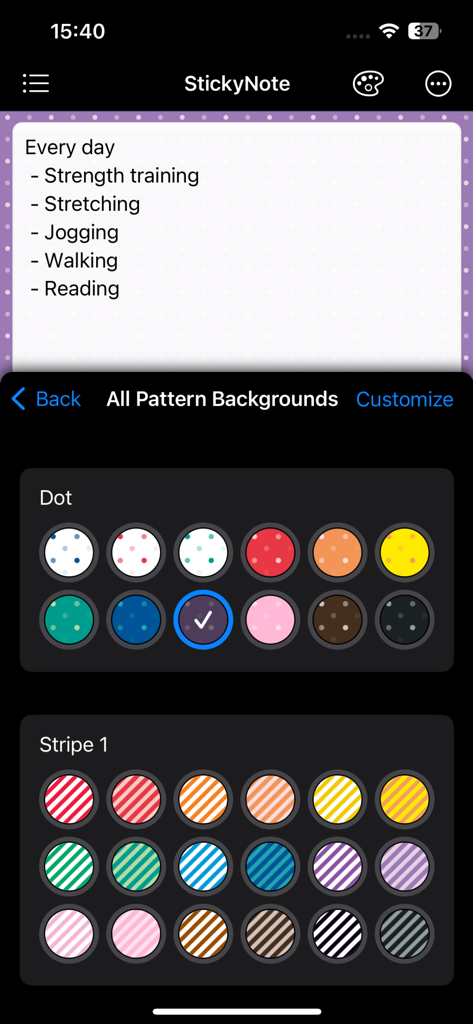
스티키 노트 위젯의 배경을 사용자 지정하기 위한 다양한 색상의 점 및 줄무늬 패턴을 보여주는 메모 앱 인터페이스
설명
Download
비슷한 앱
유사한 기능과 사용자 경험을 가진 앱

Planit - To-Do List & Calendar
BeomJoon Kim

Smile Todo - Time Management
EMMO Corp.

That Shopping List
Markus Liebschner

Lists To do
Thomas Tsopanakis

To Do List Widget
TAPUNIVERSE LLC

Daily Planner & Task Manager
Konstantin Bolgar

DailyTodo - To-Do List & Tasks
SEOLHEE LEE
Table Notes Spreadsheet maker
WEBDIA INC.

Minimal Tabbed ToDo List
App Palette LLC
이 페이지는 앱이나 개발자의 공식 페이지가 아니며, 정보 제공 및 논평을 목적으로 작성된 독립 편집 간행물입니다. 명시적으로 달리 언급되지 않는 한, 해당 앱이나 개발자는 MWM, Apple, Google Play, 앱 퍼블리셔 또는 앱 개발자와 제휴, 보증, 후원, 승인 또는 공식적으로 연결되어 있지 않으며, 이 페이지의 어떤 내용도 해당 앱이 MWM의 서비스를 사용하여 개발되었음을 의미하지 않습니다. 모든 상표, 로고, 스크린샷 및 기타 콘텐츠는 해당 소유자의 자산입니다.