
이 페이지는 앱이나 개발자의 공식 페이지가 아니며, 정보 제공 및 논평을 목적으로 작성된 독립 편집 간행물입니다. 명시적으로 달리 언급되지 않는 한, 해당 앱이나 개발자는 MWM, Apple, Google Play, 앱 퍼블리셔 또는 앱 개발자와 제휴, 보증, 후원, 승인 또는 공식적으로 연결되어 있지 않으며, 이 페이지의 어떤 내용도 해당 앱이 MWM의 서비스를 사용하여 개발되었음을 의미하지 않습니다. 모든 상표, 로고, 스크린샷 및 기타 콘텐츠는 해당 소유자의 자산입니다.

Terminal#
DevOps 및 SysAdmins를 위해 설계된 안전하고 강력한 터미널 인터페이스로 워크플로우를 강화하세요. 모바일 장치에서 직접 원격 서버를 관리하고, 로그를 모니터링하고, 가동 시간을 유지하세요.
다운로드
213K+사용자 평점
총 평가 수
0개발사
카테고리
Developer Tools지원 언어
6최신 버전
1.4크기
6.0 MB출시일
2022년 7월 20일전문가급 서버 관리
Terminal#은 시스템 관리자와 개발자가 데스크톱 없이도 모든 iOS 장치에서 인프라를 완벽하게 제어하고 가동 시간을 보장할 수 있도록 지원합니다.
보안 SSH 프로토콜
서버 자격 증명 및 원격 세션을 항상 보호하여 암호화된 데이터 전송으로 절대적인 개인 정보 보호를 보장합니다.
온콜 유연성
노트북은 두고 오세요. iPhone 또는 iPad에서 직접 Linux 클러스터, 클라우드 인스턴스 또는 Raspberry Pi를 관리하세요.
자주 묻는 질문
에 대해 알아야 할 모든 것 Terminal#
터미널#은 무엇인가요?
터미널#은 모바일 장치에서 직접 서버를 안전하게 관리할 수 있는 SSH 클라이언트입니다. 이동 중에도 효율적인 서버 관리를 위한 강력한 터미널 인터페이스를 제공합니다.
터미널#은 안전한 서버 연결을 어떻게 보장하나요?
터미널#은 SSH 프로토콜을 사용하여 안전한 연결을 보장합니다. 이 프로토콜은 데이터 전송을 암호화하여 서버 관리를 보호하고 민감한 정보를 안전하게 지킵니다.
터미널# 앱으로 여러 서버를 관리할 수 있나요?
예, 터미널# 앱은 여러 서버 관리를 지원합니다. 사용자는 "서버" 화면에서 서버 연결을 추가하고 구성하여 중앙 집중식 관리 허브를 제공합니다.
터미널#에서 새 서버 연결을 어떻게 추가하나요?
사용자는 "서버" 탭으로 이동하여 "서버 추가"를 탭하여 터미널#에서 새 서버 연결을 추가합니다. 그런 다음 사용자 이름, 주소, 포트 및 인증 세부 정보를 입력합니다.
터미널#에서 서버에 사용할 수 있는 인증 옵션은 무엇인가요?
터미널#은 서버 연결에 대한 두 가지 인증 옵션, 즉 비밀번호와 키를 제공합니다. 사용자는 새 서버 항목을 구성할 때 선호하는 보안 방법을 선택합니다.
터미널#에서 터미널 글꼴 크기를 사용자 지정할 수 있나요?
예, 터미널#에서는 터미널 글꼴 크기를 사용자 지정할 수 있습니다. 사용자는 앱의 "설정" 메뉴의 "터미널" 섹션에서 이 설정을 조정하여 가독성을 보장합니다.
터미널#은 모바일 서버 관리 애플리케이션인가요?
예, 터미널#은 모바일 서버 관리 애플리케이션으로 작동합니다. 관리자와 개발자가 모바일 장치에서 직접 서버를 안전하게 제어하여 유연성을 확보할 수 있도록 합니다.
터미널# 구독을 어떻게 취소하나요?
사용자는 iTunes 및 App Store의 Apple ID 설정을 통해 터미널# 구독을 취소합니다. 현재 기간이 종료되기 최소 24시간 전에 자동 갱신을 비활성화할 수 있습니다.
활성 터미널# 구독 취소가 가능한가요?
아니요, 활성 기간 동안에는 터미널# 구독 취소가 불가능합니다. 구독을 구매하면 사용되지 않은 무료 평가판 부분은 소멸됩니다.
터미널# 앱은 다크 테마를 지원하나요?
예, 터미널# 앱은 다크 테마를 지원합니다. 사용자는 앱 "설정" 메뉴의 "테마" 섹션에서 "다크 모드", "라이트 모드" 또는 "시스템 따르기"를 선택합니다.
터미널#의 개인정보처리방침은 어디에서 볼 수 있나요?
터미널#의 개인정보처리방침은 앱 설명에 제공된 링크: https://www.making-app.com/remterm/ 에서 액세스할 수 있습니다. 이는 데이터 처리 관행을 설명합니다.
터미널#은 서버 프로세스 정보를 표시할 수 있나요?
예, 터미널#은 서버 프로세스 정보를 표시합니다. 터미널 인터페이스는 CPU 사용량, 메모리 할당 및 활성 작업과 같은 시스템 세부 정보를 표시하여 모니터링을 용이하게 합니다.
다음 스크린샷과 설명은 앱의 공식 스토어 목록에서 직접 가져온 것이며 앱 개발자의 자산입니다.
앱 스토어
스크린샷
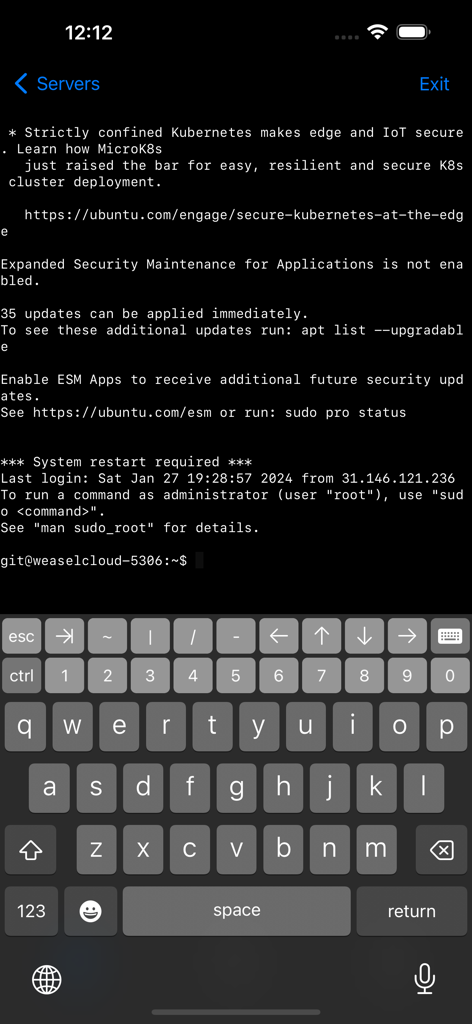
개발자 키보드가 있는 Ubuntu 서버 터미널 세션을 표시하는 모바일 SSH 클라이언트
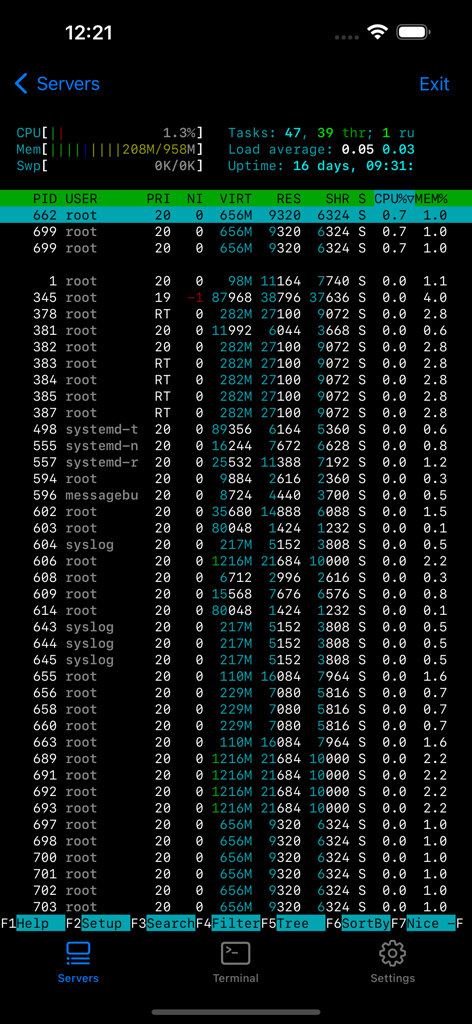
서버 프로세스 모니터링 및 시스템 상태를 보여주는 터미널 인터페이스
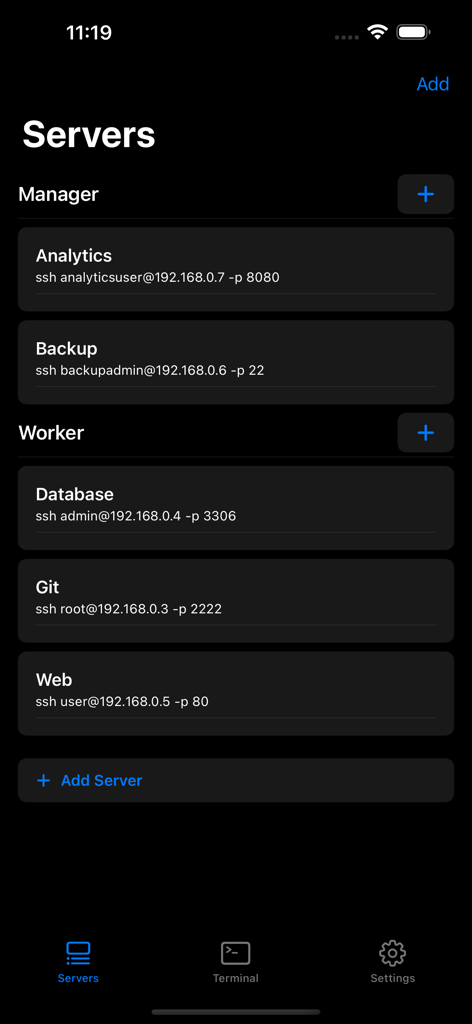
Terminal# 앱의 인터페이스로, 관리자 및 작업자 역할별로 분류된 구성된 SSH 서버 목록을 보여줍니다.
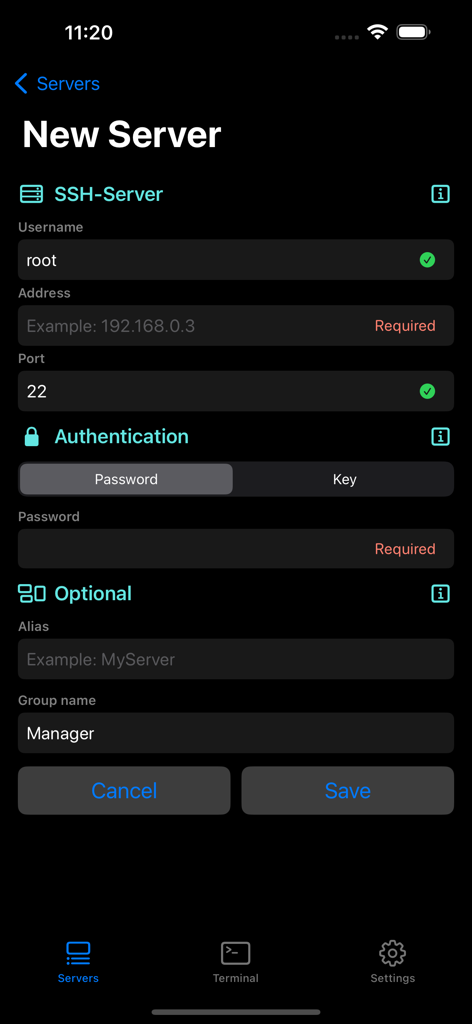
Terminal sharp 앱에서 새 SSH 서버 연결 설정 양식을 보여주는 모바일 화면
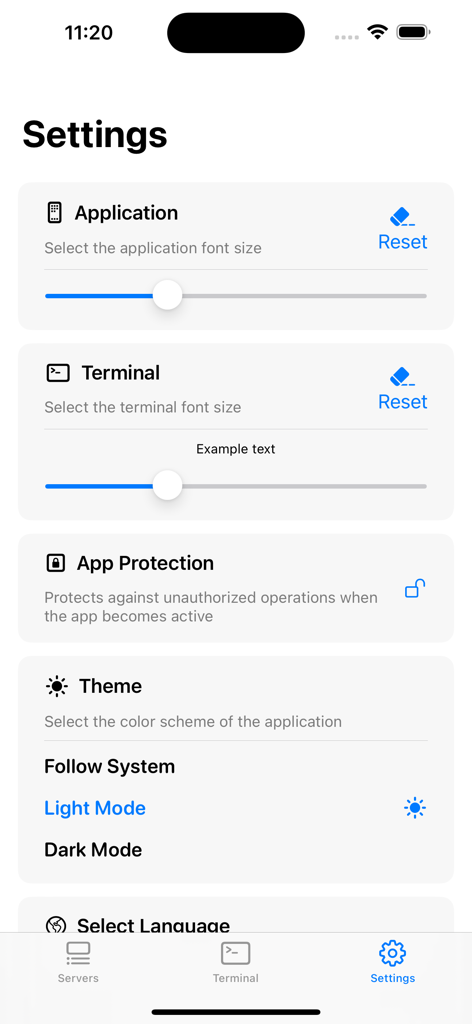
Terminal# 앱의 설정 인터페이스로, 글꼴 크기 및 테마 설정을 표시합니다.
설명
Download
비슷한 앱
유사한 기능과 사용자 경험을 가진 앱

xTerminal - SSH Terminal Shell
婉媚 邵

SSH Client - Secure ShellFish
Anders Borum

FTPManager - FTP, SFTP client
Skyjos Co., Ltd.

FTP Client Pro
Anders Havn

Termux
FREE AI UTILS COMPANY LIMITED
TN5250
Jan Frydendal

Blink Shell, Build & Code
Blink Shell, Inc

Prompt 3
Panic, Inc.

NovaAccess - Tailnet Tools
GalaxNet Ltd.
이 페이지는 앱이나 개발자의 공식 페이지가 아니며, 정보 제공 및 논평을 목적으로 작성된 독립 편집 간행물입니다. 명시적으로 달리 언급되지 않는 한, 해당 앱이나 개발자는 MWM, Apple, Google Play, 앱 퍼블리셔 또는 앱 개발자와 제휴, 보증, 후원, 승인 또는 공식적으로 연결되어 있지 않으며, 이 페이지의 어떤 내용도 해당 앱이 MWM의 서비스를 사용하여 개발되었음을 의미하지 않습니다. 모든 상표, 로고, 스크린샷 및 기타 콘텐츠는 해당 소유자의 자산입니다.