
이 페이지는 앱이나 개발자의 공식 페이지가 아니며, 정보 제공 및 논평을 목적으로 작성된 독립 편집 간행물입니다. 명시적으로 달리 언급되지 않는 한, 해당 앱이나 개발자는 MWM, Apple, Google Play, 앱 퍼블리셔 또는 앱 개발자와 제휴, 보증, 후원, 승인 또는 공식적으로 연결되어 있지 않으며, 이 페이지의 어떤 내용도 해당 앱이 MWM의 서비스를 사용하여 개발되었음을 의미하지 않습니다. 모든 상표, 로고, 스크린샷 및 기타 콘텐츠는 해당 소유자의 자산입니다.


TIM – QQ办公简洁版
이 앱은 당신의 디지털 혼란을 정리하고, 핵심적인 것에 집중하게 만듭니다. TIM은 QQ의 지저분함을 덜어내고, 필요한 도구만 날카롭게 갈고 닦아 당신의 생산성을 무자비하게 끌어올립니다.
다운로드
10M+사용자 평점
총 평가 수
40.9K개발사
카테고리
Business지원 언어
2최신 버전
4.1.0크기
347.0 MB출시일
2017년 3월 1일생산성, 협업 및 보안에 중점을 둔 핵심 기능 검토
TIM – QQ 업무 간소화 버전 앱 분석
텐센트 문서 실시간 공동 편집
이 앱은 여러 사용자가 Word 및 Excel 문서를 동시에 온라인에서 편집할 수 있게 하여, 팀 프로젝트와 문서 작업의 효율성을 크게 향상시킵니다.
강화된 계정 보안 및 기기 관리
이 도구는 계정 보안 기능을 전면적으로 업그레이드하여 다양한 안전 로그인 방식을 지원하고 온라인 기기 관리를 제공함으로써, 사용자의 계정 정보를 전방위적으로 보장합니다.
실시간 음성/영상 회의
사용자가 두 명 또는 여러 명과 실시간으로 음성 및 영상 통화를 할 수 있게 하여, 원격 회의의 부담을 줄이고 원활한 의사소통과 협업을 가능하게 합니다.
할 일 생성 및 관리
이 앱은 사용자가 언제 어디서든 할 일을 만들고 관리할 수 있도록 지원하여, 일상생활, 학습, 업무를 체계적으로 조직하고 생산성을 높이는 데 기여합니다.
파일 클라우드 저장 및 관리
채팅 중 주고받은 파일 및 로컬 파일을 손쉽게 클라우드 드라이브에 저장할 수 있도록 하여, 중요한 파일을 장기간 보관하고 언제든지 조회할 수 있게 합니다.
QQ 계정 로그인 및 친구/메시지 동기화
사용자가 QQ 계정으로 직접 로그인하여 기존의 QQ 친구와 메시지를 그대로 이용할 수 있게 함으로써, 새로운 플랫폼 적응 없이 효율적인 소통을 이어갈 수 있습니다.
일정 생성 및 관리
이 도구는 사용자가 일정을 생성하고 확인할 수 있도록 지원하여, 중요한 일정을 놓치지 않고 체계적인 시간 관리를 통해 효율적인 업무 및 학습 계획을 세울 수 있게 합니다.
QQ 채팅 메시지 다중 기기 동기화
이 앱은 QQ 채팅 메시지를 여러 기기에서 동기화하여 수신할 수 있게 하므로, 사용자가 어떤 기기를 사용하든 끊김 없는 소통을 유지하고 업무 연속성을 확보할 수 있습니다.
문서 템플릿 제공
이 도구는 회의록, 일일 보고서 등 다양한 Word 및 Excel 문서 템플릿을 제공하여, 사용자가 문서 작성을 신속하게 시작하고 팀 협업의 효율성을 높일 수 있도록 돕습니다.
정보 수집 및 편집
사용자가 텍스트, 이미지, 링크를 수집하여 '즐겨찾기'에 추가하고, 필요에 따라 2차 편집까지 가능하게 함으로써 중요한 정보와 자료를 효과적으로 관리할 수 있습니다.
자주 묻는 질문
에 대해 알아야 할 모든 것 TIM – QQ办公简洁版
What is TIM – QQ办公简洁版?
TIM is an instant messaging application developed by Tencent, focused on efficient communication and multi-person collaboration. It features a clean interface and simple operations to enhance office, study, and daily life efficiency.
Does TIM sync with QQ friends and messages?
Yes, TIM supports direct QQ login. It synchronizes your QQ friends and chat messages across multiple devices, facilitating convenient communication.
Can I make group video calls with TIM?
Yes, TIM supports real-time voice and video conference calls for two or more participants, enabling smooth communication for remote meetings without pressure.
How does TIM – QQ办公简洁版 enhance account security?
TIM enhances account security by upgrading its capabilities. This includes supporting more secure login methods, enabling users to manage online devices, and providing a comprehensively improved reporting system.
Does TIM have a to-do list feature?
Yes, TIM includes a dedicated To-Do feature. Users can create and manage their to-do items anytime and anywhere, helping to organize daily tasks and schedules effectively.
Can TIM users collaborate on documents?
Yes, TIM integrates with Tencent Docs. This allows multiple users to simultaneously edit Word and Excel documents online and provides various templates for efficient team collaboration.
Does TIM – QQ办公简洁版 offer a dark mode?
Yes, TIM offers a dark mode interface for users. This feature provides an alternative visual theme, as depicted within the application's user interface.
How do I manage logged-in devices in TIM?
TIM allows users to manage their logged-in devices. From the account security settings, users can view active sessions and transfer files between devices.
Can I customize the font in TIM?
Yes, TIM provides customizable font settings. Users can select various font styles and adjust the font size to their preference, enhancing readability within the app.
What types of files can be saved to the cloud in TIM?
TIM enables users to easily save both chat-received files and local files directly to a cloud drive. This ensures long-term storage and convenient access at any time.
다음 스크린샷과 설명은 앱의 공식 스토어 목록에서 직접 가져온 것이며 앱 개발자의 자산입니다.
앱 스토어
스크린샷

사용자는 간결하게 정렬된 메시지 목록과 상단의 편리한 검색 바를 통해 효율적인 소통 경험을 할 수 있습니다.
깔끔한 메시지 화면
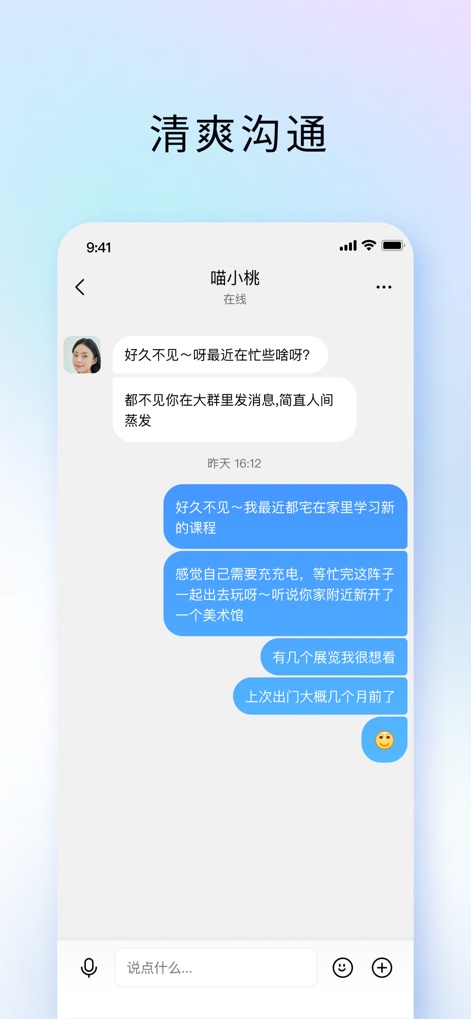
이 앱은 사용자 간의 대화 내용을 깔끔한 말풍선 형태로 보여주며, 하단에는 메시지 입력 필드와 이모지, 추가 기능 버튼이 명확히 배치되어 있습니다.
명료한 대화 경험
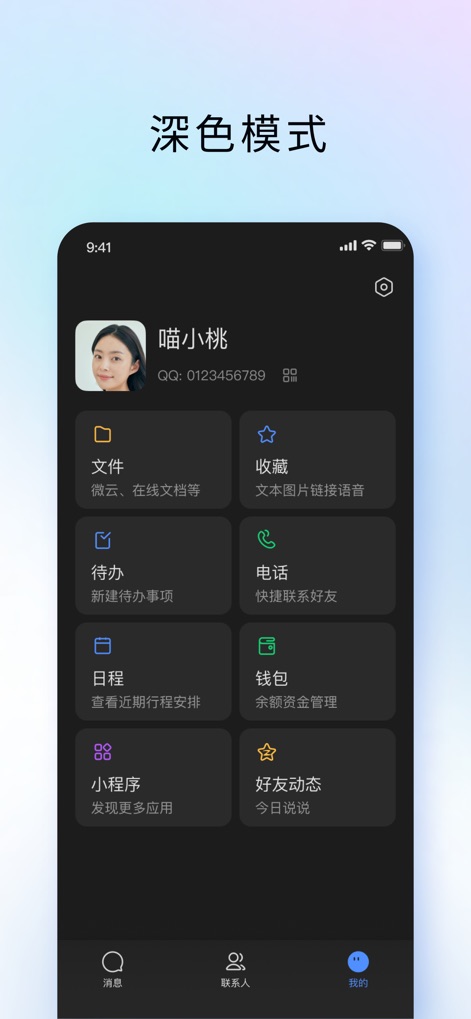
이 도구는 눈의 피로를 줄여주는 다크 모드를 제공하며, 파일, 할 일, 캘린더와 같은 다양한 기능 모듈이 한눈에 보기 쉽게 구성되어 있습니다.
효율적인 다크 모드
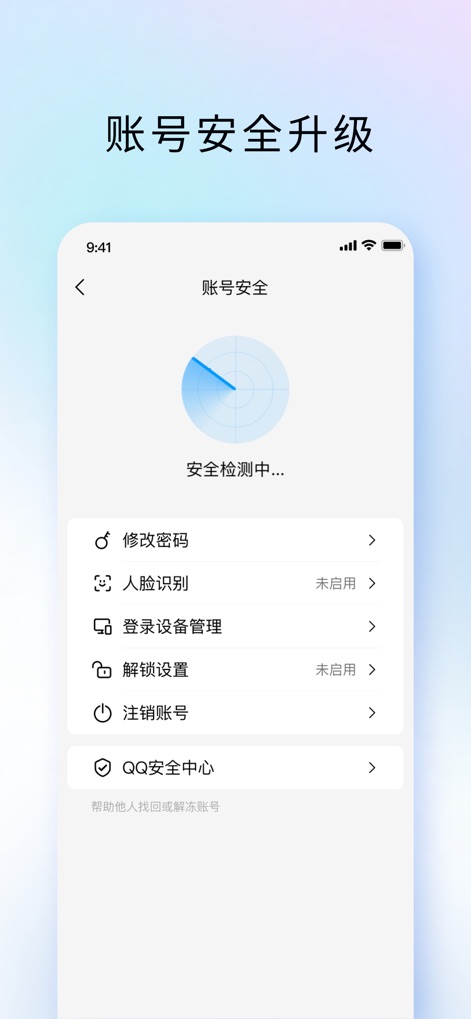
이 앱은 사용자 계정의 보안 강화를 위해 비밀번호 변경 및 안면 인식과 같은 다양한 보안 설정 옵션을 제공하며, 현재 진행 중인 보안 검사 애니메이션을 시각적으로 보여줍니다.
강력한 계정 보안
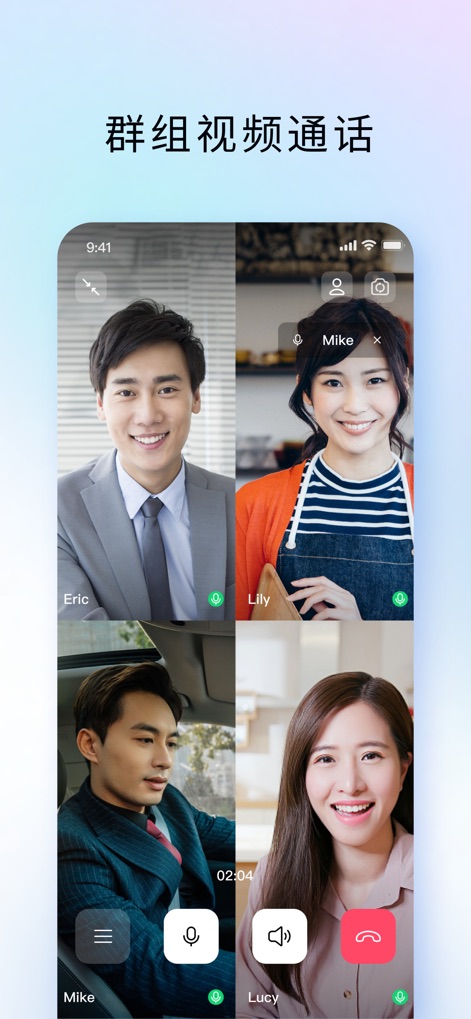
사용자는 여러 명의 참가자와 동시에 화상 통화를 진행할 수 있으며, 각 참가자의 얼굴이 명확하게 분할된 화면에 나타나고 하단에는 음소거 및 종료 버튼이 직관적으로 배치되어 있습니다.
원활한 그룹 화상 통화

이 도구는 사용자가 현재 로그인된 기기 목록을 확인하고, 파일 전송 버튼과 함께 다른 기기로 쉽게 파일을 보내거나 내보낼 수 있도록 지원합니다.
편리한 기기 간 파일 전송
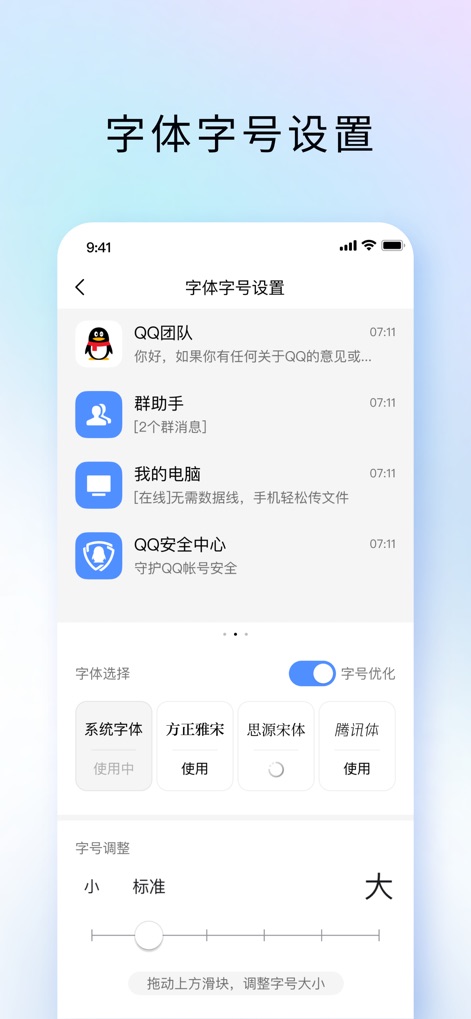
사용자는 시스템 글꼴, 특정 글꼴 옵션을 선택하여 인터페이스의 가독성을 높일 수 있으며, 직관적인 슬라이더를 사용하여 글자 크기를 세밀하게 조정할 수 있습니다.
맞춤형 글꼴 설정
설명
Download
비슷한 앱
유사한 기능과 사용자 경험을 가진 앱

GoTo
GoTo Group, Inc.

Lark - Team Collaboration
LARK TECHNOLOGIES PTE. LTD.

RingCentral
RingCentral, Inc

MTS Link
VEBINAR TEKHNOLOGII, OOO

Pronto Team Communication
Hit Labs, Inc.

Zoho Cliq - Team Communication
Zoho Corporation

Microsoft Teams
Microsoft Corporation

Zoom Workplace
Zoom Communications, Inc.

Google Meet
Google LLC
이 페이지는 앱이나 개발자의 공식 페이지가 아니며, 정보 제공 및 논평을 목적으로 작성된 독립 편집 간행물입니다. 명시적으로 달리 언급되지 않는 한, 해당 앱이나 개발자는 MWM, Apple, Google Play, 앱 퍼블리셔 또는 앱 개발자와 제휴, 보증, 후원, 승인 또는 공식적으로 연결되어 있지 않으며, 이 페이지의 어떤 내용도 해당 앱이 MWM의 서비스를 사용하여 개발되었음을 의미하지 않습니다. 모든 상표, 로고, 스크린샷 및 기타 콘텐츠는 해당 소유자의 자산입니다.