TNMaker - Multiple Choice Test

TNMaker - Multiple Choice Test

다운로드: App Store
로고: TNMaker - Multiple Choice Test

TNMaker - 즉각적인 객관식 시험 채점

스마트폰을 휴대용 스캔트론으로 바꾸세요. 답안지를 몇 초 안에 스캔하고, 수동 채점 오류를 없애고, 현대 교육자를 위한 최고의 도구로 주말을 되찾으세요.

개발사

Vinh Le

카테고리

Education

다운로드

74K+

사용자 평점

4.2/5

총 평가 수

1K+

지원 언어

16

한눈에 보는 채점

이 인터페이스를 사용하는 74K+ 명의 사용자.

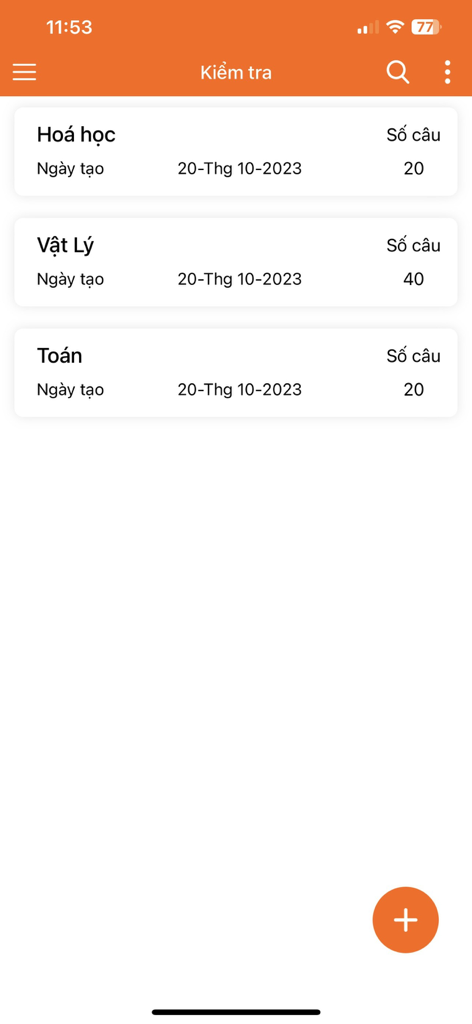
화학, 물리, 수학에 대한 객관식 시험 목록과 해당 문항 수를 보여주는 모바일 앱 화면
화학, 물리, 수학에 대한 객관식 시험 목록과 해당 문항 수를 보여주는 모바일 앱 화면

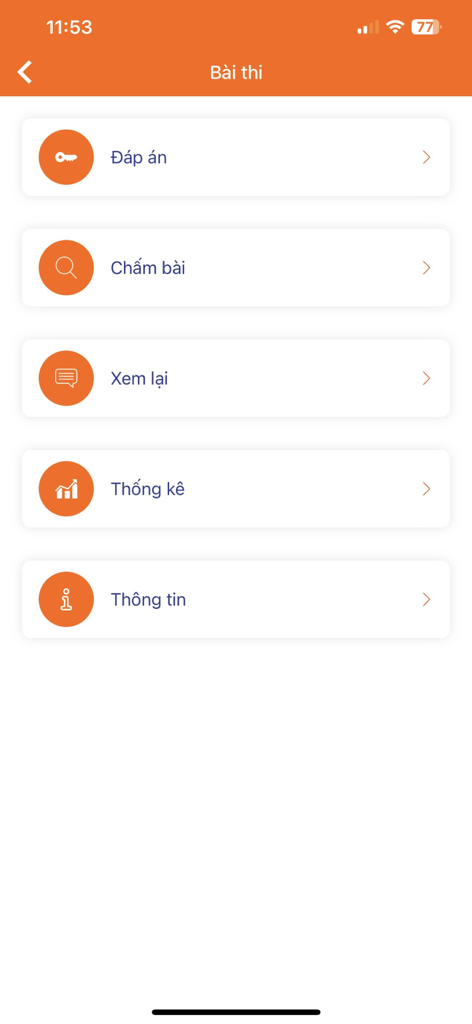
답안 키 채점 검토 및 통계 옵션을 보여주는 TNMaker 앱의 메인 메뉴
답안 키 채점 검토 및 통계 옵션을 보여주는 TNMaker 앱의 메인 메뉴

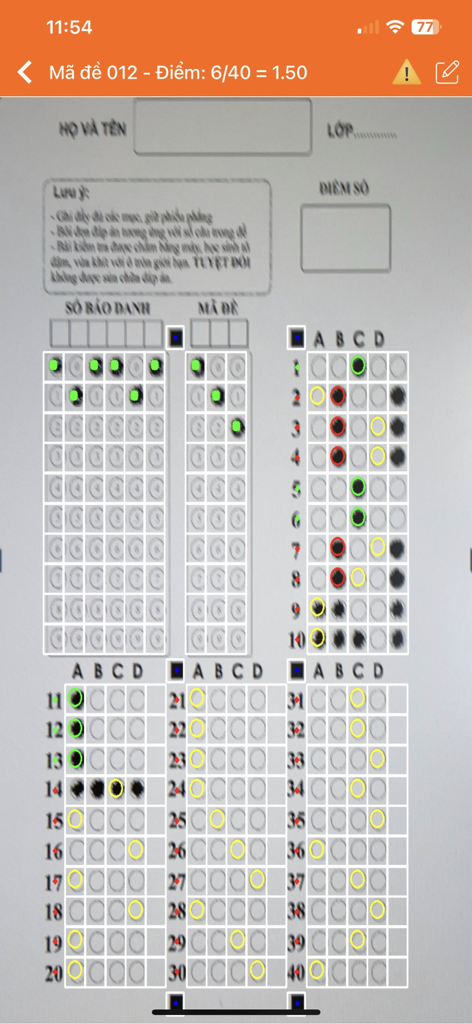
객관식 답안지 시험을 스캔하고 자동으로 채점하는 TNMaker 앱을 사용하는 스마트폰 인터페이스.
객관식 답안지 시험을 스캔하고 자동으로 채점하는 TNMaker 앱을 사용하는 스마트폰 인터페이스.

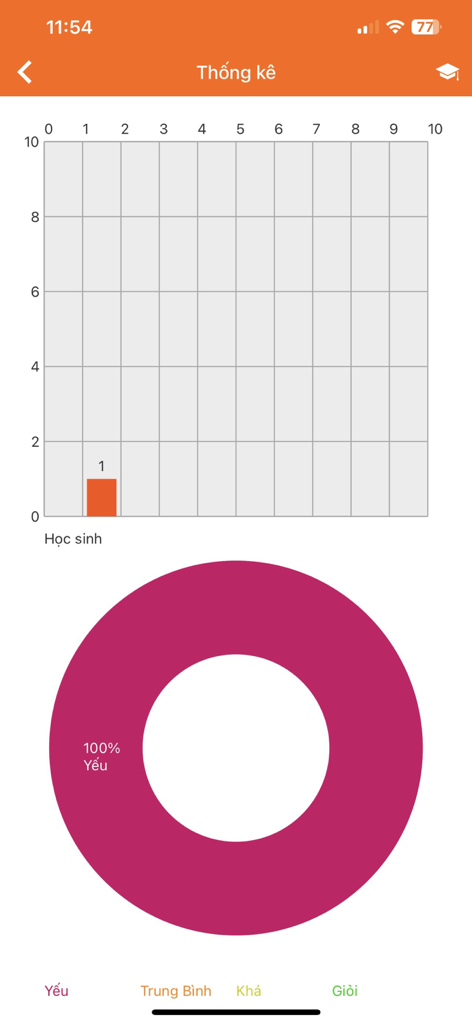
학생 점수 막대 차트와 성과 도넛 차트를 표시하는 TNMaker 앱 통계 화면.
학생 점수 막대 차트와 성과 도넛 차트를 표시하는 TNMaker 앱 통계 화면.

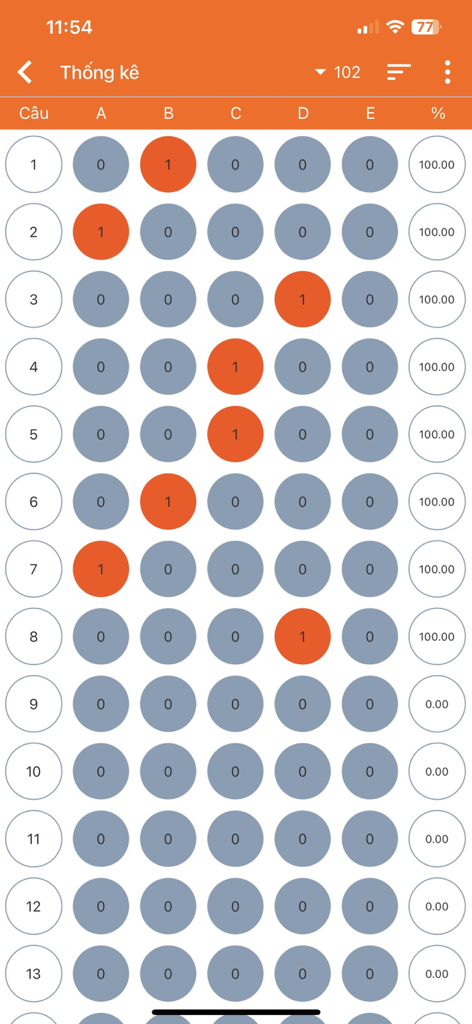
시험에 대한 객관식 답안 버블과 백분율 점수를 보여주는 디지털 보고서 보기

시험에 대한 객관식 답안 버블과 백분율 점수를 보여주는 디지털 보고서 보기

즉각적인 채점으로 시간을 되찾으세요

이 앱을 돋보이게 하는 도구, 74K+ 명의 사용자가 선택.

번개처럼 빠른 카메라 스캔

몇 분 안에 전체 학급을 채점하세요. 카메라를 답안지에 비추기만 하면 즉시 점수를 얻을 수 있으므로 비싸고 부피가 큰 스캔트론 하드웨어가 필요하지 않습니다.

🎯

완전한 시험 맞춤 설정

수업 계획에 맞는 시험을 디자인하세요. 20, 40 또는 50개 문항에 대한 답안 키를 사용자 지정하고 채점 기준에 맞게 특정 점수 값을 할당하세요.

📊

즉각적인 데이터 내보내기 및 검토

종이 더미를 집으로 가져가는 것을 멈추세요. 학생 성과를 디지털 방식으로 검토하고 Gmail, Zalo 또는 Facebook을 통해 즉시 결과를 공유하여 기록을 정리하세요.

앱 소개

에 대해 알아야 할 모든 것 TNMaker - Multiple Choice Test.

설명

Functions: + TNMaker will be very helpful for teachers to mark for multiple choice test, rather than using their hands or using a dedicated scanner. + Just use the teacher's phone to mark the students' multiple choice test quickly. + The app allows reviewing, sorting, and sharing right away with facebook, zalo, gmail... +The application allows you to customize the number of sentences and give the correct score for each sentence. Usage Guide: - Notice : App need using camera permission and storage permission to read data. - First : You link to https://tnmaker.net or Setting-> AnswerPaper to download the answer sheets (support for sample 50), next you should print in format or scale (small, large). - Key: Used to scan a key. This is the correct answer to compare when scanning. You should fill in the circle and choose only a answer for each sentence. If you are not satisfied, you should rescan or save to complete the your key.You can review your key in Review-> Menu-> Key. - Scan: Use to scan your answer, you should move the camera to the 4 corners of the answer sheets, the red square will blink.The application will detect 4 corners and find the correct answer, the correct answer will be green , the incorrect answer will be red. Notice your will only select a answer, the application will view the correct number of sentences for each sentence and the score you get. Next you should click Back to scan the next answer sheets, if you do not find the square, you should move your camera and adjust them. - Review: You can review to your key or answer, click on the item and review your answer, you can delete and share it with facebook, zalo, gmail by hold in the item. Besides, you can select the menu and have some options, you can sort the list and share it to facebook...It is helpful, your list is too long, you should delete all of them and start a new multiple choice test. - Setting: Support for you with some options, you can choose the number of sentences to your score calculator, there are 20, 40, 50 .Easy to get answer sheets on your phone and watch the video tutorial. - Feedback: We are always trying to complete the application. Any feedback, you can send an email to tracnghiemmaker@gmail.com. Your comments will help more and get better. Email: tracnghiemmaker@gmail.com Website: https://tnmaker.net Privacy Policy: https://tnmaker.net/privacy-policy

최신 버전

4.43.89

크기

19.6 MB

출시일

2017년 10월 13일

수동 채점은 이제 그만—스캔 시작

주말을 되찾은 수천 명의 교육자와 함께하세요. 지금 TNMaker를 다운로드하고 휴대폰을 강력한 휴대용 채점 스테이션으로 바꾸세요.

다운로드: App Store

App information, icons, screenshots, and descriptions displayed on this page are sourced from the Apple App Store and are the property of their respective developers. Download estimates and rankings are based on MWM's proprietary models and may not reflect actual figures. This page is provided for informational and analytical purposes only.

Believe this page infringes your intellectual property? File a dispute