
이 페이지는 앱이나 개발자의 공식 페이지가 아니며, 정보 제공 및 논평을 목적으로 작성된 독립 편집 간행물입니다. 명시적으로 달리 언급되지 않는 한, 해당 앱이나 개발자는 MWM, Apple, Google Play, 앱 퍼블리셔 또는 앱 개발자와 제휴, 보증, 후원, 승인 또는 공식적으로 연결되어 있지 않으며, 이 페이지의 어떤 내용도 해당 앱이 MWM의 서비스를 사용하여 개발되었음을 의미하지 않습니다. 모든 상표, 로고, 스크린샷 및 기타 콘텐츠는 해당 소유자의 자산입니다.


Trace Table - Light Box
이 앱은 당신의 그림자를 지배하게 합니다. 당신의 예술적 의도가 디지털 영역을 통해 현실이 되는 것을 확인하십시오.
다운로드
1M+사용자 평점
총 평가 수
17.6K개발사
카테고리
Photo & Video지원 언어
13최신 버전
2.6크기
168.3 MB출시일
2017년 3월 28일혁신적인 트레이싱 및 디지털 아트 도구
Trace Table - Light Box 앱 주요 기능 분석
AR 이미지 프로젝터
이 앱은 사용자가 장치를 캔버스 위에 배치하여 이미지와 캔버스를 화면에서 직접 볼 수 있는 AR 이미지 프로젝터 기능을 제공합니다. 이를 통해 이전과는 비교할 수 없는 손쉬운 트레이싱 경험을 할 수 있습니다.
디지털 페인팅 기능
이 도구는 브러시, 연필 등 다양한 도구를 선택하여 디지털 페인팅을 할 수 있는 기능을 갖추고 있습니다. 사용자는 창의적인 아이디어를 디지털 캔버스 위에서 구현하여 걸작으로 만들 수 있습니다.
화면 잠금 기능
이 앱은 트레이싱 중 손에 의해 그림이 실수로 움직이지 않도록 화면을 잠글 수 있는 기능을 제공합니다. 이를 통해 사용자는 안정적으로 작업에 집중할 수 있습니다.
최대 화면 밝기 관리
이 앱은 화면 밝기를 최대로 관리하여 선을 선명하게 볼 수 있도록 돕습니다. 이는 트레이싱 작업의 효율성을 높여줍니다.
사진 또는 카메라에서 작품 트레이싱
이 앱은 사용자가 사진이나 카메라를 통해 자신의 그림 및 작품을 쉽게 트레이싱할 수 있도록 지원합니다. 다양한 자료를 활용하여 창의적인 작업을 할 수 있습니다.
윤곽선 모드
이 도구는 윤곽선 모드를 제공하여 사진의 선을 더 선명하게 볼 수 있도록 조정합니다. 이를 통해 사용자는 보다 정확하게 트레이싱 작업을 수행할 수 있습니다.
작품 크기 조정, 이동 및 회전
이 앱은 사용자가 작품의 크기를 조정하고, 이동하며, 회전시킬 수 있는 기능을 갖추고 있습니다. 이는 트레이싱을 시작하기 전에 이미지의 위치와 크기를 완벽하게 맞추는 데 도움을 줍니다.
작품 좌우 반전
이 도구는 사용자가 작품을 좌우 반전할 수 있는 기능을 제공합니다. 이는 역방향 트레이싱이나 전사 작업에 유용하게 활용될 수 있습니다.
자주 묻는 질문
에 대해 알아야 할 모든 것 Trace Table - Light Box
What is Trace Table - Light Box?
Trace Table - Light Box is an app that functions as a light box for tracing drawings, photos, and various artworks. It helps users trace by maximizing screen brightness and locking artwork in place.
Can I use my own photos for tracing in Trace Table?
Yes, Trace Table allows users to trace artwork directly from their photos or camera. The app also offers options to resize, move, and rotate the imported artwork.
Does Trace Table offer an augmented reality (AR) feature for tracing?
Yes, Trace Table includes an AR Image Projector. This feature allows users to position their device above a canvas and view both the image and canvas directly on the screen for tracing.
Can I draw directly within the Trace Table app?
Yes, Trace Table features a Digital Paint function. Users can unleash creativity with various digital tools like brushes and pencils on a digital canvas within the app.
How does the Outline Mode work in Trace Table?
Outline Mode in Trace Table easily adjusts photos to help users see lines more clearly for tracing. This simplifies the process of creating clear line art from existing images.
Does Trace Table offer drawing lessons or guides?
Yes, Trace Table provides drawing lessons. These lessons present layered images to guide users step-by-step through the process of creating various drawings.
Is a subscription required to access premium features in Trace Table?
Yes, subscribing is necessary to access premium app features in Trace Table. Subscriptions are available in weekly, monthly, and yearly lengths.
How do I manage my Trace Table subscription?
Users can manage their Trace Table subscriptions and turn off auto-renewal from their iTunes Account Settings after purchase. Auto-renewal must be turned off 24 hours before the current period ends.
Does Trace Table prevent accidental screen movement during tracing?
Yes, Trace Table allows users to lock their artwork in place. This feature prevents accidental movement from a hand while tracing, ensuring stability and precision.
What types of art can I trace with Trace Table - Light Box?
Trace Table - Light Box supports tracing various art forms including drawings, photos, tattoos, flash, lettering, inking, line work, comics, and homework. It offers versatility for artists.
다음 스크린샷과 설명은 앱의 공식 스토어 목록에서 직접 가져온 것이며 앱 개발자의 자산입니다.
앱 스토어
스크린샷

사용자는 이 앱에서 휴대폰 화면을 라이트 박스처럼 활용하여 이미지를 따라 그릴 수 있으며, 잠금 및 편집 기능을 통해 작업 흐름을 제어합니다.
라이트 박스 드로잉

이 도구는 AR 프로젝터를 통해 이미지를 실제 캔버스에 투영하여 따라 그릴 수 있게 하며, 투명도 조절 슬라이더로 사용자가 원하는 선명도를 설정합니다.
AR 이미지 프로젝터
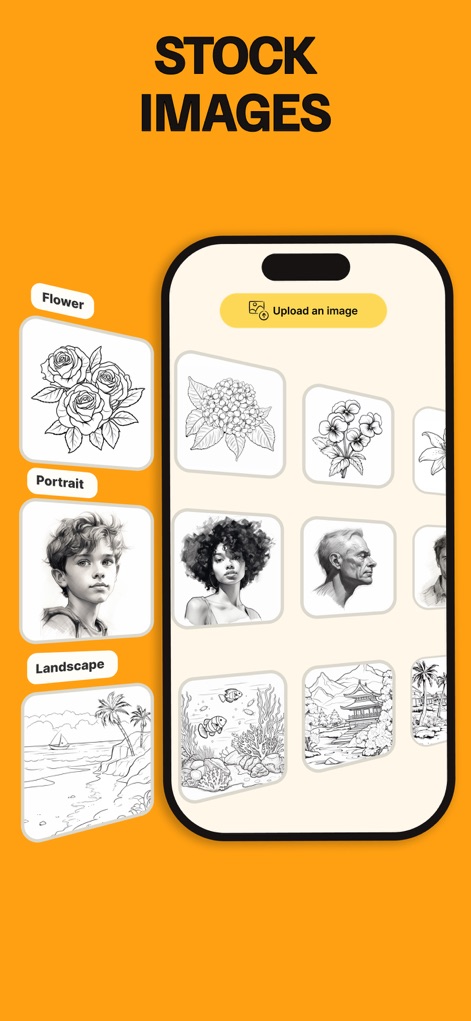
사용자는 이 앱에서 장미 꽃과 같은 풍부한 스톡 이미지 컬렉션을 탐색하며 영감을 얻거나, 직접 이미지를 업로드하여 자신만의 드로잉을 시작할 수 있습니다.
풍부한 스톡 이미지
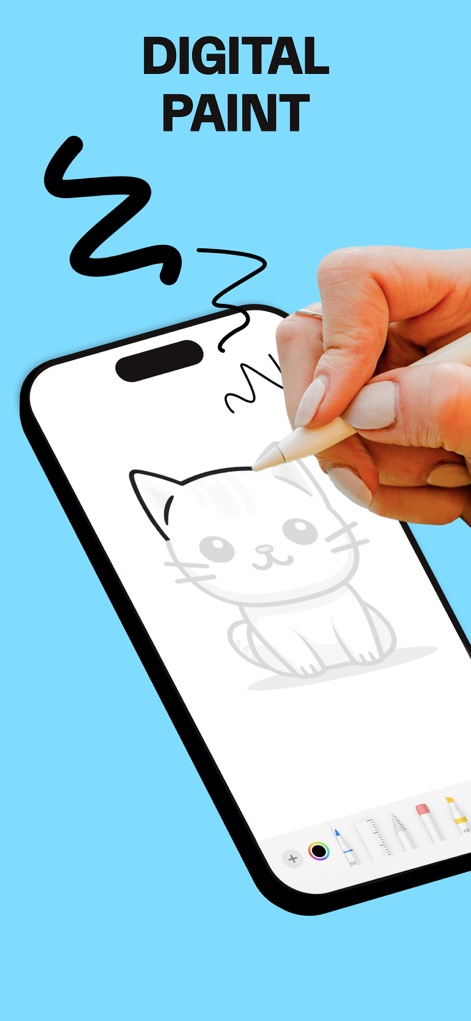
사용자는 이 앱의 브러시와 같은 다양한 디지털 페인팅 도구를 활용하여 귀여운 고양이 캐릭터를 직접 그리는 등 창의력을 자유롭게 발휘할 수 있습니다.
디지털 페인팅
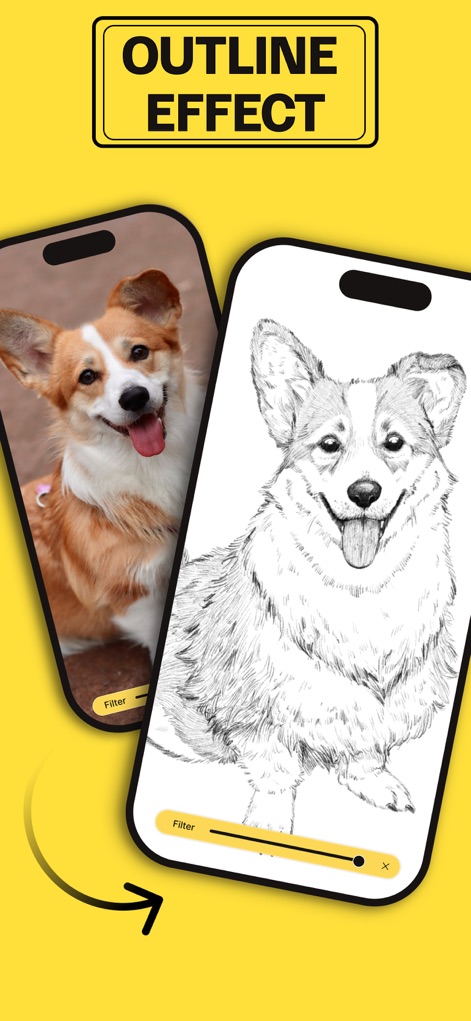
이 앱은 원본 코기 사진을 드로잉에 용이한 윤곽선 그림으로 손쉽게 변환하며, 필터 및 슬라이더를 통해 사용자가 세부 표현을 조절할 수 있습니다.
윤곽선 효과

사용자는 이 앱에서 요정 그림처럼 복잡한 대상을 단계별 드로잉 레슨을 통해 익힐 수 있으며, 기초 형태부터 세부 윤곽까지 체계적으로 배울 수 있습니다.
단계별 드로잉 레슨
설명
Download
비슷한 앱
유사한 기능과 사용자 경험을 가진 앱

AR Drawing Paint Sketch Trace
DROIDFUN LIMITED

Camera Lucida™: AR Drawing
Big Idea Design LLC

AR Drawing Sketch App: ArtEasy
SMDA GROUP SP Z O O SP KOMANDYTOWA

PicTrace: AR Drawing & Sketch
ANDROID VIETNAM TECHNOLOGY CORPORATION

AR Draw: Sketching & Painting
EIGEN SOFTWARE LIMITED

AR Drawing How to Draw Sketch
Magomed Dzhamalov

Da Vinci Eye: AR Trace & Draw
Da Vinci Eye LLC

AR Drawing - AR Sketch
Ketanbhai Khokhani

HEY CLAY®
HEY CLAY LTD
이 페이지는 앱이나 개발자의 공식 페이지가 아니며, 정보 제공 및 논평을 목적으로 작성된 독립 편집 간행물입니다. 명시적으로 달리 언급되지 않는 한, 해당 앱이나 개발자는 MWM, Apple, Google Play, 앱 퍼블리셔 또는 앱 개발자와 제휴, 보증, 후원, 승인 또는 공식적으로 연결되어 있지 않으며, 이 페이지의 어떤 내용도 해당 앱이 MWM의 서비스를 사용하여 개발되었음을 의미하지 않습니다. 모든 상표, 로고, 스크린샷 및 기타 콘텐츠는 해당 소유자의 자산입니다.