TRUE MANAGER™ AIR
TRUE MANAGER™ AIR
다운로드: App Store

이 페이지는 앱이나 개발자의 공식 페이지가 아니며, 정보 제공 및 논평을 목적으로 작성된 독립 편집 간행물입니다. 명시적으로 달리 언급되지 않는 한, 해당 앱이나 개발자는 MWM, Apple, Google Play, 앱 퍼블리셔 또는 앱 개발자와 제휴, 보증, 후원, 승인 또는 공식적으로 연결되어 있지 않으며, 이 페이지의 어떤 내용도 해당 앱이 MWM의 서비스를 사용하여 개발되었음을 의미하지 않습니다. 모든 상표, 로고, 스크린샷 및 기타 콘텐츠는 해당 소유자의 자산입니다.

로고: TRUE MANAGER™ AIR
다운로드: App Store

TRUE MANAGER™ AIR

혈당 데이터를 자동으로 동기화하고, 간단한 색상 코딩 차트로 추세를 시각화하고, 안심하고 의사나 가족에게 즉시 전문 보고서를 공유하세요.

주요 수치

다운로드

213K+

사용자 평점

2.1/5

총 평가 수

400

개발사

Trividia Health, Inc.

카테고리

Medical

지원 언어

2

최신 버전

2.1.7

크기

13.6 MB

출시일

2015년 6월 22일
기능

혈당 여정 관리

혈당 수치를 명확하고 실행 가능한 인사이트로 바꾸세요. TRUE 측정기를 연결하고 일상적인 당뇨병 관리를 쉽게 단순화하세요.

즉각적인 시각적 명확성

몇 초 안에 상태를 파악하세요. 모든 결과는 ADA 지침에 따라 색상 코딩되어 목표 범위 내에 있는지 즉시 확인할 수 있습니다.

전문적인 진행 보고서

6가지 포괄적인 보고서 유형 중에서 선택하여 추세를 파악하고 전문적인 PDF 요약을 의료 제공업체와 직접 공유하세요.

다음 스크린샷과 설명은 앱의 공식 스토어 목록에서 직접 가져온 것이며 앱 개발자의 자산입니다.

앱 스토어

스크린샷
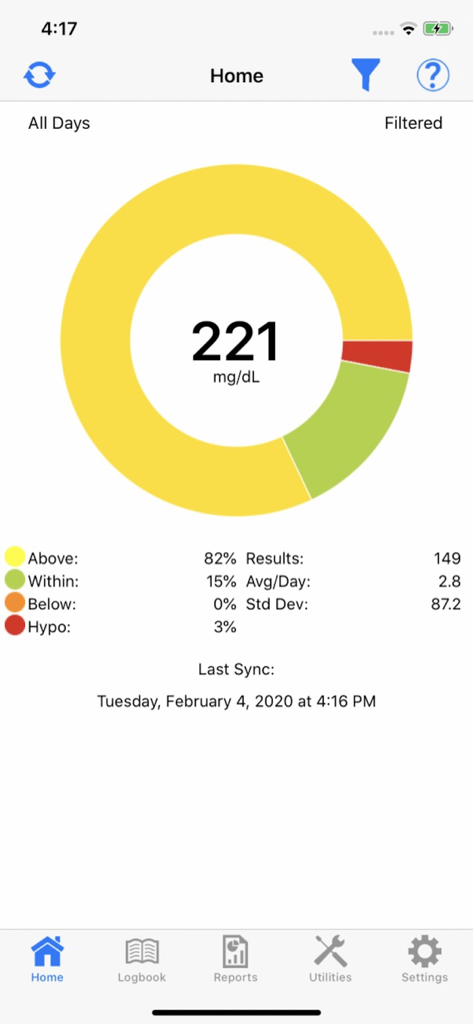
TRUE MANAGER™ AIR - TRUE MANAGER AIR 앱 대시보드에 색상 코딩된 혈당 결과 및 혈당 수치가 표시됨
TRUE MANAGER AIR 앱 대시보드에 색상 코딩된 혈당 결과 및 혈당 수치가 표시됨

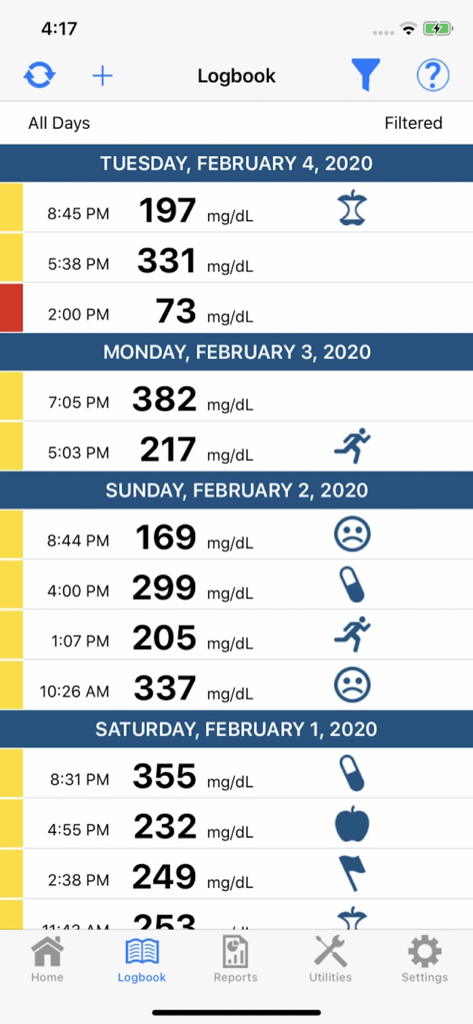
TRUE MANAGER™ AIR - 색상 코딩된 측정값과 활동 아이콘이 있는 일일 혈당 기록부를 표시하는 모바일 앱 화면
색상 코딩된 측정값과 활동 아이콘이 있는 일일 혈당 기록부를 표시하는 모바일 앱 화면

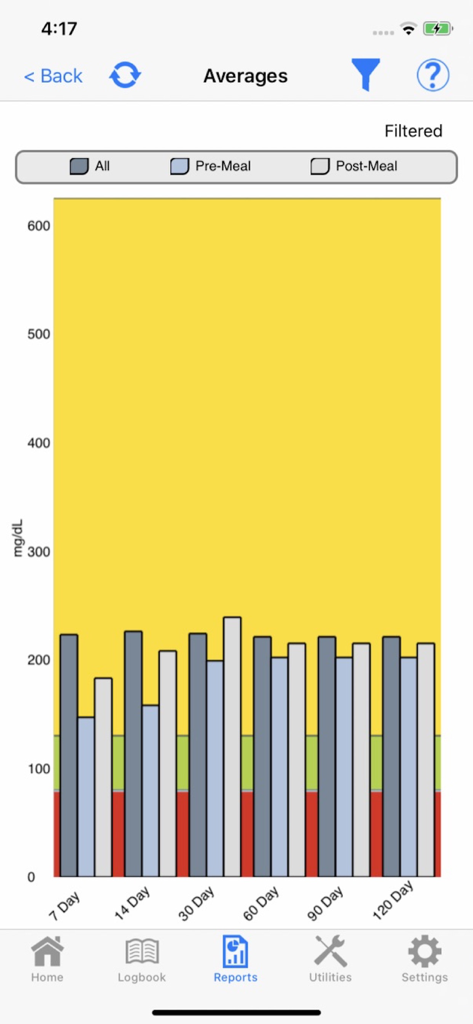
TRUE MANAGER™ AIR - 색상 코딩된 건강 범위와 함께 시간 경과에 따른 혈당 평균을 보여주는 TRUE MANAGER AIR 앱의 막대 차트
색상 코딩된 건강 범위와 함께 시간 경과에 따른 혈당 평균을 보여주는 TRUE MANAGER AIR 앱의 막대 차트

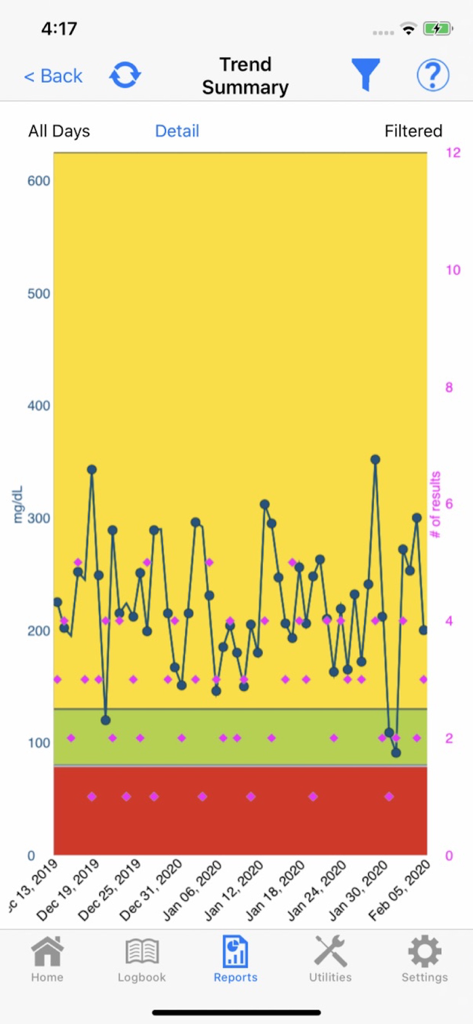
TRUE MANAGER™ AIR - 색상 코딩된 노란색, 녹색, 빨간색 영역이 있는 시간 경과에 따른 혈당 추세를 보여주는 선 그래프
색상 코딩된 노란색, 녹색, 빨간색 영역이 있는 시간 경과에 따른 혈당 추세를 보여주는 선 그래프

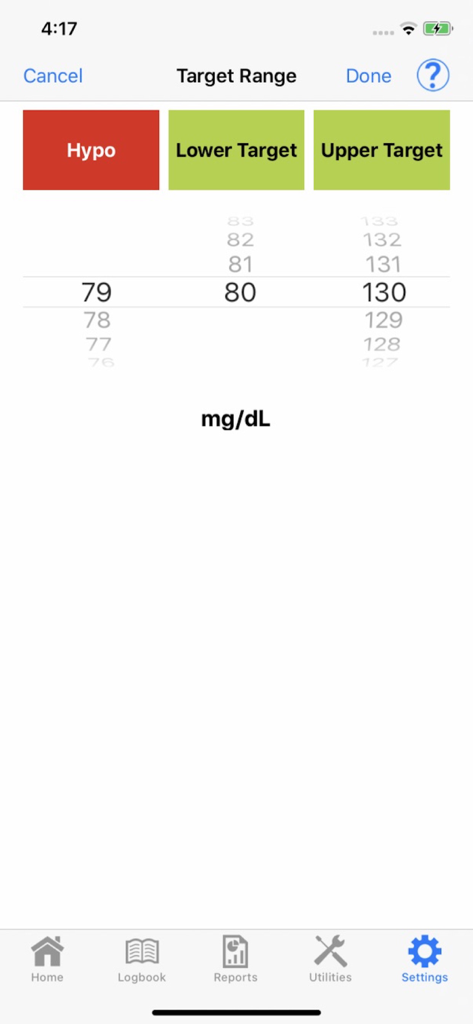
TRUE MANAGER™ AIR - TRUE MANAGER AIR 의료 앱에서 혈당 목표 범위 사용자 지정 인터페이스.

TRUE MANAGER AIR 의료 앱에서 혈당 목표 범위 사용자 지정 인터페이스.

설명

With TRUE MANAGER™ AIR Mobile App and a "TRUE" branded blood glucose wireless meter, you can track data to get valuable insights that link daily activity with your glucose results. Easy-to-read charts, graphs and customizable notes make understanding data actionable. Also, share data with healthcare providers, friends, and family to help manage diabetes. Features: o Simple to navigate logbook shows date, time, blood glucose results and event tag from meter o Additional event tags may be added to results in addition to personal notes o Each blood glucose result is color coded to indicate if you are within acceptable range. You may customize the ranges given to you by your healthcare professional or use the default setting which are the established 2015 American Diabetes Association guideline target ranges (mg/dL): YELLOW = Above Normal, greater than 130 GREEN = Normal, 80-130 RED = Hypoglycemic, less than 70 NOTE: A doctor or healthcare professional determines how often to test and what the target ranges are for blood glucose results. o Six Reports provide total insights : ▪ Average Report - View 7, 14, 30, 60, 90 and 120 day averages to review general trending and spot areas for improvement. ▪ Conformance Report - This report displays pre- and post- meal glucose results in a pie chart format. Each pie chart is divided into color coded sections identifying the percentage of glucose results that are above, within or below targeted ranges for each testing time. ▪ Glucose Trend Report - This graph can be customized by target range, date and time to reveal patterns and to quickly identify glucose results that are too low or too high. ▪ Logbook Report - Review all glucose results, including control results, over a specific time period in chronological order. ▪ Modal Day/Week Report - View all results in specific time blocks per day or week. Color coded for easy review of glucose results within, above or below customized target ranges. o Share data via PDF through email with healthcare providers, friends and family. o Help screens are available on most pages if assistance is needed. Important Information: • TRUE MANAGER AIR App is not for diagnostic use. • NEVER change your treatment plan without consulting a Doctor or Healthcare Professional. • TRUE MANAGER AIR App is for use with only specified supported mobile devices. Go to www.trividiahealth.com/truemanagerair for a list of compatible mobile devices. • This product is intended for single patient use to support better diabetes management without providing specific treatment or treatment suggestions. • Refer to your "TRUE" branded wireless glucose meter Owner’s Booklet for pairing instructions.

Download

다운로드: App Store

이 페이지는 앱이나 개발자의 공식 페이지가 아니며, 정보 제공 및 논평을 목적으로 작성된 독립 편집 간행물입니다. 명시적으로 달리 언급되지 않는 한, 해당 앱이나 개발자는 MWM, Apple, Google Play, 앱 퍼블리셔 또는 앱 개발자와 제휴, 보증, 후원, 승인 또는 공식적으로 연결되어 있지 않으며, 이 페이지의 어떤 내용도 해당 앱이 MWM의 서비스를 사용하여 개발되었음을 의미하지 않습니다. 모든 상표, 로고, 스크린샷 및 기타 콘텐츠는 해당 소유자의 자산입니다.








