Video Editor : Video Maker
다운로드: App Store

이 페이지는 앱이나 개발자의 공식 페이지가 아니며, 정보 제공 및 논평을 목적으로 작성된 독립 편집 간행물입니다. 명시적으로 달리 언급되지 않는 한, 해당 앱이나 개발자는 MWM, Apple, Google Play, 앱 퍼블리셔 또는 앱 개발자와 제휴, 보증, 후원, 승인 또는 공식적으로 연결되어 있지 않으며, 이 페이지의 어떤 내용도 해당 앱이 MWM의 서비스를 사용하여 개발되었음을 의미하지 않습니다. 모든 상표, 로고, 스크린샷 및 기타 콘텐츠는 해당 소유자의 자산입니다.


로고: Video Editor : Video Maker
다운로드: App Store

Video Editor : Video Maker

정밀 편집, 500개 이상의 감성 스티커, 영화 같은 전환 효과로 아이폰 또는 아이패드에서 클립을 멋진 릴과 틱톡으로 변환하세요.

주요 수치

다운로드

1M+

사용자 평점

4.6/5

총 평가 수

11K+

개발사

Miraitowa Inc Limited

카테고리

Photo & Video

지원 언어

8

최신 버전

1.1.7

크기

113.4 MB

출시일

2021년 7월 28일
기능

바이럴을 위한 모든 것

정밀 트리밍부터 트렌드 효과까지, VideoEditor는 주머니 속 전문가 스튜디오입니다. 하이엔드 결과물을 원하지만 배우는 과정은 부담스러워하는 차세대 소셜 미디어 스토리텔러를 위해 디자인되었습니다.

전문가 도구, 모바일 간편함

직관적인 터치 컨트롤로 키프레임, 마스킹, 색상 추출과 같은 고급 기능을 마스터하세요. 몇 분 안에 아이폰에서 데스크톱 품질의 결과물을 얻으세요.

방대한 감성 라이브러리

500개 이상의 트렌드 스티커, 영화 같은 필터, 독특한 글꼴에 액세스하세요. 최신 시각 트렌드에 맞춰 개인 브랜드를 향상시키는 데 필요한 모든 것을 갖추고 있습니다.

다음 스크린샷과 설명은 앱의 공식 스토어 목록에서 직접 가져온 것이며 앱 개발자의 자산입니다.

앱 스토어

스크린샷
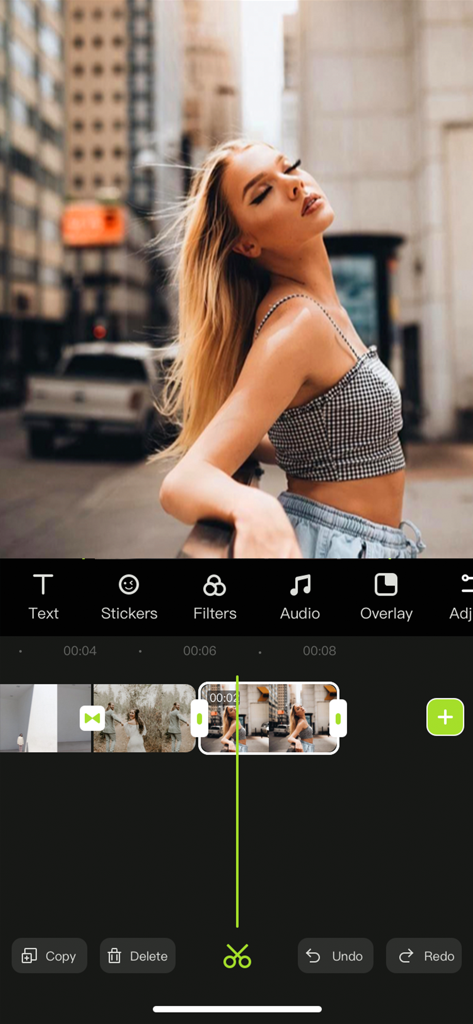
Video Editor : Video Maker - 젊은 여성이 도시 거리를 걷는 장면 미리보기와 세로 동영상 타임라인을 보여주는 Video Editor 앱 인터페이스
젊은 여성이 도시 거리를 걷는 장면 미리보기와 세로 동영상 타임라인을 보여주는 Video Editor 앱 인터페이스

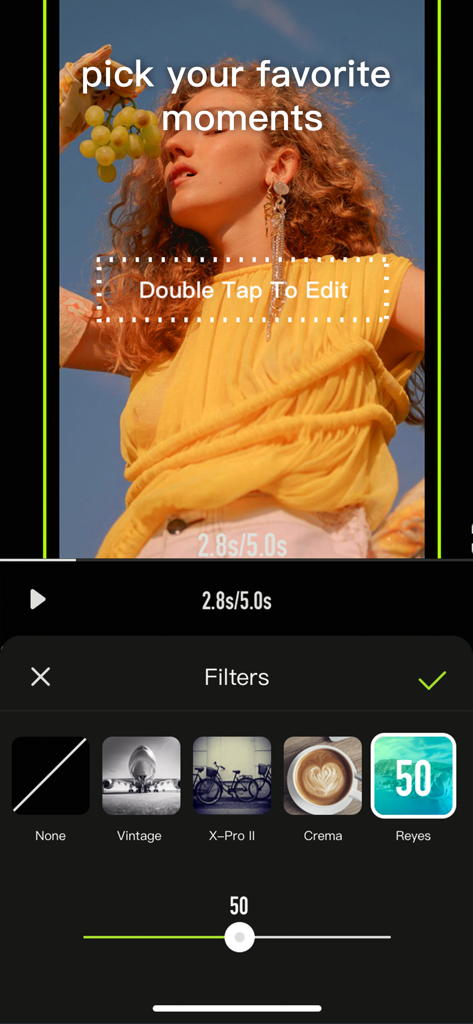
Video Editor : Video Maker - 빈티지, 크레마 등의 옵션이 적용된 필터 선택 메뉴를 보여주는 Video Editor 앱 인터페이스, 라이프스타일 동영상 클립에 적용됨
빈티지, 크레마 등의 옵션이 적용된 필터 선택 메뉴를 보여주는 Video Editor 앱 인터페이스, 라이프스타일 동영상 클립에 적용됨

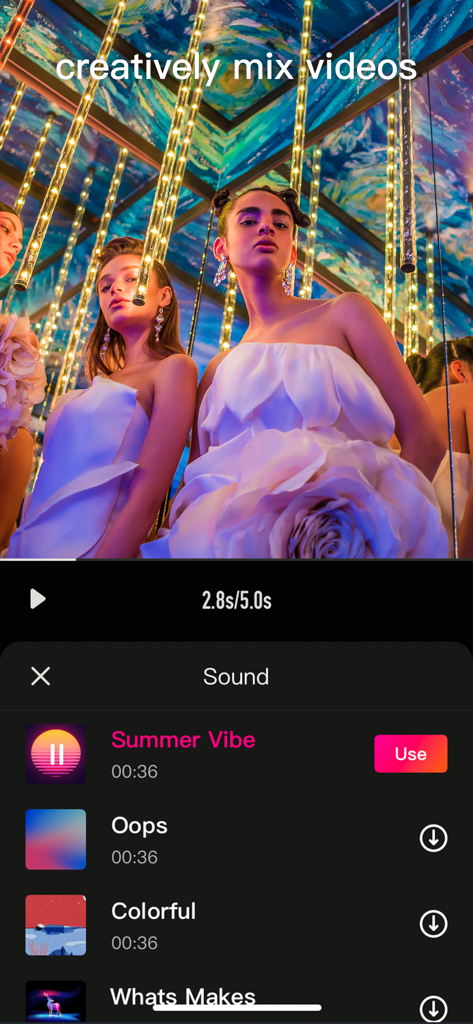
Video Editor : Video Maker - 소셜 미디어 동영상을 위한 음악 선택 메뉴를 보여주는 모바일 동영상 편집기 인터페이스
소셜 미디어 동영상을 위한 음악 선택 메뉴를 보여주는 모바일 동영상 편집기 인터페이스

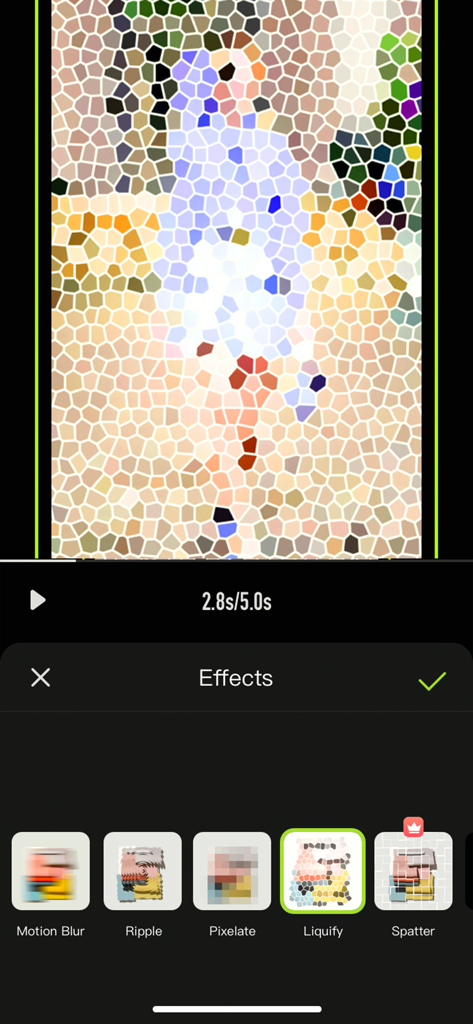
Video Editor : Video Maker - 크리에이티브 소셜 미디어 콘텐츠를 위한 유동화 및 픽셀화와 같은 특수 효과를 보여주는 모바일 동영상 편집기 인터페이스
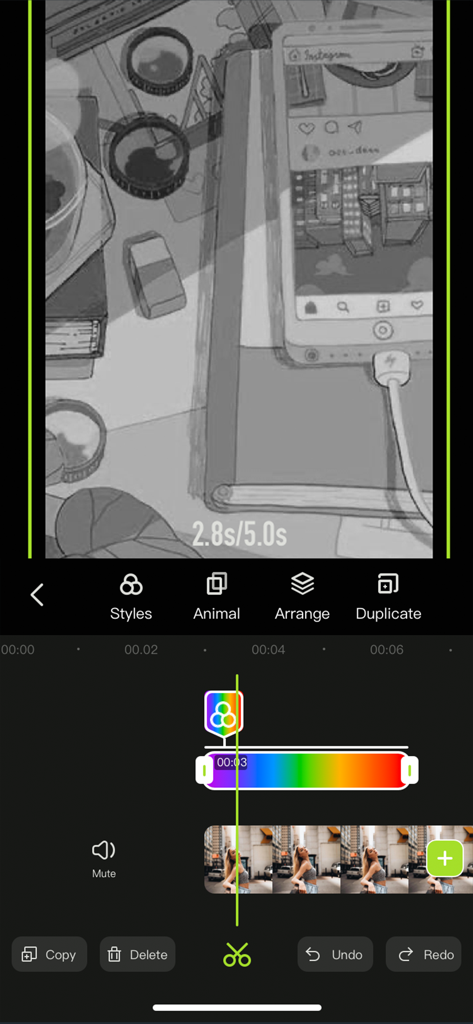
크리에이티브 소셜 미디어 콘텐츠를 위한 유동화 및 픽셀화와 같은 특수 효과를 보여주는 모바일 동영상 편집기 인터페이스

Video Editor : Video Maker - 색상 필터와 창의적인 스타일링 도구가 있는 타임라인을 특징으로 하는 스마트폰 동영상 편집 인터페이스

색상 필터와 창의적인 스타일링 도구가 있는 타임라인을 특징으로 하는 스마트폰 동영상 편집 인터페이스

설명

Videoeditor is an easy-to-operate video making App on your iPhone, iPad. Whether you are a professional or an amateur, you can find the fun of video editing in Videoeditor. Videoeditor has powerful editing functions and a massive material library (such as pictures, videos, music, sound effects, stickers, etc.), which greatly reduces the creation threshold while adding creativity to the video. Let’s start creating! Here's what Videoeditor can do for you: Powerful video editing functions - Upload materials from your phone album - Adjust the brightness, contrast, saturation and other parameters of the clips - Add the entry/exit animation of the material. - Pick color and cut out - Add a mask to hide part of the layer - Video splitting and trimming - Adjust layer order - Sound extraction from video - Record your voice and add to video - Multiple sound equalizer solutions - Adjust the speed of the video - Video reverse - Freeze the key-frame of the clip - Intuitive time-line with frame-by-frame precision scaling - Replace material while retaining editing operations - Shortcut operations for video editing (Redo/Undo/Delete/Copy/Mute) Abundant resources to inspire creativity - 500+ featured stickers of different kinds - Choose photos/videos from third-party material libraries for creation - Pleasant background music - Various sounds of nature contained in sound effect library - Various filters to beautify your video - A variety of selected fonts to choose from - Various special effects to increase the fun of the video - Various transition allow natural switching between clips and clips Various adjustment operations for the canvas - A variety of canvas sizes to choose from for better display on social media - Custom canvas background (Solid color / blur) Multiple video saving options - Multiple resolutions to meet different needs - Different frames per second options to adjust the smoothness of the video ***Some features may require in-app purchases. ------------ SUBSCRIPTION PRICING & TERMS VideoEditor is free to download. Pro Subscription gives you unlimited access to all our featured functions and selected materials. Premium Features: - Access to ALL featured filters - Access to ALL resource libraries (including fancy fonts, stickers, sound effects, music) - A variety of cool transitions - Animation effects - Unlock all masks - Audio extraction - Video reverse & freeze - Color cutout - Multiple video saving options - VideoEditor offers two auto-renewing subscription options: $6.99/Month OR $29.99/Year (including 3 days free trial). - These prices are for United States customers. Pricing in other countries may vary, and actual charges may be converted to your local currency depending on the country of residence. - Payment will be charged to your iTunes Account at confirmation of your subscription - Subscription automatically renews unless auto-renew is turned off at least 24-hours before the end of the current period - The account will be charged for renewal within 24-hours prior to the end of the current period, and at the cost of the chosen package - Any unused portion of a free trial period, if offered, will be forfeited when the user purchases a subscription to that publication, where applicable. - Your subscription automatically renews unless you turn off in Account Settings 24+ hours before the end of the billing period. - You can turn off auto-renew at any time from your iTunes account settings, but refunds will not be provided for any unused portion of the term. Read our Term of Use at: https://s3.us-west-2.amazonaws.com/s3.videocut/page/agreement.html Read our Privacy Policy at: https://s3.us-west-2.amazonaws.com/s3.videocut/page/privacy.html

Download

다운로드: App Store

이 페이지는 앱이나 개발자의 공식 페이지가 아니며, 정보 제공 및 논평을 목적으로 작성된 독립 편집 간행물입니다. 명시적으로 달리 언급되지 않는 한, 해당 앱이나 개발자는 MWM, Apple, Google Play, 앱 퍼블리셔 또는 앱 개발자와 제휴, 보증, 후원, 승인 또는 공식적으로 연결되어 있지 않으며, 이 페이지의 어떤 내용도 해당 앱이 MWM의 서비스를 사용하여 개발되었음을 의미하지 않습니다. 모든 상표, 로고, 스크린샷 및 기타 콘텐츠는 해당 소유자의 자산입니다.








