이 페이지는 앱이나 개발자의 공식 페이지가 아니며, 정보 제공 및 논평을 목적으로 작성된 독립 편집 간행물입니다. 명시적으로 달리 언급되지 않는 한, 해당 앱이나 개발자는 MWM, Apple, Google Play, 앱 퍼블리셔 또는 앱 개발자와 제휴, 보증, 후원, 승인 또는 공식적으로 연결되어 있지 않으며, 이 페이지의 어떤 내용도 해당 앱이 MWM의 서비스를 사용하여 개발되었음을 의미하지 않습니다. 모든 상표, 로고, 스크린샷 및 기타 콘텐츠는 해당 소유자의 자산입니다.
Video Eraser - Remove Object
촬영 영상에서 원치 않는 로고, 텍스트, 객체를 손쉽게 삭제하세요. 해상도를 높이고 화질을 향상시켜 몇 초 만에 모든 클립을 소셜 미디어에 바로 사용할 수 있도록 만드세요.
눈에 거슬리는 로고, 원치 않는 배경 객체, 거친 영상은 이제 그만. 몇 번의 탭만으로 원본 클립을 다듬고 플랫폼에 바로 사용할 수 있는 걸작으로 변환하세요.
매끄러운 로고 제거
크로스 플랫폼 크리에이터에게 완벽합니다. 워터마크를 손쉽게 삭제하여 피드를 깔끔하고 방해 없이 유지하세요.
스마트 AI 객체 제거
사진을 망치는 사람이나 잡동사니를 제거하여 촬영 장면을 깔끔하게 정리하세요. 최첨단 AI를 사용하여 진정으로 중요한 것에 집중하세요.
FAQ
자주 묻는 질문
에 대해 알아야 할 모든 것 Video Eraser - Remove Object
Video Eraser - Remove Object는 무엇인가요?
Video Eraser - Remove Object는 AI 기반의 동영상 편집 앱입니다. 로고, 텍스트, 원치 않는 객체를 제거하고 동영상 품질을 향상시킵니다.
Video Eraser - Remove Object는 동영상에서 객체를 어떻게 제거하나요?
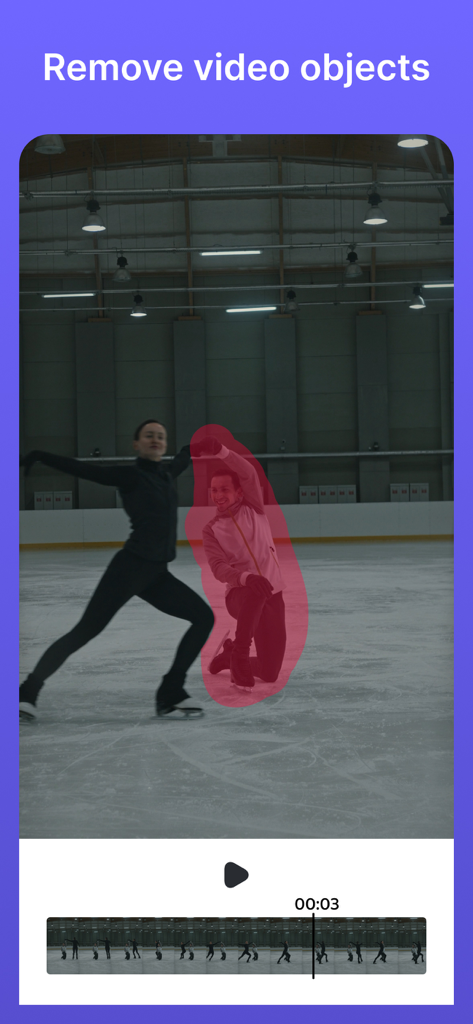
Video Eraser - Remove Object는 AI 기술을 사용하여 동영상에서 원치 않는 객체, 로고, 텍스트를 지웁니다. 사용자가 영역을 선택하면 앱이 정밀하게 변환을 처리합니다.
Video Eraser - Remove Object는 동영상에서 텍스트를 제거할 수 있나요?
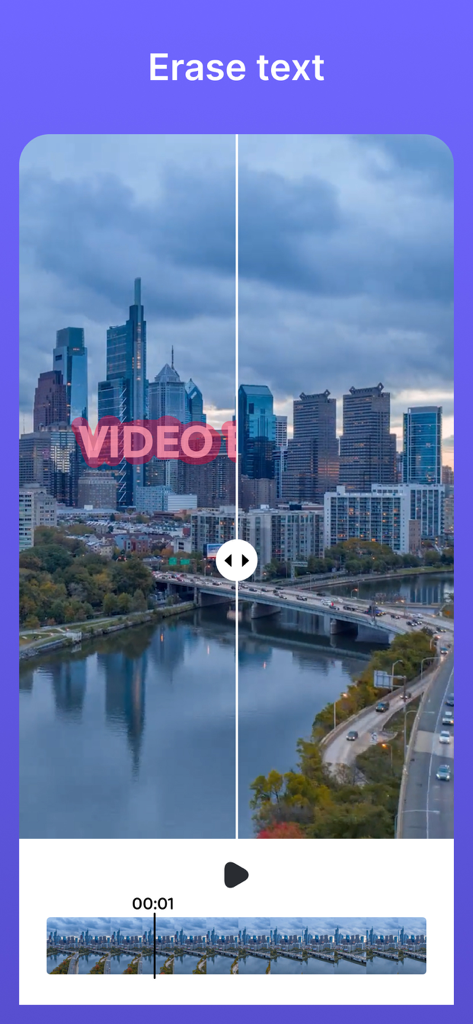
네, Video Eraser - Remove Object는 동영상에서 텍스트를 제거합니다. 텍스트 커터 및 지우개 역할을 하여 자막, 캡션 또는 기타 텍스트 오버레이를 완벽하게 제거하여 세련된 동영상을 만듭니다.
Video Eraser - Remove Object는 동영상 품질을 향상시키나요?
네, Video Eraser - Remove Object는 동영상 품질을 향상시킵니다. 색상을 개선하고, 디테일을 선명하게 하며, 전문적인 결과를 위해 더 생생하고 균형 잡힌 모습을 제공하여 시각적 경험을 높입니다.
Video Eraser - Remove Object는 동영상 해상도를 업스케일링할 수 있나요?
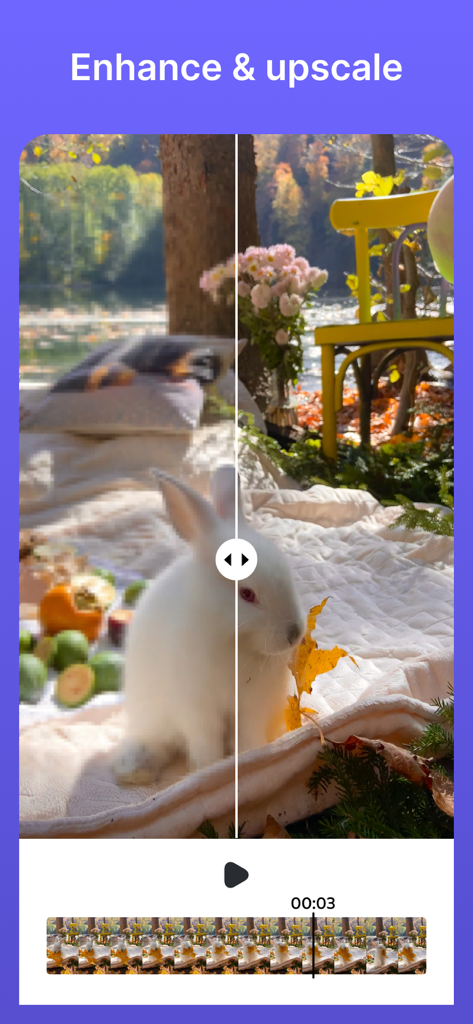
네, Video Eraser - Remove Object는 동영상 해상도를 업스케일링합니다. 저해상도 동영상을 고화질 걸작으로 변환하여 모든 기기에서 최적의 시각적 품질을 보장합니다.
Video Eraser - Remove Object는 사용하기 쉬운가요?
네, Video Eraser - Remove Object는 사용자 친화적인 인터페이스를 갖추고 있습니다. 편집 전문 지식 수준에 관계없이 사용자가 편집할 영역을 선택하기만 하면 놀라운 결과를 얻을 수 있습니다.
Video Eraser - Remove Object는 어떤 종류의 요소를 제거할 수 있나요?
Video Eraser - Remove Object는 동영상에서 로고, 텍스트 및 기타 바람직하지 않은 객체를 제거합니다. 여기에는 자막, 캡션 및 방해가 되는 모든 요소가 포함되어 깔끔한 콘텐츠를 보장합니다.
Video Eraser - Remove Object의 이용 약관은 어디서 찾을 수 있나요?
Video Eraser - Remove Object의 이용 약관은 다음 링크에서 찾을 수 있습니다: https://www.apple.com/legal/internet-services/itunes/dev/stdeula/. 이 링크는 전체 법적 계약을 제공합니다.
다음 스크린샷과 설명은 앱의 공식 스토어 목록에서 직접 가져온 것이며 앱 개발자의 자산입니다.
앱 스토어
스크린샷
AI 앱 인터페이스에 제거할 비디오의 강조 표시된 사람 표시
도시 풍경 비디오에서 텍스트를 제거하는 전후 분할 화면
정원 속 흰색 토끼의 비디오 업스케일링 및 향상 비교 전후
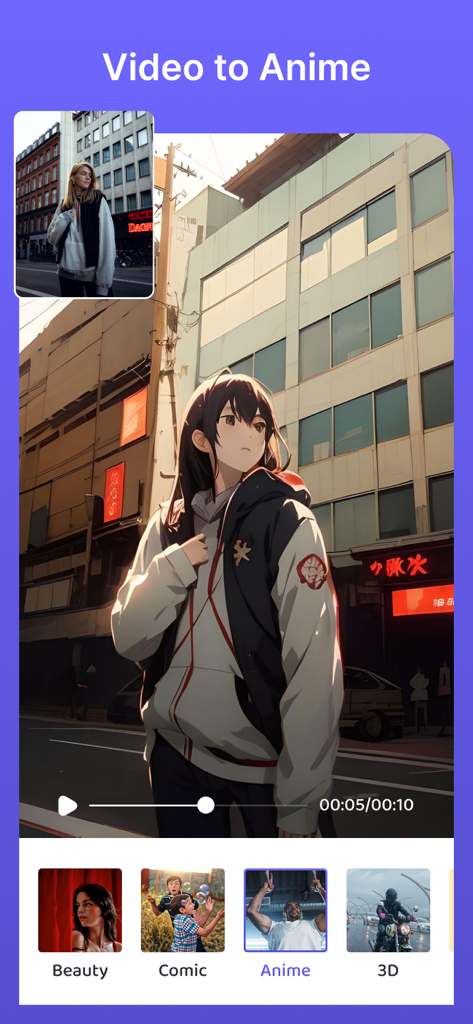
실제 사람을 Beauty, Comic, 3D와 같은 다양한 스타일 옵션으로 애니메이션 캐릭터로 변환하는 Video to Anime 기능 스크린샷.
설명
Introducing Video Object Remover – Your Ultimate Solution to Effortlessly Erase, Logos, Text, and Enhance Your Videos with the Power of AI!
Unleash Your Video Editing Creativity!
Are you tired of logos, and unwanted text cluttering your videos? Do you strive to make your videos look clean, professional, and even more impressive than before? Look no further than Video Object Remover – the ultimate video editing tool that empowers you to bring your creative vision to life.
Key Features:
1. Text Remover Extraordinaire: Our app specializes in removing logos, and text from your videos with unmatched precision and ease. Bid farewell to distracting elements and create stunning videos that captivate your audience.
2. AI-Powered Magic: Tap into the extraordinary capabilities of artificial intelligence to effortlessly erase logos, and text from your videos. Our AI remover ensures impeccable results every single time. Let technology work its wonders as you focus on unleashing your creativity.
3. Video Logo Eraser: Easily eliminate logos from your videos, transforming them into sleek, professional masterpieces. Whether you're a business owner, content creator, or simply someone striving for an immaculate video presentation, our tool has you covered.
4. Text Cutter & Eraser: Say goodbye to unwanted text that mars the beauty of your videos. Whether it's subtitles, captions, or any other text overlay, our app serves as your go-to solution for seamless removal, leaving your videos polished and distraction-free.
5. Object Vanisher: Remove undesirable objects and elements from your videos effortlessly. Enhance the visual appeal of your content by erasing distracting or unnecessary items, allowing your audience to focus on what truly matters.
6. Video Enhancement: Elevate the quality of your videos with our enhancement feature. Immerse your viewers in a more vibrant, balanced, and detailed visual experience. Enhance color quality, sharpen details, and take your videos to the next level of professionalism.
7. Upscale Video Resolution: No more compromising on video quality. Transform low-resolution videos into high-definition masterpieces that shine on any screen. Our upscale feature ensures your videos look their absolute best, whether viewed on a mobile device or a large screen.
8. Easy-to-Use Interface: Our user-friendly interface ensures that everyone, regardless of their video editing expertise, can achieve remarkable results. Simply select the area to edit, and let our intuitive app do the rest. Enjoy a seamless editing experience that allows you to focus on your creative vision.
How to Use Video Object Remover:
1. Select Your Video: Open the app and choose the video you want to edit from your device's gallery.
2. Choose Your Editing Option: Select from the available editing options, including logo removal, text erasing, object vanishing, video enhancement, and upscaling.
3. Apply the Edit: Once you've configured the settings, tap the "Process" button to start the process. The app's AI will work its magic to transform your video.
4. Save and Share: After editing is complete, save your enhanced video to your device and share it with your audience, friends, or social media followers.
Unlock your video editing potential with Video Object Remover! Experience the magic of AI-powered logo removal, enhancement, and upscaling, and regain full control over your video content.
Don't let logos, and text detract from the brilliance of your videos. Get Video Object Remover today and embark on a journey of creating captivating, distraction-free content that truly stands out and looks better than ever.
Terms of Use: https://www.apple.com/legal/internet-services/itunes/dev/stdeula/
이 페이지는 앱이나 개발자의 공식 페이지가 아니며, 정보 제공 및 논평을 목적으로 작성된 독립 편집 간행물입니다. 명시적으로 달리 언급되지 않는 한, 해당 앱이나 개발자는 MWM, Apple, Google Play, 앱 퍼블리셔 또는 앱 개발자와 제휴, 보증, 후원, 승인 또는 공식적으로 연결되어 있지 않으며, 이 페이지의 어떤 내용도 해당 앱이 MWM의 서비스를 사용하여 개발되었음을 의미하지 않습니다. 모든 상표, 로고, 스크린샷 및 기타 콘텐츠는 해당 소유자의 자산입니다.