이 페이지는 앱이나 개발자의 공식 페이지가 아니며, 정보 제공 및 논평을 목적으로 작성된 독립 편집 간행물입니다. 명시적으로 달리 언급되지 않는 한, 해당 앱이나 개발자는 MWM, Apple, Google Play, 앱 퍼블리셔 또는 앱 개발자와 제휴, 보증, 후원, 승인 또는 공식적으로 연결되어 있지 않으며, 이 페이지의 어떤 내용도 해당 앱이 MWM의 서비스를 사용하여 개발되었음을 의미하지 않습니다. 모든 상표, 로고, 스크린샷 및 기타 콘텐츠는 해당 소유자의 자산입니다.
Video Maker-movie maker&Editor
0.04초 정밀 편집, 영화 수준의 템플릿, 트렌디한 필터로 창의력을 발휘하세요. 소셜 미디어 성공을 위해 설계된 원클릭 도구로 나만의 인생 영화감독이 되어보세요. 바이럴 틱톡 브이로그부터 전문 증명사진까지.
모바일 우선 크리에이터를 위해 설계된 전문 도구를 사용하여 원본 푸티지를 영화 수준의 걸작으로 바꿔보세요.
정밀 리듬 편집
0.04초 정밀도로 모든 컷을 비트에 동기화하고 0.1배속에서 8배속까지 다양한 속도 조절 기능으로 완벽한 틱톡 및 릴 전환 효과를 만드세요.
감각적인 프로 템플릿
영화 수준의 방대한 테마와 고급 필터를 사용하여 학습 곡선을 단축하고 평범한 브이로그를 전문적인 소셜 미디어 콘텐츠로 바꿔보세요.
다음 스크린샷과 설명은 앱의 공식 스토어 목록에서 직접 가져온 것이며 앱 개발자의 자산입니다.
앱 스토어
스크린샷
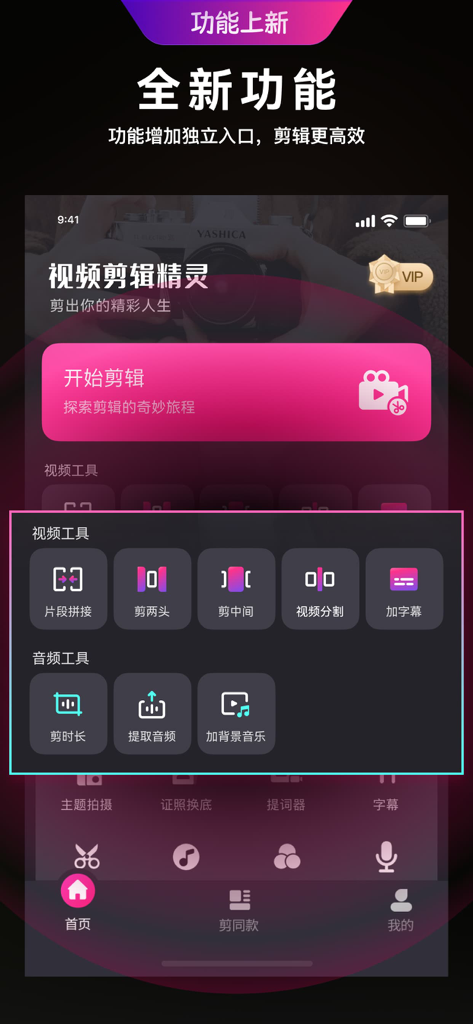
Video Maker 앱 인터페이스에서 동영상 및 오디오 편집 도구를 보여주는 스마트폰 화면
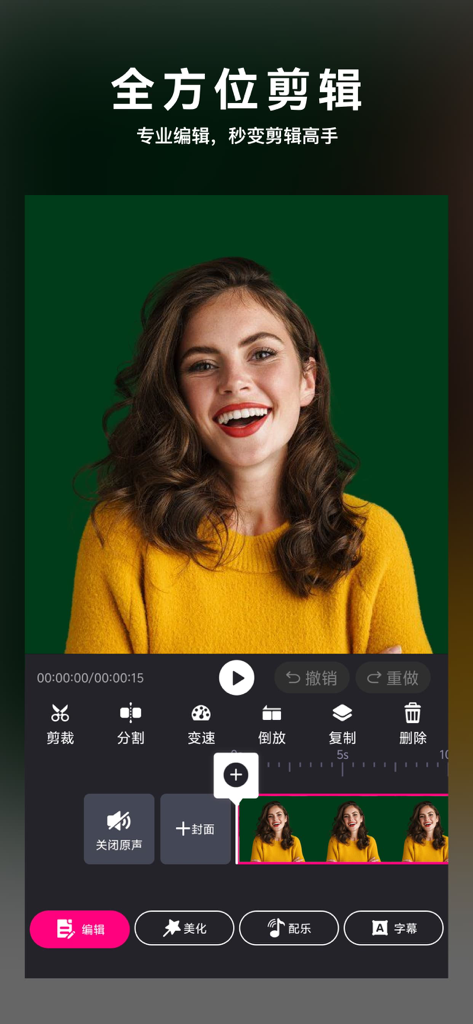
전문 모바일 동영상 편집 앱 인터페이스, 미소 짓는 여성의 미리보기와 편집 도구 표시
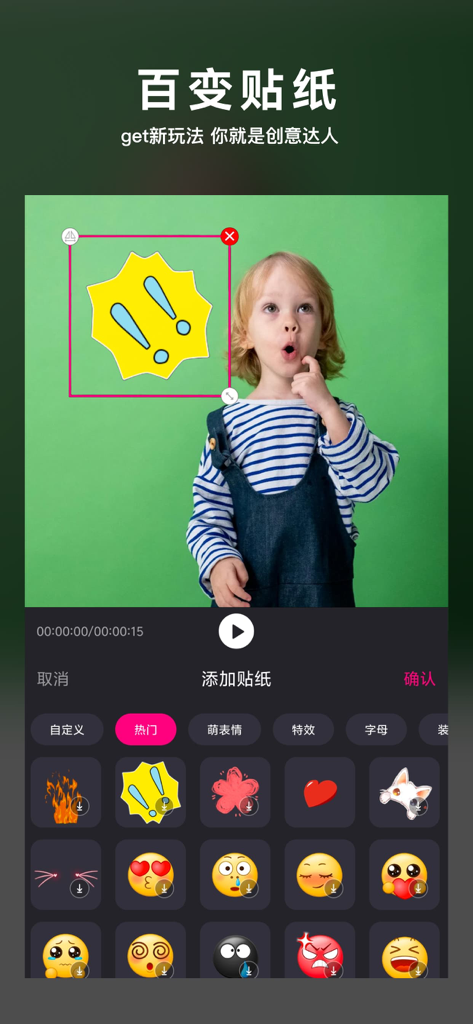
크리에이티브 브이로그 제작을 위한 다양한 색상의 스티커와 이모티콘을 보여주는 모바일 동영상 편집 앱 인터페이스
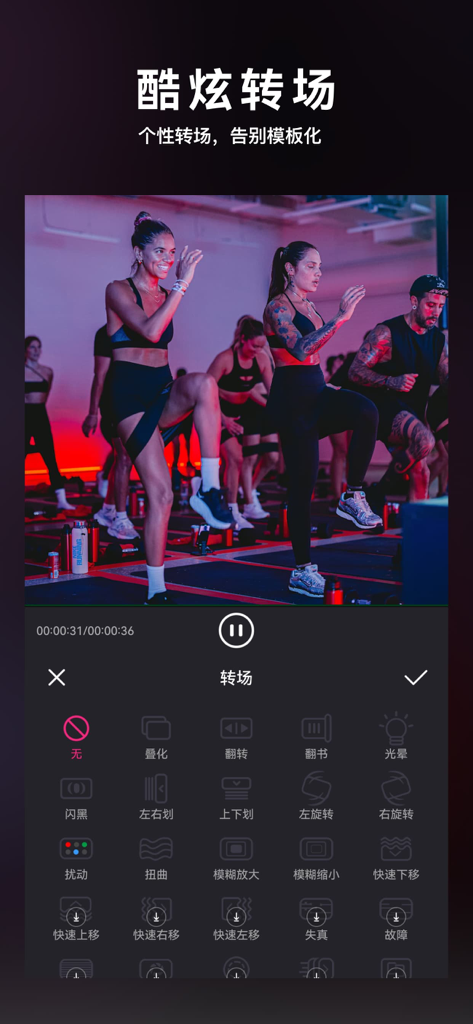
피트니스 브이로그를 위한 전문 전환 효과를 보여주는 모바일 동영상 편집 앱 인터페이스
설명
Video editing, tailored for mobile users. With just one phone, everyone can be a video editing master, with a massive selection of movie level theme templates for you to choose from. Video editing, music editing, and vlog video production are simpler and more stylish!
Video Editing is a professional mobile video editing tool focused on the fields of video editing, video editing, video production, and video beautification. It can add filters, special effects, subtitles, dubbing, music, and a plethora of effects to your videos, allowing you to be the "director" of your own life in your palm. Video editing also makes videos more beautiful and interesting, helping you create VLOG videos on your phone. You can also create short videos on a large video website, helping you quickly become popular. It also supports audio editing, allowing you to easily set your own exclusive ringtone.
[Function Introduction]
* New license change function: one-click change for background, intelligent beauty, free production, easy to make your own ID photo ~
——Video editing, video editing, creating your exclusive vlog
·Ultra high precision editing, one click cropping, free segmentation, up to 0.04 seconds of accuracy.
·The ultimate speed change experience, with 0.1x to 8x speed change, and video rhythm controlled by you.
·Multiple video scales, nearly a hundred colors for background customization.
·Dazzling video transition effects, with nearly 50 different effects to choose from, including cross fusion, flashing black, and erasing.
——Video beautification, fun stickers, make your video unique
·Multiple styles of stickers with special effects, full of personality, depending on your mood.
·With a plethora of video subtitles and text fonts, there is always one that suits you.
——Large template, high-end filters, you can also become a "super internet celebrity"
·Art only needs to be gentle, fashionable and personalized, making your life no longer mediocre.
·Professional style filters, easy to beautify with just one click, making life bigger in a second, just waiting to provide a different texture for your videos.
——Video and audio extraction and export, no worries about dubbing materials
·Do you like the dubbing of a certain video? Using video editing to easily extract audio files from videos, you can use them in your own videos, which is refreshing.
Install video editing now, cut it with your hands, and beauty is right by your side
Video Editing VIP Continuous Monthly Package Description
Subscription cycle: 1 month
Payment: After the user confirms the purchase and makes the payment, it will be credited to their iTunes account
Unsubscribe: To cancel the renewal, please enter the "iTunes Store and App Store" 24 hours before the current subscription period expires, click on "Apple ID", and select "View Apple ID". Enter the "Account Settings" page, click "Subscription", select the corresponding subscription item to cancel.
Renewal: If you purchase a continuous monthly subscription account, Apple iTunes will deduct the fee within 24 hours before the expiration date. If the deduction is successful, the subscription period will be extended by one month.
Terms of Use Agreement: http://cms.fuguizhukj.cn/article/detail/ajjiosyhxy.html
Privacy Policy: http://cms.fuguizhukj.cn/article/detail/ajjyszcios.htm
이 페이지는 앱이나 개발자의 공식 페이지가 아니며, 정보 제공 및 논평을 목적으로 작성된 독립 편집 간행물입니다. 명시적으로 달리 언급되지 않는 한, 해당 앱이나 개발자는 MWM, Apple, Google Play, 앱 퍼블리셔 또는 앱 개발자와 제휴, 보증, 후원, 승인 또는 공식적으로 연결되어 있지 않으며, 이 페이지의 어떤 내용도 해당 앱이 MWM의 서비스를 사용하여 개발되었음을 의미하지 않습니다. 모든 상표, 로고, 스크린샷 및 기타 콘텐츠는 해당 소유자의 자산입니다.