
이 페이지는 앱이나 개발자의 공식 페이지가 아니며, 정보 제공 및 논평을 목적으로 작성된 독립 편집 간행물입니다. 명시적으로 달리 언급되지 않는 한, 해당 앱이나 개발자는 MWM, Apple, Google Play, 앱 퍼블리셔 또는 앱 개발자와 제휴, 보증, 후원, 승인 또는 공식적으로 연결되어 있지 않으며, 이 페이지의 어떤 내용도 해당 앱이 MWM의 서비스를 사용하여 개발되었음을 의미하지 않습니다. 모든 상표, 로고, 스크린샷 및 기타 콘텐츠는 해당 소유자의 자산입니다.


VidSub: Video Subtitle Creator
타이핑은 그만, 말하기 시작하세요. AI 음성-텍스트 변환 기능을 사용하여 Reels, TikTok, Shorts에 즉시 자막을 추가하세요. Google 글꼴로 브랜드를 사용자 지정하고, 자막을 동영상에 직접 삽입하거나, 몇 초 만에 SRT 파일을 내보내세요.
다운로드
1K+사용자 평점
총 평가 수
0개발사
카테고리
Photo & Video지원 언어
1최신 버전
25.6.1200크기
132.1 MB출시일
2022년 9월 10일현대 크리에이터를 위한 전문 도구
모든 소셜 플랫폼에 맞게 콘텐츠를 접근 가능하고, 브랜드화되고, 준비되도록 설계된 모바일 우선 제품군으로 동영상 워크플로우를 간소화하세요.
쉬운 음성-텍스트 변환
타이핑 시간을 낭비하지 마세요. 직관적이고 빠른 입력 인터페이스로 음성을 즉시 정확한 자막으로 변환하고 편집하세요.
맞춤형 브랜딩 및 글꼴
Google 글꼴을 가져와 군중 속에서 돋보이세요. 글꼴 색상, 윤곽선, 그림자를 완벽하게 사용자 지정하여 자막이 브랜드 미학과 일치하도록 하세요.
자주 묻는 질문
에 대해 알아야 할 모든 것 VidSub: Video Subtitle Creator
VidSub: Video Subtitle Creator란 무엇인가요?
VidSub는 자막 생성 및 편집기입니다. 사용자가 자막을 생성하거나 편집하고 SRT 파일로 저장하거나 비디오 내 자막 트랙으로 추가하는 데 도움을 줍니다.
VidSub: Video Subtitle Creator는 자막 생성을 위해 음성-텍스트 변환을 지원하나요?
예, VidSub는 더 빠른 자막 입력을 위해 음성-텍스트 변환을 지원합니다. 사용자는 음성을 녹음하여 자막 줄을 효율적으로 만들 수 있습니다.
VidSub: Video Subtitle Creator는 자막을 비디오 파일에 직접 삽입(하드코딩)할 수 있나요?
예, VidSub는 자막을 비디오 파일에 직접 삽입(하드코딩)하는 작업을 쉽게 만듭니다. 사용자는 자막 스타일을 사용자 정의하고 비디오 품질 및 삽입 속도를 제어할 수 있습니다.
VidSub: Video Subtitle Creator에서 사용자 정의할 수 있는 자막 스타일은 무엇인가요?
VidSub는 색상, 윤곽선 색상, 윤곽선 두께, 텍스트 그림자, 정렬 및 배경을 포함한 자막 스타일 사용자 정의를 허용합니다.
사용자는 VidSub: Video Subtitle Creator를 사용하여 비디오에 워터마크를 추가할 수 있나요?
예, VidSub의 삽입 도구를 사용하면 사용자가 YouTube 또는 TikTok과 같은 플랫폼에 업로드하기 전에 서명 또는 기타 콘텐츠로 비디오에 워터마크를 추가할 수 있습니다.
VidSub: Video Subtitle Creator는 삽입된 자막에 사용자 정의 글꼴을 지원하나요?
예, VidSub에는 글꼴 다운로드 관리자가 있습니다. 사용자는 Google Fonts에서 사용자 정의 글꼴을 다운로드하여 삽입 비디오 도구에 사용할 수 있습니다.
VidSub: Video Subtitle Creator의 내장 플레이어는 어떤 비디오 형식을 지원하나요?
VidSub의 내장 비디오 플레이어는 MKV 및 기타 여러 인기 비디오 형식을 지원합니다. 갤러리 또는 선택한 파일에서 재생할 수 있습니다.
VidSub: Video Subtitle Creator는 비디오에서 자막 트랙을 추출할 수 있나요?
예, VidSub에는 비디오 파일에서 자막 트랙을 직접 추출하는 도구가 포함되어 있습니다. 이 기능은 자막 도구의 일부입니다.
VidSub: Video Subtitle Creator는 자막 파일을 다른 형식으로 변환할 수 있나요?
예, VidSub는 자막 파일을 다른 형식으로 변환할 수 있습니다. 변환에 지원되는 형식은 SRT, VTT 및 ASS입니다.
VidSub: Video Subtitle Creator는 기존 자막 파일을 어떻게 관리하는 데 도움을 주나요?
VidSub는 새 SRT 파일을 생성하거나 기존 SRT 파일을 편집할 수 있는 쉽고 직관적인 편집기를 제공합니다. 또한 줄을 추가하거나 제거하고 SRT로 저장할 수 있습니다.
다음 스크린샷과 설명은 앱의 공식 스토어 목록에서 직접 가져온 것이며 앱 개발자의 자산입니다.
앱 스토어
스크린샷
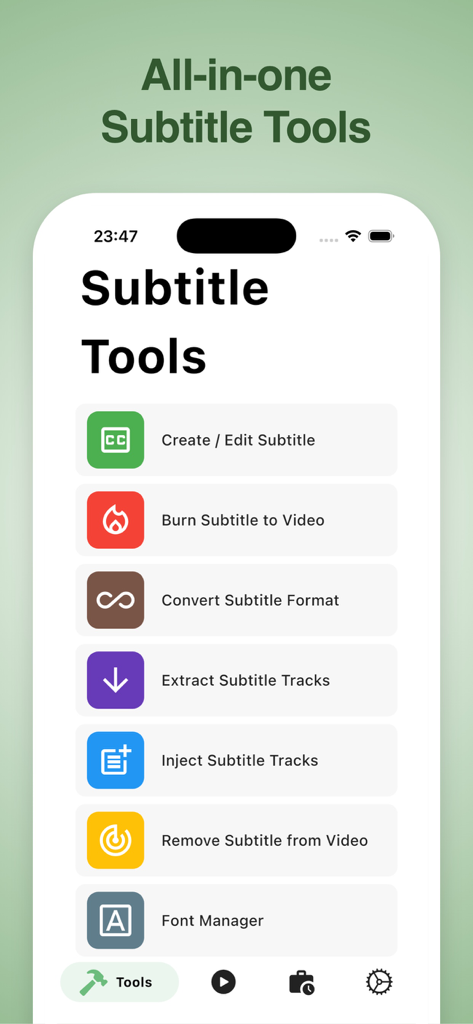
VidSub 앱 인터페이스에 생성, 편집, 삽입, 자막 변환과 같은 자막 도구가 표시됩니다.
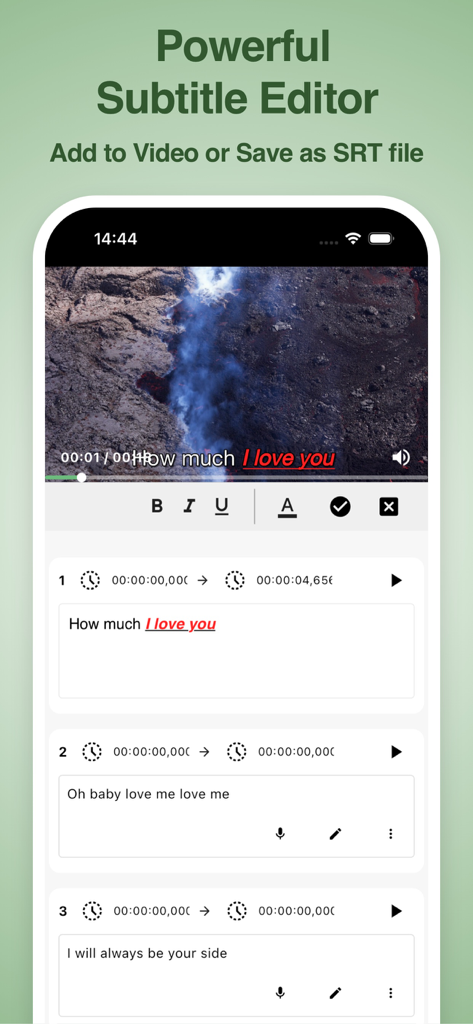
VidSub 앱 인터페이스에 동영상 플레이어와 타임스탬프 및 텍스트 스타일로 자막을 편집하는 도구가 표시됩니다.
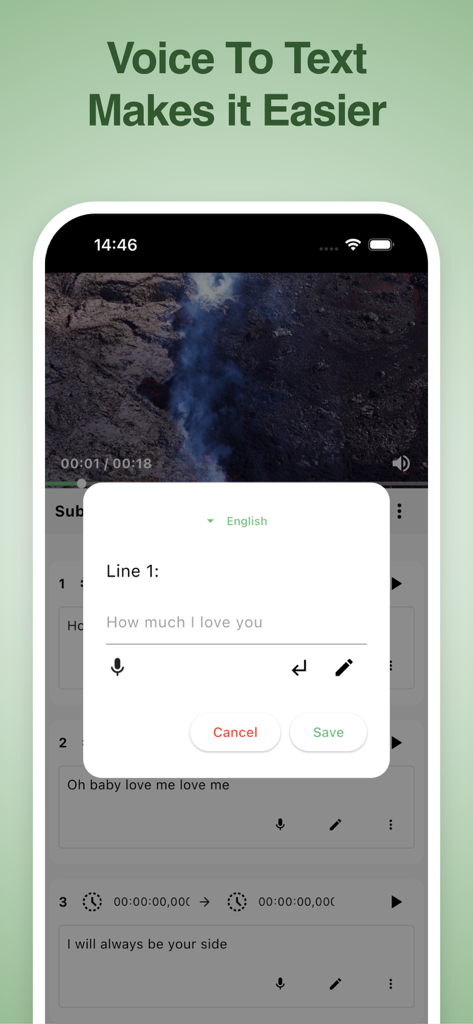
VidSub 모바일 앱 인터페이스에 동영상 자막을 만들기 위한 음성-텍스트 변환 기능이 표시됩니다.
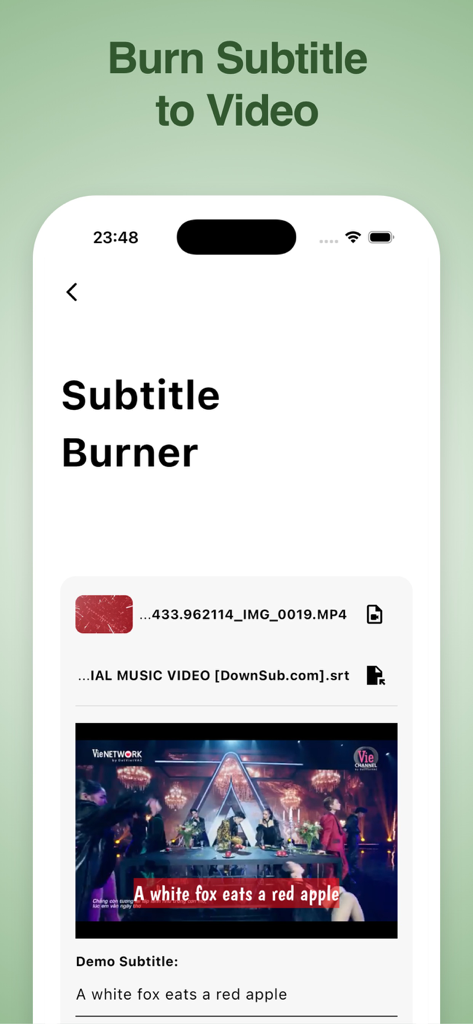
VidSub 앱 인터페이스에 동영상 미리보기 및 자막이 있는 자막 삽입 도구가 표시됩니다.
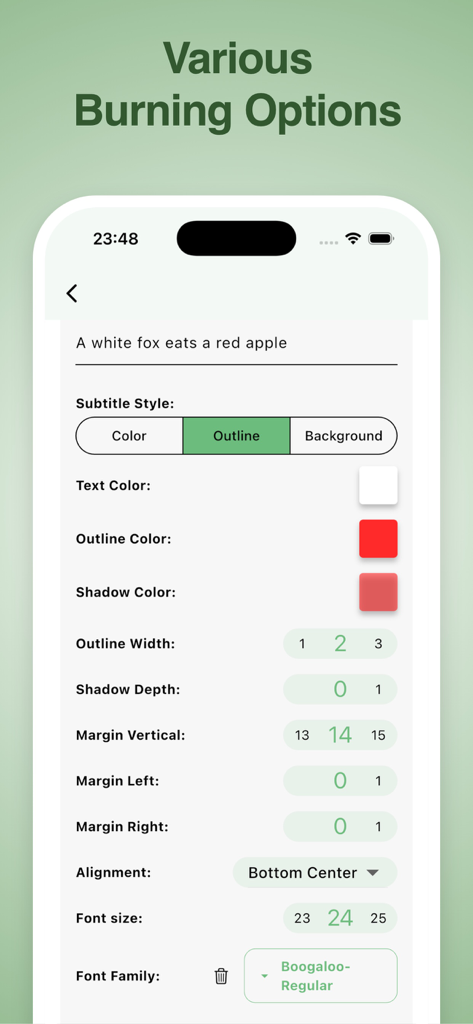
VidSub에서 글꼴, 색상, 윤곽선을 포함한 자막 스타일을 사용자 지정하는 인터페이스
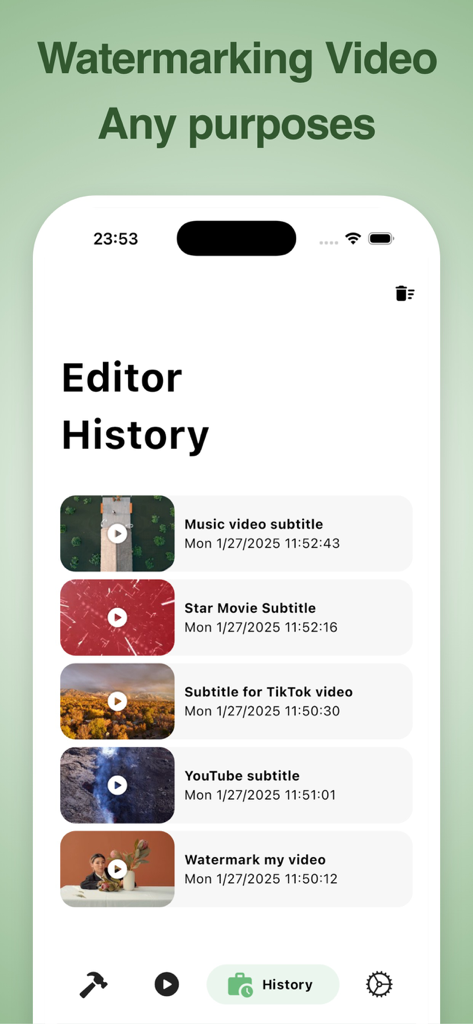
VidSub 앱 인터페이스에 편집기 기록 화면의 최근 자막 및 워터마크 프로젝트 목록이 표시됩니다.
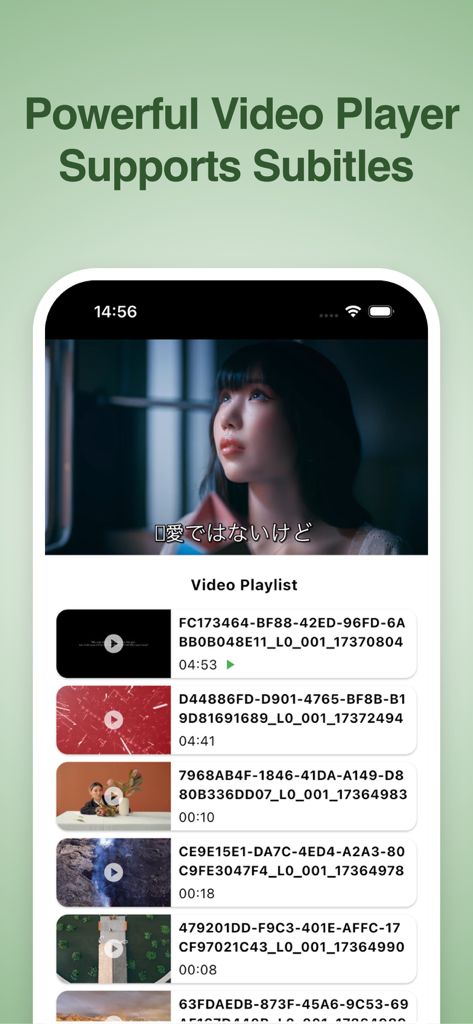
VidSub 앱 인터페이스에 스마트폰의 자막 및 동영상 재생 목록이 있는 동영상 플레이어가 표시됩니다.
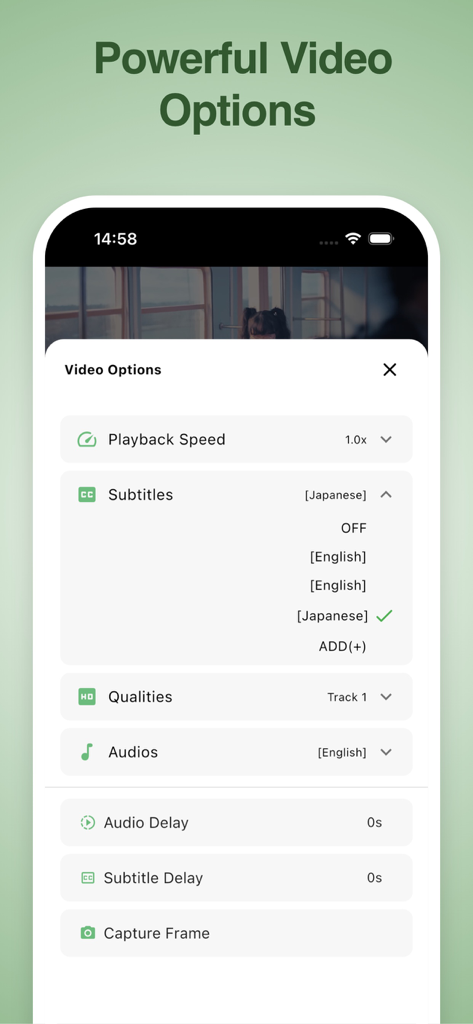
VidSub 앱 인터페이스에 자막 선택, 재생 속도, 오디오 설정과 같은 동영상 옵션 메뉴가 표시됩니다.
설명
Download
비슷한 앱
같은 카테고리의 상위 앱

CapCut: Photo & Video Editor
BYTEDANCE PTE. LTD.

Instagram, Inc.

YouTube
Google LLC

Canva: AI Photo & Video Editor
Canva Pty Ltd

Snapchat
Snap, Inc.

快手
Beijing Kwai Technology Co., Ltd.

Edits: Video Editor
Instagram, Inc.

Meitu- AI Photo & Video Editor
Xiamen Meitu Technology Co., Ltd.

Google Photos: Backup & Edit
Google LLC
이 페이지는 앱이나 개발자의 공식 페이지가 아니며, 정보 제공 및 논평을 목적으로 작성된 독립 편집 간행물입니다. 명시적으로 달리 언급되지 않는 한, 해당 앱이나 개발자는 MWM, Apple, Google Play, 앱 퍼블리셔 또는 앱 개발자와 제휴, 보증, 후원, 승인 또는 공식적으로 연결되어 있지 않으며, 이 페이지의 어떤 내용도 해당 앱이 MWM의 서비스를 사용하여 개발되었음을 의미하지 않습니다. 모든 상표, 로고, 스크린샷 및 기타 콘텐츠는 해당 소유자의 자산입니다.