
이 페이지는 앱이나 개발자의 공식 페이지가 아니며, 정보 제공 및 논평을 목적으로 작성된 독립 편집 간행물입니다. 명시적으로 달리 언급되지 않는 한, 해당 앱이나 개발자는 MWM, Apple, Google Play, 앱 퍼블리셔 또는 앱 개발자와 제휴, 보증, 후원, 승인 또는 공식적으로 연결되어 있지 않으며, 이 페이지의 어떤 내용도 해당 앱이 MWM의 서비스를 사용하여 개발되었음을 의미하지 않습니다. 모든 상표, 로고, 스크린샷 및 기타 콘텐츠는 해당 소유자의 자산입니다.


다운로드
100k+사용자 평점
총 평가 수
421개발사
카테고리
Social Networking지원 언어
17최신 버전
1.2.5크기
46.7 MB출시일
2025년 4월 15일Apple Watch 사용자를 위한 핵심 WhatsApp 커뮤니케이션 기능 평가
WatchsApp - Chat on Watch 앱 기능 분석
Apple Watch 메시징
이 앱은 사용자가 Apple Watch에서 WhatsApp 메시지를 직접 주고받을 수 있도록 지원하여, 휴대폰 없이도 항상 연결 상태를 유지하게 합니다.
신속한 응답
이 도구는 음성 입력, 텍스트 입력 또는 미리 설정된 답장을 통해 메시지에 신속하게 응답할 수 있는 기능을 제공하여, 효율적이고 편리한 소통을 가능하게 합니다.
초고속 성능
이 도구는 Apple Watch와 WhatsApp 간의 빠른 페어링과 메시지 전송 속도를 자랑하며, 모든 Apple Watch 모델에서 안정적이고 부드러운 작동을 보장합니다.
채팅 동기화
이 앱은 Apple Watch와 iPhone을 포함한 모든 기기에서 WhatsApp 채팅 기록을 완벽하게 동기화하여, 사용자가 끊김 없이 대화를 이어갈 수 있도록 합니다.
고급 입력 방식
프리미엄 기능을 통해 이 도구는 사용자가 Apple Watch에서 손글씨나 음성으로 메시지를 입력할 수 있도록 하여, 다양한 상황에서 유연한 소통 방식을 제공합니다.
최적화된 디자인
이 앱은 Apple Watch 화면에 최적화된 세련되고 사용하기 쉬운 인터페이스를 제공하여, 사용자가 작은 화면에서도 편리하게 앱을 조작하고 정보를 확인할 수 있도록 돕습니다.
자주 묻는 질문
에 대해 알아야 할 모든 것 WatchsApp - Chat on Watch
What is WatchChat for Apple Watch?
WatchChat is a leading application for WhatsApp messaging on your Apple Watch. It enables users to send and receive WhatsApp messages directly from their wrist, syncing seamlessly with their iPhone without needing the phone.
Can WatchChat send and receive WhatsApp messages on Apple Watch?
Yes, WatchChat supports sending and receiving WhatsApp messages directly from your Apple Watch. This feature ensures instant communication, allowing users to stay in touch without using their iPhone.
How do I set up WatchChat on my Apple Watch?
To set up WatchChat, open the app on your Apple Watch. Then, launch WhatsApp on your iPhone, go to WhatsApp Settings > Linked Devices > Link a Device, and scan the QR code displayed on your Apple Watch.
Does WatchChat support quick replies for WhatsApp messages?
Yes, WatchChat offers quick reply capabilities. Users can respond to messages using voice, text input, or choose from pre-set responses directly on their Apple Watch for faster communication.
Is WatchChat free to use, or does it have premium options?
WatchChat provides core Apple Watch features for free. Advanced functionalities, including unlimited chats, full contact access, HD photos/videos, and handwriting/voice input, require a paid Premium subscription.
What premium features does WatchChat offer?
Premium WatchChat features include unlimited chats, full contact access, HD photos and videos, handwriting and voice input, and an ad-free experience. These advanced options are available via paid subscription.
How fast is WatchChat's performance for pairing and message delivery?
WatchChat demonstrates lightning-fast performance. It achieves 2.3-second pairing with WhatsApp and 0.4-second message delivery between your Apple Watch and iPhone, ensuring smooth operation.
Does WatchChat collect personal user data?
No, WatchChat explicitly states it protects user privacy. The app does not collect personal data such as chats, phone numbers, or any other sensitive information from its users.
Is WatchChat officially associated with WhatsApp?
No, WatchChat is not officially associated with WhatsApp. It functions as a third-party application developed to integrate WhatsApp messaging features with the Apple Watch.
Does WatchChat allow viewing photos and videos on Apple Watch?
Yes, WatchChat supports viewing photos and videos on your Apple Watch. This capability is part of the premium subscription, providing HD quality for media viewing directly on your wrist.
다음 스크린샷과 설명은 앱의 공식 스토어 목록에서 직접 가져온 것이며 앱 개발자의 자산입니다.
앱 스토어
스크린샷
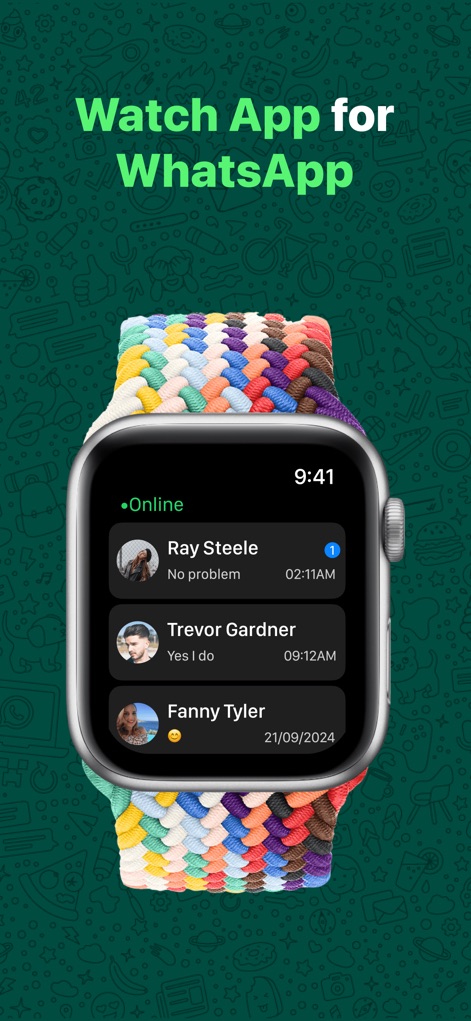
이 앱은 사용자가 Apple Watch에서 WhatsApp 대화 목록을 바로 확인할 수 있게 합니다. 연락처 이름과 최근 메시지 내용이 표시되어 손목에서 편리하게 소통할 수 있습니다.
시계에서 채팅
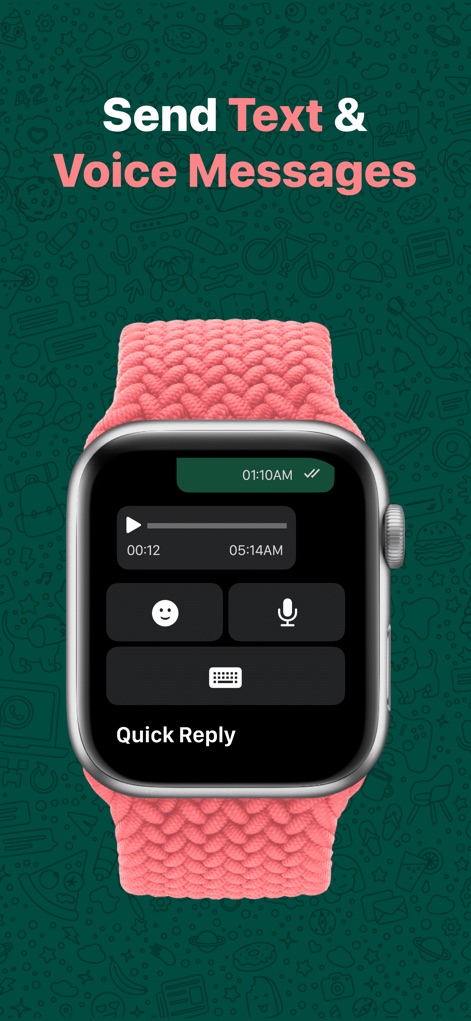
사용자는 이 앱을 통해 Apple Watch에서 텍스트 또는 음성 메시지를 쉽게 보낼 수 있습니다. 마이크 아이콘으로 음성 입력을, 키보드 아이콘으로 텍스트 입력을 선택하여 편리하게 대화하세요.
메시지 보내기
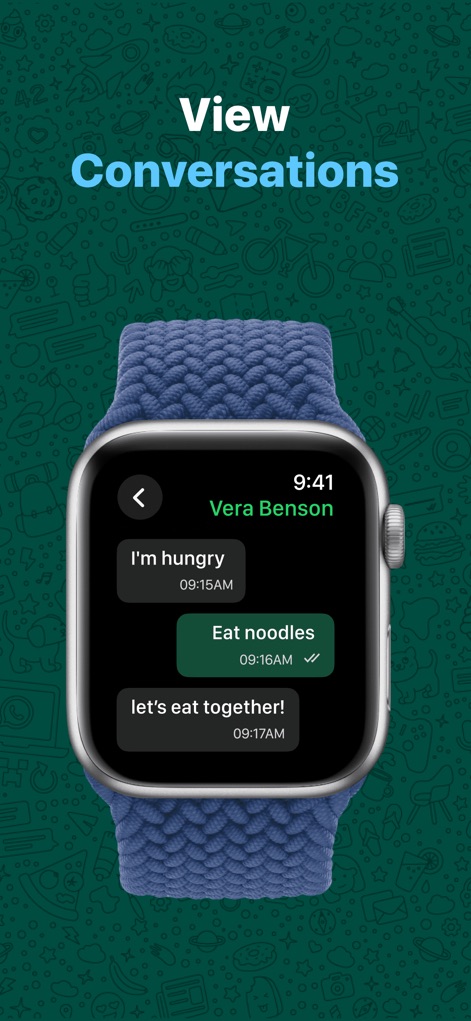
이 스크린샷은 Apple Watch에서 진행 중인 WhatsApp 대화를 명확하게 보여줍니다. 주고받은 메시지 버블을 통해 이전 대화 내용을 확인하고, 간편하게 답장할 수 있습니다.
대화 내용 확인
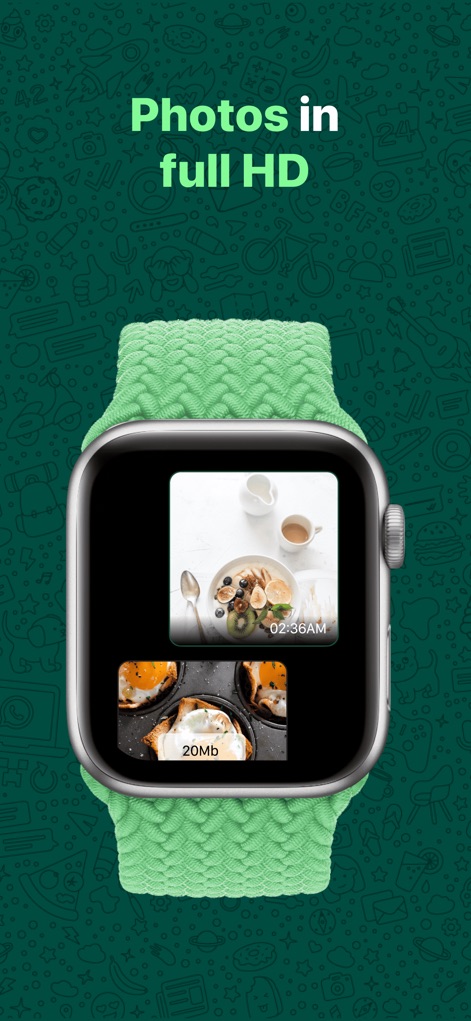
이 앱은 사용자가 Apple Watch에서 수신된 사진을 선명한 화질로 미리 볼 수 있도록 지원합니다. 여러 장의 사진이 썸네일 형태로 표시되어 중요한 순간을 놓치지 않습니다.
사진 미리 보기
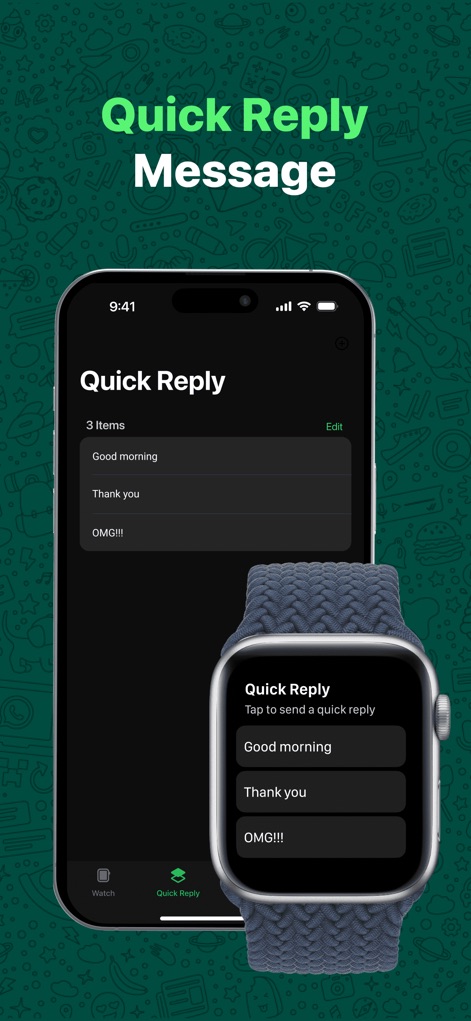
사용자는 이 앱에서 iPhone과 Apple Watch 간의 빠른 답장 기능을 설정하고 사용할 수 있습니다. iPhone에서 문구를 편집하고 Apple Watch에서 탭 한 번으로 신속하게 메시지를 보낼 수 있습니다.
빠른 답장 활용
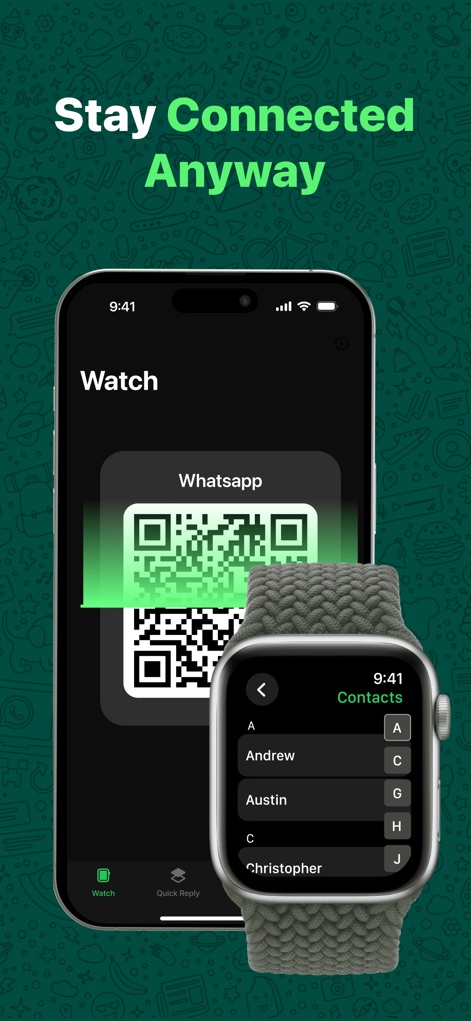
이 앱은 WhatsApp 계정과의 간편한 연동을 위해 QR 코드 스캔 기능을 제공합니다. 연동 후에는 Apple Watch에서 직접 연락처 목록을 확인하여 원하는 사람과 빠르게 대화를 시작할 수 있습니다.
간편한 연결
설명
Download
비슷한 앱
유사한 기능과 사용자 경험을 가진 앱

WatchsApp - Chat for Watch
BEYLER SAGLIK BILISIM SAVUNMA DANISMANLIK SANAYI VE TICARET LIMITED SIRKETI

Battery Life - check runtimes
RBT Digital LLC
Web Scanner - Dual App
Kokila Ukani
Whats-App Web Scanner
Sudhir Donga

WatchTalk: Chat on Watch
Bitsbaker LLC.

WristTube for YouTube
ALL RADIO DEVELOPMENT TECHNOLOGY JOINT STOCK COMPANY

WatchChat 2: Chat on Watch
XAN Software GmbH & Co. KG

WatchApp+ for Watch
Jennifer Kirby

Whats Messenger App
Michael Knochen
이 페이지는 앱이나 개발자의 공식 페이지가 아니며, 정보 제공 및 논평을 목적으로 작성된 독립 편집 간행물입니다. 명시적으로 달리 언급되지 않는 한, 해당 앱이나 개발자는 MWM, Apple, Google Play, 앱 퍼블리셔 또는 앱 개발자와 제휴, 보증, 후원, 승인 또는 공식적으로 연결되어 있지 않으며, 이 페이지의 어떤 내용도 해당 앱이 MWM의 서비스를 사용하여 개발되었음을 의미하지 않습니다. 모든 상표, 로고, 스크린샷 및 기타 콘텐츠는 해당 소유자의 자산입니다.