WritePDF

WritePDF

다운로드: App Store
로고: WritePDF

WritePDF: 모바일 전문가를 위한 데스크톱급 문서 파워

iPad를 위한 가장 진보된 PDF 엔진으로 단순한 주석을 넘어서세요. 전문 도구, 보안 클라우드 관리, 파일을 열지 않고도 필요한 것을 찾는 전역 검색 기능으로 문서를 편집, 병합, 서명하세요.

개발사

EuroSmartz Ltd

카테고리

Business

다운로드

129K+

사용자 평점

3.8/5

총 평가 수

800

지원 언어

7

한눈에 보는 전문 파워

이 인터페이스를 사용하는 129K+ 명의 사용자.

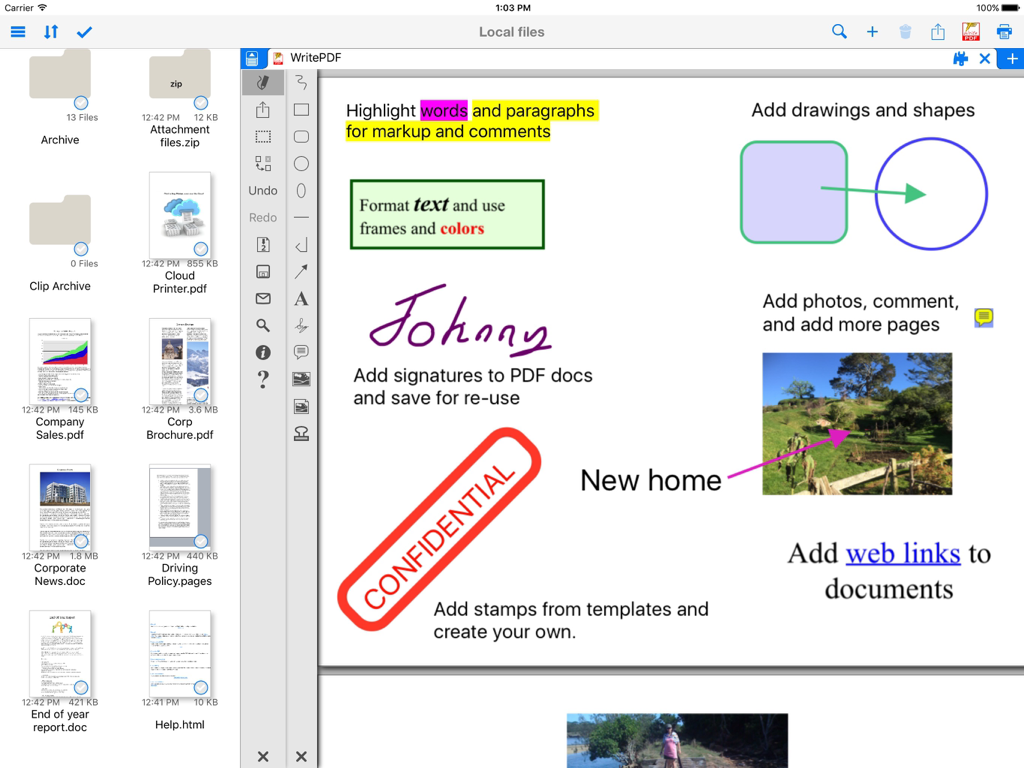
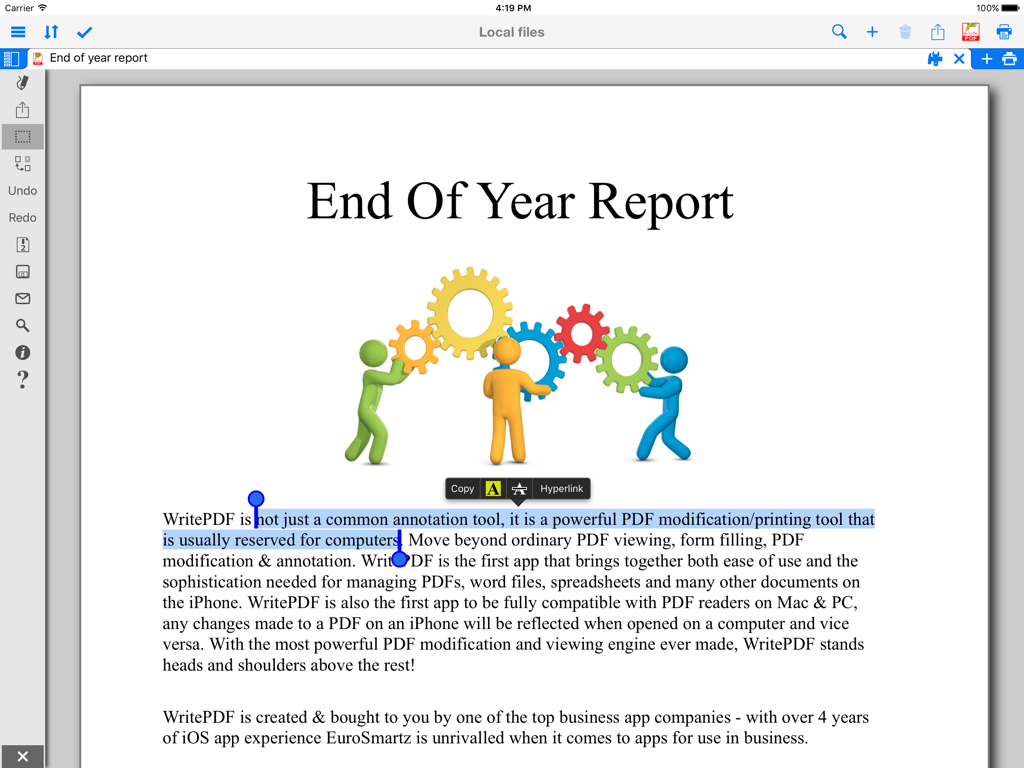
iPad의 WritePDF 앱 인터페이스에 텍스트 강조 표시, 디지털 서명, 스탬프를 포함한 문서 주석 도구가 표시됩니다.

iPad의 WritePDF 앱 인터페이스에 텍스트 강조 표시, 디지털 서명, 스탬프를 포함한 문서 주석 도구가 표시됩니다.

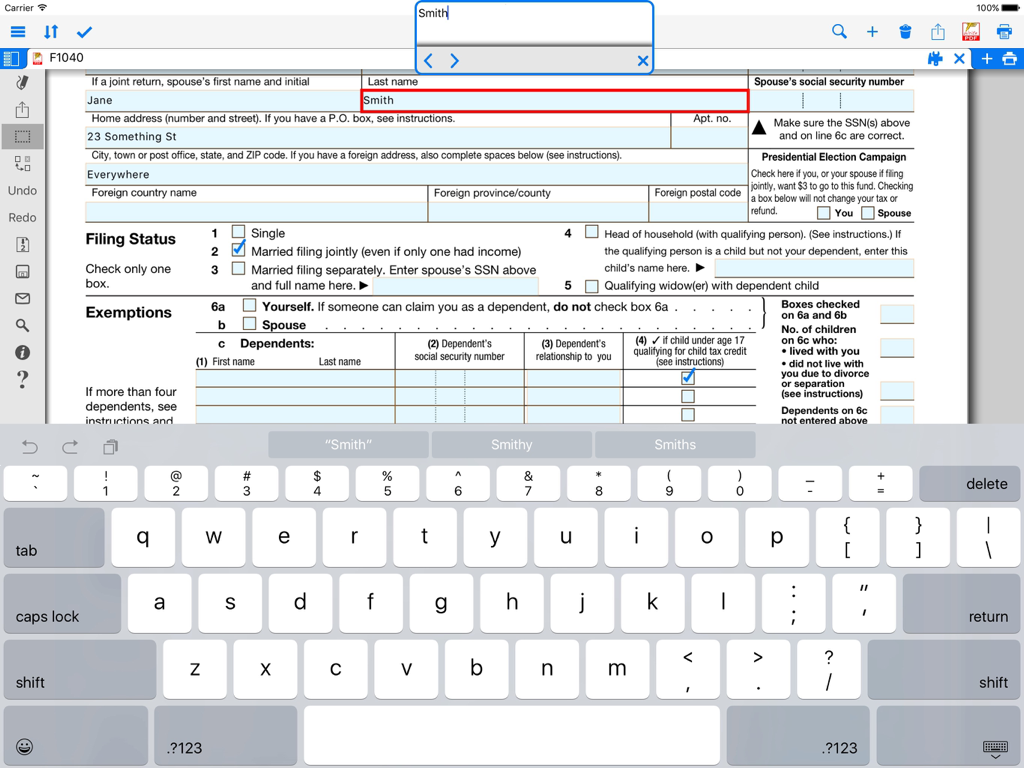
WritePDF 애플리케이션을 사용하여 iPad에서 PDF 양식을 작성하는 모습.

WritePDF 애플리케이션을 사용하여 iPad에서 PDF 양식을 작성하는 모습.

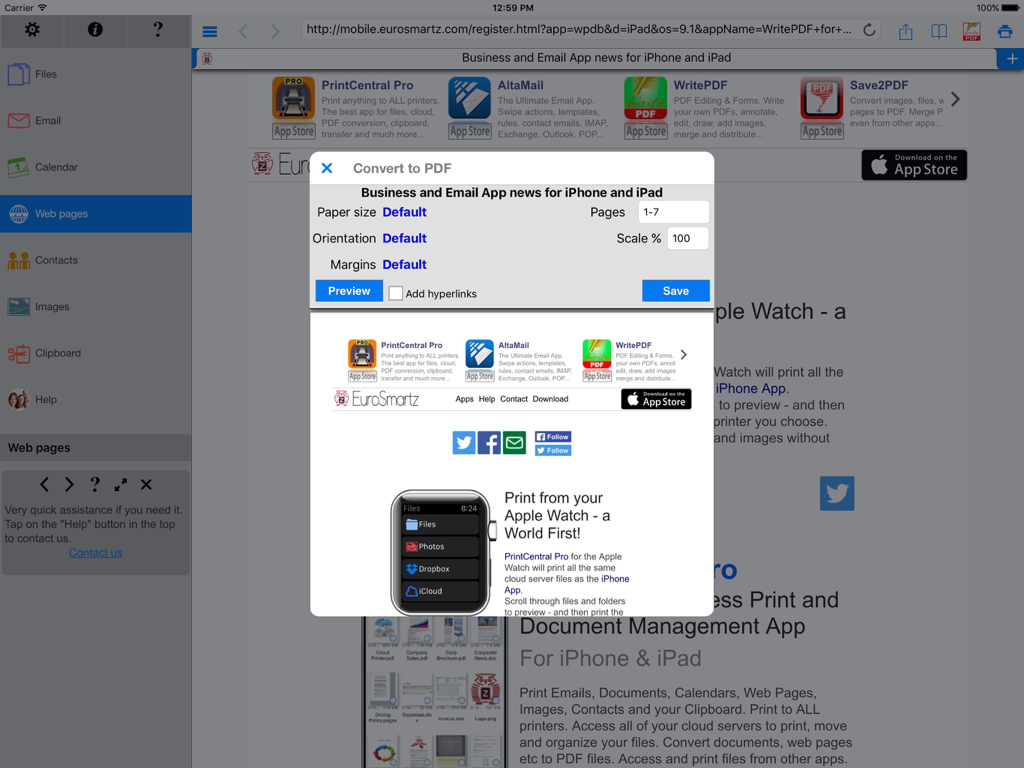
WritePDF iPad 앱 인터페이스에 문서 설정과 함께 웹 페이지를 PDF로 변환하는 대화 상자가 표시됩니다.

WritePDF iPad 앱 인터페이스에 문서 설정과 함께 웹 페이지를 PDF로 변환하는 대화 상자가 표시됩니다.

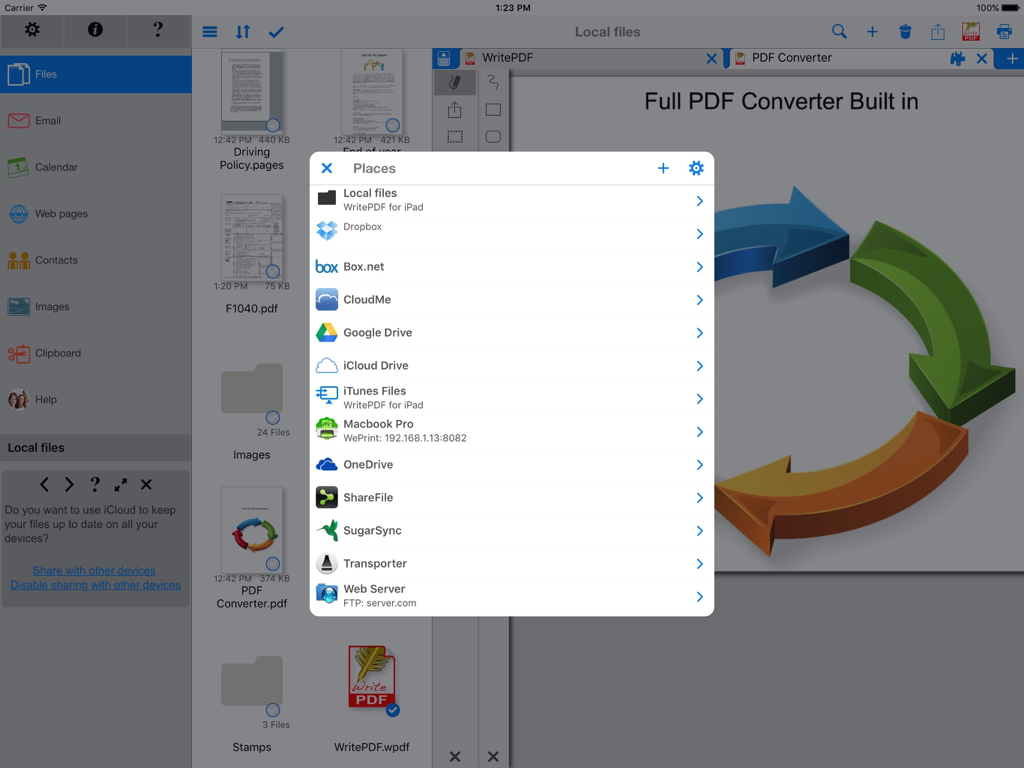
WritePDF iPad 인터페이스에 문서 관리를 위한 통합 클라우드 스토리지 서비스 목록이 표시됩니다.

WritePDF iPad 인터페이스에 문서 관리를 위한 통합 클라우드 스토리지 서비스 목록이 표시됩니다.

전문 PDF 보고서에서 텍스트 강조 표시 및 주석 옵션을 보여주는 iPad 화면

전문 PDF 보고서에서 텍스트 강조 표시 및 주석 옵션을 보여주는 iPad 화면

iPad에서 데스크톱급 파워를 경험하세요

이 앱을 돋보이게 하는 도구, 129K+ 명의 사용자가 선택.

🖋️

전문 문서 수정

이동 중에도 데스크톱 PC의 정밀함과 정교함으로 파일 형식을 병합하고, 복잡한 양식을 채우고, 주석을 추가하세요.

🔍

즉각적인 전역 검색

몇 초 만에 중요한 정보를 찾으세요. 파일을 열지 않고도 저장된 모든 파일과 클라우드 기반 파일에서 동시에 키워드를 검색하세요.

🔒

보안 클라우드 워크플로우

다운로드 없이 클라우드에서 직접 문서를 편집하고 변환하세요. 엄격한 데이터 무결성과 전문적인 보안 규정을 유지하세요.

앱 소개

에 대해 알아야 할 모든 것 WritePDF.

설명

WritePDF is more than just a common annotation tool, it is a powerful PDF modification/printing tool that is usually reserved for computers. Move beyond ordinary PDF viewing, form filling, PDF modification & annotation. WritePDF is the first app that brings together both ease of use and the sophistication needed for managing PDFs, word files, spreadsheets and many other documents on the iPad. WritePDF is also the first app to be fully compatible with PDF readers on Mac & PC, any changes made to a PDF on an iPad will be reflected when opened on a computer and vice versa. With the most powerful PDF modification and viewing engine ever made, WritePDF stands heads and shoulders above the rest! One of the most powerful and security focused features of WritePDF is the ability to read, convert and annotate PDFs in the Cloud without having to download them first. This means that you can keep all of your documents and files in the Cloud and access them on demand in a very secure environment when away from the office. It also give organisations control on documents and files. WritePDF is created & bought to you by one of the top business app companies - with years of iOS app experience from 2008, EuroSmartz is unrivaled when it comes to apps for use in business. - "Being able to quickly highlight text ready for revision is awesome" - "The ability to search for a word or phrase over all of the PDFs & files I have without opening them is something I can't even do on my PC" - "Form filling is made so easy with WritePDF, I have just applied for a new bank account using my iPad" - "The ability to quickly access a document in the cloud and modify it is the #1 feature in my book" - "I can now edit my PDF and print it to my old printer that is not AirPrint enabled, just magic!" Main Features √ Modifying PDFs > Add arrows, circles, squares and other shapes to a PDF > Fill in PDF forms & add text > Use Highlighter to highlight single words or entire sections > Add web page links to words or sections of text > Transfer PDFs to & from other apps using "Open in.." > Fully compatible with most PC, Mac & iOS App PDF viewers, shows all changes > Insert pictures to a PDF > Quickly & seamlessly transfer PDFs or files from Pages, Numbers or Keynote using Open in √ Global Search > Search for keywords or phrases in ALL files stored within WPDF without opening them > Search results displayed as tapable links √ Cloud Services > Annotate, read and convert files & PDFs directly in the Cloud without downloading > Securely access documents and files and keep control of where they are stored > CloudMe, Sharefile, Box.net, Dropbox, Google Docs, iDisk, FTP, WebDAV all supported √ PDF Page Organization > Move, delete or add pages > Add, delete, rotate, copy/paste & rearrange pages > Add selected pages to an existing PDF from docs, spreadsheets or other files √ Form Filling > Easily fill in PDF forms, even with multiple fields and boxes > Save your signature in the app and reuse when needed > Email/print completed form right from within the app √ PDF Conversion & Merging View/Convert/Merge Microsoft Office files, Photos, PDFs, Contacts, Web Pages, Email & Email attachments as well as many more file formats > Create a single PDF from multiple files even if they are a different format (i.e. merge a Word file with a Pages document with an existing PDF etc) > Print or convert PDFs from other apps using Open in or other methods √ Full featured Printing > Print direct to most existing WiFi or shared printers, or use the free printer software for ALL printers. > Print from Pages, Numbers or Keynote extremely quickly & easily without the need for an AirPrint printer using Open in > Print remotely via 3G/EDGE or Google Cloud Print √ Reminders & Keywords > Set a reminder for a file, PDF or document > Add keywords to any file for easy searching

최신 버전

4.7

크기

44.4 MB

출시일

2012년 2월 28일

iPad를 전문가용 워크스테이션으로 바꿀 준비가 되셨나요?

데스크톱급 편집, 보안 클라우드 관리, 원활한 인쇄를 위해 WritePDF를 신뢰하는 129,000명 이상의 모바일 전문가들과 함께하세요. 언제 어디서든 가능합니다.

다운로드: App Store

App information, icons, screenshots, and descriptions displayed on this page are sourced from the Apple App Store and are the property of their respective developers. Download estimates and rankings are based on MWM's proprietary models and may not reflect actual figures. This page is provided for informational and analytical purposes only.

Believe this page infringes your intellectual property? File a dispute