
This page is not an official page of the app or its developer, but an independent editorial publication created for informational and commentary purposes. Unless expressly stated otherwise, neither the app nor its developer is affiliated with, endorsed by, sponsored by, authorized by, or otherwise officially connected with MWM, Apple, Google Play, the app publisher, or the app's developer, and nothing on this page implies that the app was developed using MWM's services. Any trademarks, logos, screenshots, and other content remain the property of their respective owners.


Affinity Publisher 2 for iPad
Unleash professional-grade page design, anywhere. This app puts serious publishing power in your hands.
Downloads
1M+User Rating
Total Ratings
807Publisher
Category
Graphics & DesignLocales
8Latest Version
2.6.4Size
1.7 GBFirst Released
Nov 9, 2022An evaluation of key features enabling professional-grade desktop publishing on Apple's iPad platform.
Affinity Publisher 2 for iPad: Core Capabilities Analysis
Seamless iPad Optimization
The app provides a fully integrated and optimized iPad experience, leveraging gesture controls, Apple Pencil precision, Metal acceleration for fast performance, and iCloud integration for seamless file management.
Comprehensive Professional Layout Tools
This tool features advanced capabilities such as live master pages, facing page spreads, sophisticated guides and snapping, text wrapping around any object, and linked text frames, crucial for creating complex document layouts.
Advanced Typography & Text Control
It allows users to exercise full control over character and paragraph styles, offers comprehensive OpenType support, and enables writing text along any path, ensuring precise and visually appealing text presentation.
Robust Image & Vector Graphics Management
The app supports placing and linking various file formats (PSD, AI, PDF, JPG), includes non-destructive adjustment layers for image correction, and provides precision vector tools for creating and manipulating shapes.
Powerful Productivity Enhancements
This tool features smart master pages, automatic generation of indexes and tables of contents, savable undo history, and a 'Package' feature to collate all document resources, significantly streamlining complex publishing workflows.
Extensive Import/Export & Output Capabilities
It provides broad compatibility with IDML & XLSX import, offers professional output options like CMYK, PANTONE©, and PDF/X standards, along with live preflight checking, ensuring print-ready and exchangeable files.
Frequently Asked Questions
Everything you need to know about Affinity Publisher 2 for iPad
What is Affinity Publisher 2 for iPad?
Affinity Publisher 2 for iPad is an on-the-go page layout and design app. It enables users to create books, brochures, posters, reports, and more, offering the power of its desktop publishing software.
Is Affinity Publisher 2 for iPad optimized for iPad features?
Yes, Affinity Publisher 2 for iPad is optimized for iPad. It features gesture controls, a Quick Menu, Apple Pencil support, Metal acceleration for performance, and iCloud Drive integration for file management.
Does Affinity Publisher 2 for iPad support Apple Pencil?
Yes, Affinity Publisher 2 for iPad supports Apple Pencil. The app is sensitive to pressure, tilt, and angle, harnessing the full power and precision of the Apple Pencil for design tasks.
Does Affinity Publisher 2 for iPad integrate with iCloud Drive?
Yes, Affinity Publisher 2 for iPad includes full iCloud Drive integration. This feature allows for seamless file management, storage, and sharing of documents directly within the app.
Can Affinity Publisher 2 for iPad handle professional page layouts?
Yes, Affinity Publisher 2 for iPad provides professional layout tools. These include facing page spreads, live master pages, advanced guides, tables, text wrapping, and the ability to link multiple text frames.
Does Affinity Publisher 2 for iPad support footnotes and endnotes?
Yes, Affinity Publisher 2 for iPad supports footnotes, sidenotes, and endnotes. Users can incorporate these elements into their documents for academic or reference purposes.
What typography features does Affinity Publisher 2 for iPad offer?
Affinity Publisher 2 for iPad offers advanced typography features. These include full control over character and paragraph styles, comprehensive OpenType support, text along any path, and advanced flow options.
Does Affinity Publisher 2 for iPad support OpenType fonts?
Yes, Affinity Publisher 2 for iPad provides comprehensive OpenType support. This allows users to access advanced typographic features for detailed text formatting in their designs.
What image and graphic formats can Affinity Publisher 2 for iPad import?
Affinity Publisher 2 for iPad can import PSD, AI, PDF, JPG, TIFF, PNG, DWG, or Affinity files. Users can link or embed these images and graphics into their documents.
Does Affinity Publisher 2 for iPad support non-destructive image editing?
Yes, Affinity Publisher 2 for iPad supports non-destructive image editing. Users can correct and enhance images using adjustment layers, preserving original image data.
How does Affinity Publisher 2 for iPad enhance productivity?
Affinity Publisher 2 for iPad enhances productivity with features like a section manager, savable undo history, smart master pages, automatic index/TOC generation, and the Package feature for collating document resources.
Can Affinity Publisher 2 for iPad package documents for sharing?
Yes, Affinity Publisher 2 for iPad can package documents. The Package feature collates the document with all used image and font resources into a folder, facilitating collaboration and sharing.
Does Affinity Publisher 2 for iPad have PDF passthrough?
Yes, Affinity Publisher 2 for iPad features PDF passthrough. This allows users to flag imported PDFs, ensuring professional output and integration within their layouts.
Does Affinity Publisher 2 for iPad support auto-flow for content?
Yes, Affinity Publisher 2 for iPad supports auto-flow. It offers autoflow for multiple images and multi-page PDFs, which helps save time during document creation and layout.
Can Affinity Publisher 2 for iPad create multi-page spreads?
Yes, Affinity Publisher 2 for iPad allows users to easily create multi-page spreads. This feature is part of its professional layout tools for designing publications effectively.
Can Affinity Publisher 2 for iPad import InDesign files?
Yes, Affinity Publisher 2 for iPad supports importing from Adobe InDesign® and other programs via IDML. This facilitates transferring existing projects into the application.
Does Affinity Publisher 2 for iPad integrate with Dropbox?
Yes, Affinity Publisher 2 for iPad includes Dropbox API integration. This feature helps retain placed resource linkage across multiple devices for seamless workflow and collaboration.
What professional output options are available in Affinity Publisher 2 for iPad?
Affinity Publisher 2 for iPad offers professional output options. These include end-to-end CMYK, PANTONE©, spot color, live preflight checking, and PDF/X-1a, PDF/X-3, PDF/X-4 output.
Does Affinity Publisher 2 for iPad support PANTONE colors?
Yes, Affinity Publisher 2 for iPad supports PANTONE© and spot colors. It provides end-to-end CMYK and color management for professional print output.
Does Affinity Publisher 2 for iPad integrate with other Affinity apps?
Yes, Affinity Publisher 2 for iPad integrates fully with other Affinity apps via StudioLink. Users can instantly switch to Affinity Photo's photo editing or Affinity Designer's vector tools without leaving Publisher.
What is StudioLink in Affinity Publisher 2 for iPad?
StudioLink is a feature in Affinity Publisher 2 for iPad that enables seamless integration with other Affinity apps. It allows users to access Affinity Photo's and Designer's tools directly within Publisher.
Does Affinity Publisher 2 for iPad offer extensive color control?
Yes, Affinity Publisher 2 for iPad provides full color control. It supports end-to-end CMYK, PANTONE©, spot color, and includes vast swatch libraries for precise color management.
Can users create and format tables in Affinity Publisher 2 for iPad?
Yes, Affinity Publisher 2 for iPad allows users to create and format tables. The app provides tools for custom table formats, enhancing document organization and presentation.
The following screenshots and description are sourced directly from the app's official store listing and are the property of the app developer.
App Store
Screenshots

See how the app enables complex text wrapping around objects and offers comprehensive OpenType controls for precise typography.
Dynamic Text Layout

Explore how users can efficiently manage master pages for consistent branding and easily apply them across multi-page product layouts.
Master Page Control

Discover the app's advanced features for adding footnotes, sidenotes, and endnotes, alongside seamless integration of data visualizations like graphs.
Comprehensive Referencing

Witness the robust OpenType support for ligatures and stylistic sets, enabling users to craft intricate and visually striking book cover designs.
Advanced Typography Artistry

Observe how the app utilizes PDF passthrough for imported files, allowing users to integrate complex PDFs into professional multi-column layouts.
Seamless PDF Integration

Explore the intuitive 'Package' feature for collating resources, ensuring seamless collaboration and organization within multi-section business reports.
Effortless Document Packaging

See how the app's autoflow capability streamlines the placement of multiple images, perfect for creating dynamic and organized product catalogs.
Dynamic Image Autoflow
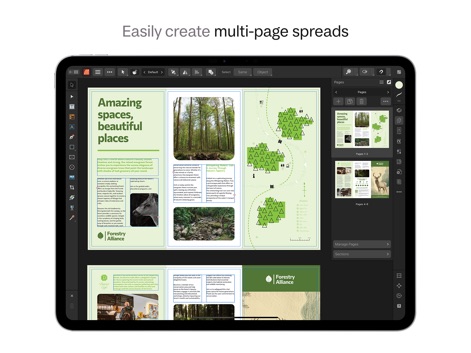
Discover the app's powerful tools for crafting elegant multi-page spreads, evident in the sophisticated three-column layouts and clear page management.
Flexible Page Spreads

Witness the app's comprehensive color control with vast swatch libraries, including CMYK and PANTONE©, for precise branding and visual fidelity.
Professional Color Management

Observe the robust table creation and formatting tools, allowing users to customize cell styles and integrate complex data such as timetables into their designs.
Advanced Table Creation
Description
Download
More Like This
Apps with similar features and user experience

Brochure Maker, Pamphlet Maker
Bhavesh Gabani

Zine - Enjoy Writing
Aura Marker Studio Co., Ltd.

Pages: Create Documents
Apple Inc.

Price List & Menu Maker
Desygner Pty Ltd

Story Creator - Easy Story Book Maker for Kids
Innovative Mobile Apps Ltd

Book Creator for iPad
Tools for Schools Limited

Book Creator One
Tools for Schools Limited
This page is not an official page of the app or its developer, but an independent editorial publication created for informational and commentary purposes. Unless expressly stated otherwise, neither the app nor its developer is affiliated with, endorsed by, sponsored by, authorized by, or otherwise officially connected with MWM, Apple, Google Play, the app publisher, or the app's developer, and nothing on this page implies that the app was developed using MWM's services. Any trademarks, logos, screenshots, and other content remain the property of their respective owners.