
This page is not an official page of the app or its developer, but an independent editorial publication created for informational and commentary purposes. Unless expressly stated otherwise, neither the app nor its developer is affiliated with, endorsed by, sponsored by, authorized by, or otherwise officially connected with MWM, Apple, Google Play, the app publisher, or the app's developer, and nothing on this page implies that the app was developed using MWM's services. Any trademarks, logos, screenshots, and other content remain the property of their respective owners.


AirMini™ by ResMed
Sleep therapy, unleashed. The app hands users command over their AirMini, transforming a complex regimen into a daily routine.
Downloads
500k+User Rating
Total Ratings
610Publisher
Category
MedicalLocales
24Latest Version
1.8.0Size
225.6 MBFirst Released
May 5, 2017An evaluation of core functionalities designed for sleep apnea therapy management.
AirMini™ by ResMed App: Key Features Analysis
Comprehensive Sleep Tracking
The app provides detailed daily statistics, including usage hours, mask seal quality, and apnea-hypopnea events per hour, for post-sleep review.
Mask Fit Test & Therapy Simulation
This tool offers a Test Drive tutorial to simulate therapy sensation and assist in troubleshooting mask leaks, ensuring a smooth first night.
Secure Data Sharing
It allows users to easily share their therapy data with healthcare providers or physicians through a cloud upload function.
Guided Setup Assistance
The app provides step-by-step machine and mask setup tools, guiding users from the initial stages of their therapy journey.
Smartphone Therapy Control
It allows users to effortlessly start and stop therapy and manage device operations directly from their smartphone.
Adjustable Comfort Settings
This tool features adjustable comfort settings, enabling users to fine-tune their therapy experience to suit personal preferences, while pressure is set by the provider.
Frequently Asked Questions
Everything you need to know about AirMini™ by ResMed
What is the AirMini™ by ResMed app used for?
The AirMini™ by ResMed app is a personal sleep therapy assistant. It enables users to set up therapy, change comfort settings, and track sleep data directly from their smart device.
How does the AirMini™ by ResMed app connect to the AirMini machine?
The AirMini™ by ResMed app connects to the AirMini machine using built-in wireless Bluetooth® technology. Users press the Bluetooth button on the AirMini device to establish the connection.
Can I track my sleep data with the AirMini™ by ResMed app?
Yes, the AirMini™ by ResMed app provides sleep tracking. It records daily statistics including usage hours, mask seal performance, and events per hour, viewable after each sleep session.
What kind of data does the AirMini™ by ResMed app track?
The AirMini™ by ResMed app tracks daily therapy data such as usage hours, mask seal efficacy, and respiratory events per hour. This information is displayed on a personal dashboard for easy review.
Does the AirMini™ by ResMed app support other ResMed devices?
No, the AirMini™ by ResMed app does not support ResMed AirSense 10 or AirCurve 10 devices. It is specifically designed for use with the AirMini™ CPAP machine.
How do I adjust comfort settings in the AirMini™ by ResMed app?
The AirMini™ by ResMed app allows users to adjust comfort settings to tailor their therapy experience. While the therapy pressure is set by a provider, other adjustable comfort settings are available in the app.
Can the AirMini™ by ResMed app help with machine setup?
Yes, the AirMini™ by ResMed app includes guided setup tools for both the machine and mask. It provides step-by-step instructions and videos to assist users from their first day of therapy.
How can I share my therapy data from the AirMini™ by ResMed app?
The AirMini™ by ResMed app includes an 'Upload Data to Cloud' function. This feature enables users to easily share their therapy data with their healthcare provider or physician.
Does the AirMini™ by ResMed app offer a tutorial for new users?
Yes, the AirMini™ by ResMed app offers a 'Test Drive' tutorial. This feature allows new users to experience therapy and helps troubleshoot mask leaks, ensuring a smooth initial experience.
The following screenshots and description are sourced directly from the app's official store listing and are the property of the app developer.
App Store
Screenshots

This visual shows the AirMini device alongside a connected smartphone, highlighting the app's capability to control the CPAP machine and view essential sleep data.
App Control Overview
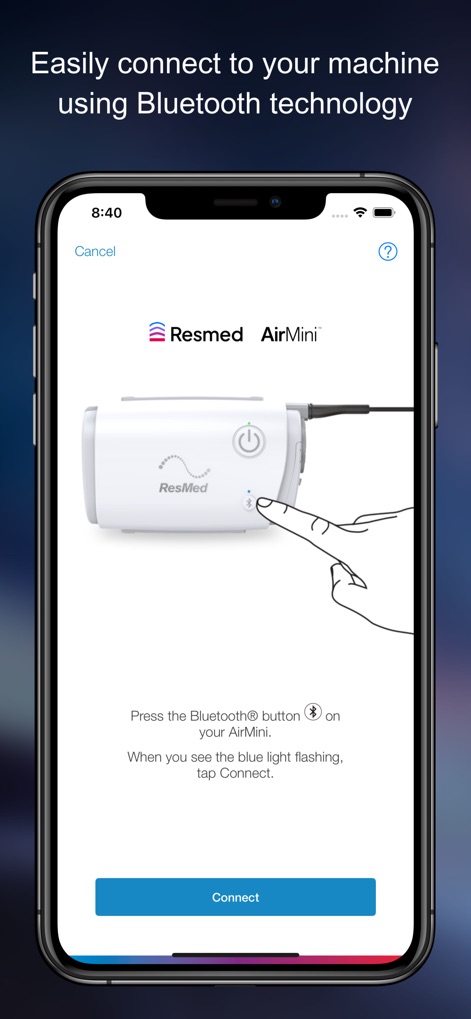
Users can easily connect their device via the app's intuitive interface, featuring clear instructions to press the Bluetooth button and a prominent "Connect" option.
Effortless Connectivity
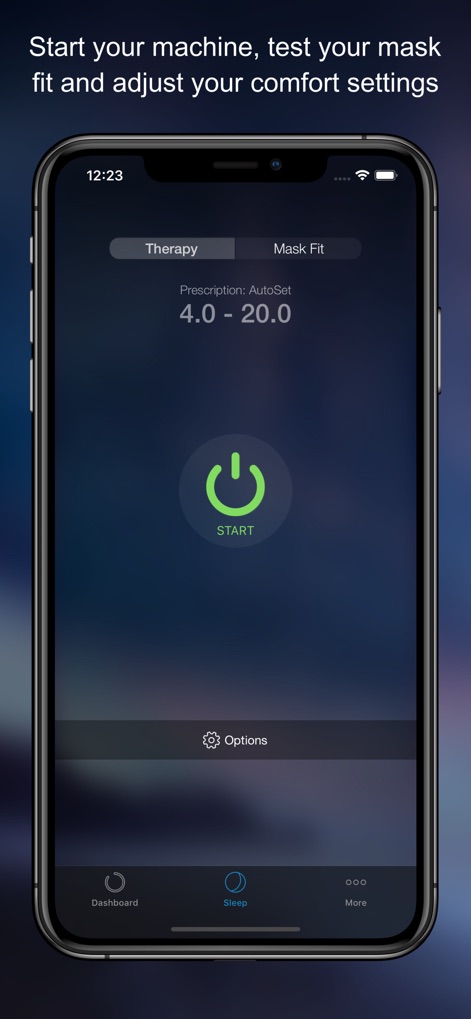
The app provides a centralized control panel, enabling users to initiate therapy with a prominent "START" button and navigate between "Therapy" and "Mask Fit" functions.
Therapy Management Hub
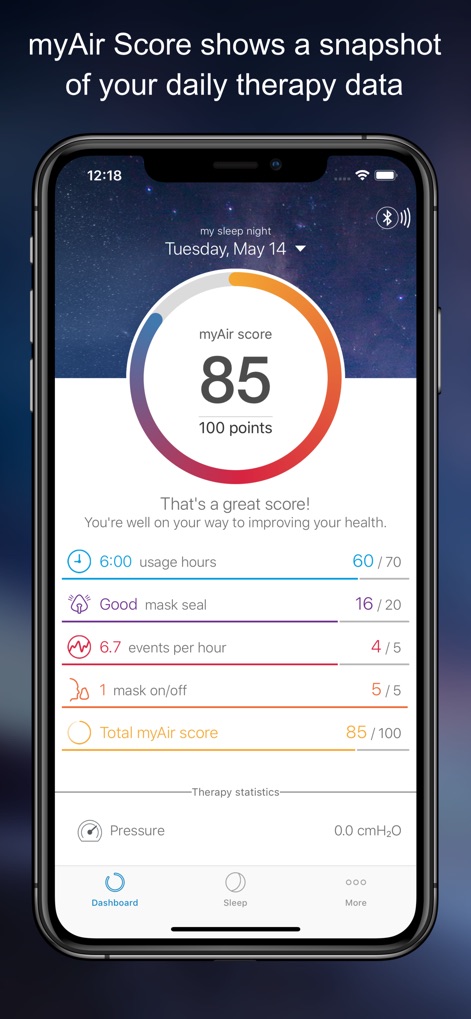
This screen illustrates the personalized dashboard, presenting key metrics such as the "myAir score" for overall progress and specific data on "usage hours".
Personalized Sleep Insights
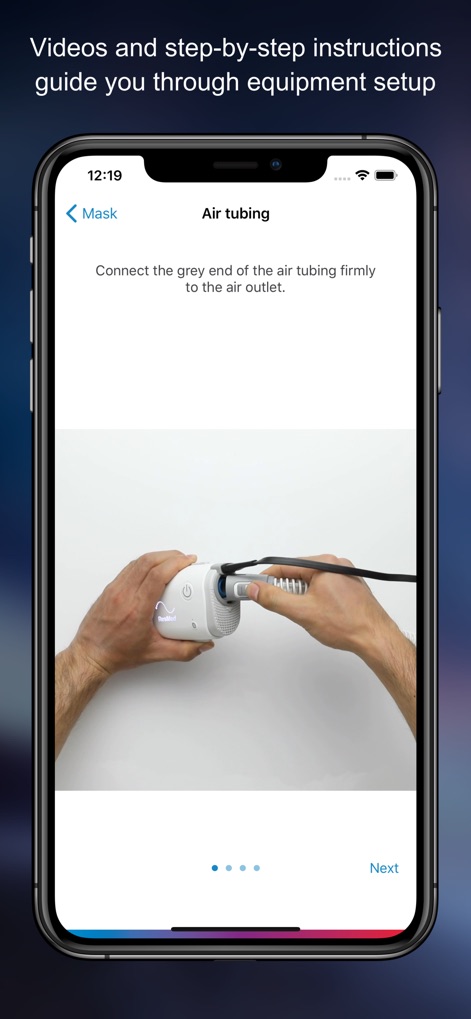
This visual highlights the app's guided setup feature, offering clear, step-by-step instructions for equipment assembly and visual cues like connecting the air tubing.
Guided Setup Assistance
Description
Download
More Like This
Apps with similar features and user experience

Accredo
Accredo Health Group, Inc

ASPIRE Galderma Rewards
Galderma Laboratories, L.P.

myAir™ by Resmed
RESMED LTD.

CenterWell Pharmacy
Humana Inc.

myAPP by Adapthealth
ADAPTHEALTH CORP

SleepCircle
Lincare Holdings Inc.

CVS Specialty
CVS Pharmacy

MARLÖ
Alcon Vision, LLC
MyCareLink Heart™
Medtronic, Inc.
This page is not an official page of the app or its developer, but an independent editorial publication created for informational and commentary purposes. Unless expressly stated otherwise, neither the app nor its developer is affiliated with, endorsed by, sponsored by, authorized by, or otherwise officially connected with MWM, Apple, Google Play, the app publisher, or the app's developer, and nothing on this page implies that the app was developed using MWM's services. Any trademarks, logos, screenshots, and other content remain the property of their respective owners.