
This page is not an official page of the app or its developer, but an independent editorial publication created for informational and commentary purposes. Unless expressly stated otherwise, neither the app nor its developer is affiliated with, endorsed by, sponsored by, authorized by, or otherwise officially connected with MWM, Apple, Google Play, the app publisher, or the app's developer, and nothing on this page implies that the app was developed using MWM's services. Any trademarks, logos, screenshots, and other content remain the property of their respective owners.


微信输入法
Forget slow searches. This app injects cutting-edge AI directly into your input, transforming how users access information and express ideas.
Downloads
25M+User Rating
Total Ratings
128.9KPublisher
Category
UtilitiesLocales
1Latest Version
3.1.0Size
402.3 MBFirst Released
Dec 18, 2022WeType Input Method: Core Capabilities Analysis
An in-depth evaluation of 微信输入法's features for the efficiency-driven user.
AI Assistant Integration
The app provides advanced AI capabilities, including DeepSeek and Hunyuan support, allowing users to get deep answers, encyclopedia knowledge, and writing assistance directly within the input process.
Productivity-Boosting Input Tools
This tool features quick access to common phrases, a robust clipboard, handwriting character lookup, and spell-checking functionalities, ensuring faster and more accurate text input for efficient communication.
Versatile Input Modes
It allows users to choose from six different keyboard input modes and offers a convenient voice-to-text feature, enabling personalized and hands-free typing without long presses.
Smart Emoji Features
The app includes intelligent emoji recommendations and customization options, facilitating more expressive and personalized communication during chats.
Frequently Asked Questions
Everything you need to know about 微信输入法
Does 微信输入法 support AI deep answers?
Yes, 微信输入法 (WeChat Input Method) supports AI deep answers. It integrates with DeepSeek and Hunyuan models, allowing users to instantly get and share AI-generated responses for various informational and creative needs.
Can 微信输入法 convert speech to text?
Yes, 微信输入法 (WeChat Input Method) provides a speech-to-text function. This feature enables quick voice input without needing a long press and supports unlimited transcription duration for ease of use.
How many input modes does 微信输入法 offer?
微信输入法 (WeChat Input Method) offers six distinct keyboard input modes. Combined with its speech-to-text function, these options provide users with diverse and personalized input experiences.
What quick input tools are available in 微信输入法?
微信输入法 (WeChat Input Method) includes several quick input tools. These features encompass common phrases, a clipboard for cross-device copy-paste, handwriting character lookup, and spell checking for faster, more accurate typing.
Where can I find the privacy policy for 微信输入法?
Yes, the privacy policy for 微信输入法 (WeChat Input Method) is publicly available. Users can access the complete policy document at the provided URL: https://wetype.weixin.qq.com/web/privacy?platform=ios.
Does 微信输入法 offer emoji recommendations?
Yes, 微信输入法 (WeChat Input Method) enhances communication with comprehensive emoji features. It provides emoji recommendations and supports custom emojis, offering a wide array of options for user expression.
Does 微信输入法 support cross-device copy-paste?
Yes, 微信输入法 (WeChat Input Method) supports cross-device copy-paste. This functionality allows users to copy text on their mobile device and instantly paste it on their computer, facilitating seamless workflow.
The following screenshots and description are sourced directly from the app's official store listing and are the property of the app developer.
App Store
Screenshots

Input Method Essentials
Explore the sleek user interface and the intuitive QWERTY keyboard layout, showcasing the app's foundational input capabilities for quick and efficient typing.
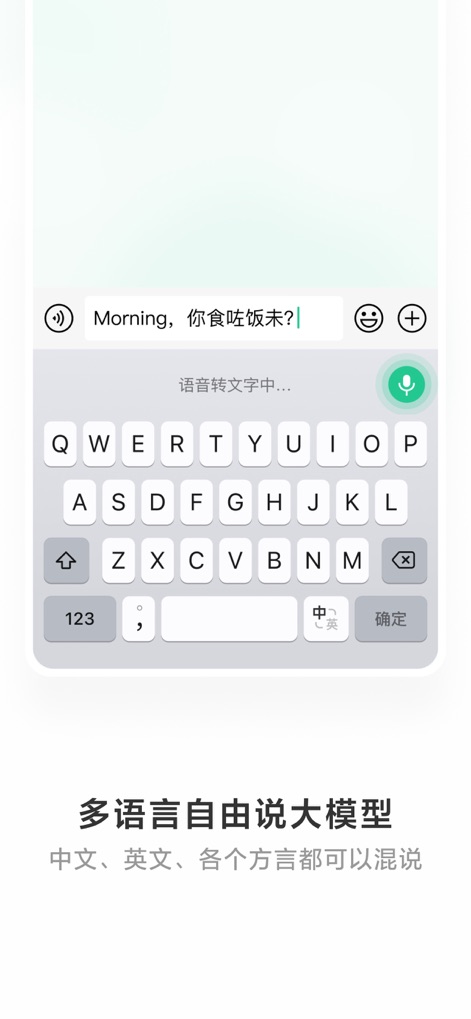
Multilingual Voice Input
Discover how this tool supports seamless multi-language input and intelligent speech-to-text conversion, enabling users to effortlessly mix Chinese and English within a single conversation.
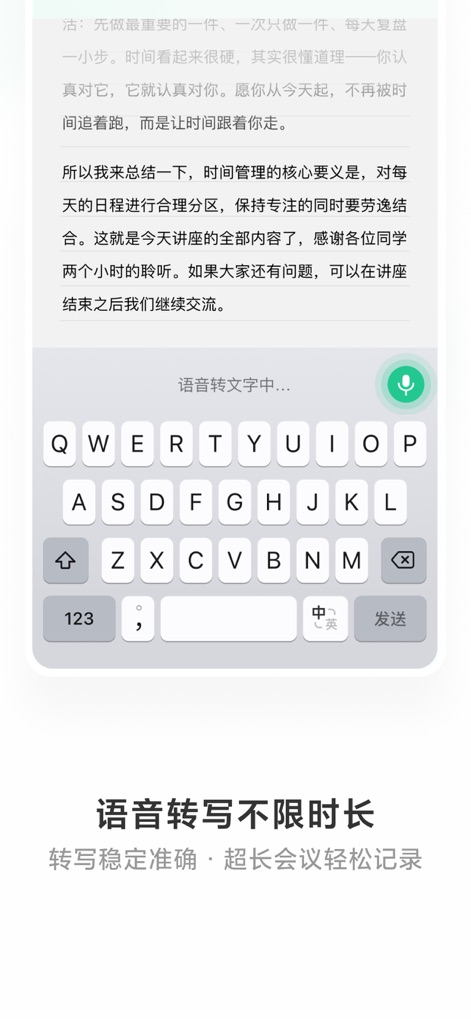
Extended Voice Transcription
Witness the app's capability for unlimited voice transcription, providing stable and accurate conversion of lengthy spoken content, as demonstrated by the extensive text block and the microphone icon.

Instant Content Formatting
Examine the "Layout to Image" function, allowing users to effortlessly transform plain text into visually appealing images, complete with various layout templates and one-click export options.

AI-Powered Assistance
Engage with the integrated AI feature, which provides in-depth answers to complex queries like "How to reply when praised?", leveraging advanced DeepSeek/Hunyuan models for comprehensive support.
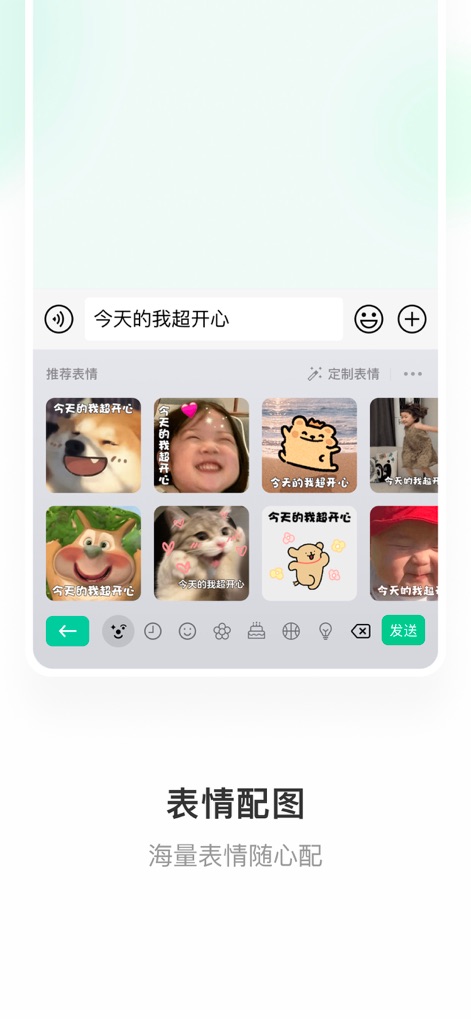
Expressive Emoji Matching
Explore the "Emoji Matching" feature that intelligently suggests relevant emojis based on the input text ("I'm super happy today"), offering a wide array of recommended and customizable expressive stickers.

Seamless Cross-Device Sync
Observe the intuitive "Cross-Device Copy-Paste" functionality, enabling users to seamlessly transfer text between mobile devices and computers, illustrated by the clear visual diagram.

Creative Emoticon Library
Discover the app's "Kaomoji" feature, which intelligently suggests creative emoticons based on contextual input like "Happy Birthday", enhancing expressive communication with a diverse library.
Description
Download
More Like This
Apps with similar features and user experience

AiText: Grammar & Spell Check
Mikhail Chelbaev
Grammar Check Corrector AI
DAMIEN, NATHANAEL ELLEDGE

LanguageTool - Grammar Checker
LanguageTooler GmbH

AI Email Writer - Boss
Curious Creators Co.
AI Keyboard Type AI – AnyWrite
Appnest Technologies LLC

TypeEasy-AI Keyboard & Writer
Jie Huang
Grammarly: AI Writing Keyboard
Grammarly, Inc

QuillBot: AI Writing, Keyboard
QuillBot, a Learneo Inc. business

G.AI - AI ChatBot Assistant
Nanjing Diant Network Technology Co., LTD
This page is not an official page of the app or its developer, but an independent editorial publication created for informational and commentary purposes. Unless expressly stated otherwise, neither the app nor its developer is affiliated with, endorsed by, sponsored by, authorized by, or otherwise officially connected with MWM, Apple, Google Play, the app publisher, or the app's developer, and nothing on this page implies that the app was developed using MWM's services. Any trademarks, logos, screenshots, and other content remain the property of their respective owners.