
This page is not an official page of the app or its developer, but an independent editorial publication created for informational and commentary purposes. Unless expressly stated otherwise, neither the app nor its developer is affiliated with, endorsed by, sponsored by, authorized by, or otherwise officially connected with MWM, Apple, Google Play, the app publisher, or the app's developer, and nothing on this page implies that the app was developed using MWM's services. Any trademarks, logos, screenshots, and other content remain the property of their respective owners.

Grammarly: AI Keyboard & Notes
Ambiguity ends here. The app equips users with an instant AI co-pilot, ensuring every message achieves maximum impact and flawless execution.
Downloads
50M+User Rating
Total Ratings
368.3KPublisher
Category
ProductivityLocales
1Latest Version
9.3.0Size
263.8 MBFirst Released
Nov 2, 2017Grammarly: AI Keyboard & Notes - Key Features Analysis
An evaluation of core functionalities designed to empower precise and impactful written communication.
AI-Powered Multi-Language Keyboard Assistance
The app provides real-time spelling, grammar, conciseness, and tone suggestions in multiple languages (English, Spanish, French, German, Portuguese, Italian) directly within any application, significantly enhancing clarity and confidence in daily communication. Premium offers advanced vocabulary and clarity recommendations.
Generative AI Message Rewriting
This tool features the ability to instantly generate new versions of messages, adjusting for length, fluency, and tone across 19 languages. It allows users to quickly adapt communication to various contexts and audiences.
Integrated Document Editor & Analytics
It allows users to draft long-form content in a dedicated editor that offers comprehensive writing feedback, cloud-based management, personal writing statistics, and essential plagiarism and AI detection capabilities.
Seamless Safari Web Extension
The app provides a Safari extension for direct spelling and grammar checks on websites, ensuring consistent writing quality across all online interactions.
Frequently Asked Questions
Everything you need to know about Grammarly: AI Keyboard & Notes
What is the Grammarly: AI Writing Keyboard app?
The Grammarly: AI Writing Keyboard is an AI-powered tool for iPhone and iPad that provides real-time writing feedback, including spelling, grammar, and conciseness suggestions, directly within your apps.
Does the Grammarly: AI Writing Keyboard work on both iPhone and iPad?
Yes, the Grammarly Keyboard is designed to work directly in your iPhone and iPad apps, providing seamless writing assistance across both devices.
What writing suggestions does the Grammarly Keyboard offer?
The Grammarly Keyboard offers spelling, grammar, and conciseness suggestions. It also provides multiword text predictions, smart autocorrect, swipe typing, and emoji predictions and search bar.
Does Grammarly Premium offer advanced vocabulary and clarity recommendations?
Yes, Grammarly Premium provides advanced suggestions for clarity, conciseness, tone, and vocabulary, enhancing your writing to be more engaging and effective.
Can the Grammarly app detect and transform the tone of my writing?
Yes, the Grammarly Keyboard features tone detection. Grammarly Premium also offers tone transformations to adjust your message for desired effects, such as professionalism or diplomacy.
How does Grammarly's Generative AI Rewrites feature work?
Grammarly's Generative AI Rewrites create new versions of your entire message with a couple of taps. These versions adjust for length, fluency, and tone, and function in all your favorite apps.
Does Grammarly include a document editor for long-form writing?
Yes, Grammarly includes a document editor providing comprehensive writing feedback, cloud-based document management, personal writing statistics, and plagiarism and AI detection. It is compatible with hardware keyboards.
Is there a Grammarly extension available for Safari on iPhone and iPad?
Yes, Grammarly offers a Safari extension specifically for typing on websites, which includes a spelling and grammar checker to assist your writing online.
How do I manage my Grammarly Premium subscription renewal?
Your Grammarly Premium subscription automatically renews unless you cancel it at least 24 hours before the current period ends. You can manage your subscription in your App Store account settings after purchase.
How does Grammarly protect my privacy and data?
Grammarly practices privacy by design, stating that your words are your own. The company asserts it will never rent or sell your data, prioritizing user trust.
What applications can the Grammarly Keyboard be used with?
The Grammarly Keyboard works in all your iPhone and iPad apps. This includes popular applications like Gmail, Notes, Slack, WhatsApp, LinkedIn, and Safari, as visually confirmed.
Can Grammarly help make my writing more concise?
Yes, Grammarly provides conciseness suggestions. For example, it can recommend changing phrases like "cause an adverse effect on" to the more direct word "hurt" for improved clarity.
Does Grammarly assist in making writing sound more confident?
Yes, Grammarly offers suggestions to sound more confident. It can recommend replacing phrases such as "I think I should be able to" with "I can" for a more assertive and direct tone.
The following screenshots and description are sourced directly from the app's official store listing and are the property of the app developer.
App Store
Screenshots

AI Writing Setup
Users can easily activate the Grammarly keyboard within system settings and observe its real-time writing suggestions in email composition.
AI Rewrites & Tones
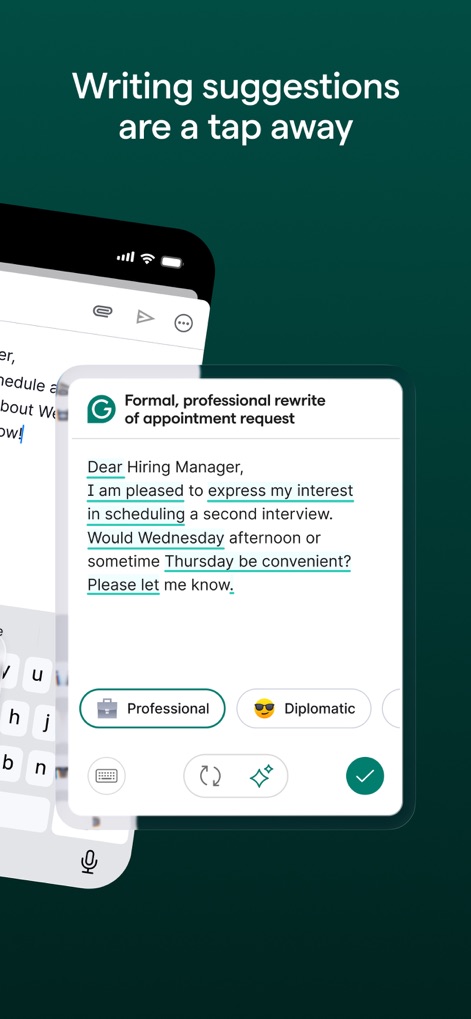
Explore the app's generative AI rewrites, providing options to refine messages with suggestions for tone and formality.

Precise Word Choice
The app accurately identifies spelling errors, offering precise vocabulary corrections and multi-word text predictions in messaging apps.

Tone Detection Insights
The app's tone detector analyzes written text, providing valuable feedback on potential perceptions such as "Disapproving" or "Confused" sentiments.

Enhance Engagement
See how this tool elevates writing engagement, offering advanced tone transformations and improved fluency suggestions for professional content.

Clarity & Conciseness
This tool streamlines text by offering conciseness suggestions, transforming wordy phrases into clear and direct alternatives.

Boost Confidence
Users can strengthen their writing with confidence suggestions, transforming hesitant phrasing into assertive and direct statements.

Error-Free Writing
The app offers comprehensive correctness feedback, automatically identifying and correcting spelling and grammar mistakes within user compositions.

Universal Integration
This tool demonstrates its broad compatibility, integrating effortlessly across popular applications including email clients and messaging platforms.

Desktop Companion
The desktop version expands functionality with comprehensive writing feedback and advanced tools for document management and AI detection.
Description
Download
More Like This
Apps with similar features and user experience
AiText: Grammar & Spell Check
Mikhail Chelbaev
Grammar Check Corrector AI
DAMIEN, NATHANAEL ELLEDGE

LanguageTool - Grammar Checker
LanguageTooler GmbH

AI Email Writer - Boss
Curious Creators Co.
AI Keyboard Type AI – AnyWrite
Appnest Technologies LLC
TypeEasy-AI Keyboard & Writer
Jie Huang

微信输入法
Tencent Technology (Shenzhen) Company Limited
QuillBot: AI Writing, Keyboard
QuillBot, a Learneo Inc. business

G.AI - AI ChatBot Assistant
Nanjing Diant Network Technology Co., LTD
This page is not an official page of the app or its developer, but an independent editorial publication created for informational and commentary purposes. Unless expressly stated otherwise, neither the app nor its developer is affiliated with, endorsed by, sponsored by, authorized by, or otherwise officially connected with MWM, Apple, Google Play, the app publisher, or the app's developer, and nothing on this page implies that the app was developed using MWM's services. Any trademarks, logos, screenshots, and other content remain the property of their respective owners.