
This page is not an official page of the app or its developer, but an independent editorial publication created for informational and commentary purposes. Unless expressly stated otherwise, neither the app nor its developer is affiliated with, endorsed by, sponsored by, authorized by, or otherwise officially connected with MWM, Apple, Google Play, the app publisher, or the app's developer, and nothing on this page implies that the app was developed using MWM's services. Any trademarks, logos, screenshots, and other content remain the property of their respective owners.


ARCCTV
Take total control with 24/7 real-time monitoring, easy QR-code setup, and full PTZ camera support—reliable DIY security with no monthly subscription fees.
Downloads
105K+User Rating
Total Ratings
100Publisher
Category
Photo & VideoLocales
26Latest Version
4.6.1Size
549.8 MBFirst Released
May 3, 2018Professional Security Without the Monthly Fees
ARCCTV provides a powerful, no-nonsense interface to manage your security cameras. Designed for homeowners and business owners who want total control over their property 24/7.
24/7 Live Remote Viewing
Keep a watchful eye on your home, children, or business from anywhere in the world with stable, real-time video streaming.
Active PTZ Camera Control
Take full command of your hardware. Remotely Pan, Tilt, and Zoom to eliminate blind spots and focus on what matters most.
Frequently Asked Questions
Everything you need to know about ARCCTV
Does ARCCTV provide 24-hour remote viewing?
Yes, the ARCCTV mobile application offers 24-hour remote viewing. Users can continuously monitor their connected security devices at any time through the app.
What are the main features of the ARCCTV app?
The ARCCTV app features real-time preview for multiple cameras, QR scan device adding, PTZ control, video capture, and recording backup. It has a concise and modern graphical user interface.
Can I control PTZ cameras with ARCCTV?
Yes, ARCCTV supports PTZ (Pan-Tilt-Zoom) control for compatible cameras. Users can navigate and adjust camera views directly using the in-app interface for comprehensive monitoring.
How do I add a new camera device to ARCCTV?
To add a new device, navigate to the "Add Device" screen in ARCCTV. The app can automatically find new network cameras, which you then select and add to your system.
Does ARCCTV allow video recording and image capture?
Yes, ARCCTV enables video capture and image snapshots from live camera feeds. The app also provides functionality for recording backup, securing your surveillance footage.
Does ARCCTV support real-time camera preview?
Yes, ARCCTV provides real-time preview for multiple connected cameras. The app displays live video streams, including timestamps and data transfer rates, for immediate monitoring.
Can I view recorded footage in ARCCTV?
Yes, ARCCTV includes a dedicated playback function. Users can access and review previously recorded footage directly from the live view interface by selecting the "Playback" option.
Where can I find the Cloud terms of use for ARCCTV?
The Cloud terms of use for ARCCTV are located at https://www.apple.com/legal/internet-services/itunes/dev/minterms/. This specific URL is provided within the application's store description.
The following screenshots and description are sourced directly from the app's official store listing and are the property of the app developer.
App Store
Screenshots
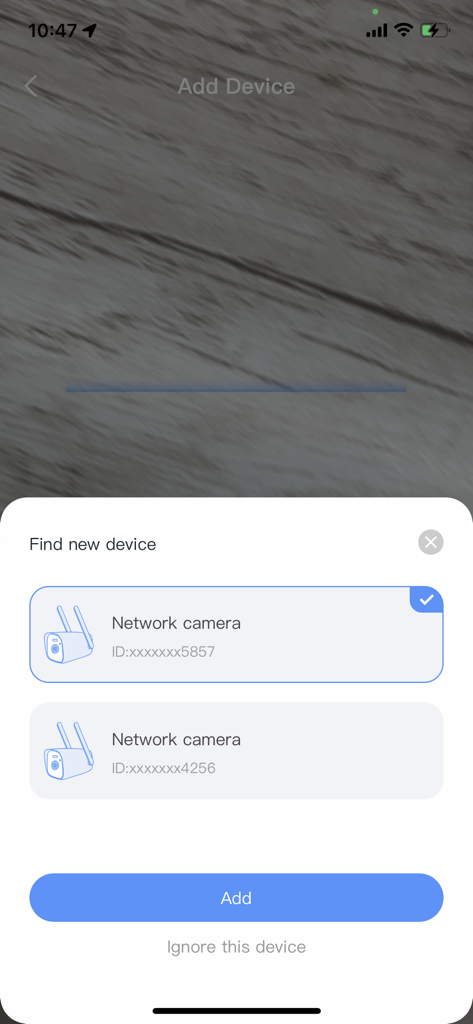
Adding a new network camera to the ARCCTV app interface
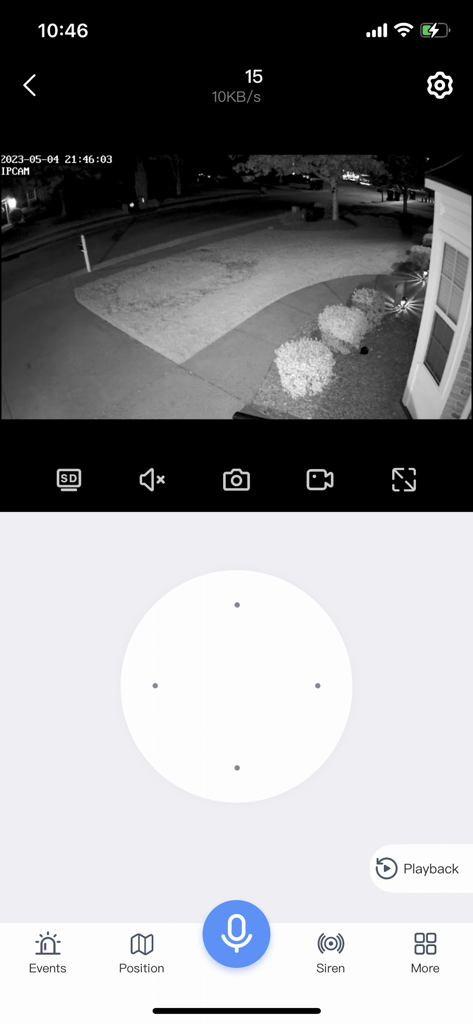
ARCCTV app interface showing a black and white night vision security camera feed of a house exterior with remote control options
Description
Download
More Like This
Apps with similar features and user experience

DMSS
Hangzhou Dong Bin Information Technology Co., Ltd.

Joolink
Shenzhen Jooan Technology Company

VicoHome: Smart Home Camera
PHOTON SAIL TECHNOLOGIES PTE. LTD.

Ubox
洪波 王

SimpliSafe Home Security App
SimpliSafe, Inc.

Active Mobile V4
JFL Equipamentos Eletronicos Industria e Comercio Ltda.

Dzees Home
Shenzhen Weixi Technology Co., Ltd

Ring - Always Home
Bot Home Automation, INC

Hik-Connect - for End user
Hangzhou Hikvision Digital Technology Co., Ltd.
This page is not an official page of the app or its developer, but an independent editorial publication created for informational and commentary purposes. Unless expressly stated otherwise, neither the app nor its developer is affiliated with, endorsed by, sponsored by, authorized by, or otherwise officially connected with MWM, Apple, Google Play, the app publisher, or the app's developer, and nothing on this page implies that the app was developed using MWM's services. Any trademarks, logos, screenshots, and other content remain the property of their respective owners.