
This page is not an official page of the app or its developer, but an independent editorial publication created for informational and commentary purposes. Unless expressly stated otherwise, neither the app nor its developer is affiliated with, endorsed by, sponsored by, authorized by, or otherwise officially connected with MWM, Apple, Google Play, the app publisher, or the app's developer, and nothing on this page implies that the app was developed using MWM's services. Any trademarks, logos, screenshots, and other content remain the property of their respective owners.


DMSS
Traditional security chains you to a location. This app shatters that, delivering instant awareness and control from any distance.
Downloads
12.5M+User Rating
Total Ratings
617.2KPublisher
Category
LifestyleLocales
37Latest Version
2.4.10Size
420.4 MBFirst Released
Jan 10, 2020DMSS App: Remote Security and Surveillance Management Analysis
An evaluation of key features for homeowners and small business operators.
Instant Alarm Notifications
The app provides immediate alerts to users when a security event is detected, enabling rapid response to potential threats like intrusion, fire, or other monitored incidents.
Real-time Live View
The app offers real-time streaming of surveillance video, allowing users to monitor their properties remotely from anywhere at any time via their mobile device.
Video Playback
It allows users to access and review historical video footage based on specific dates and event categories, which is vital for investigating past incidents and gathering evidence.
Alarm Hub Integration
This tool integrates with various peripheral alarm accessories, providing comprehensive warning capabilities for diverse threats such as theft, intrusion, fire, or water damage, and activates immediate alerts during unforeseen events.
Access Control Management
It enables the remote management of access control devices, allowing users to check door statuses, review unlock records, and perform remote unlocking operations for enhanced security and convenience.
Visual Intercom
The app features integration with visual intercom devices, facilitating video calls between the device and the user's mobile app, and enabling remote functions like locking and unlocking doors.
Frequently Asked Questions
Everything you need to know about DMSS
What is the DMSS app used for?
The DMSS app enhances security management by providing real-time surveillance, video playback, and instant alarm notifications from connected devices. It allows monitoring of home environments remotely via Wi-Fi or cellular networks.
Can I view live surveillance footage with the DMSS app?
Yes, the DMSS app enables users to view real-time surveillance videos from added devices anytime and anywhere. This feature helps monitor the safety of your home environment.
Does DMSS offer video playback?
Yes, the DMSS app provides video playback functionality. Users can quickly find events by date and event category to review required historical video footage.
How does DMSS notify users about security events?
The DMSS app sends instant alarm notifications when a subscribed event is triggered. Users receive immediate message notifications for various events like motion detection, sound intensity change, or other alerts.
Can I share my DMSS devices with family members?
Yes, the DMSS app supports device sharing. Users can share devices with family members for shared use and assign them different usage permissions.
What types of login methods does the DMSS app support?
The DMSS app supports multiple login methods. These include phone or email with password, biometric login, phone number login, and third-party login options.
Can DMSS manage alarm systems and peripherals?
Yes, the DMSS app includes an Alarm Hub feature. This allows users to add various peripheral accessories to provide warnings for potential theft, intrusion, fire, or water damage, activating alarms and sending danger notifications.
Does DMSS support visual intercom features?
Yes, the DMSS app integrates visual intercom capabilities. Users can add visual intercom devices to engage in video calls between the device and the app, and perform functions like locking and unlocking.
Can I control access devices with the DMSS app?
Yes, the DMSS app allows you to add access control devices. You can check the current status of doors, view unlock records, and perform remote unlocking operations directly through the app.
Does the DMSS app offer a "Privacy mode" for security cameras?
Yes, the DMSS app offers a "Privacy mode" for security cameras. This feature is visible on the home page for devices like "Smart IPC", allowing users to toggle privacy settings directly.
The following screenshots and description are sourced directly from the app's official store listing and are the property of the app developer.
App Store
Screenshots

Seamless Registration
The app offers flexible login options, including secure biometric access and convenient third-party integrations, for quick onboarding.

Device Management Hub
Users can monitor multiple security devices like Smart IPC cameras and NVRs from a unified dashboard, complete with privacy mode toggles for discreet operation.

Real-time Control
This tool provides immediate live video feeds and intuitive pan-tilt-zoom (PTZ) controls, allowing users to remotely manage camera views and add favorite positions.

Event Playback
The app enables effortless review of historical footage using a clear timeline with event markers, helping users quickly locate specific incidents.
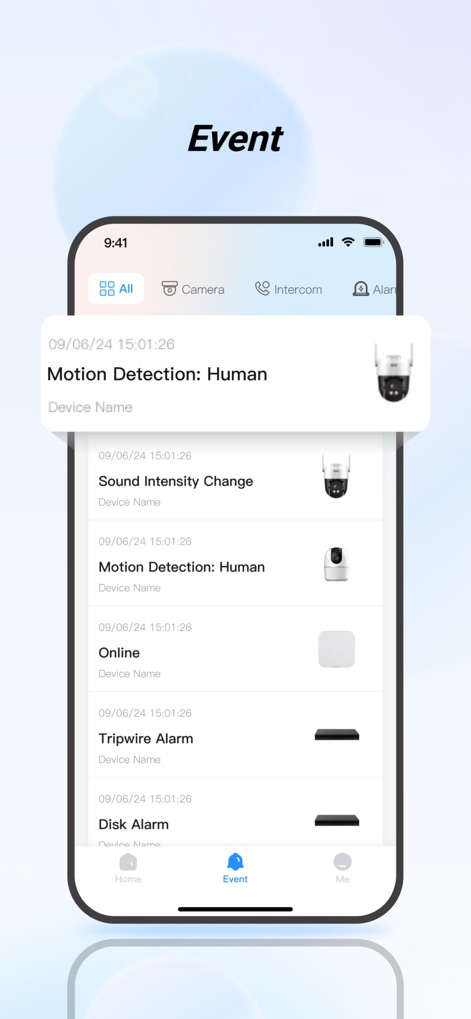
Incident Notifications
Users receive comprehensive event logs detailing various alerts such as human motion detection and sound intensity changes, ensuring timely awareness of security incidents.
Description
Download
More Like This
Apps with similar features and user experience

Joolink
Shenzhen Jooan Technology Company

VicoHome: Smart Home Camera
PHOTON SAIL TECHNOLOGIES PTE. LTD.

Ubox
洪波 王

SimpliSafe Home Security App
SimpliSafe, Inc.

Active Mobile V4
JFL Equipamentos Eletronicos Industria e Comercio Ltda.

Dzees Home
Shenzhen Weixi Technology Co., Ltd

Ring - Always Home
Bot Home Automation, INC

Hik-Connect - for End user
Hangzhou Hikvision Digital Technology Co., Ltd.

EZVIZ
EZVIZ Inc.
This page is not an official page of the app or its developer, but an independent editorial publication created for informational and commentary purposes. Unless expressly stated otherwise, neither the app nor its developer is affiliated with, endorsed by, sponsored by, authorized by, or otherwise officially connected with MWM, Apple, Google Play, the app publisher, or the app's developer, and nothing on this page implies that the app was developed using MWM's services. Any trademarks, logos, screenshots, and other content remain the property of their respective owners.