
This page is not an official page of the app or its developer, but an independent editorial publication created for informational and commentary purposes. Unless expressly stated otherwise, neither the app nor its developer is affiliated with, endorsed by, sponsored by, authorized by, or otherwise officially connected with MWM, Apple, Google Play, the app publisher, or the app's developer, and nothing on this page implies that the app was developed using MWM's services. Any trademarks, logos, screenshots, and other content remain the property of their respective owners.


Australian Immi App
Identity verification just got an overdue upgrade. The app gives visa applicants a direct, secure line to Canberra.
Downloads
100k+User Rating
Total Ratings
4.7KPublisher
Category
TravelLocales
1Latest Version
2.2.0Size
240.0 MBFirst Released
Sep 24, 2024Evaluating the core functionalities streamlining digital identity submission for Australian visa applicants.
Australian Immi App: Key Features Analysis
Official Government Endorsement
As an Australian Government application, it assures users of high standards of security, reliability, and data privacy for sensitive personal information.
Digital Identity Submission
The app facilitates the secure digital submission of essential identity information required for visa applications, eliminating the need for physical documents or in-person visits.
Live Facial Image Capture
It allows users to capture and submit a live facial image directly through their mobile device, ensuring compliance with strict biometric requirements and enhancing verification security.
Passport Details Provision
This tool enables the convenient and accurate submission of passport details digitally, reducing data entry errors and speeding up the verification process.
Mobile-First Experience
The app provides a dedicated mobile platform for submitting personal identifiers, offering unparalleled convenience and accessibility from virtually anywhere, at any time.
Eligibility-Based Access
It restricts access to eligible applicants who have received an official "Requirement to provide personal identifiers" letter, ensuring a directed and efficient process for those who need it.
Frequently Asked Questions
Everything you need to know about Australian Immi App
What is the purpose of the Australian Immi App?
The Australian Immi App provides identity information for your visa application. It allows eligible applicants to submit their live facial image and passport details after receiving a "Requirement to provide personal identifiers" letter.
Who can use the Australian Immi App?
Yes, the Australian Immi App is for eligible applicants who have received a "Requirement to provide personal identifiers" letter. This app facilitates the submission of live facial images and passport details for their visa application.
How do I start my identity check with the Australian Immi App?
To start your identity check with the Australian Immi App, you must provide your Visa Lodgement Number (VLN). You can either manually enter the details or scan the barcode from your letter.
How do I scan my passport with the Australian Immi App?
To scan your passport using the Australian Immi App, remove any cases, open the data page on a flat surface, ensure no fingers cover information, avoid glare, and keep the full page within the frame.
Does the Australian Immi App require me to scan my passport chip?
Yes, the Australian Immi App requires reading the passport chip. You place your phone on top of the passport's front cover, ensuring it touches, then slide your phone slowly until the app recognizes the chip.
How do I take a live photo for my visa application using the Australian Immi App?
To take a live photo with the Australian Immi App, ensure the applicant is in a well-lit area with a plain background. The applicant faces the camera with open eyes, positions their face in the circle, and removes glasses or head coverings.
The following screenshots and description are sourced directly from the app's official store listing and are the property of the app developer.
App Store
Screenshots
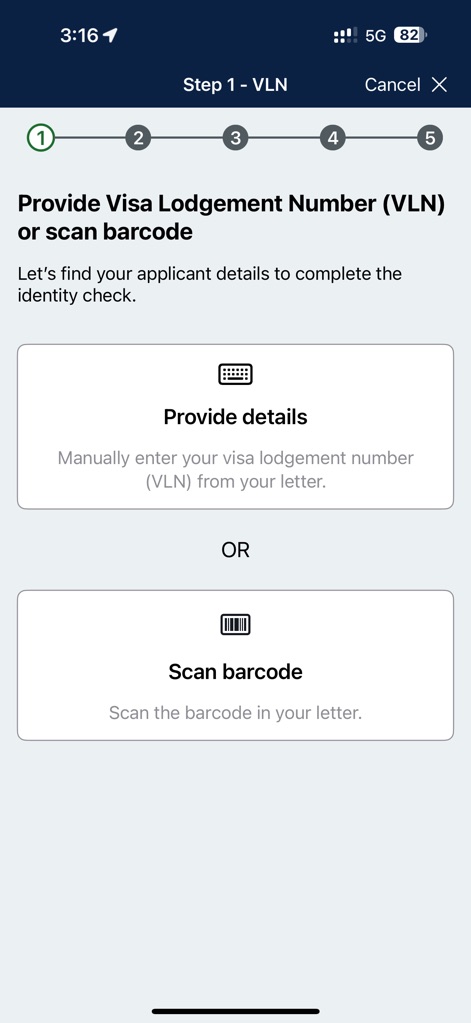
The app streamlines the initial identity check by allowing users to either manually enter their Visa Lodgement Number (VLN) or scan a barcode from their official letter.
Effortless Onboarding
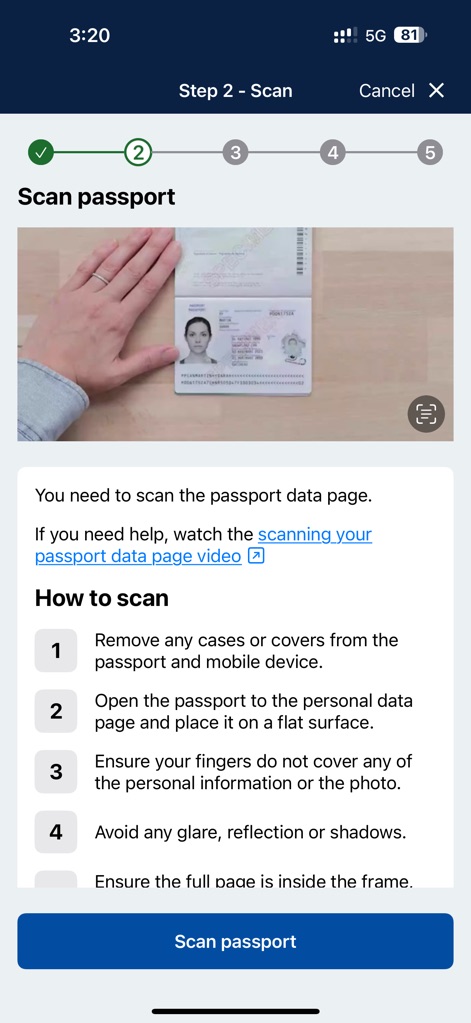
This tool guides users through the critical passport data page scan with clear, numbered instructions and a visual example for optimal accuracy.
Secure Document Scan
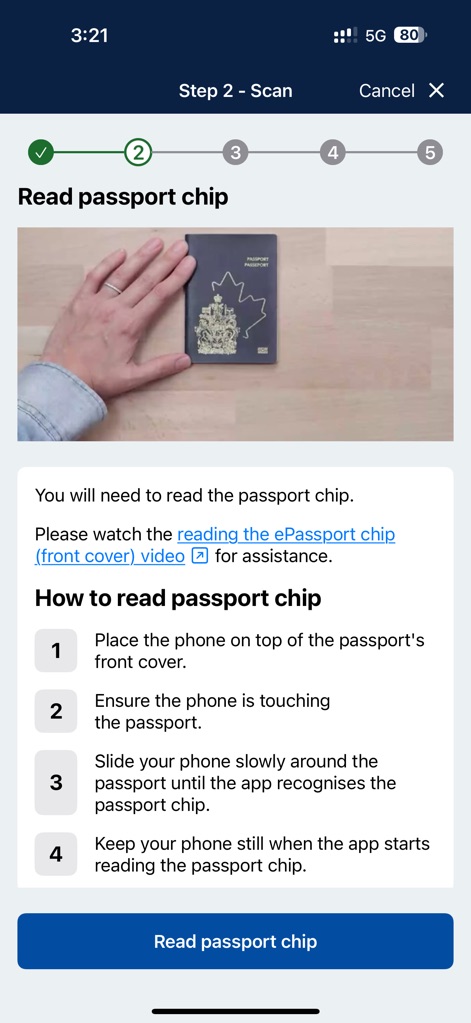
The app instructs users on how to read their ePassport chip, providing step-by-step guidance for phone placement and ensuring a successful data capture.
Advanced Chip Scan
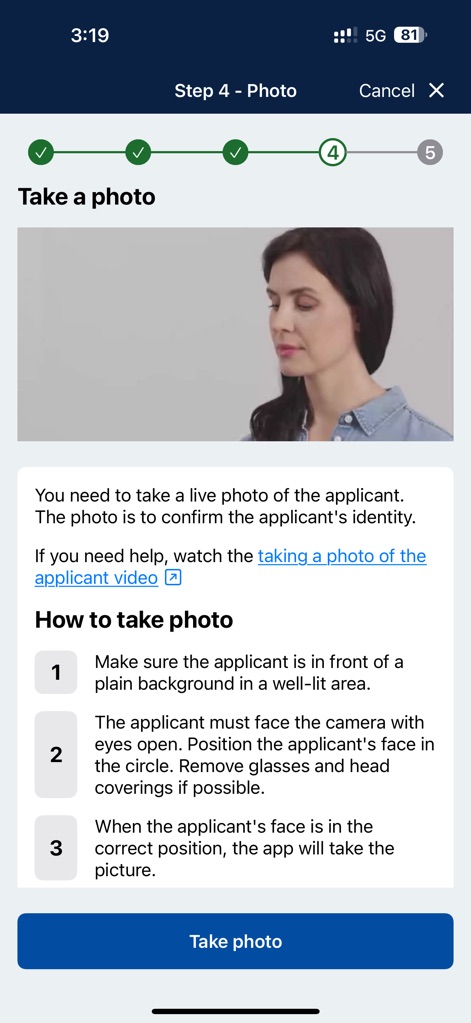
Users can easily capture a live facial image for identity confirmation, supported by clear instructions on positioning and lighting conditions for optimal results.
Live Photo Capture
Description
Download
More Like This
Apps with similar features and user experience

ESTA Mobile
US Customs and Border Protection

AustralianETA
Department of Home Affairs

iVisa: ETA, eVisa, NZeTA, Visa
Document Advisor LLC

Atlys - Visas on Time
VDC, Legal Liability Corporation

Country Days Tracker
Andrey Solovyev

MOFA - وزارة الخارجية السعودية
Ministry of Foreign Affairs, kingdom of Saudi arabia

Fish | Hunt FL
Florida Fish and Wildlife Conservation Commission

UK ETA
Home Office

NZeTA
Ministry of Business, Innovation and Employment
This page is not an official page of the app or its developer, but an independent editorial publication created for informational and commentary purposes. Unless expressly stated otherwise, neither the app nor its developer is affiliated with, endorsed by, sponsored by, authorized by, or otherwise officially connected with MWM, Apple, Google Play, the app publisher, or the app's developer, and nothing on this page implies that the app was developed using MWM's services. Any trademarks, logos, screenshots, and other content remain the property of their respective owners.