
This page is not an official page of the app or its developer, but an independent editorial publication created for informational and commentary purposes. Unless expressly stated otherwise, neither the app nor its developer is affiliated with, endorsed by, sponsored by, authorized by, or otherwise officially connected with MWM, Apple, Google Play, the app publisher, or the app's developer, and nothing on this page implies that the app was developed using MWM's services. Any trademarks, logos, screenshots, and other content remain the property of their respective owners.


Auto Clicker - Automatic Tap Q
Reclaim your time; this app turns repetitive taps into automated victory.
Downloads
250k+User Rating
Total Ratings
14.2KPublisher
Category
UtilitiesLocales
3Latest Version
1.4Size
6.9 MBFirst Released
Aug 11, 2025An analytical overview highlighting core capabilities for automation enthusiasts.
Key Features of Auto Clicker - Automatic Tap Q
Advanced Multi-Sequence Automation
The app offers robust functionality to create intricate multi-point tapping sequences, facilitating automation of complex gestures, macros, and multi-step processes.
Core Tapping Automation
The app provides fundamental automated tapping, essential for users looking to eliminate manual, repetitive screen interactions across various applications.
Precise Interval Control
It allows users to define highly specific click intervals, ranging from ultra-fast 1ms to 10s, catering to tasks requiring exact timing for gaming, testing, or rapid data entry.
Targeted Tap Placement
This tool features the ability to designate specific tap locations on the screen, enabling automation of precise UI interactions for complex workflows or game mechanics.
Frequently Asked Questions
Everything you need to know about Auto Clicker - Automatic Tap Q
What is Auto Clicker - Automatic Tap Q?
Auto Clicker - Automatic Tap Q is a tapping automation tool designed for effortless repetitive tasks. It allows users to set custom click intervals and choose tap locations.
Can Auto Clicker - Automatic Tap Q customize click intervals?
Yes, Auto Clicker - Automatic Tap Q allows users to set custom click intervals. These intervals range from 1 millisecond to 10 seconds.
Does Auto Clicker - Automatic Tap Q support multi-point tapping?
Yes, Auto Clicker - Automatic Tap Q supports creating multi-point sequences. This feature is available as 'Multi-point Cycle' within the Basic Functions.
How can I choose tap locations with Auto Clicker - Automatic Tap Q?
Auto Clicker - Automatic Tap Q allows users to choose tap locations. Options include 'Screen Center' and 'Custom Position' within the Single Tap Mode settings.
What advanced functions does Auto Clicker - Automatic Tap Q offer?
Auto Clicker - Automatic Tap Q provides 'Smart Trigger' for color detection and scheduled tasks, and a 'Script Editor' for visual programming and script editing.
Can Auto Clicker - Automatic Tap Q set trigger conditions for taps?
Yes, Auto Clicker - Automatic Tap Q supports trigger conditions. Users can set a 'Click Count Limit' to control the total number of taps.
Where can I find the Privacy Policy for Auto Clicker - Automatic Tap Q?
The Privacy Policy for Auto Clicker - Automatic Tap Q is available via the link provided in the app description.
Does Auto Clicker - Automatic Tap Q have a Terms of Service?
Yes, Auto Clicker - Automatic Tap Q provides a Terms of Service document. The link is located within the app's description.
Can I adjust the tap frequency in Auto Clicker - Automatic Tap Q?
Yes, Auto Clicker - Automatic Tap Q allows users to adjust the tap frequency. The 'Tap Frequency (times/sec)' setting is available in 'Single Tap Mode'.
Does Auto Clicker - Automatic Tap Q include gesture simulation?
Yes, Auto Clicker - Automatic Tap Q offers a 'Gesture Simulation' feature. This is listed under the 'Basic Functions' of the application.
The following screenshots and description are sourced directly from the app's official store listing and are the property of the app developer.
App Store
Screenshots
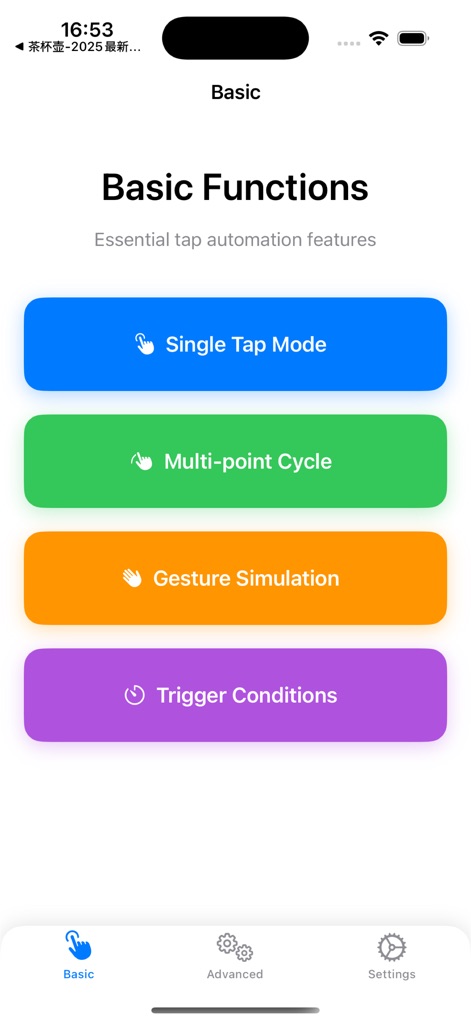
The app’s intuitive interface presents fundamental automation options like Single Tap Mode and Multi-point Cycle for diverse tapping needs.
Core Automation Modes

Users can precisely configure tap frequency and duration, alongside defining a custom tap position or utilizing the screen center for single-point automation.
Precision Tap Control
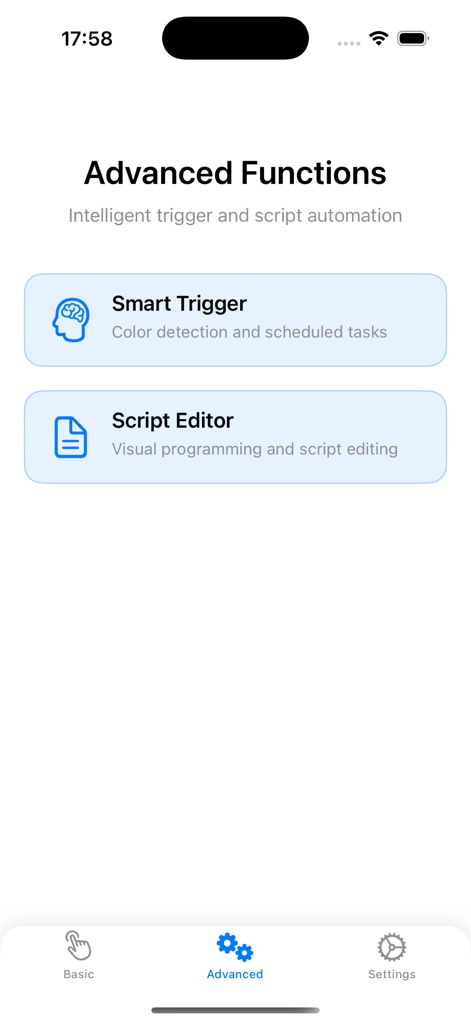
This tool offers sophisticated functionalities such as Smart Trigger for intelligent automation and a Script Editor for visual programming and complex task management.
Unleash Advanced Logic
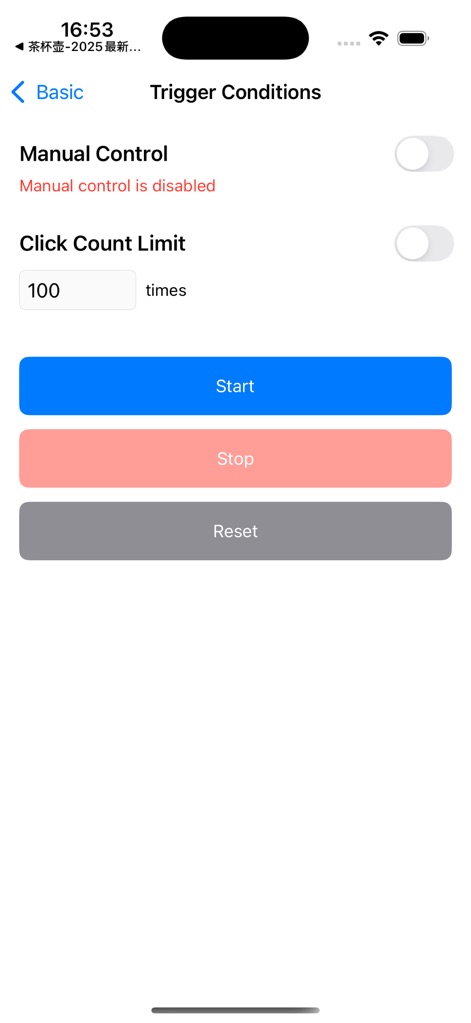
Users gain granular control over automation with options to enable Manual Control and set a specific Click Count Limit for task execution.
Define Automation Rules
Description
Download
More Like This
Apps with similar features and user experience

自动ּ连点器 - 自动点击器
壮壮 彭

连点器-高效自动点击按键辅助工具
和圆 魏

连点器 - 自动点击持续滚动刷新&旋转指针工具
源 韦

自动点击器·连点器
磊 赵

Auto Clicker-Auto Tapper tool
佳豪 张

Auto Clicker: Click Automatic
RH LANDSCAPING LLC

连点器-自动连点神器&点赞抢购助手
倩格 刘

Auto Clicker - Tap Assistant
乐飞 张

Auto Tapper Assistant App
KUPERTINO BIL. YAZ. HALIL IBRAHIM KARAHAN SAFFET ARSLAN MUSTAFA AYTEN MUHAMMET YALCIN OZDEMIR K. S.
This page is not an official page of the app or its developer, but an independent editorial publication created for informational and commentary purposes. Unless expressly stated otherwise, neither the app nor its developer is affiliated with, endorsed by, sponsored by, authorized by, or otherwise officially connected with MWM, Apple, Google Play, the app publisher, or the app's developer, and nothing on this page implies that the app was developed using MWM's services. Any trademarks, logos, screenshots, and other content remain the property of their respective owners.