
This page is not an official page of the app or its developer, but an independent editorial publication created for informational and commentary purposes. Unless expressly stated otherwise, neither the app nor its developer is affiliated with, endorsed by, sponsored by, authorized by, or otherwise officially connected with MWM, Apple, Google Play, the app publisher, or the app's developer, and nothing on this page implies that the app was developed using MWM's services. Any trademarks, logos, screenshots, and other content remain the property of their respective owners.


Bleach Bypass
Flat photos? This app makes your content pop, delivering that gritty, analog film look without the darkroom mess.
Downloads
500k+User Rating
Total Ratings
273Publisher
Category
Photo & VideoLocales
1Latest Version
1.26Size
64.7 MBFirst Released
Oct 25, 2025An analytical overview of key features catering to young adults and creative individuals seeking distinctive retro and alternative visual styles.
Bleach Bypass: A Niche Aesthetic Powerhouse for Digital Creators
Exclusive Visual Effects Library
The app offers an extensive library of premium effects, providing users with advanced tools to cultivate truly distinctive, alternative, or retro visual styles that elevate their digital content beyond standard filters.
Curated Advanced Filters
This tool features access to a curated selection of premium filters, enabling users to effortlessly apply sophisticated and unique aesthetic overlays that define their alternative or vintage-inspired style.
Real-time Creative Enhancement
The app provides live camera effects, allowing users to apply unique visual styles directly while capturing content, which is ideal for spontaneous and distinctive social media posts.
Dynamic Video Styling
It allows users to edit videos, applying unique visual treatments to moving footage, ensuring their video content stands out with an edgy or vintage-inspired aesthetic.
Frequently Asked Questions
Everything you need to know about Bleach Bypass
What does the Bleach Bypass app do?
Bleach Bypass is a photo and video editing application that offers live camera effects. Users can apply various filters and adjust parameters to enhance their media.
Does Bleach Bypass offer premium features?
Yes, Bleach Bypass offers a Premium Subscription that unlocks all premium effects and filters within the app. This subscription enhances the available editing tools.
How much does a monthly Bleach Bypass Premium Subscription cost?
The monthly Premium Subscription for Bleach Bypass costs $2.99 per month. This provides access to all premium effects and filters for one month.
What is the yearly price for Bleach Bypass Premium Subscription?
The yearly Premium Subscription for Bleach Bypass costs $14.99 per year. This offers a cost-effective way to access all premium effects and filters.
Does the Bleach Bypass subscription auto-renew?
Yes, the Bleach Bypass subscription automatically renews. To prevent renewal, auto-renew must be turned off at least 24 hours before the end of the current billing period.
Where can I find the Terms of Use for Bleach Bypass?
The Terms of Use for the Bleach Bypass app are available at the provided URL: https://www.apple.com/legal/internet-services/itunes/dev/stdeula/. This link outlines the legal conditions.
Can users apply various effects and filters in Bleach Bypass?
Yes, users can apply various effects like "Desolate," "Ashtray," and "JPEG Effect" in Bleach Bypass. The app also provides adjustable parameters such as Bloom Gamma and Sharpen/Blur.
How do I save my edits in the Bleach Bypass app?
Users save their edits in the Bleach Bypass app by tapping the "Save" button. This button is located at the top right corner of the editing interface.
How do I apply effects and adjustments in Bleach Bypass?
Users apply effects and adjustments in Bleach Bypass by tapping the "Apply" button. This action finalizes the current edits made within the application.
The following screenshots and description are sourced directly from the app's official store listing and are the property of the app developer.
App Store
Screenshots

This tool offers precise control over bloom effects, with sliders for Bloom Gamma and Bloom Strength, complemented by evocative presets like Desolate and Ashtray for instant stylistic changes.
Creative Effect Controls
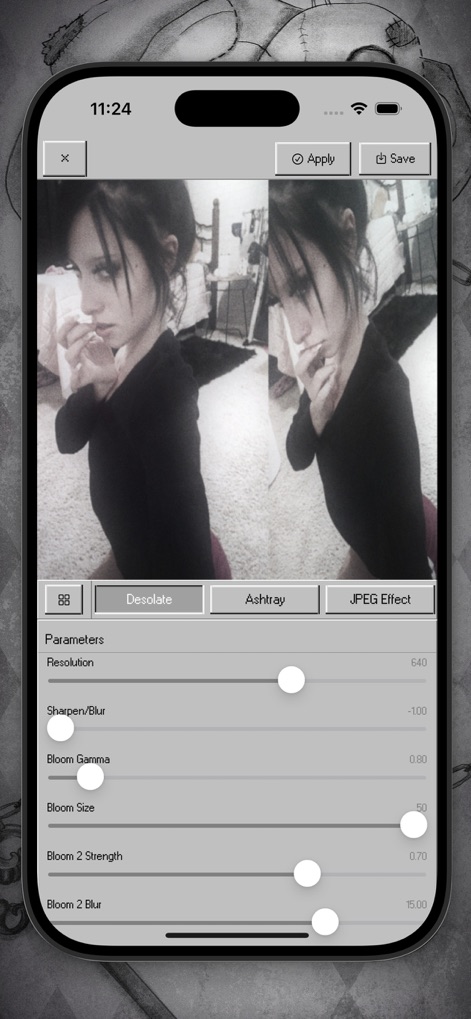
The app features a dynamic split-screen comparison to visualize changes instantly, allowing precise adjustments to Resolution and Sharpen/Blur parameters for impeccable detail.
Split-Screen Mastery
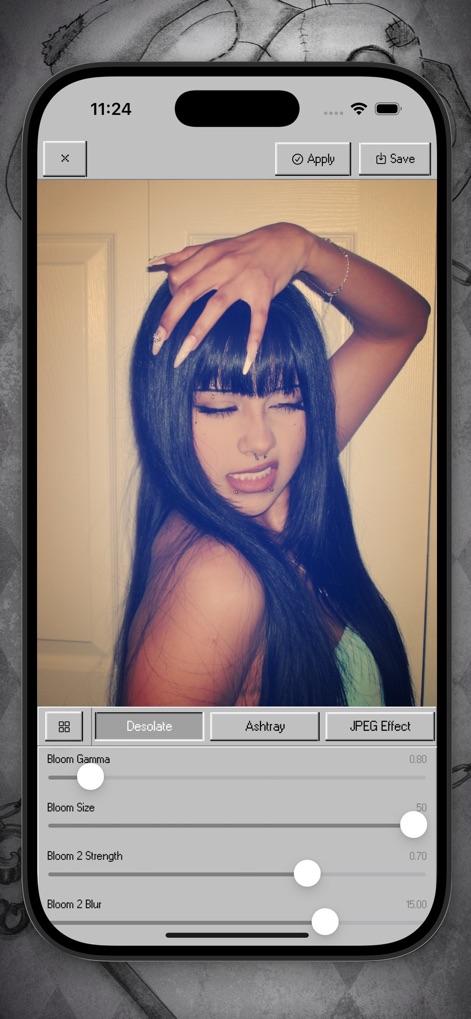
Users can instantly apply unique stylistic presets, including JPEG Effect, and further customize the visual outcome using sensitive controls like Bloom Gamma and Bloom Size.
Distinctive Style Presets
Description
Download
More Like This
Apps with similar features and user experience
Dazz Cam - Vintage Camera
DAZZ PTE. LTD.

Kapi - Vintage Film Camera
Shanghai Yuhuan Technology Co., Ltd.
ProCCD - Digital Film Camera
秉妍 蔡

Fomz - Vintage Analog Camera
Guangzhou Mengdong Information Technology Co., Ltd.

Liit - Photo & Video Editor
DAZZ PTE. LTD.
1998 Cam - Vintage Camera
Huu Nguyen Chi

y2k: 2000s photo editor
Abel Thomas Noble

Uplens: Photo & Video Editor
MPGAMES LTD

Buttercam
Beijing Muke Technology Co., Ltd.
This page is not an official page of the app or its developer, but an independent editorial publication created for informational and commentary purposes. Unless expressly stated otherwise, neither the app nor its developer is affiliated with, endorsed by, sponsored by, authorized by, or otherwise officially connected with MWM, Apple, Google Play, the app publisher, or the app's developer, and nothing on this page implies that the app was developed using MWM's services. Any trademarks, logos, screenshots, and other content remain the property of their respective owners.