
This page is not an official page of the app or its developer, but an independent editorial publication created for informational and commentary purposes. Unless expressly stated otherwise, neither the app nor its developer is affiliated with, endorsed by, sponsored by, authorized by, or otherwise officially connected with MWM, Apple, Google Play, the app publisher, or the app's developer, and nothing on this page implies that the app was developed using MWM's services. Any trademarks, logos, screenshots, and other content remain the property of their respective owners.


Blink — Friends circle
No more guessing games. This app turns casual check-ins into real-time presence, giving users the ultimate social superpower.
Downloads
7.5M+User Rating
Total Ratings
165.9KPublisher
Category
Social NetworkingLocales
10Latest Version
1.60Size
387.1 MBFirst Released
Jul 14, 2023An evaluation of Blink's core functionalities for real-time social connection.
App Feature Analysis: Blink — Friends Circle
Real-time Friend Locator
The app provides an interactive map that displays the precise, real-time locations of friends, enabling spontaneous meet-ups and alleviating the need for constant "where are you?" texts.
Dynamic Movement Tracking
This tool features the ability to show how fast friends are currently moving, offering insights into whether they are walking, driving, or stationary, which can be playfully integrated into social interactions or used for coordination.
Frequently Asked Questions
Everything you need to know about Blink — Friends circle
What is Blink — Friends circle?
Blink — Friends circle is a social app that provides an interactive map to track friends' real-time locations. It also displays their phone charge and movement speed, enhancing social connection by keeping users informed about their friends' status.
Can I see my friends' movement speed in the Blink — Friends circle app?
Yes, Blink — Friends circle displays your friends' current movement speed directly on the interactive map. For instance, the app shows specific speeds like "35 m/h" next to a friend's avatar.
Does Blink — Friends circle show my friends' phone battery levels?
Yes, Blink — Friends circle shows friends' phone charge levels. This feature integrates the battery percentage directly into the map view, allowing users to monitor their friends' device status.
Can I call my friends using the Blink — Friends circle app?
Yes, Blink — Friends circle includes a direct calling feature. Users can initiate video calls with their friends seamlessly through the app's dedicated interface.
Does Blink — Friends circle have private messaging?
Yes, Blink — Friends circle supports private messaging. Users can engage in one-on-one chats with friends, sending text messages and expressive emojis within the app.
How do I send audiostickers in Blink — Friends circle?
Blink — Friends circle enables users to send unique audiostickers. The app provides a selection of these "funny audiostickers" to enhance communication within chat conversations.
How does Freeze Mode work in Blink — Friends circle?
Freeze Mode in Blink — Friends circle allows users to temporarily hide their real-time location. When activated for a chosen duration, the app displays only their last known location to friends.
What is the BUMP feature in Blink — Friends circle?
The BUMP feature in Blink — Friends circle alerts friends when users are physically together. It generates a "BUMP!" notification and states that specific users are currently in proximity.
Can I track my steps and compare them with friends in Blink — Friends circle?
Yes, Blink — Friends circle incorporates a step tracking and ranking system. Users can monitor their daily, weekly, or monthly steps and view their position on a friend leaderboard.
What kind of updates does Blink — Friends circle provide about friends' activities?
Blink — Friends circle provides real-time notifications about friends' activities. These updates include location arrivals, social interactions, and new messages, summarized in an activity feed.
Does Blink — Friends circle allow users to check in at places?
Yes, Blink — Friends circle features a check-in function on its interactive map. Users can select and register their presence at various recognized locations, enhancing location sharing.
The following screenshots and description are sourced directly from the app's official store listing and are the property of the app developer.
App Store
Screenshots
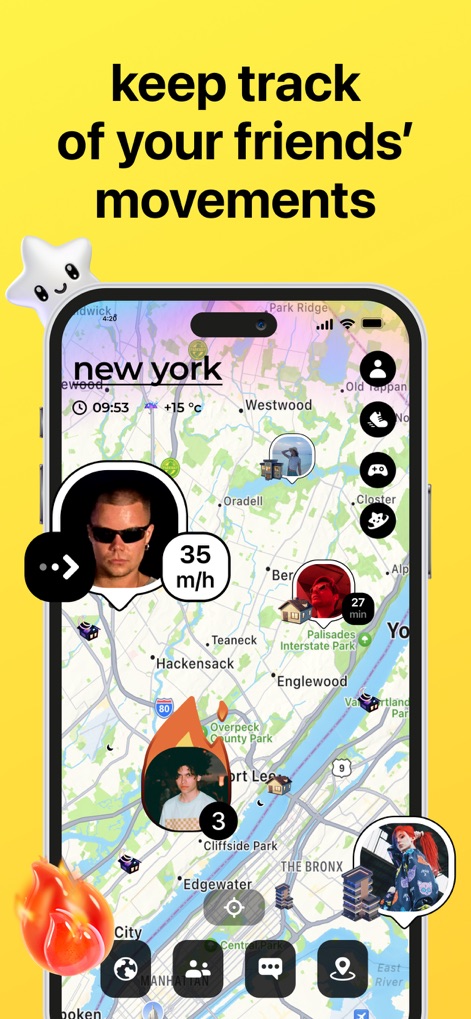
Explore the interactive map displaying friends' real-time locations and current movement speeds.
Live Location Tracking

Users can initiate crystal-clear video calls, featuring a visible talk time counter for group chats.
Instant Video Calls

Personalize messages with humorous audiostickers while viewing a friend's online status and phone charge on the map.
Expressive Audio Stickers

This tool reveals explored regions on a dynamic map, complete with a competitive footprints ranking system.
Explore & Rank

The app highlights instant connections with friends through a "BUMP!" animation and displayed profile pictures when users are physically close.
Instant Friend Connection

Blink — Friends circle gamifies fitness with a daily, weekly, and monthly step ranking leaderboard for friends.
Activity Leaderboard

Stay informed with real-time notifications about friends' activities, from new arrivals to recent 'bumps' and messages.
Real-time Updates
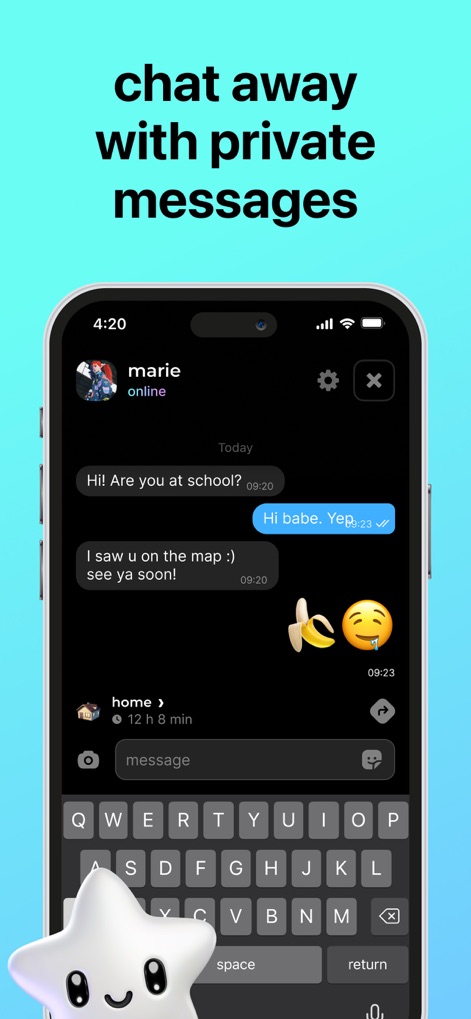
This tool offers a seamless private chat interface, complete with message timestamps for clear communication history.
Secure Private Chat
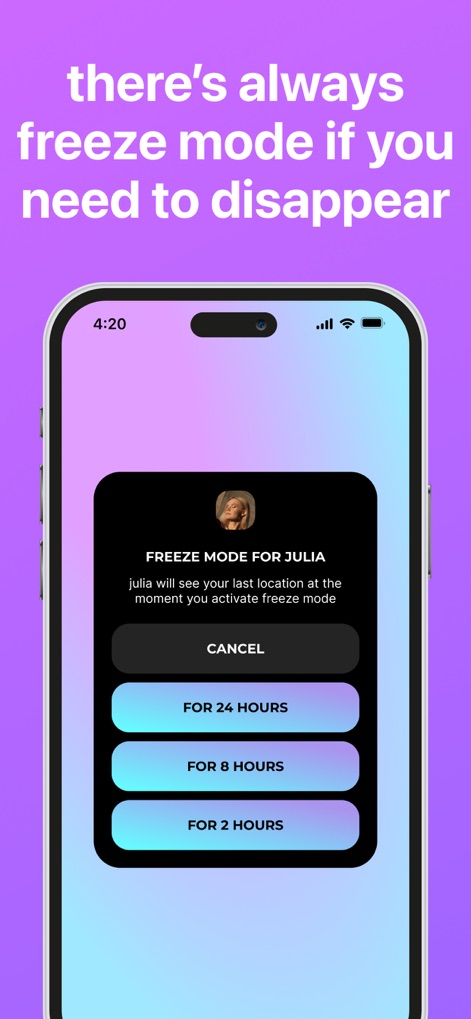
Users can activate Freeze Mode with customizable duration options, allowing control over location visibility.
Privacy Control

The app allows users to check into various locations and view friends' photos associated with those spots.
Location Check-ins
Description
Download
More Like This
Apps with similar features and user experience
Bump - hang with friends IRL
amo

Beer Buddy - Friends Alerts
Buddy Network GmbH

Beer With Me
Beer With Me AB

whoo - Meet Your Friends
LINQ, K.K.

Locate & Track Phone By Number
Blender Soft Ltd

Findus-安心守护日常自动报备
Chongqing Wanyijia Technology Co., Ltd.

Niantic Campfire
Niantic, Inc.
Tracker - Share My Location
Andy Brailo

eta: Share ETAs & Journeys
ONIN LTD.
This page is not an official page of the app or its developer, but an independent editorial publication created for informational and commentary purposes. Unless expressly stated otherwise, neither the app nor its developer is affiliated with, endorsed by, sponsored by, authorized by, or otherwise officially connected with MWM, Apple, Google Play, the app publisher, or the app's developer, and nothing on this page implies that the app was developed using MWM's services. Any trademarks, logos, screenshots, and other content remain the property of their respective owners.