
This page is not an official page of the app or its developer, but an independent editorial publication created for informational and commentary purposes. Unless expressly stated otherwise, neither the app nor its developer is affiliated with, endorsed by, sponsored by, authorized by, or otherwise officially connected with MWM, Apple, Google Play, the app publisher, or the app's developer, and nothing on this page implies that the app was developed using MWM's services. Any trademarks, logos, screenshots, and other content remain the property of their respective owners.


Bluebook Exams
No more bubbling in. This app hands students a digital edge for high-stakes College Board tests, directly on their iPad.
Downloads
500k+User Rating
Total Ratings
920Publisher
Category
EducationLocales
1Latest Version
1.14.2Size
2.8 MBFirst Released
Oct 17, 2022An Analytical Review for Standardized Test Preparation and Administration on iPad
Key Features of Bluebook Exams
Secure Test Environment
The app provides a locked-down, secure environment that prevents unauthorized access to other applications or resources during official College Board exams, ensuring test integrity.
Intuitive Navigation & Interface
It allows users to navigate seamlessly through test sections and questions on an iPad, ensuring a clear and user-friendly experience during high-stakes exams.
Integrated Digital Tools
This tool features essential built-in functionalities like a digital calculator, highlighter, and scratchpad, enabling students to perform necessary calculations and mark text directly within the exam interface.
Offline Exam Functionality
The app supports offline test-taking, ensuring that exams can be completed without interruption even if internet connectivity is lost during a high-stakes assessment.
Real-time Timer and Progress Monitor
It allows users to track their remaining time and monitor their progress through the exam sections, aiding in effective time management and pacing.
Question Flagging & Review
The app provides functionality for users to flag questions for later review and easily navigate back to them before submitting their exam.
Comprehensive Accessibility Options
This tool features a range of accessibility options, including text-to-speech, adjustable font sizes, and color contrast settings, to accommodate diverse student needs.
Automatic Progress Saving
The app automatically saves student progress throughout the exam, allowing them to resume from where they left off in case of an unexpected interruption or device issue.
Frequently Asked Questions
Everything you need to know about Bluebook Exams
What is the Bluebook Exams app used for?
The Bluebook Exams app allows students to take the SAT, PSAT, and AP Exams on iPads. It also provides tools for practice and test preparation.
Which exams can students take using the Bluebook Exams app?
Students can take the SAT, PSAT, and AP Exams using the Bluebook Exams app. The app also supports practice tests for these exams.
Does the Bluebook Exams app require a sign-in?
Yes, the Bluebook Exams app requires users to sign in with a College Board account. Users enter an Email Address and Password to access the app.
Can users prepare for tests with practice tests in Bluebook Exams?
Yes, Bluebook Exams offers practice test options. Users can access a "Test Preview" or a "Full-Length Practice" to prepare for their exams.
How do I sign in as an educator in the Bluebook Exams app?
The Bluebook Exams app provides an option to sign in as "I'm an Educator" on the College Board Sign-In screen. This allows educators to access relevant features.
When are upcoming exams listed in the Bluebook Exams app?
SAT Weekend and AP Exams are listed in the Bluebook Exams app 5 days before the test day. For SAT School Day, schools share information directly.
What type of questions does the Bluebook Exams app present?
The Bluebook Exams app presents various question types, including multiple-choice questions for sections like "Reading and Writing." It supports features like "Mark for Review."
The following screenshots and description are sourced directly from the app's official store listing and are the property of the app developer.
App Store
Screenshots
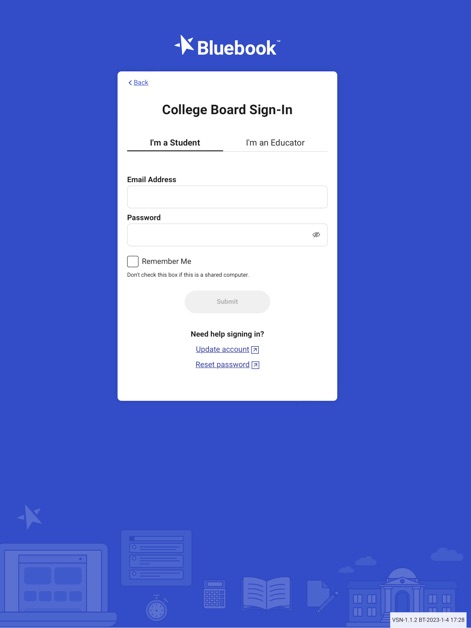
This tool provides a secure gateway for academic users, featuring a clear 'College Board Sign-In' interface and distinct 'I'm a Student' and 'I'm an Educator' tabs to manage access.
Secure Access Point
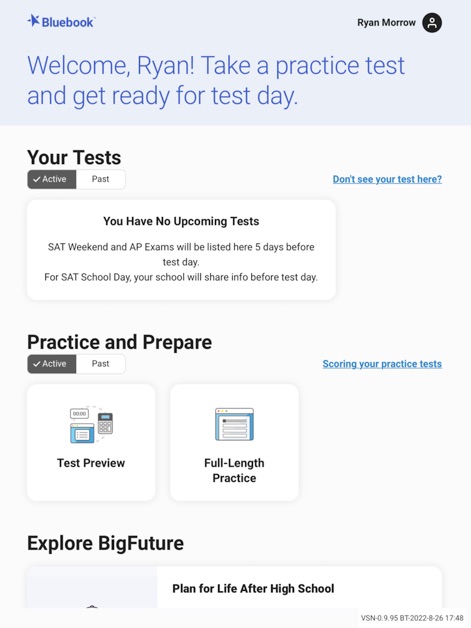
The app offers a personalized dashboard, prominently displaying 'Your Tests' with 'Active' and 'Past' test statuses, alongside dedicated 'Practice and Prepare' options for test preview and full-length practice.
Personalized Test Hub
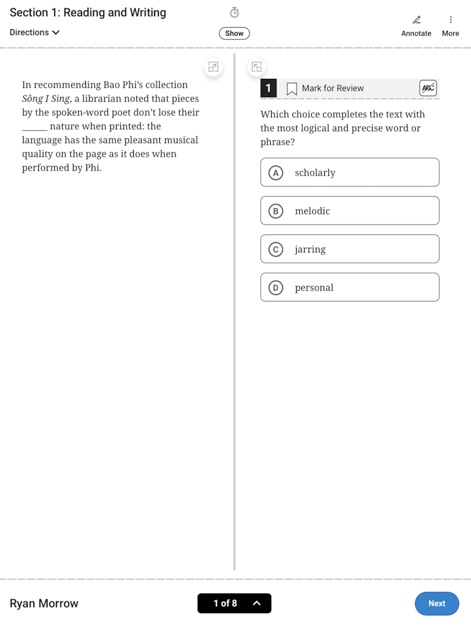
Users can engage with the exam content through a streamlined interface, showcasing 'Section 1: Reading and Writing' with an intuitive 'Mark for Review' feature to aid in test navigation.
Exam Interface Walkthrough
Description
Download
More Like This
Apps with similar features and user experience






This page is not an official page of the app or its developer, but an independent editorial publication created for informational and commentary purposes. Unless expressly stated otherwise, neither the app nor its developer is affiliated with, endorsed by, sponsored by, authorized by, or otherwise officially connected with MWM, Apple, Google Play, the app publisher, or the app's developer, and nothing on this page implies that the app was developed using MWM's services. Any trademarks, logos, screenshots, and other content remain the property of their respective owners.