
This page is not an official page of the app or its developer, but an independent editorial publication created for informational and commentary purposes. Unless expressly stated otherwise, neither the app nor its developer is affiliated with, endorsed by, sponsored by, authorized by, or otherwise officially connected with MWM, Apple, Google Play, the app publisher, or the app's developer, and nothing on this page implies that the app was developed using MWM's services. Any trademarks, logos, screenshots, and other content remain the property of their respective owners.


SafeExamBrowser
No more digital distractions. SafeExamBrowser locks down your exams, delivering uncompromised focus.
Downloads
1M+User Rating
Total Ratings
6.6KPublisher
Category
EducationLocales
2Latest Version
3.6.2Size
66.8 MBFirst Released
Jun 15, 2017An Analytical Overview for Educational Institutions and IT Administrators
SafeExamBrowser for iOS: Key Security & Deployment Features
Secure Kiosk Environment
The app provides a locked-down assessment kiosk mode that prevents students from switching applications, accessing unauthorized websites, or communicating with others, ensuring exam integrity.
Broad LMS & E-Assessment System Compatibility
This tool integrates seamlessly with major learning management systems (LMS) like Moodle and OpenOlat, as well as various commercial and non-commercial e-assessment platforms.
Enterprise MDM & Deployment Support
It allows IT administrators to easily deploy and manage configurations for SEB across multiple iOS devices using Mobile Device Management (MDM) systems.
Flexible Configuration and Distribution
The app features diverse configuration options, including encrypted .seb files, config hyperlinks, and QR codes, enabling customized exam setups and easy distribution to examinees.
Support for Institutional & Student Devices
It enables secure exams on both institution-owned and unmanaged student-owned iOS devices, offering flexibility and reducing hardware constraints.
Automated Exam Session Management
The app can automatically end the self-lock assessment mode upon exam submission, or an invigilator can manually unlock the device using a quit password.
Apple Classroom Integration
This tool works with Apple Classroom, allowing teachers to initiate individually configured exams on all student devices simultaneously.
Intuitive In-App Navigation & Controls
It provides an optional Dock and a slider menu with commands for managing browser tabs, navigating history, and performing actions like quitting the session or reloading pages within the secure environment.
Frequently Asked Questions
Everything you need to know about SafeExamBrowser
What is SafeExamBrowser (SEB)?
SafeExamBrowser (SEB) is a secure kiosk web browser environment designed for e-assessments on iOS devices. It locks the device into an exam mode, preventing students from accessing other apps or websites during an exam.
Which devices does SafeExamBrowser support?
SafeExamBrowser supports iOS devices, specifically iPads, iPhones, and iPod Touches. It enables secure exams on both unmanaged student-owned devices and institution-managed devices.
How does SafeExamBrowser ensure exam security?
SafeExamBrowser locks an iOS device into assessment kiosk mode. This prevents students from switching to other apps, accessing unauthorized websites, or communicating during an exam.
Can SafeExamBrowser be used with existing learning management systems (LMS)?
Yes, SafeExamBrowser integrates well with learning management systems (LMS) such as Moodle, OpenOlat, and ILIAS. It also supports various commercial and non-commercial exam systems.
How can an exam be started in SafeExamBrowser?
Exams can be started in SafeExamBrowser by opening a configuration hyperlink from Safari, Mail, or a messenger app. Users can also scan a QR code or enter an institution's URL.
Does SafeExamBrowser use a cloud service for exams?
No, SafeExamBrowser does not use a centralized server or cloud service. It can be configured using an API, configuration files, special links, and QR codes.
Is SafeExamBrowser compatible with Apple Classroom?
Yes, SafeExamBrowser works with Apple Classroom. Teachers can start individually configured exams on all student devices directly through Apple Classroom.
How can an exam session be quit in SafeExamBrowser?
An exam session in SafeExamBrowser can be quit automatically after submission, or manually by an invigilator using a quit password. A left slider menu command also exists for quitting.
Can students reconfigure SafeExamBrowser during an exam?
Reconfiguring SafeExamBrowser during an exam session can be restricted. The "Allow Reconfiguring" option in the Exam Session settings controls this functionality.
Is SafeExamBrowser a free application?
Yes, SafeExamBrowser is released as freeware. Its code is subject to the Mozilla Public License Version 1.1, which permits its free use.
The following screenshots and description are sourced directly from the app's official store listing and are the property of the app developer.
App Store
Screenshots

This interface provides flexible methods for initiating exams, showcasing both the QR code scanner and direct URL input for institutional configuration.
Exam Launch Options

The app's accessible side menu offers vital functionalities, such as quick access to Edit Settings and the crucial Quit Session command for proctors.
In-Exam Controls
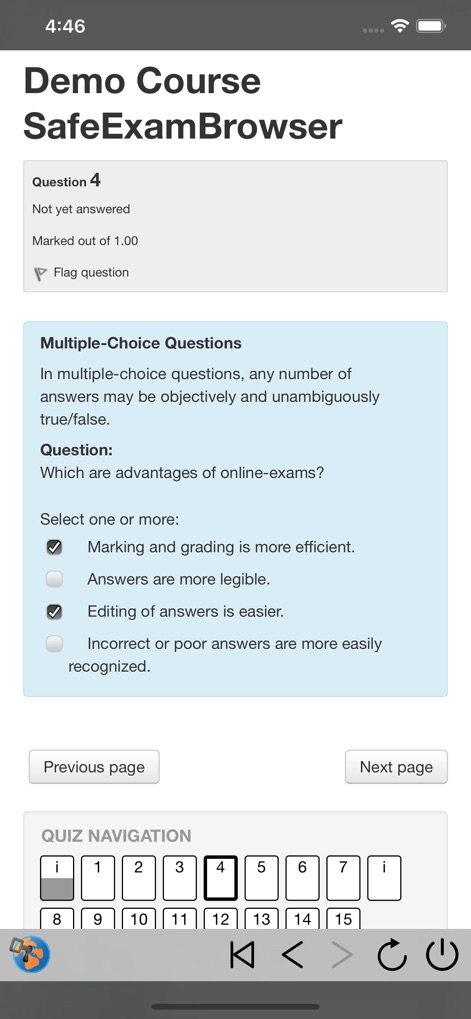
Observe the structured multiple-choice question presentation and the convenient Quiz Navigation bar, facilitating clear progression through the exam.
Assessment Layout
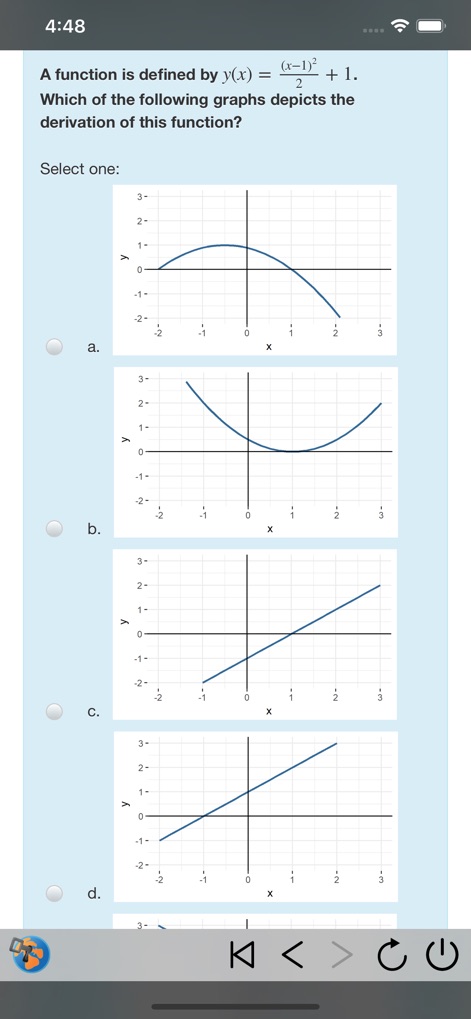
The tool accommodates complex question formats, displaying intricate graphical response options and universal navigation controls at the bottom.
Diverse Question Types

Explore the extensive configuration panel, detailing options like the critical Admin Password and the customizable Start URL for tailored deployments.
Administrative Settings

Configure every aspect of the exam session, from toggling 'Confirm Quitting' for security to defining specific 'Quit URL' endpoints for post-exam actions.
Session Management

The app seamlessly connects to SEB Servers, presenting a clear 'Select Exam' list for users to choose their assessment from.
Server Integration
Description
Download
More Like This
Apps with similar features and user experience




This page is not an official page of the app or its developer, but an independent editorial publication created for informational and commentary purposes. Unless expressly stated otherwise, neither the app nor its developer is affiliated with, endorsed by, sponsored by, authorized by, or otherwise officially connected with MWM, Apple, Google Play, the app publisher, or the app's developer, and nothing on this page implies that the app was developed using MWM's services. Any trademarks, logos, screenshots, and other content remain the property of their respective owners.