
This page is not an official page of the app or its developer, but an independent editorial publication created for informational and commentary purposes. Unless expressly stated otherwise, neither the app nor its developer is affiliated with, endorsed by, sponsored by, authorized by, or otherwise officially connected with MWM, Apple, Google Play, the app publisher, or the app's developer, and nothing on this page implies that the app was developed using MWM's services. Any trademarks, logos, screenshots, and other content remain the property of their respective owners.


Bluetooth Mini Thermal Printer
Unleash your printer. This app transforms your phone into a portable receipt factory.
Downloads
250k+User Rating
Total Ratings
3.0KPublisher
Category
BusinessLocales
6Latest Version
1.3.5Size
100.9 MBFirst Released
Dec 21, 2021An Analytical Overview for Mobile Business Operations
Key Features of Bluetooth Mini Thermal Printer
Universal Bluetooth Printer Compatibility
This tool ensures broad compatibility with any Bluetooth thermal printer that supports ESC POS commands, offering users maximum flexibility in hardware choice.
Customizable Receipt & Label Generation
The app provides extensive customization options for receipts and labels, allowing users to incorporate various elements like text, images, barcodes, QR codes, and tabular data, ensuring professional and tailored outputs for any business need.
Multilingual & Rich Text Support
It allows users to print in any language with comprehensive rich text formatting options, including custom fonts, sizes, and styles, enhancing global usability and brand consistency.
Web Service Integration for Printing
The app functions as a service, offering integration capabilities to print custom receipts directly from a webpage with minimal coding, ideal for businesses with existing web-based systems.
iOS App Integration for Printing
It provides an API for seamless integration into custom iOS applications, enabling developers to incorporate direct receipt printing functionality with minimal code.
OCR for Bank Receipt Processing
This tool features Optical Character Recognition (OCR) capability, enabling the capture and printing of customer bank receipts with high quality, streamlining transaction record-keeping.
Automated Dynamic Data Insertion
The app automatically inserts dynamic data such as current dates, times, amounts, and calculations using short codes, significantly boosting efficiency in receipt generation.
Image & PDF Document Printing
It enables direct printing of image and PDF documents with high quality, facilitating the reproduction of various content types from external sources.
Frequently Asked Questions
Everything you need to know about Bluetooth Mini Thermal Printer
What is Thermer?
Thermer is a mobile application that creates and prints custom receipts and labels from a phone to Bluetooth thermal printers. It supports various customizable elements.
Can Thermer create and print custom receipts and labels?
Yes, Thermer creates fully customizable receipts and labels. It supports text, images, lines, barcodes, QR codes, tabular data, PDFs, and notepad files for comprehensive personalization.
Does Thermer offer OCR for printing bank payment receipts?
Yes, Thermer offers OCR functionality specifically for printing customer bank payment receipts. This feature ensures high-quality output for scanned payment documents.
What languages does Thermer support for receipt printing?
Thermer supports printing in any language, allowing users to set custom fonts, sizes, and formats. It is not limited to English like other POS printing applications.
Can Thermer automatically add dates and times to receipts?
Yes, Thermer automatically adds current dates, times, amounts, and calculations to receipts using short codes. This provides dynamic content generation for prints.
Which Bluetooth thermal printers are compatible with Thermer?
Thermer is compatible with any Bluetooth thermal printer that supports ESC POS commands. This ensures broad usability across various printer models.
How do users create a receipt using the Thermer app?
Users create a receipt by adding elements like text, images, lines, barcodes, QR codes, or PDFs. They can rearrange entries, preview, and then instantly print the receipt.
Does Thermer allow printing images directly from the phone's gallery or camera?
Yes, Thermer allows printing images directly from the phone's gallery or camera. It also supports rich text formatting for versatile print content.
What are the subscription costs for Thermer?
Thermer offers two auto-renewing subscription options: $19.99 for six months or $24.99 annually. These prices are for United States customers and may vary elsewhere.
How do I manage or cancel my Thermer subscription?
Users manage or cancel their Thermer subscription through their App Store account settings. Cancellation must occur at least 24 hours before the current period ends to avoid renewal.
Where can I find Thermer's Terms of Use?
The official Terms of Use for Thermer are available at: https://www.thermerapp.com/myfiles/tosprivacy/ios_bluetooth_print_tos.html. This document outlines the service's legal conditions.
Can Thermer share and print PDF documents?
Yes, Thermer shares and prints PDF documents. The app ensures optimal quality for both image and PDF documents, along with rich text formatting support.
Can Thermer print from a website or custom iOS application?
Yes, Thermer prints custom receipts from a website or a user's own iOS application by integrating a few lines of code. The app functions as a printing service.
Does Thermer maintain a history of printed items?
Yes, Thermer includes a feature to view print history. Users can track all previously printed receipts and labels directly within the application.
The following screenshots and description are sourced directly from the app's official store listing and are the property of the app developer.
App Store
Screenshots
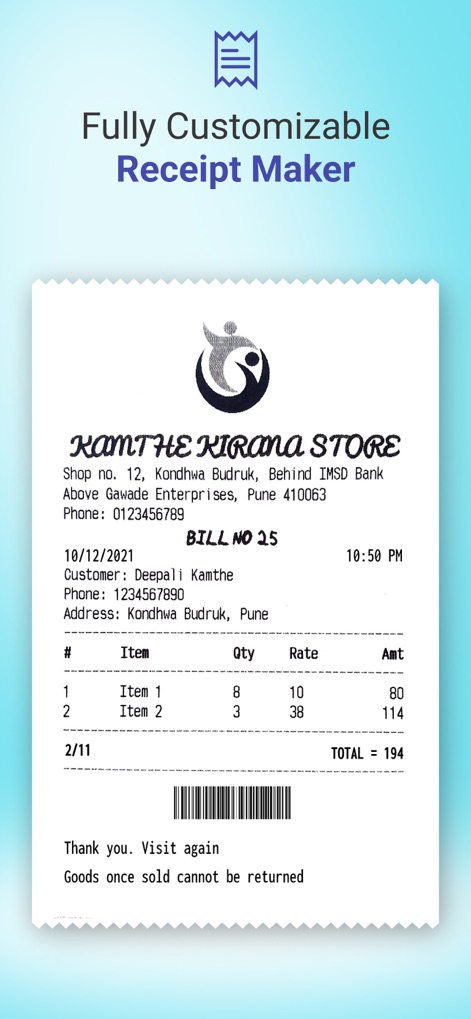
This app offers comprehensive tools for crafting fully customized receipts, evident in its detailed itemized list section and the automatically generated barcode.
Receipt Design Freedom

The tool provides robust options for multilingual printing and extensive style customization, enabling users to choose preferred fonts and formats for their transaction receipts.
Diverse Printing Options

Users benefit from dynamic short codes that automate the inclusion of current dates and times, streamlining the process of generating accurate and timely printouts.
Dynamic Content Automation

The app enables seamless sharing of receipts from various applications or browsers, complemented by powerful OCR capabilities for converting shared images into editable text.
Effortless Sharing & OCR
Description
Download
More Like This
Apps with similar features and user experience

NIIMBOT
WUHAN JINGCHEN INTELLIGENT IDENTIFICATION TECHNOLOGY CO., LTD

Nelko
E-z Ink Technology Co., Ltd

Print Master
PHOMEMO PTE. LTD.

Labelnize
E-z Ink Technology Co., Ltd

NIIM
WUHAN JINGCHEN INTELLIGENT IDENTIFICATION TECHNOLOGY CO., LTD
Polaroid Hi·Print
Polaroid International B.V.

Jadens Printer
JADENS COMPANY LIMITED

FlashLabel Pro
Xiamen Print Future Technology Co.Ltd.

WePrint App
Shanghai ThanMore Network Technology Co., Ltd.
This page is not an official page of the app or its developer, but an independent editorial publication created for informational and commentary purposes. Unless expressly stated otherwise, neither the app nor its developer is affiliated with, endorsed by, sponsored by, authorized by, or otherwise officially connected with MWM, Apple, Google Play, the app publisher, or the app's developer, and nothing on this page implies that the app was developed using MWM's services. Any trademarks, logos, screenshots, and other content remain the property of their respective owners.