
This page is not an official page of the app or its developer, but an independent editorial publication created for informational and commentary purposes. Unless expressly stated otherwise, neither the app nor its developer is affiliated with, endorsed by, sponsored by, authorized by, or otherwise officially connected with MWM, Apple, Google Play, the app publisher, or the app's developer, and nothing on this page implies that the app was developed using MWM's services. Any trademarks, logos, screenshots, and other content remain the property of their respective owners.


WePrint App
Design custom labels, automate inventory with Excel, and print instantly via Bluetooth. The all-in-one tool for entrepreneurs and organizers who value efficiency and professional results.
Downloads
406K+User Rating
Total Ratings
21K+Publisher
Category
UtilitiesLocales
12Latest Version
5.8.20260111Size
35.8 MBFirst Released
Apr 21, 2016Professional Labeling in the Palm of Your Hand
Transform how you manage your small business and home with powerful, mobile-first design tools and seamless wireless printing.
Automated Batch Printing
Save hours by syncing Excel or CSV data to print hundreds of serial numbers and labels instantly.
Premium Brand Customization
Elevate your business with custom logos, barcodes, and professional fonts that give your products a boutique look.
Frequently Asked Questions
Everything you need to know about WePrint App
What is the WePrint App?
The WePrint App is a label design and printing application. It offers powerful label customization, supports various barcode types, and provides data printing options for mobile use via Bluetooth and WiFi.
Does the WePrint App support Bluetooth printing?
Yes, the WePrint App supports high-speed Bluetooth printing, enabling continuous printing directly from a mobile device. This is a core connection method for the app.
Can I print Excel data with the WePrint App?
Yes, the WePrint App supports printing Excel data. It allows binding XLS, XLSX, and CSV files directly from the app for label printing.
How can I customize labels in the WePrint App?
The WePrint App offers extensive label customization. Users can personalize size, direction, background images, text, barcodes, and various graphics to create unique labels.
What types of barcodes does the WePrint App support?
The WePrint App supports multiple barcode types, including EAN13, ITF25, CODE128, and CODE39. These options cater to diverse labeling and scanning requirements.
Can the WePrint App connect via WiFi for printing?
Yes, the WePrint App supports high-speed WiFi printing. It connects via a local area network (LAN), providing a faster printing experience compared to Bluetooth.
How do I manage label templates in the WePrint App?
The WePrint App features a 'Cloud Catalog' for sharing label templates online. Users can also edit, print, delete, share, and upload existing templates.
Does WePrint App allow automatic data changes for serial numbers?
Yes, the WePrint App includes a 'Serial Number' function. It automatically manages gradual data changes for serial numbers, supporting both ascending and descending sequences.
What image color modes are available for printing in the WePrint App?
The WePrint App offers four image color modes for printing: original, gray, black and white, and halftone. These options provide flexibility for various image outputs.
Can users undo or reset operations in the WePrint App?
Yes, the WePrint App provides functionality to cancel and reset operating steps. This allows users to undo previous actions during the label design process.
Can I print PDFs using the WePrint App?
Yes, the WePrint App supports printing PDF files. Users can initiate PDF printing directly from the main interface for label creation.
How do I adjust print settings like darkness and speed in WePrint App?
The WePrint App allows users to adjust print settings like number of copies, print darkness, print speed, and orientation from the dedicated printer settings menu.
Does WePrint App support printing on different page types?
Yes, the WePrint App supports printing on various page types. Options include Receipt, Label, Cardstock, and Transparent, catering to different printing needs.
The following screenshots and description are sourced directly from the app's official store listing and are the property of the app developer.
App Store
Screenshots
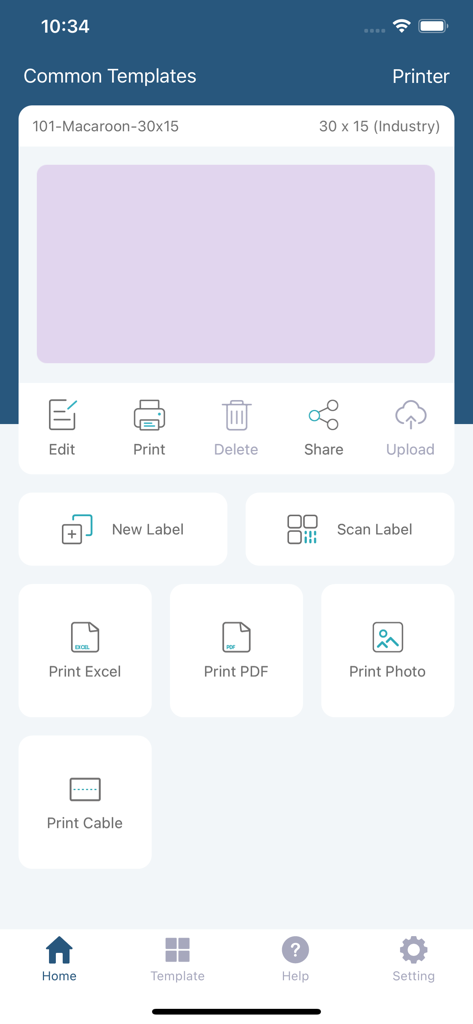
WePrint App interface displaying label creation and printing options like Excel and PDF
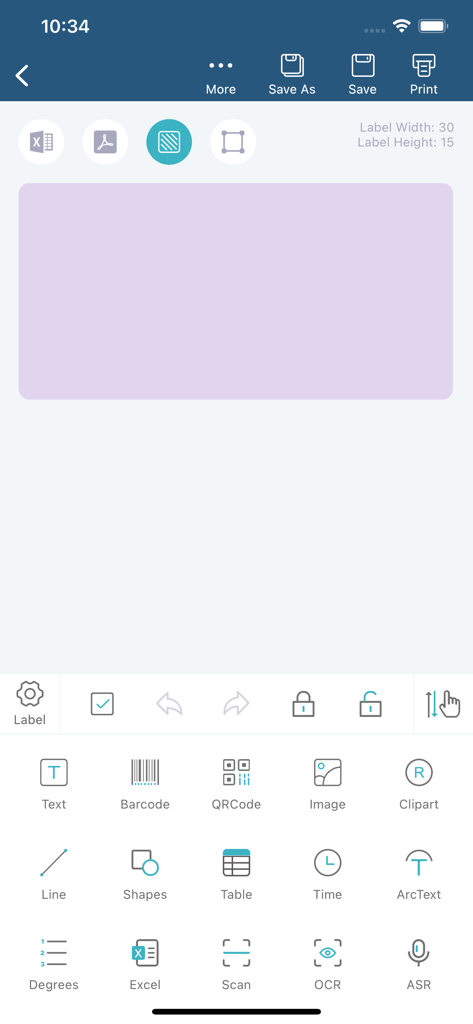
WePrint app interface showing a label design workspace with tools for barcodes QR codes and text
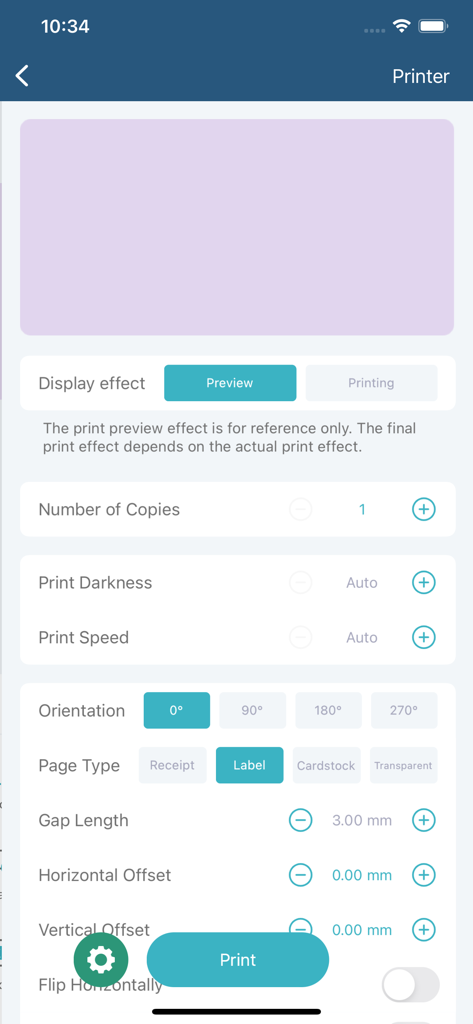
A mobile interface of the WePrint app displaying customizable print settings for labels and receipts
Description
Download
More Like This
Apps with similar features and user experience

NIIMBOT
WUHAN JINGCHEN INTELLIGENT IDENTIFICATION TECHNOLOGY CO., LTD
Nelko
E-z Ink Technology Co., Ltd

Print Master
PHOMEMO PTE. LTD.

Labelnize
E-z Ink Technology Co., Ltd

NIIM
WUHAN JINGCHEN INTELLIGENT IDENTIFICATION TECHNOLOGY CO., LTD
Polaroid Hi·Print
Polaroid International B.V.
Jadens Printer
JADENS COMPANY LIMITED
FlashLabel Pro
Xiamen Print Future Technology Co.Ltd.
Bluetooth Mini Thermal Printer
Mate Technologies
This page is not an official page of the app or its developer, but an independent editorial publication created for informational and commentary purposes. Unless expressly stated otherwise, neither the app nor its developer is affiliated with, endorsed by, sponsored by, authorized by, or otherwise officially connected with MWM, Apple, Google Play, the app publisher, or the app's developer, and nothing on this page implies that the app was developed using MWM's services. Any trademarks, logos, screenshots, and other content remain the property of their respective owners.