
This page is not an official page of the app or its developer, but an independent editorial publication created for informational and commentary purposes. Unless expressly stated otherwise, neither the app nor its developer is affiliated with, endorsed by, sponsored by, authorized by, or otherwise officially connected with MWM, Apple, Google Play, the app publisher, or the app's developer, and nothing on this page implies that the app was developed using MWM's services. Any trademarks, logos, screenshots, and other content remain the property of their respective owners.


NIIM
Labeling is broken. This app fixes it, delivering order and style to your domain.
Downloads
1M+User Rating
Total Ratings
33.0KPublisher
Category
LifestyleLocales
30Latest Version
2.5.16Size
208.5 MBFirst Released
Mar 11, 2021Evaluating essential functionalities for organized and aesthetic users.
NIIM App Key Features Analysis
Advanced Label Customization
It allows users to personalize labels with a wide array of fonts, symbols, borders, icons, pictures, and doodles, ensuring aesthetically pleasing and unique organization.
Bluetooth Printer Connectivity
The app provides seamless wireless connection to NIIMBOT smart label printers, enabling convenient and efficient label printing directly from the user's device.
Assortment Management System
This tool features a comprehensive system for managing and categorizing belongings, fostering an orderly and comfortable living or working environment.
Integrated Label Design & Printing
The app offers a complete service for designing and printing custom labels, streamlining the process of creating organized and identifiable items.
Frequently Asked Questions
Everything you need to know about NIIM
What is the NIIM app?
The NIIM app provides home assortment inspirations and label editing and printing services. It connects with NIIMBOT smart label printers via Bluetooth to create interesting and neat labels, offering a more orderly and comfortable life.
Can I connect the NIIM app to a label printer?
Yes, you can connect the NIIM app to NIIMBOT smart label printers. The connection occurs via Bluetooth, enabling the app to send your designed labels for printing directly from your mobile device.
What editing tools are available in the NIIM app for label design?
The NIIM app offers comprehensive editing tools including fonts, symbols, borders, icons, pictures, and doodles. It also supports adding photos, graffiti, templates, text, time, QR codes, and lines to labels for creative customization.
Does the NIIM app provide a variety of fonts and icons?
Yes, the NIIM app features a massive collection of materials for label creation. It includes over 1000 icons and more than 300 fonts to choose from, allowing extensive customization options for users.
Can the NIIM app manage expiration dates for food or other items?
Yes, the NIIM app includes a validity management function. This feature allows users to manage expiration dates for various items and set timely reminders, contributing to better health and organization for the whole family.
Does the NIIM app offer batch printing capabilities?
Yes, the NIIM app supports quick printing through its batch printing of word lists feature. This functionality makes it more efficient to print multiple labels simultaneously, optimizing the label creation process.
The following screenshots and description are sourced directly from the app's official store listing and are the property of the app developer.
App Store
Screenshots

Explore user-shared labeling triumphs and organizational ideas within the app's 'Community' tab, showcasing examples like neatly labeled kitchen jars and practical wardrobe arrangements.
Community Inspirations
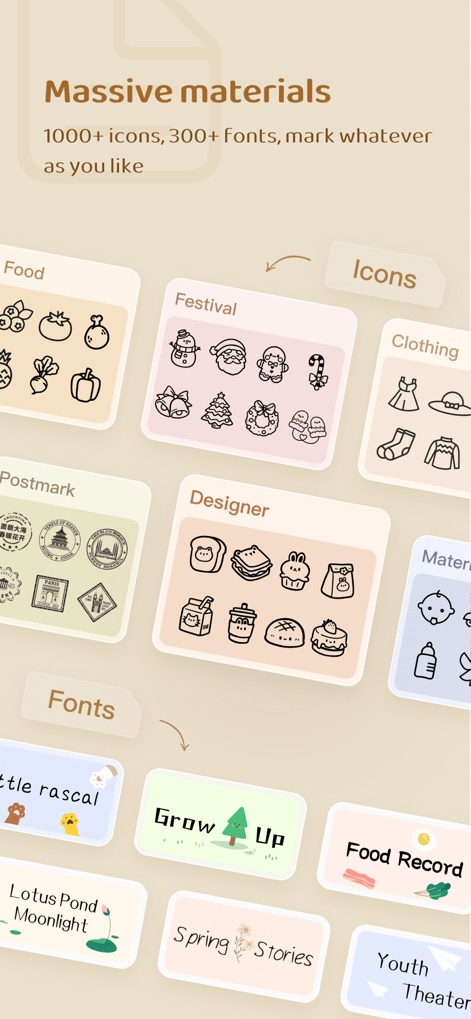
Unleash creativity with a vast library of design elements, featuring extensive icon categories for themes like 'Food' and 'Festival,' alongside a diverse range of artistic fonts.
Rich Design Assets
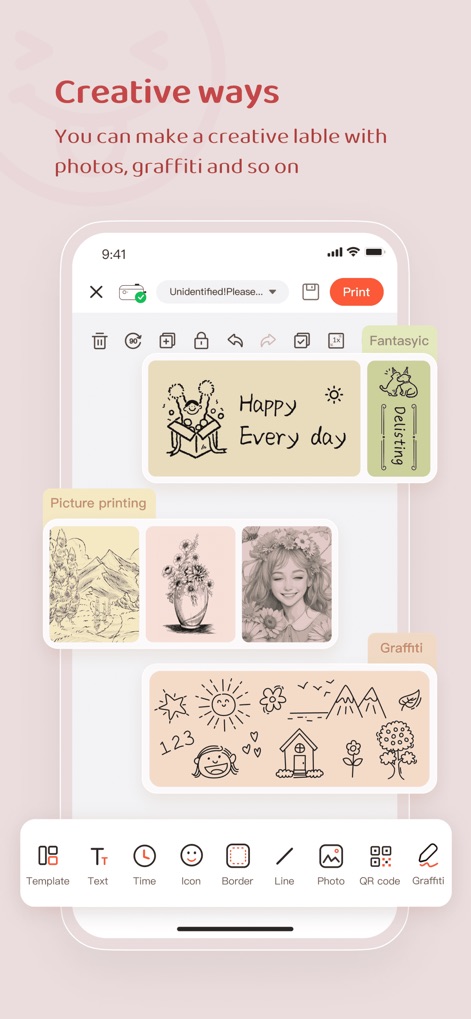
Design unique labels effortlessly using the app's comprehensive editor, which offers features like direct photo integration and freehand 'Graffiti' for personalized touches.
Custom Label Design

Streamline your labeling process with the efficient 'Batch printing' feature, enabling users to quickly print multiple labels for organized items, as demonstrated by the neatly stacked and labeled food containers.
Efficient Batch Printing

Ensure food safety and minimize waste with the app's 'My expiration dates' manager, allowing users to track item validity and set convenient 'Expiration reminder' alerts.
Expiration Tracking
Description
Download
More Like This
Apps with similar features and user experience
NIIMBOT
WUHAN JINGCHEN INTELLIGENT IDENTIFICATION TECHNOLOGY CO., LTD
Nelko
E-z Ink Technology Co., Ltd

Print Master
PHOMEMO PTE. LTD.
Labelnize
E-z Ink Technology Co., Ltd
Polaroid Hi·Print
Polaroid International B.V.
Jadens Printer
JADENS COMPANY LIMITED
FlashLabel Pro
Xiamen Print Future Technology Co.Ltd.

WePrint App
Shanghai ThanMore Network Technology Co., Ltd.
Bluetooth Mini Thermal Printer
Mate Technologies
This page is not an official page of the app or its developer, but an independent editorial publication created for informational and commentary purposes. Unless expressly stated otherwise, neither the app nor its developer is affiliated with, endorsed by, sponsored by, authorized by, or otherwise officially connected with MWM, Apple, Google Play, the app publisher, or the app's developer, and nothing on this page implies that the app was developed using MWM's services. Any trademarks, logos, screenshots, and other content remain the property of their respective owners.