
This page is not an official page of the app or its developer, but an independent editorial publication created for informational and commentary purposes. Unless expressly stated otherwise, neither the app nor its developer is affiliated with, endorsed by, sponsored by, authorized by, or otherwise officially connected with MWM, Apple, Google Play, the app publisher, or the app's developer, and nothing on this page implies that the app was developed using MWM's services. Any trademarks, logos, screenshots, and other content remain the property of their respective owners.


Brivo Mobile Pass
Physical keys are dead. This app makes your phone the master key.
Downloads
1M+User Rating
Total Ratings
147.9KPublisher
Category
UtilitiesLocales
6Latest Version
4.27.2Size
241.9 MBFirst Released
Sep 14, 2015An evaluation of core functionalities enhancing convenience and security for professionals using cloud-based access systems.
Brivo Mobile Pass: Key Feature Analysis for Modern Access Control
Smartphone Access Control
The app provides users with the ability to securely unlock doors and access controlled areas directly from their smartphone, offering unparalleled convenience.
Digital Credential Management
It eliminates the necessity for traditional physical keys and access cards, centralizing access credentials onto a user's mobile device for improved security and reduced loss risk.
Easy Credential Provisioning
The system allows administrators to easily issue and distribute mobile passes to users via email, simplifying the onboarding process and access management.
Brivo Access Cloud Integration
This tool is exclusively designed as an enhancement for the Brivo Access cloud-based access control platform, ensuring seamless integration and leveraging existing infrastructure.
Frequently Asked Questions
Everything you need to know about Brivo Mobile Pass
What is Brivo Mobile Pass and what does it do?
Brivo Mobile Pass is a digital credential format allowing users to access secured areas with their smartphone. It eliminates the need for physical keys and access cards and is exclusively for the Brivo Access cloud-based platform.
Does Brivo Mobile Pass eliminate physical keys and access cards?
Yes, Brivo Mobile Pass functions as a digital credential, integrating with the Brivo Access platform to allow smartphone-based door unlocking. This system directly replaces the need for traditional physical keys or access cards.
Which access control platform does Brivo Mobile Pass work with?
Brivo Mobile Pass is exclusively available for the Brivo Access cloud-based access control platform. It serves as an enhancement to this existing system, providing digital credential capabilities.
Is new hardware required to use Brivo Mobile Pass?
No, Brivo Mobile Pass does not require any new hardware. It is an enhancement to the Brivo Access platform, functioning as a digital credential within the existing infrastructure.
How do administrators issue a Brivo Mobile Pass to a user?
Brivo Access administrators email a Brivo Mobile Pass to a user. The user then adds this digital credential to their mobile application, enabling them to unlock doors with their smartphone.
Can Brivo Mobile Pass manage access for several locations?
Yes, Brivo Mobile Pass unifies the access experience, allowing users to manage access across multiple facilities with a single credential. Screenshot #3 displays multiple sites like London, NYC, Madrid, and Washington.
Can I customize door names in the Brivo Mobile Pass app?
Yes, users can rename and favorite doors within the Brivo Mobile Pass app for a personalized experience. Screenshot #4 shows options to "Edit Name" and "Add to Favorites" for specific doors.
Does Brivo Mobile Pass integrate with smart home devices?
Yes, Brivo Mobile Pass supports smart home integration. It unlocks new possibilities by connecting your Smart Home experience, as depicted in Screenshot #5 which shows controls for a thermostat and lights.
Can Brivo Mobile Pass be used to grant guest access?
Yes, the Brivo Mobile Pass app allows users to grant known guests access. Users can add guests and assign temporary access codes through the "My Guests" feature, as shown in Screenshot #6.
The following screenshots and description are sourced directly from the app's official store listing and are the property of the app developer.
App Store
Screenshots
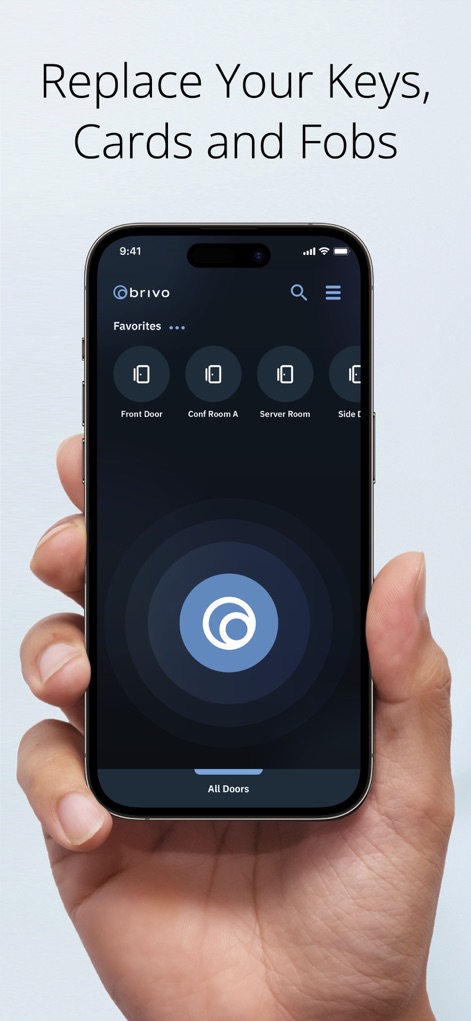
See how Brivo Mobile Pass organizes frequently accessed locations in the "Favorites" section and provides a prominent central unlock button for quick entry.
Effortless Access Control
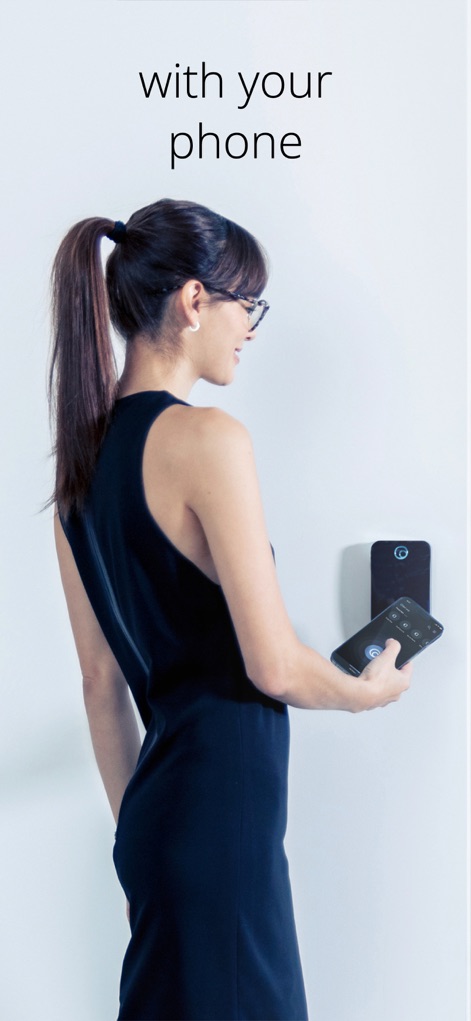
This visual demonstrates users conveniently accessing secured areas by simply tapping their smartphone near a compatible access reader, showcasing the app's integrated unlocking functionality.
Seamless Mobile Entry
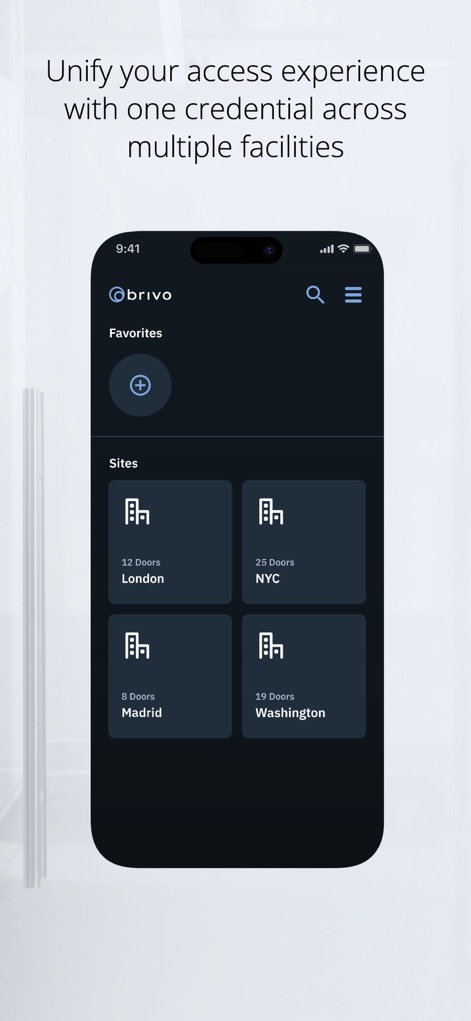
Discover how this tool allows users to manage access across various "Sites" like "London" and "NYC", centralizing control for multiple facilities within a single interface.
Unified Facility Management
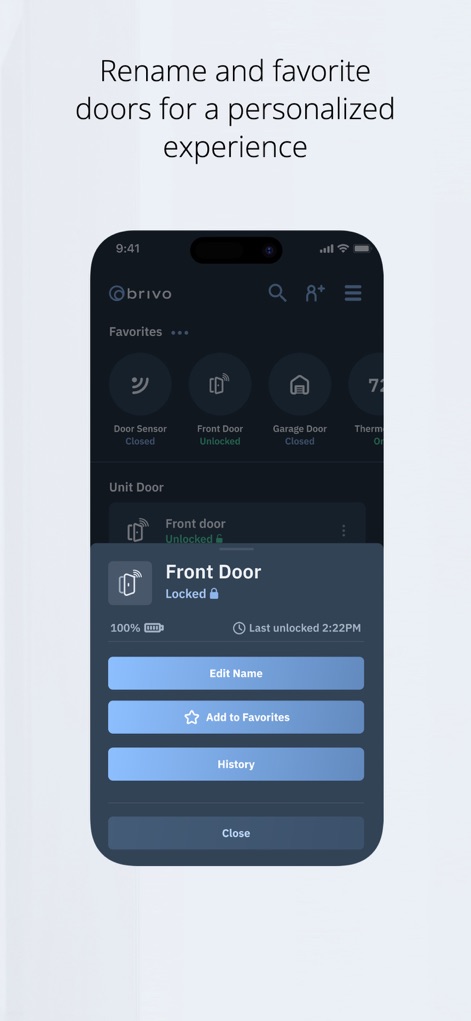
Explore the app's capability to personalize access points through the door detail pop-up, offering options such as "Edit Name" and "Add to Favorites" for tailored control.
Personalized Door Management

This tool extends its utility beyond basic access, integrating with smart home features like "Thermostat" controls and managing various "Common Doors" for a comprehensive living experience.
Integrated Smart Living
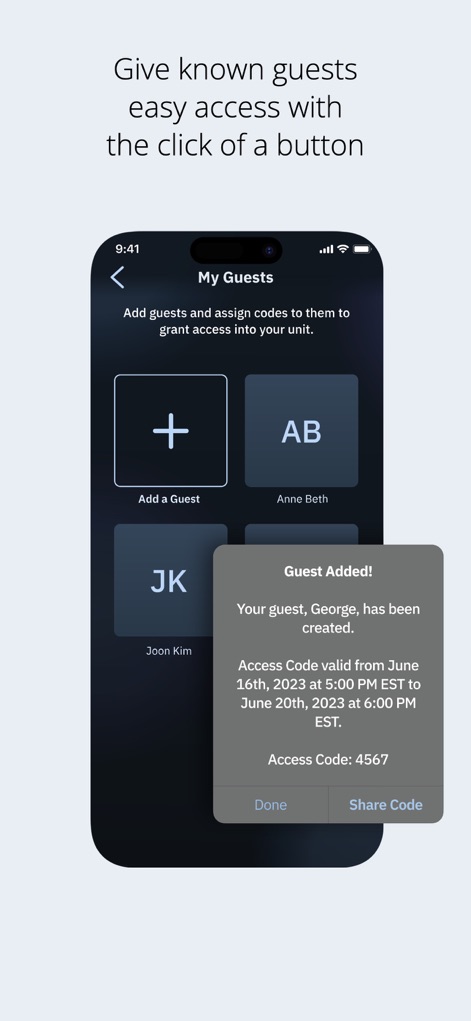
Observe how the "My Guests" section simplifies access management for visitors, with a clear "Guest Added!" confirmation providing a generated access code and validity details.
Effortless Guest Provisioning
Description
Download
More Like This
Apps with similar features and user experience

Titan Email: Contacts,Calendar
Flock FZ-LLC

Tableau Mobile
Tableau Software, LLC

Teachable online courses
Teachable Inc.

Liquid UI Client for SAP
Synactive

Garoon
Cybozu, Inc.
NZBClient for NZBGet
Digital Tools Ltd

Aruba PEC
Aruba S.p.A.

Purple Mash Browser
2 Simple Limited

BT Email
British Telecommunications plc
This page is not an official page of the app or its developer, but an independent editorial publication created for informational and commentary purposes. Unless expressly stated otherwise, neither the app nor its developer is affiliated with, endorsed by, sponsored by, authorized by, or otherwise officially connected with MWM, Apple, Google Play, the app publisher, or the app's developer, and nothing on this page implies that the app was developed using MWM's services. Any trademarks, logos, screenshots, and other content remain the property of their respective owners.