
This page is not an official page of the app or its developer, but an independent editorial publication created for informational and commentary purposes. Unless expressly stated otherwise, neither the app nor its developer is affiliated with, endorsed by, sponsored by, authorized by, or otherwise officially connected with MWM, Apple, Google Play, the app publisher, or the app's developer, and nothing on this page implies that the app was developed using MWM's services. Any trademarks, logos, screenshots, and other content remain the property of their respective owners.


Budget Bestie
Your money disappears without a trace. This app puts you back in charge.
Downloads
750k+User Rating
Total Ratings
3.6KPublisher
Category
FinanceLocales
1Latest Version
1.5.3Size
111.1 MBFirst Released
Mar 8, 2024An analytical review of key features designed for approachable personal finance management.
Budget Bestie: Core Capabilities Analysis
Digital Envelope Budgeting
This tool provides a digital adaptation of the popular cash stuffing method, enabling users to visually allocate funds into virtual envelopes for different spending categories without needing to handle physical cash.
Smart Allocation Recommendations
It automatically suggests how much to 'stuff' into each envelope by analyzing past spending habits and upcoming bills, significantly reducing the need for manual calculations and spreadsheets.
Goal-Oriented Savings Tracking
Users can establish specific savings envelopes and track their progress towards financial goals, providing motivation and clarity on their path to achieving targets like debt reduction or emergency funds.
Flexible Pay Cycle Management
The app allows users to create budgets that align with their specific income schedule, whether they are paid weekly, bi-weekly, or monthly, offering personalized financial control.
Spending Insights & Recaps
It offers valuable insights into spending patterns through monthly recaps, enabling users to identify where their money goes and make informed adjustments to their budget.
Recurring Expense Reminders
The app sends timely notifications for recurring expenses that haven't been recorded, helping users avoid late fees and maintain better financial discipline.
Frequently Asked Questions
Everything you need to know about Budget Bestie
What is Budget Bestie?
Budget Bestie is an app that helps users manage their money using the cash stuffing method. It provides features like creating digital envelopes, tracking spending, and hitting savings goals.
How does the cash stuffing method work in Budget Bestie?
Budget Bestie digitizes the cash stuffing method. Users create envelopes for expenses, virtually 'stuff' them with funds, spend from corresponding envelopes, and repeat the process upon receiving income.
Can Budget Bestie help me achieve my savings goals?
Yes, Budget Bestie helps users hit savings goals. The app allows for the creation of specific savings envelopes and tracks progress to ensure users stay on track towards their targets.
What budgeting frequencies does Budget Bestie support?
Budget Bestie supports various budgeting frequencies, including weekly, biweekly, twice a month, or monthly. Users select their preferred schedule to align with their income cycle.
Does Budget Bestie offer suggestions for how much money to put in envelopes?
Yes, Budget Bestie provides budget suggestions. It recommends how much to 'stuff' into each envelope by analyzing previous spending habits and upcoming bills, eliminating manual calculations.
How does Budget Bestie prevent late payments?
Budget Bestie helps avoid late fees by sending notifications for unrecorded recurring expenses. Users receive reminders when a scheduled payment is due but not yet logged.
How do I log an expense in the Budget Bestie app?
Users can easily add expenses in Budget Bestie by selecting the 'Expense' option from the transaction screen. They input the amount, date, and choose the corresponding envelope.
Can I create different types of custom envelopes in Budget Bestie?
Yes, Budget Bestie allows users to create custom envelopes. Options include variable envelopes for fluctuating costs, fixed envelopes for regular payments, and saving envelopes for financial goals.
How do subscriptions work for Budget Bestie?
Budget Bestie offers subscription plans (monthly or annual) managed directly by Apple. Users choose their plan before a free trial begins and can manage or cancel it within their iPhone settings.
Can I cancel my Budget Bestie subscription at any time?
Yes, users can cancel their Budget Bestie subscription anytime. Subscriptions are billed and managed by Apple, so cancellation occurs within the iPhone's settings app.
The following screenshots and description are sourced directly from the app's official store listing and are the property of the app developer.
App Store
Screenshots
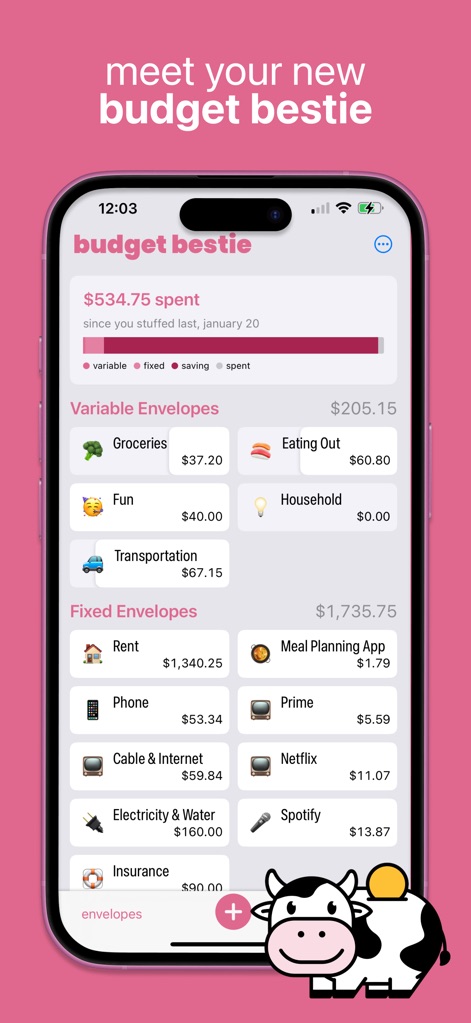
See how the app's intuitive "Variable Envelopes" and "Fixed Envelopes" visually organize spending categories, making the cash stuffing method clear and easy to understand.
Envelope System Overview
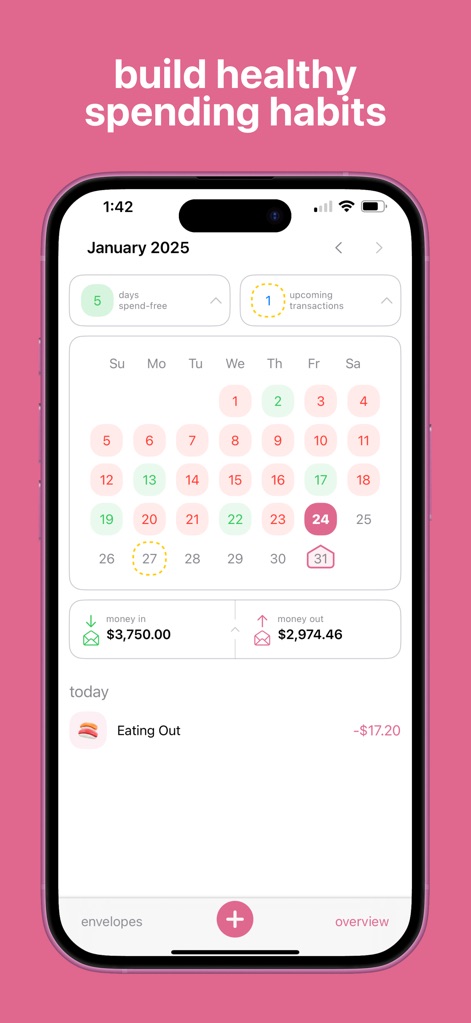
This tool empowers users to visualize their financial journey through a dynamic calendar display, highlighting "days spend-free" and upcoming transactions for proactive money management.
Spending Habits Calendar
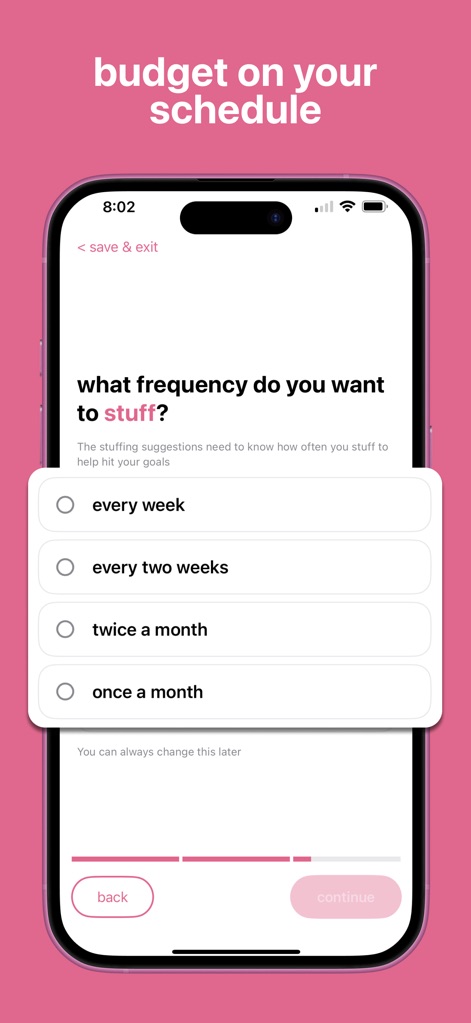
Users can effortlessly tailor their budgeting frequency by selecting options like "every two weeks" or "monthly", ensuring the app adapts to their pay schedule.
Flexible Budget Scheduling
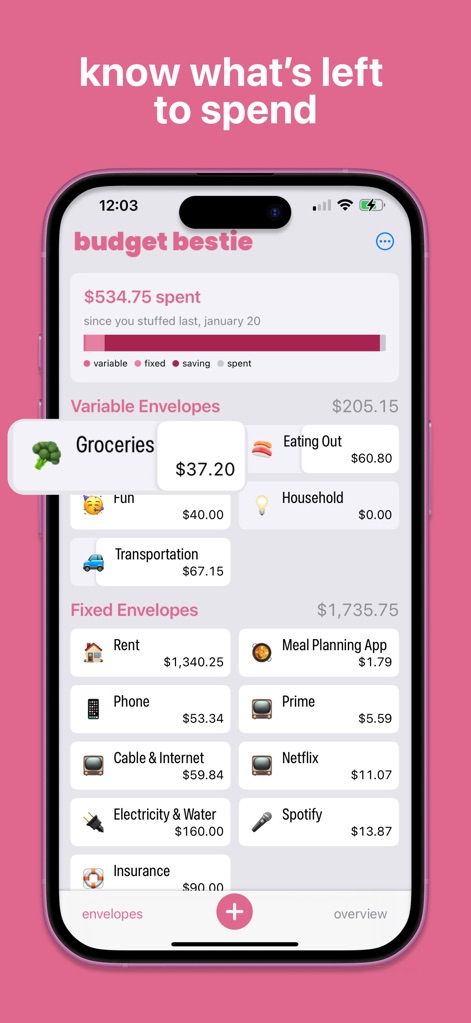
The app clearly displays the "spent" amount and the remaining balances within "Variable Envelopes", allowing users to quickly assess their financial standing at a glance.
Real-time Balance Tracking

This feature provides intelligent "budget suggestions" for categories like "rent", guiding users with data-driven amounts through an integrated calculator interface for precise adjustments.
Smart Budget Recommendations

The tool simplifies financial tracking with an easy-to-use "Add Transaction" interface, allowing quick recording of expenses by selecting the "From Envelope" category and entering amounts via a clear keypad.
Streamlined Expense Entry

The app proactively notifies users of "pending transactions" and recurring expenses like "Electricity & Water", helping them avoid late fees and manage bills efficiently.
Avoid Late Payments

Users can track progress toward specific financial targets within a "Saving Envelope" like "Emergency Fund", with a clear progress bar and detailed "Budget Update" history keeping them motivated.
Achieve Savings Goals
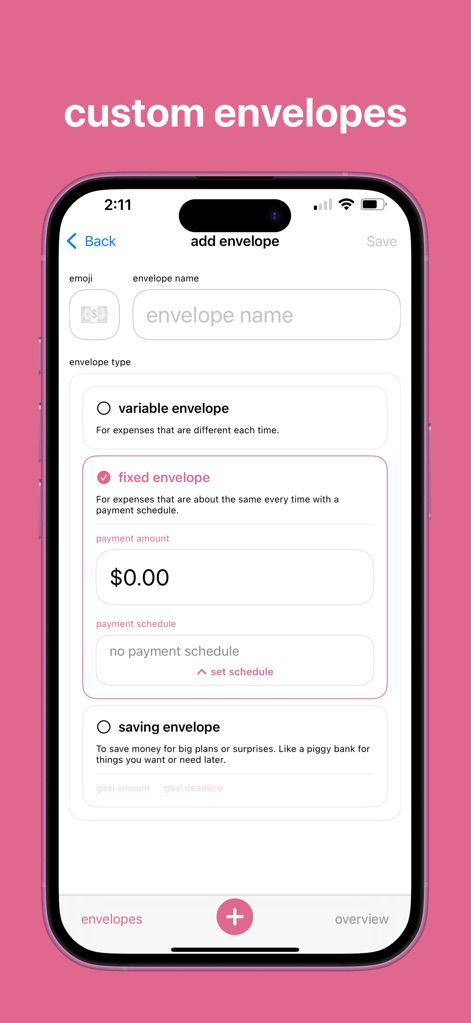
The app allows for deep customization, enabling users to create distinct "variable envelope" or "fixed envelope" types to perfectly match their unique spending and saving needs.
Personalized Envelope Creation
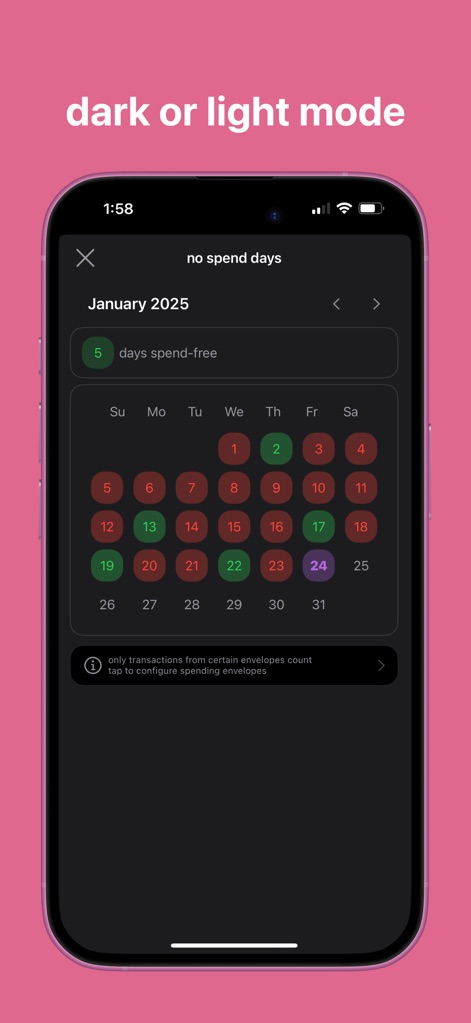
This tool offers aesthetic flexibility with "Dark or Light Mode" options and a "no spend days" calendar, allowing users to personalize their visual experience while tracking financial discipline.
Flexible Interface Themes
Description
Download
More Like This
Apps with similar features and user experience

鲨鱼记账本-城市理财圈子必备工具软件
Beijing Shark Pioneer Network Technology Co.,Ltd

咔皮记账 -自动记账 AI记账 预算 多账本 资产管理 存钱
Shanghai Yuhuan Technology Co., Ltd.

Money manager, expense tracker
Orange dog d.o.o.

Money Manager Expense & Budget
Realbyte Inc.

Budget Planner App - Fleur
Akash Jain

iCost记账-快速简洁好用的记账理财助手&记账软件
Guangzhou Quji Technology Co., Ltd.

YNAB
You Need A Budget LLC

Copilot: Track & Budget Money
Copilot Money, Inc.

小青账记账-存钱记账本理财购物清单
YouQian
This page is not an official page of the app or its developer, but an independent editorial publication created for informational and commentary purposes. Unless expressly stated otherwise, neither the app nor its developer is affiliated with, endorsed by, sponsored by, authorized by, or otherwise officially connected with MWM, Apple, Google Play, the app publisher, or the app's developer, and nothing on this page implies that the app was developed using MWM's services. Any trademarks, logos, screenshots, and other content remain the property of their respective owners.