
This page is not an official page of the app or its developer, but an independent editorial publication created for informational and commentary purposes. Unless expressly stated otherwise, neither the app nor its developer is affiliated with, endorsed by, sponsored by, authorized by, or otherwise officially connected with MWM, Apple, Google Play, the app publisher, or the app's developer, and nothing on this page implies that the app was developed using MWM's services. Any trademarks, logos, screenshots, and other content remain the property of their respective owners.


Calculator for iPad!
Finally, an iPad calculator that doesn't suck. This app turns your tablet into a math powerhouse.
Downloads
2.5M+User Rating
Total Ratings
237.0KPublisher
Category
UtilitiesLocales
22Latest Version
2.65Size
70.5 MBFirst Released
Jul 30, 2011Evaluating its utility for STEM students and professionals.
Key Features Analysis of 'Calculator for iPad!'
High Precision Calculations
The app provides high precision calculations, supporting over 75 significant digits, which is crucial for accuracy in scientific, engineering, and financial computations.
Scientific Calculator Mode
This tool features both basic and advanced scientific calculator modes, offering more than 30 scientific operations essential for complex mathematical and technical problems.
Parentheses and Nested Support
It allows users to utilize parentheses and nested parentheses in their calculations, ensuring correct order of operations for accurate and complex expressions.
Calculation History & Editing
The app provides a History Tab to review, re-use, and modify past calculations, significantly boosting productivity and enabling easy error checking.
Current Equation Visualization
This tool features the ability to view the full equation of current calculations, which helps in verifying input and understanding the structure of complex expressions before execution.
Integrated Notes Functionality
It allows users to take notes or draw directly with a finger on the dedicated Notes Tab, serving as a convenient scratchpad for problem-solving or formula recall.
Flexible Display Orientation
The app provides the flexibility to use both basic and scientific calculators in portrait or landscape mode, enhancing user comfort and usability, especially on iPad devices.
Aesthetic Customization Options
This tool features options to customize the aesthetic look of the application by changing the leather color and background texture, offering a personalized user experience.
Frequently Asked Questions
Everything you need to know about Calculator for iPad!
What types of calculators does Calculator for iPad! offer?
Calculator for iPad! provides both a standard calculator and a scientific calculator. The scientific mode includes over 30 operations for advanced calculations.
Can users customize the appearance of Calculator for iPad!?
Yes, Calculator for iPad! allows users to customize its appearance. On iPad, users can change the leather color and background texture to personalize the application's look.
Does Calculator for iPad! support both portrait and landscape orientations?
Yes, Calculator for iPad! supports both portrait and landscape modes for its calculators on iPad. This allows for flexible use depending on user preference and device orientation.
Can I view my past calculations in Calculator for iPad!?
Yes, Calculator for iPad! includes a History Tab. Users can view and edit a history of their calculations. It also allows viewing the equation of current calculations.
What is the Notes Tab feature in Calculator for iPad!?
The Notes Tab in Calculator for iPad! enables users to take notes or draw directly with their finger. This feature provides a convenient way to jot down information alongside calculations.
What is the accuracy of calculations in Calculator for iPad!?
Calculator for iPad! calculates with high accuracy, supporting more than 75 significant digits. This ensures precise results for complex mathematical operations and professional use.
Does Calculator for iPad! support parenthesis in calculations?
Yes, Calculator for iPad! supports the use of parenthesis and nested parenthesis in calculations. This feature allows users to define the order of operations accurately.
The following screenshots and description are sourced directly from the app's official store listing and are the property of the app developer.
App Store
Screenshots
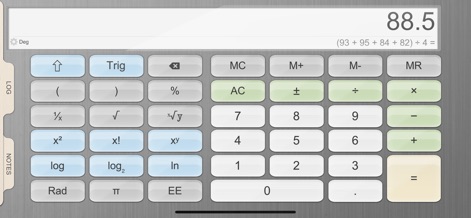
Explore the app's scientific calculator interface, featuring a comprehensive array of scientific operations and a clear 'Deg' mode indicator for precision.
Advanced Calculations Unlocked
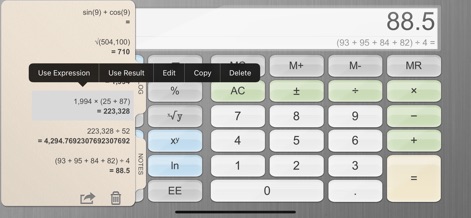
This tool allows users to review past computations on the 'History Tab' and quickly re-employ figures with options like 'Use Expression' or 'Use Result'.
Seamless History Tracking
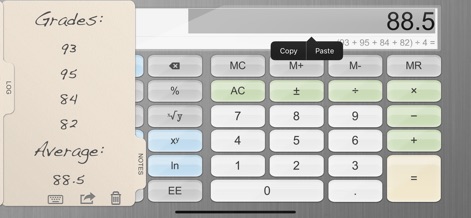
Discover how the app enhances productivity with its 'Notes Tab', enabling users to jot down handwritten remarks and utilize convenient 'Copy' and 'Paste' functions.
Integrated Note-Taking
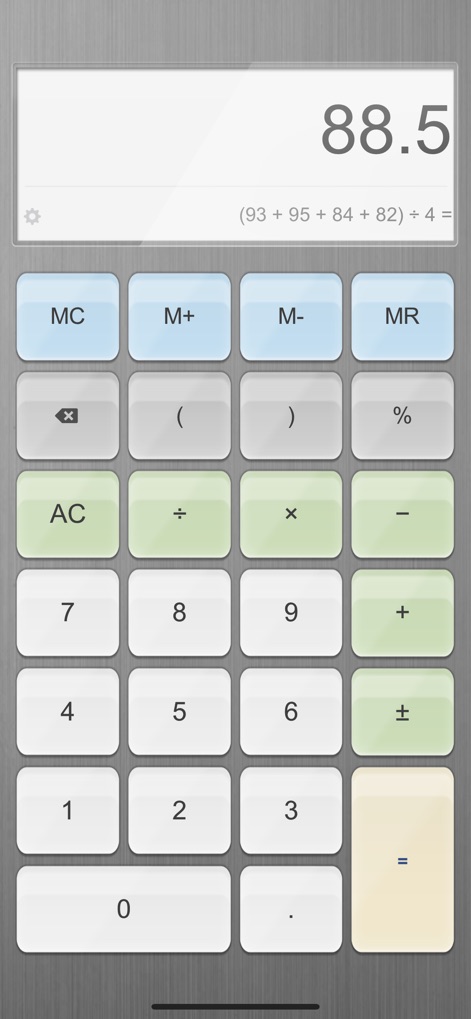
Experience the app's intuitive standard calculator, offering fundamental arithmetic operations within a clean and simplified layout for everyday calculations.
Essential Functions Streamlined
Description
Download
More Like This
Apps with similar features and user experience

Unit Converter - Best Unit App
Alan Mrvica
计算器i -简单好用算得快
Chongqing Frozen Technology Co., LTD
Metric Conversion tool
Wight Hat Ltd
Convert Any Unit
Cider Software LLC

Calculator - Pad Edition
Ratha Sou
Calculator with History +
Beijing Free Calculator Technology Co., Ltd.

ClevCalc - Calculator
Cleveni Inc.
Calculator!
7th Gear

Calzy
Raja V
This page is not an official page of the app or its developer, but an independent editorial publication created for informational and commentary purposes. Unless expressly stated otherwise, neither the app nor its developer is affiliated with, endorsed by, sponsored by, authorized by, or otherwise officially connected with MWM, Apple, Google Play, the app publisher, or the app's developer, and nothing on this page implies that the app was developed using MWM's services. Any trademarks, logos, screenshots, and other content remain the property of their respective owners.