
This page is not an official page of the app or its developer, but an independent editorial publication created for informational and commentary purposes. Unless expressly stated otherwise, neither the app nor its developer is affiliated with, endorsed by, sponsored by, authorized by, or otherwise officially connected with MWM, Apple, Google Play, the app publisher, or the app's developer, and nothing on this page implies that the app was developed using MWM's services. Any trademarks, logos, screenshots, and other content remain the property of their respective owners.

Calculator - Pad Edition
The iPad's numeric limitations end here. This app transforms the tablet into a calculation titan, mastering scientific, financial, and programming demands.
Downloads
12.5M+User Rating
Total Ratings
737.4KPublisher
Category
UtilitiesLocales
34Latest Version
7.1Size
46.0 MBFirst Released
Aug 14, 2013Key Features Analysis: Calculator - Pad Edition
An in-depth evaluation of functionalities catering to diverse iPad user needs, from academic to professional applications.
Advanced Mathematical Capabilities
The app provides comprehensive basic and scientific calculator functionalities, including roots, powers, factorials, exponential, divisions, logarithms, and trigonometric functions. It supports switching between degrees and radians and allows complex calculations with memory buttons.
Versatile Unit and Currency Conversion
This tool features a versatile unit converter with daily updated exchange rates for currency and a wide range of categories including Area, Data, Length, Mass, Velocity, Temperature, Time, and Volume. It allows for free conversion between various units.
Integrated iOS Experience
It allows users to leverage iOS-specific features like Split View multitasking, external hardware keyboard input, and offers a widget for quick access to results and calculations, ensuring seamless productivity.
Calculation Traceability
The app provides a clear view of the entire calculation equation and allows users to check previous calculations through a history feature, enhancing accuracy and traceability for complex problems.
Adaptive User Interface
This tool features a modern flat UI design consistent with iOS, offering basic calculations in portrait mode and scientific calculations in landscape, with manual switching options for optimal usability.
Specialized Programmer Mode
It allows users to perform multi-base calculations, seamlessly switching between binary, octal, decimal, and hexadecimal. This includes arithmetic and logical operations, with a built-in Bit Editor for direct manipulation of individual bits.
Precise Fraction Solver
The app includes a dedicated fraction calculator designed to quickly and easily solve fraction math problems, displaying results in proper fraction, improper fraction, or decimal formats.
Practical Financial Tools
This tool features a built-in tip calculator to determine tip percentages on the fly and a bill splitter to easily share expenses with others. It allows for simple rounding of totals, tips, or per-person amounts.
Frequently Asked Questions
Everything you need to know about Calculator - Pad Edition
Does Calculator - Pad Edition support scientific calculations?
Yes, Calculator - Pad Edition supports both basic and scientific calculations. Basic functions are available in portrait mode, while scientific functions like trigonometry and logarithms appear in landscape mode.
Does Calculator - Pad Edition include a unit converter?
Yes, Calculator - Pad Edition includes a comprehensive unit converter. It handles currency with daily updated exchange rates, along with various categories like area, data, length, mass, and temperature.
Can Calculator - Pad Edition handle fraction calculations?
Yes, Calculator - Pad Edition features a built-in Fraction Calculator. It solves fraction math problems and displays results as proper fractions, improper fractions, or decimal numbers.
Does Calculator - Pad Edition offer a programmer calculator?
Yes, Calculator - Pad Edition provides a Programmer Calculator. It supports multi-base calculations, allowing seamless switching between binary, octal, decimal, and hexadecimal bases for arithmetic and logical operations.
Does Calculator - Pad Edition have a tip calculator and bill splitter?
Yes, Calculator - Pad Edition features a Tip Calculator. It calculates tip percentages on the fly and includes a bill splitter to easily share costs among multiple people.
Can Calculator - Pad Edition be accessed via an iOS widget?
Yes, Calculator - Pad Edition supports access via a widget. Users can add the Calculator widget to view results and perform calculations directly from the iOS widget list.
Does Calculator - Pad Edition save calculation history?
Yes, Calculator - Pad Edition records previous calculations. Users can check their calculation history to review past equations and results within the app.
Does Calculator - Pad Edition support external keyboard input?
Yes, Calculator - Pad Edition supports external hardware keyboard input. This feature allows users to easily input numbers and operations, enhancing usability.
The following screenshots and description are sourced directly from the app's official store listing and are the property of the app developer.
App Store
Screenshots
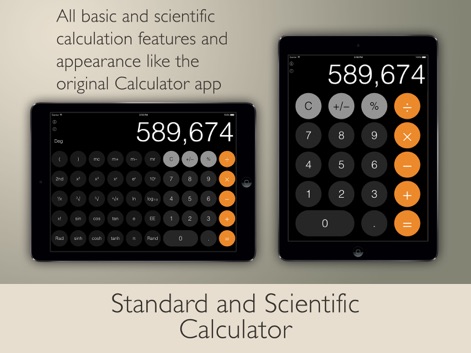
Versatile Calculation Modes
This tool seamlessly transitions between a standard portrait calculator and a scientific landscape mode for diverse mathematical needs.

Fraction Math Solved
The app simplifies complex fraction problems, showcasing both clear fraction input and accurate numerical results.
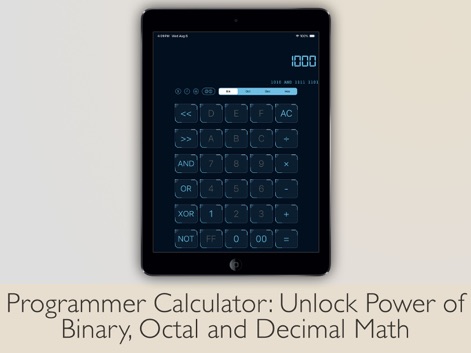
Programmer's Precision
Users can effortlessly switch between binary, octal, decimal, and hexadecimal modes, alongside dedicated bit manipulation functions for advanced programming tasks.

Universal Conversions
The app includes a robust converter, featuring up-to-date currency exchange rates and a clear display of conversion results.
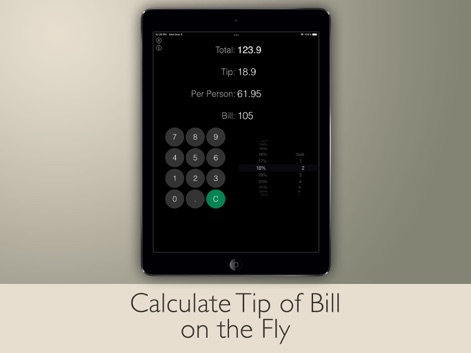
Smart Financial Tools
This tool offers a practical tip calculator with an intuitive percentage selector and efficient bill splitting capabilities.

Instant Widget Access
The app provides quick access to its basic calculation functions directly within the iOS widget, enhancing user convenience.

Recall Past Calculations
Users can review past operations with the comprehensive calculation history feature, displaying a chronological list of entries.
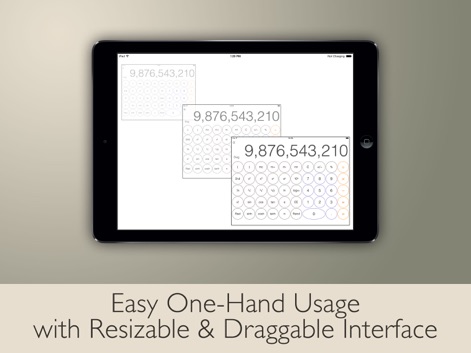
Adaptive Interface Design
The app features a resizable calculator window and draggable interface elements, optimizing for comfortable one-hand usage on the iPad.
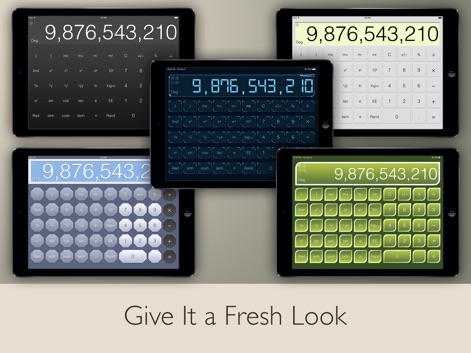
Personalized Visual Themes
Users can personalize their experience with multiple vibrant color themes and customized button appearances, refreshing the app's look.

Streamlined Workflow Support
The app supports seamless external hardware keyboard input and offers easy copy/paste functionality for enhanced productivity.
Description
Download
More Like This
Apps with similar features and user experience

Unit Converter - Best Unit App
Alan Mrvica
计算器i -简单好用算得快
Chongqing Frozen Technology Co., LTD
Metric Conversion tool
Wight Hat Ltd
Convert Any Unit
Cider Software LLC
Calculator with History +
Beijing Free Calculator Technology Co., Ltd.

ClevCalc - Calculator
Cleveni Inc.
Calculator for iPad!
7th Gear
Calculator!
7th Gear

Calzy
Raja V
This page is not an official page of the app or its developer, but an independent editorial publication created for informational and commentary purposes. Unless expressly stated otherwise, neither the app nor its developer is affiliated with, endorsed by, sponsored by, authorized by, or otherwise officially connected with MWM, Apple, Google Play, the app publisher, or the app's developer, and nothing on this page implies that the app was developed using MWM's services. Any trademarks, logos, screenshots, and other content remain the property of their respective owners.