
This page is not an official page of the app or its developer, but an independent editorial publication created for informational and commentary purposes. Unless expressly stated otherwise, neither the app nor its developer is affiliated with, endorsed by, sponsored by, authorized by, or otherwise officially connected with MWM, Apple, Google Play, the app publisher, or the app's developer, and nothing on this page implies that the app was developed using MWM's services. Any trademarks, logos, screenshots, and other content remain the property of their respective owners.


Call Recorder iCall
Finally, gain total recall over every conversation. The app puts call recordings on demand.
Downloads
10M+User Rating
Total Ratings
53.1KPublisher
Category
BusinessLocales
14Latest Version
3.6.0Size
484.0 MBFirst Released
Jan 23, 2019An analytical overview of functionalities enhancing communication efficiency and record-keeping.
Key Features of Call Recorder iCall
Comprehensive Call Recording
The app provides seamless recording of both incoming and outgoing phone calls, ensuring no critical conversation is missed.
Unlimited Recording Duration
This tool features the ability to record conversations without any time limits, which is crucial for lengthy business meetings or important discussions.
Secure Recording Access & Management
It allows users to securely save, access, and manage all recorded conversations within the app, providing a reliable archive for important information.
Playback and Sharing Capabilities
The app enables users to easily play back recordings and share them with relevant parties, facilitating review, collaboration, and dissemination of information.
Intuitive One-Tap Recording
This tool features a user-friendly, one-tap interface that simplifies the process of initiating call recordings, enhancing productivity and ease of use.
Dedicated Customer Support
The app offers dedicated customer service to address any issues or queries, ensuring a smooth and reliable user experience.
Frequently Asked Questions
Everything you need to know about Call Recorder iCall
How do I record phone calls using Call Recorder iCall?
Call Recorder iCall records calls in one tap. Open the app, press ‘Record,’ and continue your conversation. Recordings are accessible after the call, and you can play or share them.
Does Call Recorder iCall offer a free trial?
Yes, Call Recorder iCall offers a free trial version for 3 days. This trial is included with the 1-week subscription plan and provides access to all available features.
Can Call Recorder iCall record both incoming and outgoing calls?
Yes, Call Recorder iCall records both incoming and outgoing phone calls. These features are part of the Pro Upgrade.
How can I manage my recordings in Call Recorder iCall?
Users can save, access, play, and share recordings within Call Recorder iCall. The Pro Upgrade enhances this with a specific 'Share-and-manage your calls' feature for comprehensive management.
Does my Call Recorder iCall subscription automatically renew?
Yes, Call Recorder iCall subscriptions automatically renew. Users can manage their subscriptions and disable auto-renewal through their Account Settings at least 24 hours before the current period ends.
Does Call Recorder iCall have a security feature like a PIN?
Call Recorder iCall provides a PIN setting feature to secure your recordings and app access. This enhances privacy by requiring a passcode to open the app.
Does Call Recorder iCall transcribe recorded conversations?
Yes, Call Recorder iCall offers a feature to transcribe your calls. This converts the spoken content of your recordings into text for easy review.
What are the available subscription plans for Call Recorder iCall?
Call Recorder iCall provides three subscription options: a 1-week plan with a 3-day trial, a 1-month plan, and an Annual subscription. Pricing may vary by region.
The following screenshots and description are sourced directly from the app's official store listing and are the property of the app developer.
App Store
Screenshots

See how the app provides a clear 'record' button and essential in-call controls for seamless conversation recording.
Effortless Call Capture

Discover how the tool organizes recordings with clear contact details and handy 'TRANSCRIBED' labels for quick reference.
Organized Recordings Hub
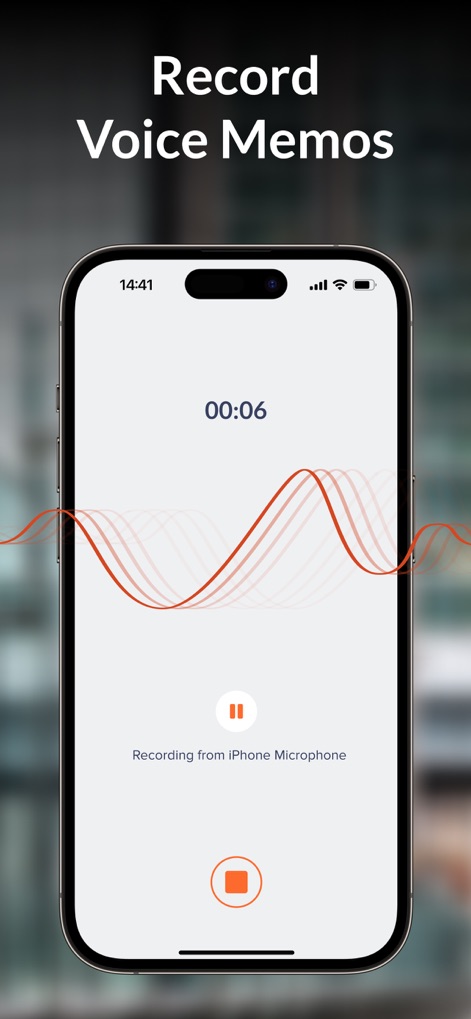
Observe the intuitive interface for recording voice memos, featuring a dynamic audio waveform and precise duration tracking.
Voice Memo Creation
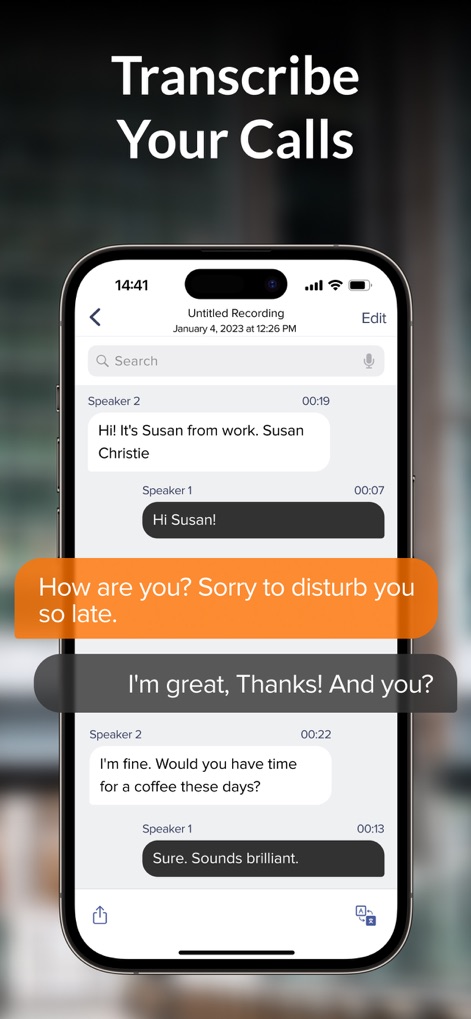
Explore the app's powerful transcription feature, presenting conversations as identifiable speaker bubbles and a convenient search bar.
Automated Call Transcriptions

Understand how the app prioritizes security with a customizable PIN entry system and clear passcode confirmation dots.
Secure Access Control

Review the app's impressive user base of '6 MILLION users' and its extensive recording volume, totaling '3,8 MILLION mins of call recording'.
Proven Performance Metrics
Description
Download
More Like This
Apps with similar features and user experience

Beside (M1): AI Receptionist
Interface, Inc.

Call Recorder for iPhone.
JatApp LLC

Voice Recorder & Audio Editor
TapMedia Ltd

Call Recorder App ◉ACR MyCalls
AppAmore Limited

Switch - Call recording app
Atlas Guide, Inc.

Call Recorder App-Voice Record
WindTalking LLC

TeleMe – Record on 2nd Number
Gelenk Networks Inc.

Call Recorder: Record All
Henrieta Jaworski

Record Phone Calls App - Auto
Henning Christensen Bonde Søgaard
This page is not an official page of the app or its developer, but an independent editorial publication created for informational and commentary purposes. Unless expressly stated otherwise, neither the app nor its developer is affiliated with, endorsed by, sponsored by, authorized by, or otherwise officially connected with MWM, Apple, Google Play, the app publisher, or the app's developer, and nothing on this page implies that the app was developed using MWM's services. Any trademarks, logos, screenshots, and other content remain the property of their respective owners.