
This page is not an official page of the app or its developer, but an independent editorial publication created for informational and commentary purposes. Unless expressly stated otherwise, neither the app nor its developer is affiliated with, endorsed by, sponsored by, authorized by, or otherwise officially connected with MWM, Apple, Google Play, the app publisher, or the app's developer, and nothing on this page implies that the app was developed using MWM's services. Any trademarks, logos, screenshots, and other content remain the property of their respective owners.


Voice Recorder & Audio Editor
Audio isn't just sound anymore; it's a data goldmine. This app puts a powerful AI at your command, transforming raw recordings into actionable insights and polished content.
Downloads
10M+User Rating
Total Ratings
650.8KPublisher
Category
UtilitiesLocales
29Latest Version
6.0.8Size
176.6 MBFirst Released
Aug 30, 2013An in-depth analysis of key functionalities catering to advanced users and professionals.
Voice Recorder & Audio Editor: Core Features Evaluation
AI Transcription & Summarization
The app leverages advanced AI to convert spoken words into text and generate concise summaries, significantly enhancing productivity for note-takers and analysts.
On-Device AI Processing
It ensures data privacy by processing all AI features locally on the device, addressing concerns about data security for sensitive recordings.
Professional Call Recording
This tool enables secure recording of incoming and outgoing phone calls, a vital function for journalists, business professionals, and anyone needing to document conversations.
Advanced Audio Editing & Enhancement
It provides robust audio editing capabilities, including AI-driven enhancement, noise reduction, and voice transformation, empowering users to refine their recordings to a professional standard.
Cloud Integration & Sharing
The app facilitates seamless upload to popular cloud services and easy sharing across multiple platforms, ensuring accessibility and collaborative workflows.
Integrated Podcast Creation
It allows users to craft and personalize podcasts directly within the app, appealing to content creators seeking an all-in-one solution for audio content production.
Unlimited Recording Capacity
This tool offers unrestricted recording duration, limited only by device storage, providing peace of mind for long lectures, interviews, or creative sessions.
Flexible Playback & Trimming
It features essential playback controls like speed adjustment, skipping, and precise trimming, allowing for efficient review and refinement of audio segments.
Frequently Asked Questions
Everything you need to know about Voice Recorder & Audio Editor
Can I record for an unlimited duration with Voice Recorder & Audio Editor?
Yes, the Voice Recorder & Audio Editor app allows unlimited recordings as long as there is sufficient storage on your device.
Does Voice Recorder & Audio Editor offer AI transcription?
Yes, Voice Recorder & Audio Editor offers AI transcription to convert spoken words into written text.
Can Voice Recorder & Audio Editor summarize my recordings?
Yes, the Voice Recorder & Audio Editor app includes a Smart Summarize AI feature that provides instant summaries of conversations.
Does Voice Recorder & Audio Editor have an AI chat feature for recordings?
Yes, Voice Recorder & Audio Editor provides an AI Chat feature to engage in dynamic conversations and learn more about your recordings.
Can I change my voice using Voice Recorder & Audio Editor?
Yes, Voice Recorder & Audio Editor includes a Voice Changer AI feature to transform your voice to sound like anyone.
Does Voice Recorder & Audio Editor offer audio enhancement tools?
Yes, Voice Recorder & Audio Editor includes an Audio Editor with an Audio Enhancement tool to improve voice quality and remove background noise.
Can I create podcasts with the Voice Recorder & Audio Editor app?
Yes, Voice Recorder & Audio Editor features a Podcast Creator to craft personalized podcasts on various topics with ease.
Are Voice Recorder & Audio Editor's AI features processed locally for privacy?
Yes, Voice Recorder & Audio Editor's new AI features run locally on your device, ensuring user data remains safe and secure without leaving the device.
Does Voice Recorder & Audio Editor support 3D Touch?
Yes, Voice Recorder & Audio Editor supports 3D Touch for quickly starting and stopping recordings directly from your home screen.
Can I add text notes to recordings in Voice Recorder & Audio Editor?
Yes, Voice Recorder & Audio Editor allows you to add text notes to individual recordings as an in-app purchase.
What cloud services does Voice Recorder & Audio Editor support for uploads?
Voice Recorder & Audio Editor supports uploading recordings to iCloud Drive, Dropbox, GoogleDrive, OneDrive, and Box.
How can I share recordings from Voice Recorder & Audio Editor?
Voice Recorder & Audio Editor allows sharing audio or video via Email, Messages, Facebook, Twitter, YouTube, Instagram, TikTok, and Snapchat.
How do I transfer recordings from Voice Recorder & Audio Editor to a computer?
You can transfer recordings from Voice Recorder & Audio Editor to your desktop computer via USB cable or WiFi Sync.
Does Voice Recorder & Audio Editor support trimming recordings?
Yes, Voice Recorder & Audio Editor includes advanced features such as trimming recordings, changing playback speed, and skipping segments.
Can I protect my recordings with a passcode in Voice Recorder & Audio Editor?
Yes, Voice Recorder & Audio Editor offers advanced features including the option to passcode protect your recordings for enhanced security.
Can Voice Recorder & Audio Editor record phone calls?
Yes, Voice Recorder & Audio Editor can record incoming and outgoing phone calls, but it requires a monthly subscription and a 3-way conference call setup.
How does the call recording feature work in Voice Recorder & Audio Editor?
The call recording feature in Voice Recorder & Audio Editor uses a 3-way conference call. The app's recording line acts as the third caller to save the phone call.
Is there a limit on call recording duration or fees per minute in Voice Recorder & Audio Editor?
No, Voice Recorder & Audio Editor imposes no limit on the number or duration of call recordings and charges no per-minute fees with a subscription.
Are there carrier restrictions for using Voice Recorder & Audio Editor's call recorder?
Yes, the call recorder feature requires your carrier to support 3-way conference calling. SimplyTalk and H2o Wireless do NOT offer this service in the US.
How long are call recordings stored on the server by Voice Recorder & Audio Editor?
Call recordings are deleted from the server after 7 days. Users must download them offline during this timeframe.
Is a subscription required for the Call Recorder feature in Voice Recorder & Audio Editor?
Yes, a monthly subscription is required to use the Call Recorder feature in Voice Recorder & Audio Editor, which includes a one-week free trial.
What does the TapMedia PRO subscription offer for Voice Recorder & Audio Editor?
The TapMedia PRO subscription grants access to all apps within the TapMedia PRO bundle for the subscription duration, with a monthly plan including a one-week free trial.
The following screenshots and description are sourced directly from the app's official store listing and are the property of the app developer.
App Store
Screenshots

Observe the app's intuitive waveform display and precise playback controls for easy navigation and review of recordings.
Precision Playback
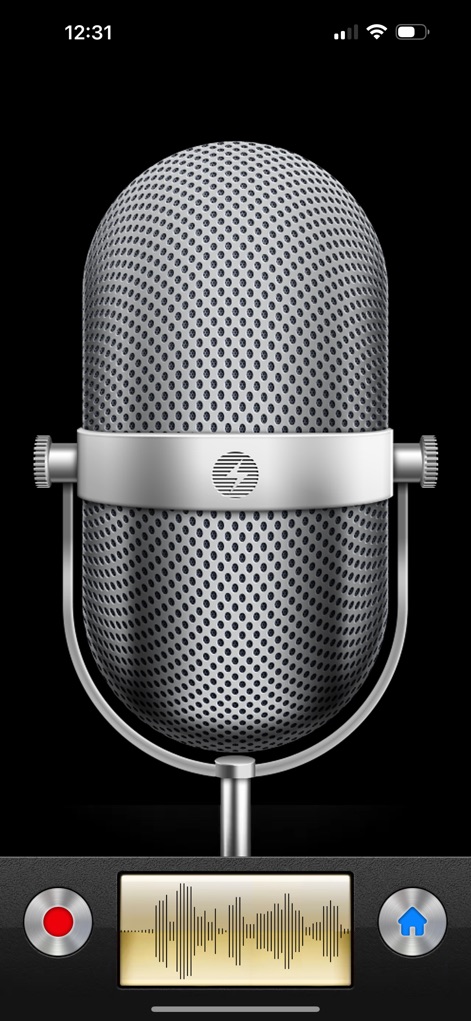
Experience the app's classic vintage microphone interface and prominent recording indicator for an authentic recording feel.
Retro Recording
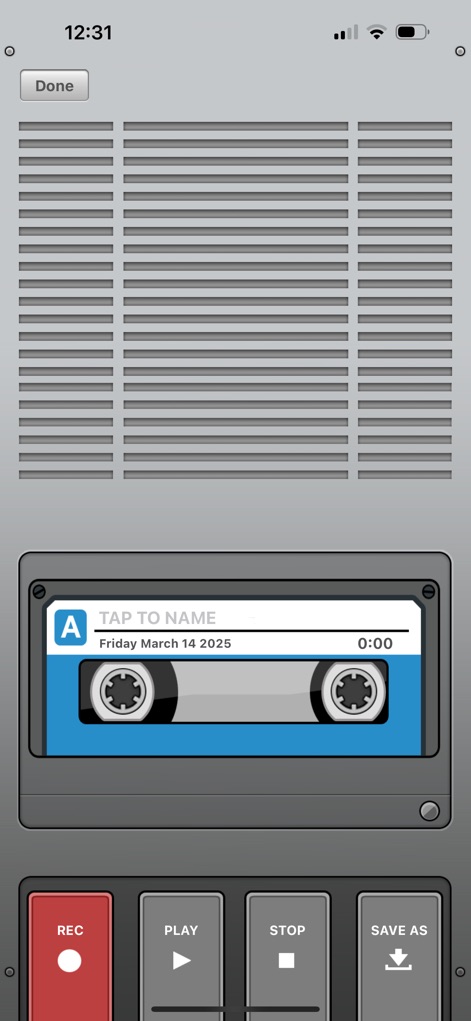
Discover the app's unique analog cassette tape interface and the clear 'REC' button for a nostalgic yet functional recording experience.
Analog Aesthetic
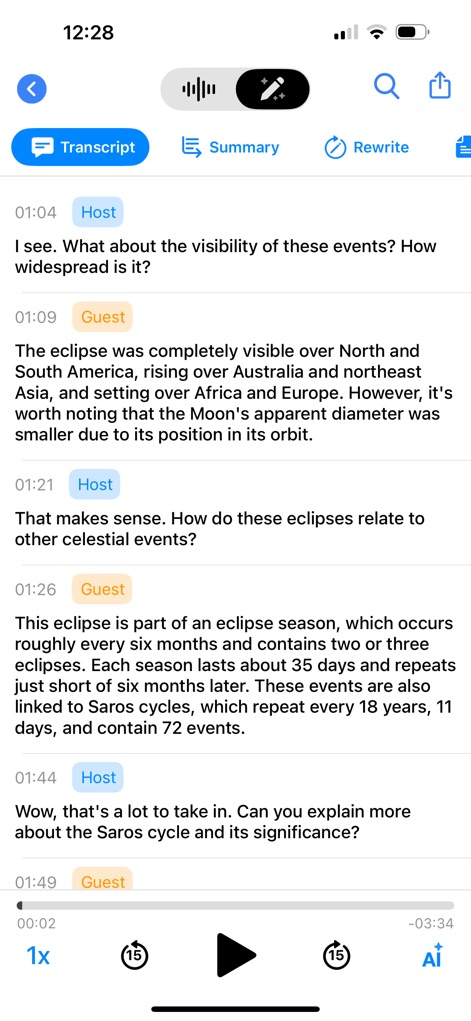
This tool showcases its intelligent transcription with clear speaker identification and integrated AI options like 'Summary' and 'Rewrite' for enhanced content analysis.
AI Insights
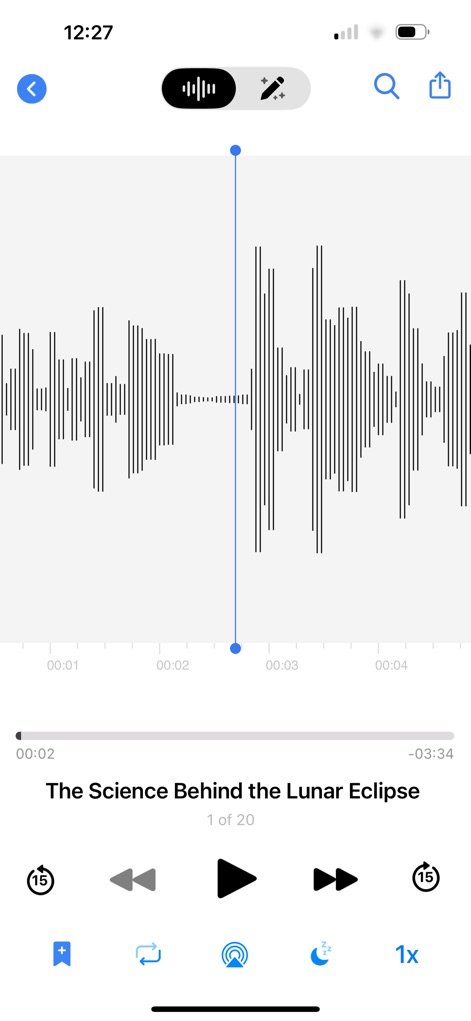
Users can leverage the detailed waveform visualization and convenient playback speed controls to meticulously review and edit audio segments.
Audio Refinement
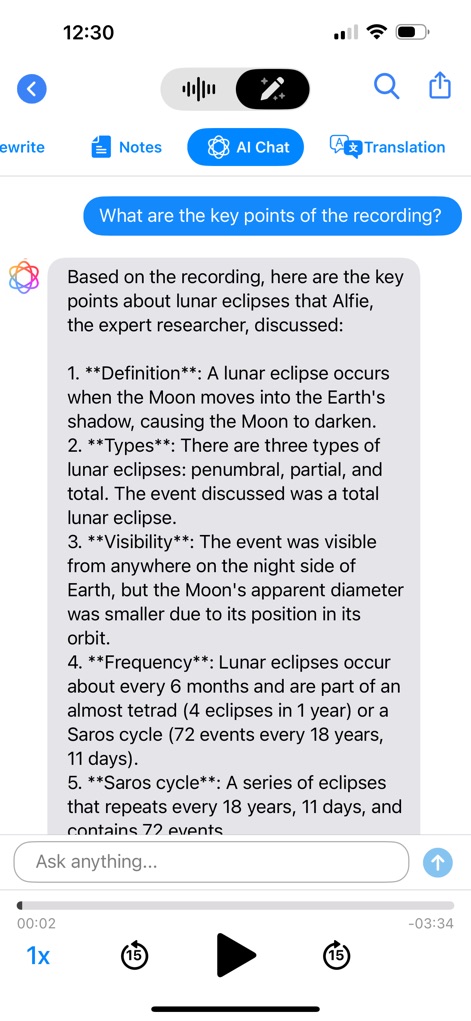
Explore the app's AI Chat feature, which generates concise key point summaries directly from recordings, offering dynamic interaction with audio content.
Conversational AI
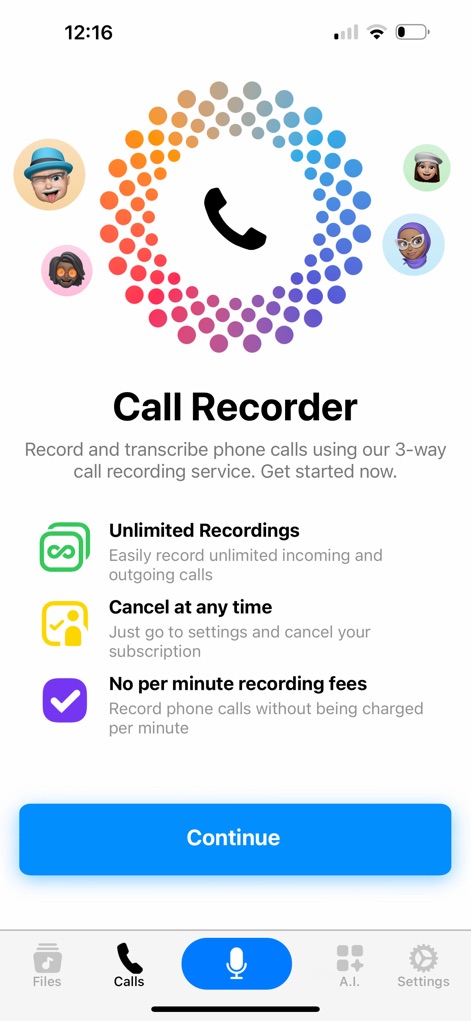
The app introduces its Call Recorder functionality, highlighting benefits like 'Unlimited Recordings' and the flexibility to 'Cancel at any time' for user convenience.
Secure Calls
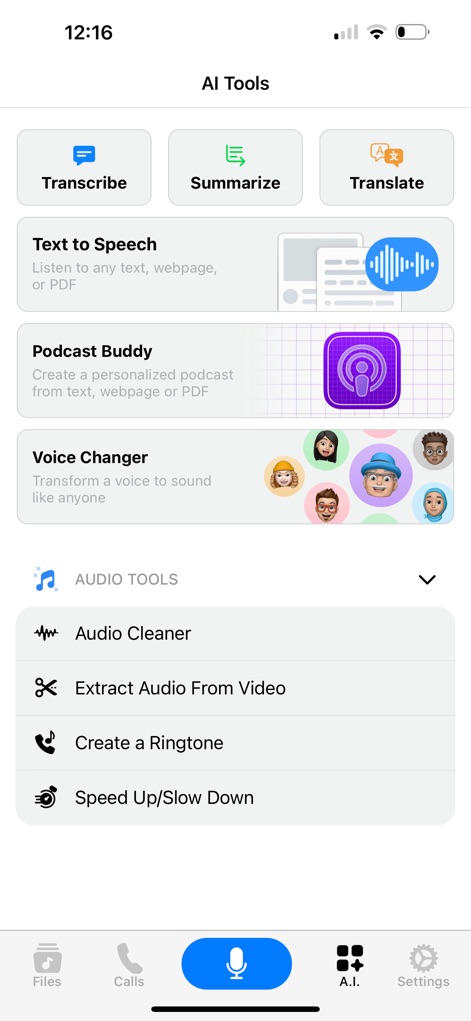
This tool presents a comprehensive suite of AI capabilities including 'Transcribe' and 'Summarize,' alongside essential 'Audio Tools' for advanced sound manipulation.
AI Powerhouse
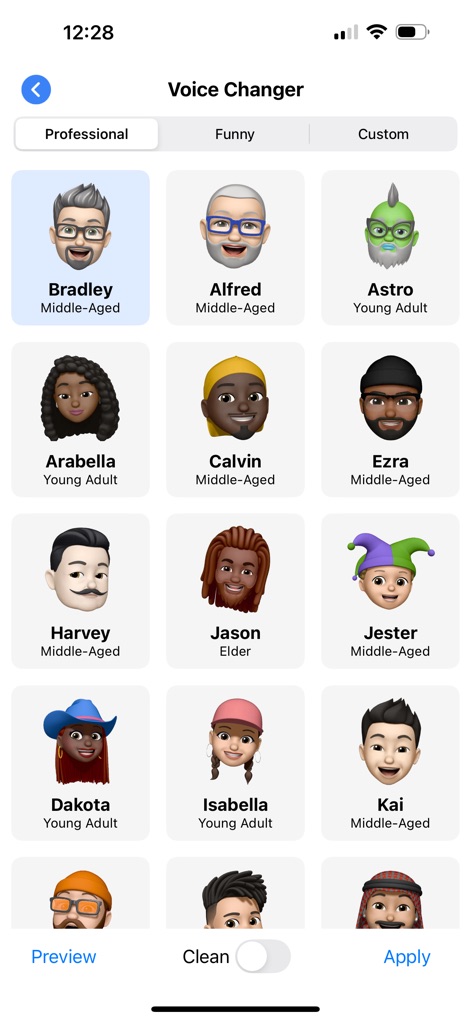
Users can personalize their sound with the 'Voice Changer' feature, offering a diverse array of characters like 'Bradley' and 'Astro' across 'Professional' and 'Funny' categories.
Voice Transformation
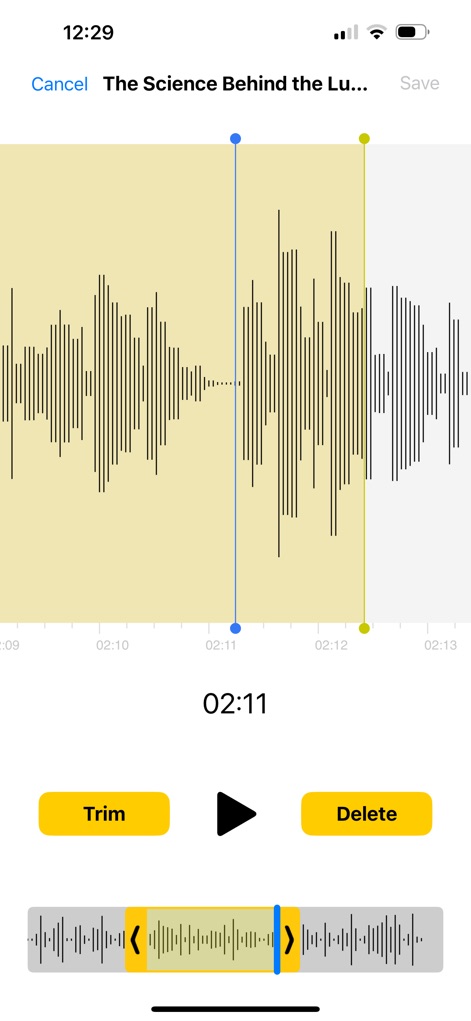
The app provides straightforward audio editing, allowing users to easily select segments for trimming and execute 'Delete' actions with precision.
Effortless Editing
Description
Download
More Like This
Apps with similar features and user experience

Beside (M1): AI Receptionist
Interface, Inc.

Call Recorder for iPhone.
JatApp LLC

Call Recorder App ◉ACR MyCalls
AppAmore Limited

Switch - Call recording app
Atlas Guide, Inc.

Call Recorder App-Voice Record
WindTalking LLC

TeleMe – Record on 2nd Number
Gelenk Networks Inc.

Call Recorder: Record All
Henrieta Jaworski

Record Phone Calls App - Auto
Henning Christensen Bonde Søgaard

Call Recorder App - RecordCall
DIGITALSTALK PRIVATE LIMITED
This page is not an official page of the app or its developer, but an independent editorial publication created for informational and commentary purposes. Unless expressly stated otherwise, neither the app nor its developer is affiliated with, endorsed by, sponsored by, authorized by, or otherwise officially connected with MWM, Apple, Google Play, the app publisher, or the app's developer, and nothing on this page implies that the app was developed using MWM's services. Any trademarks, logos, screenshots, and other content remain the property of their respective owners.